



 本文介绍了一个使用jQuery和CSS3实现的仿iPhone风格开关按钮组件。该组件具备良好的交互体验,可通过点击切换开关状态,并更新隐藏表单字段的值。文章提供了完整的HTML、CSS和JavaScript代码。
仿iPhone开关式按钮(jQuery+CSS3)
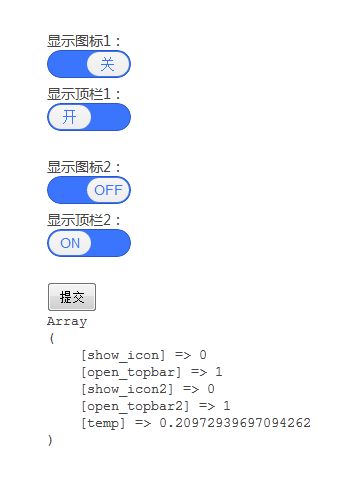
001 | <!DOCTYPE html> |
002 | <html> |
003 | <head> |
004 | <meta http-equiv="Content-Type" content="text/html; charset=utf-8" /> |
005 | <meta name="author" content="pandao QQ:272383090" /> |
006 | <title>仿iPhone开关式按钮(jQuery+CSS3)</title> |
007 | <style type="text/css"> |
008 | *{margin:0;padding:0;} |
009 | body{font-size:14px;color:#444;font-family:"微软雅黑",Arial;background:#fff;padding:50px;} |
010 | a{color:#444;text-decoration: none;} |
011 | a:hover{color:#065BC2;text-decoration: none;} |
012 | .clear{clear:both;} |
013 | img{border:none;vertical-align: middle;} |
014 | ul{list-style: none;} |
015 | .mwui-switch-btn{ |
016 | width:84px; |
017 | display:block; |
018 | padding:1px; |
019 | background:#3B75FD; |
020 | overflow:hidden; |
021 | margin-bottom:5px; |
022 | border:1px solid #2E58C1; |
023 | border-radius:18px; |
024 | cursor: pointer; |
025 | } |
026 | .mwui-switch-btn span{ |
027 | width:32px; |
028 | font-size:14px; |
029 | height:18px; |
030 | padding:4px 5px 2px 5px; |
031 | display:block; |
032 | filter:progid:DXImageTransform.Microsoft.gradient(startColorstr=#f6f6f6,endColorstr=#eeeeee,grandientType=1); |
033 | background:-webkit-gradient(linear, 0 0, 0 100%, from(#f6f6f6), to(#eeeeee)); |
034 | background:-moz-linear-gradient(top, #f6f6f6, #eeeeee); |
035 | border-radius:18px; |
036 | float:left; |
037 | color:#3B75FD; |
038 | text-align:center; |
039 | } |
040 | .mwui-switch-btn:hover span{ |
041 | background:#fff; |
042 | } |
043 | .mwui-switch-btn span.off{float:right;} |
044 | input[type='submit']{padding:5px 10px;cursor: pointer;} |
045 | </style> |
046 | </head> |
047 | <body> |
048 | <form method="post"> |
049 | 显示图标1:<button class="mwui-switch-btn"><span change="开" class="off">关</span><inputtype="hidden" name="show_icon" value="0" /></button> |
050 | 显示顶栏1:<button class="mwui-switch-btn"><span change="关">开</span><input type="hidden" name="open_topbar" value="1" /></button> |
051 | <br /> |
052 | 显示图标2:<button class="mwui-switch-btn"><span change="OFF">ON</span><input type="hidden" name="show_icon2" value="1" /></button> |
053 | 显示顶栏2:<button class="mwui-switch-btn"><span change="ON" class="off">OFF</span><input type="hidden" name="open_topbar2" value="0" /></button> |
054 | <br /> |
055 | <input type="submit" id="submit" value="提交" /> |
056 | </form> |
057 | <div id="debuger"></div> |
058 | <script type="text/javascript" src="http://code.jquery.com/jquery-1.6.4.min.js"></script> |
059 | <script type="text/javascript"> |
060 | $(function() { |
061 | $('.mwui-switch-btn').each(function() { |
062 | $(this).bind("click", function() { |
063 | var btn = $(this).find("span"); |
064 | var change = btn.attr("change"); |
065 | btn.toggleClass('off'); |
066 |
067 | if(btn.attr("class") == 'off') { |
068 | $(this).find("input").val("0"); |
069 | btn.attr("change", btn.html()); |
070 | btn.html(change); |
071 | } else { |
072 | $(this).find("input").val("1"); |
073 | btn.attr("change", btn.html()); |
074 | btn.html(change); |
075 | } |
076 |
077 | return false; |
078 | }); |
079 | }); |
080 |
081 | $("#submit").click(function() { |
082 | var form = $(this).parent()[0]; |
083 | var inputs = form.getElementsByTagName('input'); |
084 | var params = []; |
085 | $('#debuger').html(''); |
086 |
087 | for (var i=0; i < inputs.length; i++) { |
088 | params.push(inputs[i].name+"="+inputs[i].value); |
089 | } |
090 |
091 | $.post("post.php", params.join("&")+"&temp="+Math.random(), function(data) { |
092 | $('#debuger').html(data); |
093 | }); |
094 |
095 | return false; |
096 | }); |
097 | }); |
098 | </script> |
099 | </body> |
100 | </html> |





 扫一扫
扫一扫


 3968
3968

 被折叠的 条评论
为什么被折叠?
被折叠的 条评论
为什么被折叠?
 到【灌水乐园】发言





