


 本文介绍如何启动WCF服务并通过soapUI工具进行测试。包括创建图书、查询所有图书的操作步骤。
启动WCF服务
- 在TinyLibraryCQRS解决方案下,找到TinyLibrary.Services项目
- 右键单击CommandService.svc,然后选择View in Browser,这将启动ASP.NET Development Server
- 当ASP.NET Development Server成功启动,并在浏览器中打开了CommandService.svc后,将出现如下界面

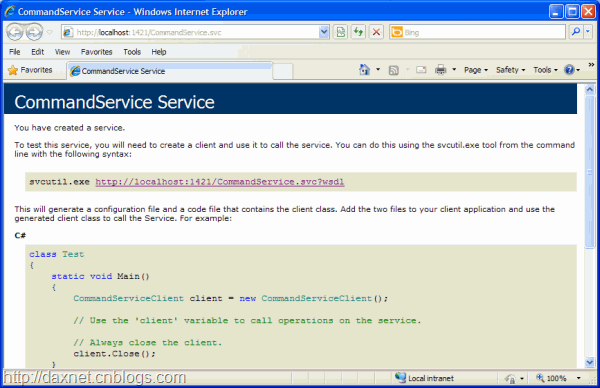
使用soapUI测试WCF服务
可以使用soapUI来对WCF服务进行测试。soapUI是一款用于测试Web Service的工具软件。有关soapUI的更多信息,请参考http://www.soapui.org。
- 打开soapUI,然后选择File | New soapUI Project菜单,这将打开New soapUI Project对话框
- 在Initial WSDL/WADL文本框中,输入WCF服务的WSDL地址,然后单击OK按钮
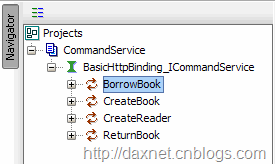
- 成功添加项目后,即可在Navigator面板中看到WCF的Bindings和Service Operations

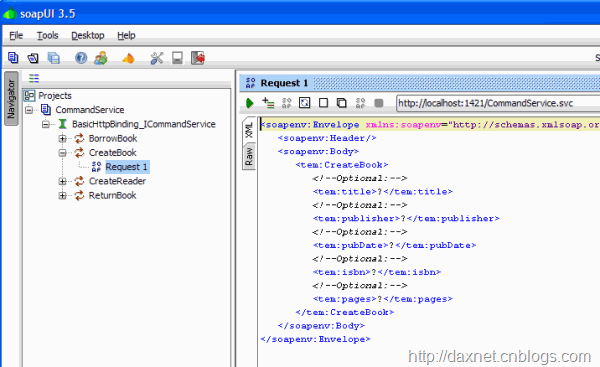
- 现在我们使用soapUI调用WCF服务来创建一本图书。在Navigator中展开CreateBook节点,双击Request 1,这将在右边的窗口中显示一个请求XML的样本

- 将这个请求XML文本改成如下形式
1: <soapenv:Envelope xmlns:soapenv="http://schemas.xmlsoap.org/soap/envelope/" xmlns:tem="http://tempuri.org/">2: <soapenv:Header/>3: <soapenv:Body>4: <tem:CreateBook>5: <!--Optional:-->6: <tem:title>Essential .NET, Volume 1: The Common Language Runtime</tem:title>7: <!--Optional:-->8: <tem:publisher>Addison Wesley</tem:publisher>9: <!--Optional:-->10: <tem:pubDate>2002-11-01</tem:pubDate>11: <!--Optional:-->12: <tem:isbn>0-201-73411-7</tem:isbn>13: <!--Optional:-->14: <tem:pages>432</tem:pages>15: </tem:CreateBook>16: </soapenv:Body>17: </soapenv:Envelope> - 单击Request 1子窗口上的绿色右箭头按钮以调用WCF服务,当服务成功调用后,将得到如下结果
1: <s:Envelope xmlns:s="http://schemas.xmlsoap.org/soap/envelope/">2: <s:Body>3: <CreateBookResponse xmlns="http://tempuri.org/">4: <CreateBookResult>161891709900001</CreateBookResult>5: </CreateBookResponse>6: </s:Body>7: </s:Envelope>
上面的数字161891709900001就是Book ID - 使用上面相同的方法在soapUI中添加QueryService.svc
- 在GetAllBooks操作上创建并提交如下请求
1: <soapenv:Envelope xmlns:soapenv="http://schemas.xmlsoap.org/soap/envelope/" xmlns:tem="http://tempuri.org/">2: <soapenv:Header/>3: <soapenv:Body>4: <tem:GetAllBooks/>5: </soapenv:Body>6: </soapenv:Envelope>
当请求被成功处理后,将得到如下结果
1: <s:Envelope xmlns:s="http://schemas.xmlsoap.org/soap/envelope/">2: <s:Body>3: <GetAllBooksResponse xmlns="http://tempuri.org/">4: <GetAllBooksResult xmlns:a="http://schemas.datacontract.org/2004/07/TinyLibrary.QueryObjects"5: xmlns:i="http://www.w3.org/2001/XMLSchema-instance">6: <a:BookObject>7: <a:AggregateRootId>161891709900001</a:AggregateRootId>8: <a:ISBN>0-201-73411-7</a:ISBN>9: <a:Id>1</a:Id>10: <a:LendTo/>11: <a:Lent>false</a:Lent>12: <a:Pages>432</a:Pages>13: <a:PubDate>2002-11-01T00:00:00</a:PubDate>14: <a:Publisher>Addison Wesley</a:Publisher>15: <a:Title>Essential .NET, Volume 1: The Common Language Runtime</a:Title>16: </a:BookObject>17: </GetAllBooksResult>18: </GetAllBooksResponse>19: </s:Body>20: </s:Envelope>

运行应用程序
- 在TinyLibraryCQRS解决方案下,右键单击TinyLibrary.WebApp项目(之前的文章中没有介绍该项目,请读者朋友到http://tlibcqrs.codeplex.com下载完整的解决方案文件),然后选择Set as StartUp Project
- 按下Ctrl+F5直接运行应用程序
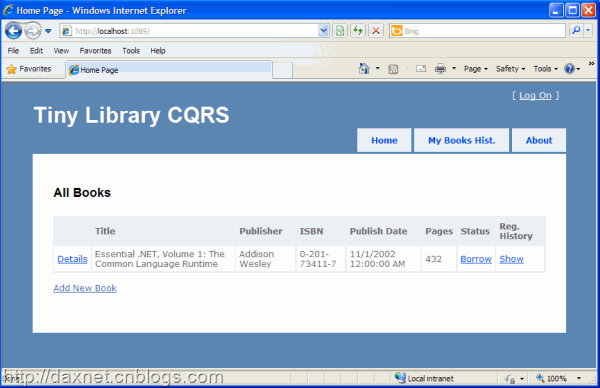
- 当应用程序成功执行后,将出现如下界面






 扫一扫
扫一扫


 121
121

 被折叠的 条评论
为什么被折叠?
被折叠的 条评论
为什么被折叠?
 到【灌水乐园】发言





