


 本文深入讲解CoordinatorLayout在Android开发中的作用,如何通过Behavior实现子View之间的联动效果,包括代码和XML绑定方式,以及具体实现联动的两个关键方法:layoutDependsOn和onDependentViewChange。
CoordinatorLayout从名字来看叫做协调者布局,所以它的作用是协调子view的。
- 为什么要协调多个子view:
例如一个子view需要在向下滑动的时候另一个子view的位移,大小,或颜色等做出相应的改变(联动),这种需求是很常见的。
- 谁来协调:
CoordinatorLayout里内置了一个Behavior协调,如果有时间看下源码因该是CoordinatorLayout委托了Behavior做了一系列操作(有时间分析下源码)
换句话说要想达到联动的效果必须子view依赖Behavior。谷歌提供了多个已
经带有Behavior的view。CollapsingToolbarLayout,AppBarLayout
子view没有Behavior的就没有联动效果,要想有就要绑定,这里说两种方式代码里绑定,xml布局文件里绑定,在子view里设置此属性app:layout_behavior=".MyBehaviorTest",
其中.MyBehaviorTest是抽象类Behavior的实现类且要写拥有2个参数的构造方法。
需要实现的方法主要有两个:
boolean layoutDependsOn(CoordinatorLayout parent, View child, View dependency):判断 child 是否依赖 dependency(依赖的意思)。至少会被回调一次。所以可以在此如果返回true就表示我们绑定的child(例如:在xml设置的app:layout_behavior=".MyBehaviorTest")和dependency是依赖关系,此时就会调用onDependentViewChange。
boolean onDependentViewChange(CoordinatorLayout parent, View child, View dependency):如果layoutDependsOn 中返回true,在此方法中 child 实现根据依赖的 dependency 的变动情况变动 child。
要使用上面两个方法必须要搞清楚你想要谁依赖谁,如果需求是child1的位置变化了child2也要联动做出某个动作,那么child2就依赖child1,child1就是参数 layoutDependsOn的dependency
- 未有behavior绑定后实现联动示例:
xml
<?xml version="1.0" encoding="utf-8"?>
<androidx.coordinatorlayout.widget.CoordinatorLayout xmlns:android="http://schemas.android.com/apk/res/android"
android:layout_width="match_parent"
android:layout_height="match_parent"
xmlns:app="http://schemas.android.com/apk/res-auto">
<Button
android:layout_width="wrap_content"
android:layout_height="wrap_content"
android:text="button"
android:id="@+id/move_btn"
/>
<TextView
android:layout_width="wrap_content"
android:layout_height="wrap_content"
app:layout_behavior=".MyBehaviorTest"
android:text="text"/>
</androidx.coordinatorlayout.widget.CoordinatorLayout>
实现抽象
public class MyBehaviorTest extends CoordinatorLayout.Behavior{
public MyBehaviorTest(Context context, AttributeSet attrs) {
super(context,attrs);
}
@Override
public boolean layoutDependsOn(@NonNull CoordinatorLayout parent, @NonNull View child, @NonNull View dependency) {
return dependency instanceof Button;
}
@Override
public boolean onDependentViewChanged(@NonNull CoordinatorLayout parent, @NonNull View child, @NonNull View dependency) {
child.setX(dependency.getX() + 150);
child.setY(dependency.getY() + 150);
return true;
}
}
测试联动
btn = findViewById(R.id.move_btn);
btn.setOnTouchListener(new View.OnTouchListener() {
@Override
public boolean onTouch(View v, MotionEvent event) {
if (event.getAction() == MotionEvent.ACTION_MOVE) {
v.setX(event.getRawX()-v.getWidth()/2);
v.setY(event.getRawY()-v.getHeight()/2);
}
return true;
}
});
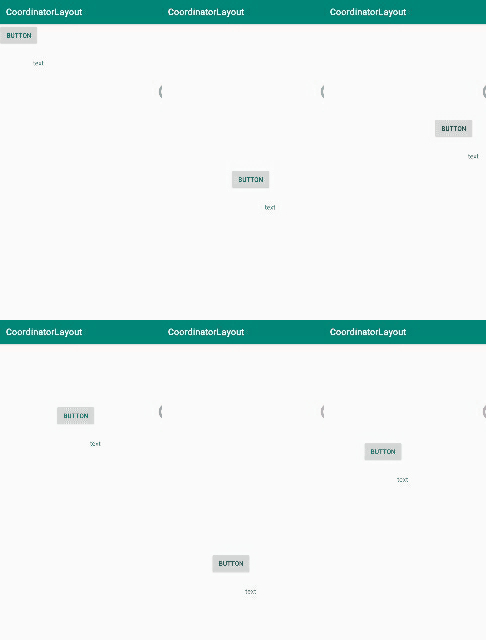
测试图:





 扫一扫
扫一扫


 21万+
21万+

 被折叠的 条评论
为什么被折叠?
被折叠的 条评论
为什么被折叠?
 到【灌水乐园】发言





