



-
修改UITabBarItem下面字体的颜色,如图:
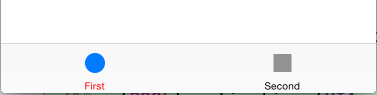
[[UITabBarItemappearance]setTitleTextAttributes:[NSDictionarydictionaryWithObjectsAndKeys:[UIColorblackColor],UITextAttributeTextColor,nil]forState:UIControlStateNormal];
[[UITabBarItemappearance]setTitleTextAttributes: [NSDictionarydictionaryWithObjectsAndKeys:[UIColorredColor],UITextAttributeTextColor,nil]forState:UIControlStateSelected];
这个时候会报警告'UITextAttributeTextColor' is deprecated in iOS 7. The iOS 7 key is 'NSForegroundColorAttributeName
然后替换一下就可以了,不过NSForegroundColorAttributeName最底支持到ios6.0
[[UITabBarItemappearance]setTitleTextAttributes:[NSDictionarydictionaryWithObjectsAndKeys:[UIColorblackColor],NSForegroundColorAttributeName,nil]forState:UIControlStateNormal];
[[UITabBarItemappearance]setTitleTextAttributes: [NSDictionarydictionaryWithObjectsAndKeys:[UIColorredColor],NSForegroundColorAttributeName,nil]forState:UIControlStateSelected];
以上是改变字体颜色的,图片颜色无法改变,
[[UITabBarappearance]setTintColor:[UIColorredColor]];
但是上面这一句就可以改变并设置点击后的图片和文字颜色了。
修改UITabBarItem字体颜色
最新推荐文章于 2024-07-04 16:07:25 发布
 本文介绍了如何在iOS应用中修改UITabBarItem的字体颜色,包括使用正确的属性名称以兼容不同版本的iOS,并展示了如何设置选中状态的颜色。





 扫一扫
扫一扫


 3259
3259

 被折叠的 条评论
为什么被折叠?
被折叠的 条评论
为什么被折叠?
 到【灌水乐园】发言





