


本文介绍FFmpeg发送RTP封包的H264,以及用VLC工具的验证方法,即是分享也做记录;
一、RTP协议简单说明
RTP标准定义了两个子协议 ,RTP和RTCP:
数据传输协议RTP,用于实时传输数据。该协议提供的信息包括:时间戳(用于同步)、序列号(用于丢包和重排序检测)、以及负载格式(用于说明数据的编码格式)。
控制协议RTCP,用于QoS反馈和同步媒体流。相对于RTP来说,RTCP所占的带宽非常小,通常只有5%。
RTP报文头格式(见RFC3550 RFC3550 中文翻译 中文RFC RFC文档 RFC翻译 RFC中文版):
    0                   1                   2                   3
    0 1 2 3 4 5 6 7 8 9 0 1 2 3 4 5 6 7 8 9 0 1 2 3 4 5 6 7 8 9 0 1
   +-+-+-+-+-+-+-+-+-+-+-+-+-+-+-+-+-+-+-+-+-+-+-+-+-+-+-+-+-+-+-+-+
   |V=2|P|X|  CC   |M|     PT      |       sequence number         |
   +-+-+-+-+-+-+-+-+-+-+-+-+-+-+-+-+-+-+-+-+-+-+-+-+-+-+-+-+-+-+-+-+
   |                           timestamp                           |
   +-+-+-+-+-+-+-+-+-+-+-+-+-+-+-+-+-+-+-+-+-+-+-+-+-+-+-+-+-+-+-+-+
   |           synchronization source (SSRC) identifier            |
   +=+=+=+=+=+=+=+=+=+=+=+=+=+=+=+=+=+=+=+=+=+=+=+=+=+=+=+=+=+=+=+=+
   |            contributing source (CSRC) identifiers             |
   |                             ....                              |
   +-+-+-+-+-+-+-+-+-+-+-+-+-+-+-+-+-+-+-+-+-+-+-+-+-+-+-+-+-+-+-+-+
1).版本号(V):用来标志使用的RTP版本,占2位,当前协议版本号为2
2).填充位(P):填充标志,占1位,如果P=1,则该RTP包的尾部就包含附加的填充字节,在该报文的尾部填充一个或多个额外的八位组,它们不是有效载荷的一部分。
3).扩展位(X):扩展标志,占1位,如果X=1,则在RTP固定头部后面就跟有一个扩展头部
4).CSRC计数器(CC):CSRC计数器,占4位,指示固定头部后面跟着的CSRC 标识符的个数
5).标记位(M):标记,占1位,该位的解释由配置文档(Profile)来承担,不同的有效载荷有不同的含义,一般而言,对于视频,标记一帧的结束;对于音频,标记会话的开始。
6).载荷类型(PayloadType): 有效荷载类型,占7位,用于说明RTP报文中有效载荷的类型,如GSM音频、JPEM图像等,在流媒体中大部分是用来区分音频流和视频流的,这样便于客户端进行解析。
7).序列号(SN):占16位,用于标识发送者所发送的RTP报文的序列号,每发送一个报文,序列号增1。接收端可以据此检测丢包和重建包序列,当下层的承载协议用UDP的时候,网络状况不好的时候可以用来检查丢包,同时出现网络抖动的情况可以用来对数据进行重新排序,序列号的初始值是随机的,同时音频包和视频包的sequence是分别记数的。
8).时间戳(Timestamp): 占32位,记录了该包中数据的第一个字节的采样时刻。在一次会话开始时,时间戳初始化成一个初始值。即使在没有信号发送时,时间戳的数值也要随时间而不断地增加(时间在流逝嘛)。时钟频率依赖于负载数据格式,并在描述文件(profile)中进行描述。一般而言,必须使用90 kHz 时钟频率。接收者使用时戳来计算延迟和延迟抖动,并进行同步控制。
9).同步源标识符(SSRC):占32位,用于标识同步信源,同步源就是指RTP包流的来源。在同一个RTP会话中不能有两个相同的SSRC值。该标识符是随机选取的,RFC1889推荐了MD5随机算法。
10).贡献源列表(CSRC List):可以有0~15个,每个CSRC标识符占32位,用来标志对一个RTP混合器产生的新包有贡献的所有RTP包的源。由混合器将这些有贡献的SSRC标识符插入表中。SSRC标识符都被列出来,以便接收端能正确指出交谈双方的身份。
二、H264协议简单说明
H264 的两种码流格式,它们分别为:字节流格式和 RTP包格式。
字节流格式: 默认的输出格式。它的基本数据单位为 NAL 单元,也即 NALU。为了从字节流中提取出 NALU,协议规定,在每个 NALU 的前面加上起始码:0x000001 或 0x00000001(0x 代表十六进制)- RTP 包格式:一种数据传输格式,主要用于网络传送
字节流格式,也成称之为裸流;
1、H264字节流格式
Start_Code_Prefix + NALU + Start_Code_Prefix + NALU + ...
起始码与NALU
起始码:0x000001或者0x00000001;在两个起始码间的数据称之为NALU;
NALU
NALU单元的第一个byte:
1)第1位是禁止位:1语法错误
2)第2~3位是参考位,数值越大越重要
3)第4~8位是NAL类型
| 1 | 不分区,非IDR |
| 2 | 片分区A |
| 3 | 片分区B |
| 4 | 片分区C |
| 5 | IDR图像中的片 |
| 6 | SEI |
| 7 | SPS |
| 8 | PPS |
| 9 | 分节符 |
| 10 | 序列结束 |
| 11 | 码流结束 |
| 12 | 填充 |
每个 NAL 单元包括一个原始字节序列负荷 (RBSP, Raw Byte Sequence Payload)、一组对应于视频编码的 NAL 头信息:
NALU = NALU头 + RBSP
三、通过ffmpeg命令发送数据
ffmpeg -re -i dump.h264 -vcodec copy -f rtp rtp://ip:port>test.sdp
参数说明:
-r 设定帧率,默认为25
-i 设定输入流
-vcodec 设定视频编码器
-f 设定输入格式
dump.h264 h264视频文件,ip和port是要推送的目标ip和端口,test.sdp推送视频产生的sdp格式(VLC工具要根据此格式取流);
四、代码实现rtp封包发送
#ifdef __cplusplus
extern "C"
{
#endif
#include <libavformat/avformat.h>
#include <libavutil/mathematics.h>
#include <libavutil/time.h>
#ifdef __cplusplus
};
#endif

int main()
{
    AVOutputFormat *outputfmt = NULL;
	AVFormatContext *inputfmt_ctx = NULL, *outputfmt_ctx = NULL;
	AVPacket pkt;
	const char *in_filename, *out_filename;
	int ret, i;
	int videoindex = -1;
	int frame_index = 0;
	int64_t start_time = 0;
	in_filename  = "dump.h264";
	out_filename = "rtp://192.168.1.1:1234";
	av_register_all();
	//Network
	avformat_network_init();
	//Input
	if ((ret = avformat_open_input(&inputfmt_ctx, in_filename, 0, 0)) < 0) {
		printf( "Could not open input file.");
		goto end;
	}

	if ((ret = avformat_find_stream_info(inputfmt_ctx, 0)) < 0) {
		printf( "Failed to retrieve input stream information");
		goto end;
	}
    //查找视频帧
	for(i=0; i<inputfmt_ctx->nb_streams; i++)
		if(inputfmt_ctx->streams[i]->codec->codec_type==AVMEDIA_TYPE_VIDEO){
			videoindex=i;
			break;
		}

	av_dump_format(inputfmt_ctx, 0, in_filename, 0);

	//Output
	avformat_alloc_output_context2(&outputfmt_ctx, NULL, "rtp", out_filename);
	if (!outputfmt_ctx) {
		printf( "Could not create output context\n");
		ret = AVERROR_UNKNOWN;
		goto end;
	}

	outputfmt = outputfmt_ctx->oformat;
	for (i = 0; i < inputfmt_ctx->nb_streams; i++) {
		//Create output AVStream according to input AVStream
		AVStream *in_stream = inputfmt_ctx->streams[i];
		AVStream *out_stream = avformat_new_stream(outputfmt_ctx, in_stream->codec->codec);
		if (!out_stream) {
			printf( "Failed allocating output stream\n");
			ret = AVERROR_UNKNOWN;
			goto end;
		}
		//Copy the settings of AVCodecContext
		ret = avcodec_copy_context(out_stream->codec, in_stream->codec);
		if (ret < 0) {
			printf( "Failed to copy context from input to output stream codec context\n");
			goto end;
		}
		out_stream->codec->codec_tag = 0;
		if (outputfmt_ctx->oformat->flags & AVFMT_GLOBALHEADER)
			out_stream->codec->flags |= CODEC_FLAG_GLOBAL_HEADER;
	}
	//Dump Format------------------
	av_dump_format(outputfmt_ctx, 0, out_filename, 1);
	//Open output URL
	if (!(outputfmt->flags & AVFMT_NOFILE)) {
		ret = avio_open(&outputfmt_ctx->pb, out_filename, AVIO_FLAG_WRITE);
		if (ret < 0) {
			printf( "Could not open output URL '%s'", out_filename);
			goto end;
		}
	}
	//Write file header
	ret = avformat_write_header(outputfmt_ctx, NULL);
	if (ret < 0) {
		printf( "Error occurred when opening output URL\n");
		goto end;
	}

	start_time=av_gettime();
	while (1) {
		AVStream *in_stream, *out_stream;
		//Get an AVPacket
		ret = av_read_frame(inputfmt_ctx, &pkt);
		if (ret < 0)
			break;
		//FIX:No PTS (Example: Raw H.264)
		//Simple Write PTS
		if(pkt.pts==AV_NOPTS_VALUE){
			//Write PTS
			AVRational time_base1=inputfmt_ctx->streams[videoindex]->time_base;
			//Duration between 2 frames (us)
			int64_t calc_duration=(double)AV_TIME_BASE/av_q2d(inputfmt_ctx->streams[videoindex]->r_frame_rate);
			//Parameters
			pkt.pts=(double)(frame_index*calc_duration)/(double)(av_q2d(time_base1)*AV_TIME_BASE);
			pkt.dts=pkt.pts;
			pkt.duration=(double)calc_duration/(double)(av_q2d(time_base1)*AV_TIME_BASE);
		}
		//Important:Delay
		if(pkt.stream_index==videoindex){
			AVRational time_base=inputfmt_ctx->streams[videoindex]->time_base;
			AVRational time_base_q={1,AV_TIME_BASE};
			int64_t pts_time = av_rescale_q(pkt.dts, time_base, time_base_q);
			int64_t now_time = av_gettime() - start_time;
			if (pts_time > now_time)
				av_usleep(pts_time - now_time);

		}

		in_stream  = inputfmt_ctx->streams[pkt.stream_index];
		out_stream = outputfmt_ctx->streams[pkt.stream_index];
		/* copy packet */
		//Convert PTS/DTS
		pkt.pts = av_rescale_q_rnd(pkt.pts, in_stream->time_base, out_stream->time_base, (AVRounding)(AV_ROUND_NEAR_INF|AV_ROUND_PASS_MINMAX));
		pkt.dts = av_rescale_q_rnd(pkt.dts, in_stream->time_base, out_stream->time_base, (AVRounding)(AV_ROUND_NEAR_INF|AV_ROUND_PASS_MINMAX));
		pkt.duration = av_rescale_q(pkt.duration, in_stream->time_base, out_stream->time_base);
		pkt.pos = -1;
		//Print to Screen
		if(pkt.stream_index==videoindex){
			printf("Send %8d video frames to output URL\n",frame_index);
			frame_index++;
		}
		//ret = av_write_frame(outputfmt_ctx, &pkt);
		ret = av_interleaved_write_frame(outputfmt_ctx, &pkt);

		if (ret < 0) {
			printf( "Error muxing packet\n");
			break;
		}

		av_free_packet(&pkt);

	}
	//Write file trailer
	av_write_trailer(outputfmt_ctx);
end:
	avformat_close_input(&inputfmt_ctx);
	/* close output */
	if (outputfmt_ctx && !(outputfmt->flags & AVFMT_NOFILE))
		avio_close(outputfmt_ctx->pb);
	avformat_free_context(outputfmt_ctx);
	if (ret < 0 && ret != AVERROR_EOF) {
		printf( "Error occurred.\n");
		return -1;
	}

    return 0;
}
五、用VLC测试接收
VLC media player工具
媒体->打开网络串流->网络->网络协议中输入网络URL:rtp://192.168.1.1:1234;
如果出现如下错误:
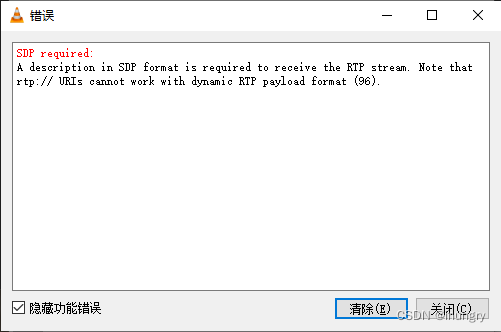
请使用VLC media player工具打开如下内容的sdp文件(三、ffmpeg命令生成的内容修改)
v=0
m=video 1234 RTP/AVP 96
a=rtpmap:96 H264/90000
c=IN IP4 127.0.0.1
v:版本号
m:媒体格式信息
a:rtp属性信息
c:127.0.01可以修改为本地ip





 扫一扫
扫一扫


 2323
2323

 被折叠的 条评论
为什么被折叠?
被折叠的 条评论
为什么被折叠?
 到【灌水乐园】发言





