


 本文详细介绍如何在Linux环境下使用root用户安装Jenkins,并配置其端口及Java路径,最终实现自动化部署流程。
查看Jenkins官网最新稳定版:
https://pkg.jenkins.io/redhat-stable/
root用户下:
下载依赖
sudo wget -O /etc/yum.repos.d/jenkins.repo https://pkg.jenkins.io/redhat-stable/jenkins.repo
导入秘钥
sudo rpm --import https://pkg.jenkins.io/redhat-stable/jenkins.io.key
安装jenkins
yum install jenkins
[root@localhost ~]# wget -O /etc/yum.repos.d/jenkins.repo http://pkg.jenkins.io/redhat-stable/jenkins.repo
--2019-05-01 16:53:22--  http://pkg.jenkins.io/redhat-stable/jenkins.repo
正在解析主机 pkg.jenkins.io (pkg.jenkins.io)... 52.202.51.185
正在连接 pkg.jenkins.io (pkg.jenkins.io)|52.202.51.185|:80... 已连接。
已发出 HTTP 请求,正在等待回应... 200 OK
长度:85
正在保存至: “/etc/yum.repos.d/jenkins.repo”

100%[===================================================>] 85          --.-K/s 用时 0s

2019-05-01 16:53:23 (22.6 MB/s) - 已保存 “/etc/yum.repos.d/jenkins.repo” [85/85])

[root@localhost ~]# rpm --import http://pkg.jenkins.io/redhat-stable/jenkins.io.key
[root@localhost ~]# yum install jenkins
已加载插件:fastestmirror
Loading mirror speeds from cached hostfile

- base: mirrors.nwsuaf.edu.cn
- epel: mirrors.tuna.tsinghua.edu.cn
- extras: centos.ustc.edu.cn
- updates: centos.ustc.edu.cn
  正在解决依赖关系
  --> 正在检查事务
  ---> 软件包 jenkins.noarch.0.2.164.2-1.1 将被 安装
  --> 解决依赖关系完成

依赖关系解决

=============================================================================

#  Package             架构               版本                       源                   大小

正在安装:
 jenkins             noarch             2.164.2-1.1                jenkins              74 M

============================================================================
安装  1 软件包

总下载量:74 M
安装大小:74 M
Is this ok [y/d/N]: y
Downloading packages:
jenkins-2.164.2-1.1.noarch.rpm                                        |  74 MB  00:00:21
Running transaction check
Running transaction test
Transaction test succeeded
Running transaction
  正在安装    : jenkins-2.164.2-1.1.noarch                                               1/1
  验证中      : jenkins-2.164.2-1.1.noarch                                               1/1

已安装:
  jenkins.noarch 0:2.164.2-1.1

完毕!

------
配置jenkins的端口以及修改用户为root:
[root@localhost ~]# vi /etc/sysconfig/jenkins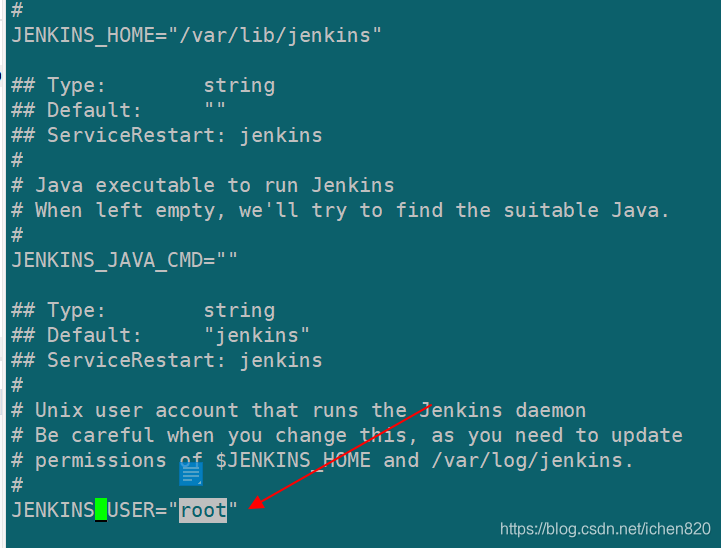
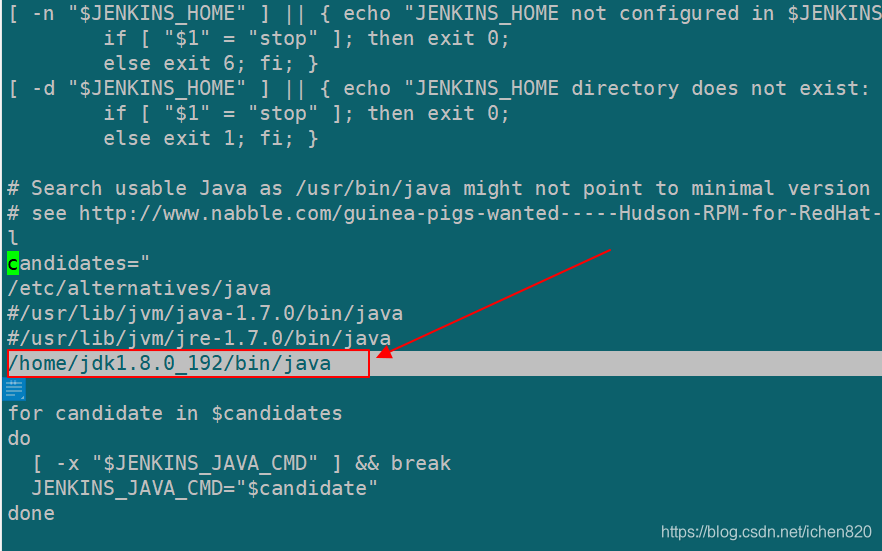
配置jenkins的java路径
[root@localhost ~]# vi /etc/init.d/jenkins
找到 candidates,里面加入你本机的实际java路径
启动jenkins
[root@localhost ~]# systemctl enable jenkins.service
[root@localhost ~]# systemctl daemon-reload
[root@localhost ~]# systemctl start jenkins.service





 扫一扫
扫一扫


 821
821

 被折叠的 条评论
为什么被折叠?
被折叠的 条评论
为什么被折叠?
 到【灌水乐园】发言





