


大家好,小编为大家解答python画冰墩墩代码怎么运行的问题。很多人还不知道python画冰墩墩代码简单,现在让我们一起来看看吧!
一、满树樱花
说明:
以下项目我是在ipython里面运行的:
ipython安装方式: pip install ipython
当然我这里已经有了所以才是下面的结果
然后在控制台输入 ipython 命令,将代码复制进去运行即可
当然在你写完之后,你可以将这代码打包成可执行文件,这样就可以点击直接运行了,命令如下:
pyinstaller -F -w [文件名].py
# coding=utf-8
# 画一棵樱花


import turtle
import random
from turtle import *
from time import sleep


# 画樱花的躯干(60,t)
def tree(branchLen,t):
    sleep(0.0005)
    if branchLen >3:
        if 8<= branchLen <=12:
            if random.randint(0,2) == 0:
                t.color('snow') # 白
            else:
                t.color('lightcoral') # 淡珊瑚色
            t.pensize(branchLen / 3)
        elif branchLen <8:
            if random.randint(0,1) == 0:
                t.color('snow')
            else:
                t.color('lightcoral') # 淡珊瑚色
            t.pensize(branchLen / 2)
        else:
            t.color('sienna') # 赭(zhě)色
            t.pensize(branchLen / 10) # 6
        t.forward(branchLen)
        a = 1.5 * random.random()
        t.right(20*a)
        b = 1.5 * random.random()
        tree(branchLen-10*b, t)
        t.left(40*a)
        tree(branchLen-10*b, t)
        t.right(20*a)
        t.up()
        t.backward(branchLen)
        t.down()

# 掉落的花瓣
def petal(m, t):
    for i in range(m):
        a = 200 - 400 * random.random()
        b = 10 - 20 * random.random()
        t.up()
        t.forward(b)
        t.left(90)
        t.forward(a)
        t.down()
        t.color('lightcoral') # 淡珊瑚色
        t.circle(1)
        t.up()
        t.backward(a)
        t.right(90)
        t.backward(b)

def main():
    # 绘图区域
    t = turtle.Turtle()
    # 画布大小
    w = turtle.Screen()
    t.hideturtle() # 隐藏画笔
    getscreen().tracer(5,0)
    w.screensize(bg='wheat') # wheat小麦
    t.left(90)
    t.up()
    t.backward(150)
    t.down()
    t.color('sienna')

    # 画樱花的躯干
    tree(60,t)
    # 掉落的花瓣
    petal(200, t)
    w.exitonclick()

main()
效果图

二、樱花
from turtle import *
from random import *
from math import *

def tree(n,l):
    pd()#下笔
    #阴影效果
    t = cos(radians(heading()+45))/8+0.25
    pencolor(t,t,t)
    pensize(n/3)
    forward(l)#画树枝

    if n>0:
        b = random()*15+10 #右分支偏转角度
        c = random()*15+10 #左分支偏转角度
        d = l*(random()*0.25+0.7) #下一个分支的长度
        #右转一定角度,画右分支
        right(b)
        tree(n-1,d)
        #左转一定角度,画左分支
        left(b+c)
        tree(n-1,d)
        #转回来
        right(c)
    else:
        #画叶子
        right(90)
        n=cos(radians(heading()-45))/4+0.5
        pencolor(n,n*0.8,n*0.8)
        circle(3)
        left(90)
        #添加0.3倍的飘落叶子
        if(random()>0.7):
            pu()
            #飘落
            t = heading()
            an = -40 +random()*40
            setheading(an)
            dis = int(800*random()*0.5 + 400*random()*0.3 + 200*random()*0.2)
            forward(dis)
            setheading(t)
            #画叶子
            pd()
            right(90)
            n = cos(radians(heading()-45))/4+0.5
            pencolor(n*0.5+0.5,0.4+n*0.4,0.4+n*0.4)
            circle(2)
            left(90)
            pu()
            #返回
            t=heading()
            setheading(an)
            backward(dis)
            setheading(t)
    pu()
    backward(l)#退回

bgcolor(0.5,0.5,0.5)#背景色
ht()#隐藏turtle
speed(0)#速度 1-10渐进,0 最快
tracer(0,0)
pu()#抬笔
backward(100)
left(90)#左转90度
pu()#抬笔
backward(300)#后退300
tree(12,100)#递归7层
done()
效果图
三、落花
from turtle import *
import random

def drawTree(length):
    if length>1:
        if length<30 and length>14:#缩小一下树干
            pensize(4)
        elif length<15 and length>5:#长度这个范围内那么就是绿叶
            color('#04B486')#
            pensize(3)
        elif length<5 and length>1:#红花
            color('#FE2E9A')
            pensize(2)
        else:
            color('#5E5E5E')#其他范围就是正常的树干
            pensize(5)
        #随机角度与长度
        randangle=2*random.random()
        randlen=2*random.random()

        #每次使用函数先绘制线段,再调整角度,这里是向右的角度转动
        fd(length)
        right(20*randangle)
        drawTree(length - 10*randlen)

        #这里是向左的角度转动
        left(40 * randangle)
        drawTree(length - 10*randlen)

        #为什么需要再向右转20度?那是因为我一共向左转了40度,使用backward后退,必须是相同的角度,不然退回去角度就不同了位置就不会对
        right(20 * randangle)

        up()
        backward(length)
        down()
def fallingFlowers(m):
    x,y=-1000,-750
    for i in range(30):
        up()
        goto(x,y)
        x+=100
        down()
        yval=50
        for i in range(m):
            a = 100*random.random()
            b = 2*random.random()
            print(a)
            if a>59:
                color('#FE2E9A')
            else:
                color('#04B486')
            circle(5)
            up()
            goto(x,y+(yval*b))
            fd(a)
            yval+=50
            down()

setworldcoordinates(-1000,-750,1000,750)
tracer(False)

fallingFlowers(10)#绘制落叶
bgcolor("#F5F6CE")
color('#5E5E5E')
pensize(5)

up()
goto(0,-700)#跳到绘制起始点
down()

left(80)
fd(140)
drawTree(120)

input()
效果图
如过有闪退,一般都是版本问题:
解决办法:
python2.*后面加上:raw_input()

python3.*后面加上:input()
四、画个爱心
from turtle import *


def go_to(x, y):
  up()
  goto(x, y)
  down()


def big_Circle(size):  #函数用于绘制心的大圆
  speed(10)
  for i in range(150):
      forward(size)
      right(0.3)

def small_Circle(size):  #函数用于绘制心的小圆
  speed(10)
  for i in range(210):
      forward(size)
      right(0.786)

def line(size):
  speed(10)
  forward(51*size)

def heart( x, y, size):
  go_to(x, y)
  left(150)
  begin_fill()
  line(size)
  big_Circle(size)
  small_Circle(size)
  left(120)
  small_Circle(size)
  big_Circle(size)
  line(size)
  end_fill()

def arrow():
  pensize(10)
  setheading(0)
  go_to(-400, 0)
  left(15)
  forward(150)
  go_to(339, 178)
  forward(150)

def arrowHead():
  pensize(1)
  speed(20)
  color('red', 'red')
  begin_fill()
  left(120)
  forward(20)
  right(150)
  forward(35)
  right(120)
  forward(35)
  right(150)
  forward(20)
  end_fill()


def main():
  pensize(2)
  color('red', 'pink')
  #getscreen().tracer(30, 0) #取消注释后,快速显示图案
  heart(200, 0, 1)          #画出第一颗心,前面两个参数控制心的位置,函数最后一个参数可控制心的大小
  setheading(0)             #使画笔的方向朝向x轴正方向
  heart(-80, -100, 1.5)     #画出第二颗心
  arrow()                   #画出穿过两颗心的直线
  arrowHead()               #画出箭的箭头
  go_to(400, -300)
  write("爱你的:渣渣", move=True, align="left", font=("宋体", 30, "normal")) #署名
  done()

main()
效果图:
五、画个圣诞树
from turtle import *
import random
import time
n = 80.0

speed("fastest")
screensize(bg='seashell')
left(90)
forward(3*n)
color("orange", "yellow")
begin_fill()
left(126)

for i in range(5):
    forward(n/5)
    right(144)
    forward(n/5)
    left(72)
end_fill()
right(126)

color("dark green")
backward(n*4.8)
def tree(d, s):
    if d <= 0: return
    forward(s)
    tree(d-1, s*.8)
    right(120)
    tree(d-3, s*.5)
    right(120)
    tree(d-3, s*.5)
    right(120)
    backward(s)
tree(15, n)
backward(n/2)

for i in range(200):
    a = 200 - 400 * random.random()
    b = 10 - 20 * random.random()
    up()
    forward(b)
    left(90)
    forward(a)
    down()
    if random.randint(0, 1) == 0:
            color('tomato')
    else:
        color('wheat')
    circle(2)
    up()
    backward(a)
    right(90)
    backward(b)
time.sleep(60)
效果图如下:
六、豪华版圣诞树
import turtle as t  #as就是取个别名,后续调用的t都是turtle
from turtle import *
import random as r
import time


n = 100.0

speed("fastest")  #定义速度
screensize(bg='black')  #定义背景颜色,可以自己换颜色
left(90)
forward(3*n)
color("orange", "yellow")#定义最上端星星的颜色,外圈是orange,内部是yellow
begin_fill()
left(126)

for i in range(5): #画五角星
    forward(n/5)
    right(144)    #五角星的角度
    forward(n/5)
    left(72)    #继续换角度
end_fill()
right(126)

def drawlight():#定义画彩灯的方法
    if r.randint(0, 30) == 0:#如果觉得彩灯太多,可以把取值范围加大一些,对应的灯就会少一些
        color('tomato')#定义第一种颜色
        circle(6)#定义彩灯大小
    elif r.randint(0,30) == 1:
        color('orange')#定义第二种颜色
        circle(3)#定义彩灯大小
    else:
        color('dark green')#其余的随机数情况下画空的树枝


color("dark green")#定义树枝的颜色
backward(n*4.8)
def tree(d, s):#开始画树
    if d <= 0: return
    forward(s)
    tree(d-1, s*.8)
    right(120)
    tree(d-3, s*.5)
    drawlight()#同时调用小彩灯的方法
    right(120)
    tree(d-3, s*.5)
    right(120)
    backward(s)
tree(15, n)
backward(n/2)

for i in range(200):#循环画最底端的小装饰
    a = 200 - 400 * r.random()
    b = 10 - 20 * r.random()
    up()
    forward(b)
    left(90)
    forward(a)
    down()
    if r.randint(0, 1) == 0:
            color('tomato')
    else:
        color('wheat')
    circle(2)
    up()
    backward(a)
    right(90)
    backward(b)

t.color("dark red","red")#定义字体颜色
t.write("Merry Christmas",align ="center",font=("Comic Sans MS",40,"bold"))#定义文字、位置、字体、大小


def drawsnow():#定义画雪花的方法
    t.ht()  #隐藏笔头,ht=hideturtle
    t.pensize(2)  #定义笔头大小
    for i in range(200): #画多少雪花
        t.pencolor("white") #定义画笔颜色为白色,其实就是雪花为白色
        t.pu() #提笔,pu=penup
        t.setx(r.randint(-350,350)) #定义x坐标,随机从-350到350之间选择
        t.sety(r.randint(-100,350)) #定义y坐标,注意雪花一般在地上不会落下,所以不会从太小的纵座轴开始
        t.pd() #落笔,pd=pendown
        dens = 6 #雪花瓣数设为6
        snowsize = r.randint(1,10) #定义雪花大小
        for j in range(dens): #就是6,那就是画5次,也就是一个雪花五角星
            #t.forward(int(snowsize))  #int()取整数
            t.fd(int(snowsize))
            t.backward(int(snowsize))
            #t.bd(int(snowsize))  #注意没有bd=backward,但有fd=forward,小bug
            t.right(int(360/dens))  #转动角度

drawsnow()#调用画雪花的方法
t.done()  # 完成,否则会直接关闭
time.sleep(10)
效果图
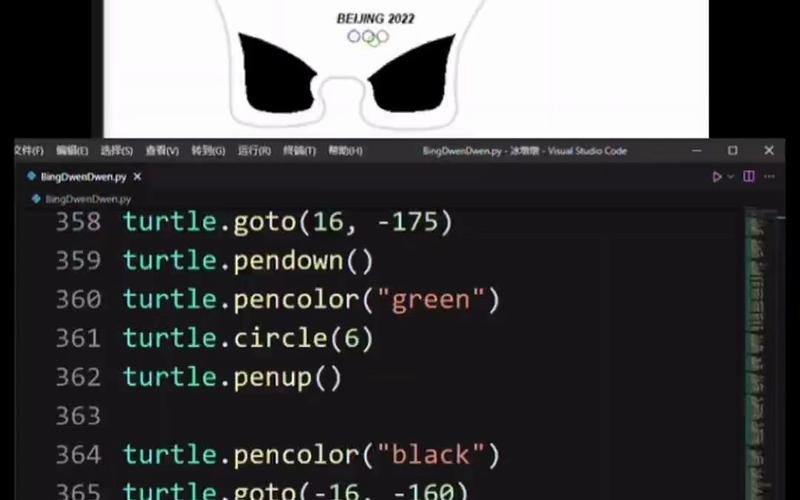
七、画个冰墩墩
# -*- coding:utf-8 -*-
import turtle as t

# 设置速度
t.speed(50)  # 速度
t.delay(10)  # 延迟

t.title('冰墩墩')
# t.bgcolor('red')
# 双耳
# 左耳
t.penup()
t.goto(-150, 200)
t.setheading(160)
t.begin_fill()
t.pendown()
t.circle(-30, 230)
t.setheading(180)
t.circle(37, 90)
t.end_fill()
# 右耳
t.penup()
t.goto(60, 200)
t.setheading(20)
t.begin_fill()
t.pendown()
t.circle(30, 230)
t.setheading(0)
t.circle(-37, 90)
t.end_fill()
# 头
t.pensize(5)
t.penup()
t.goto(-113, 237)
t.setheading(30)
t.pendown()
t.circle(-134, 60)

t.penup()
t.goto(-150, 200)
t.setheading(-120)
t.pendown()
t.circle(200, 80)

t.penup()
t.goto(60, 200)
t.setheading(-60)
t.pendown()
t.circle(-200, 80)

t.penup()
t.setheading(210)
t.pendown()
t.circle(-120, 60)
# 双眼
# 左眼
# 眼圈
t.speed(100)
t.penup()
t.goto(-140, 100)
t.setheading(-45)
t.begin_fill()
t.pendown()
a = 0.2
for i in range(120):
    if 0 <= i < 30 or 60 <= i < 90:
        a = a + 0.1
        t.speed(100)
        t.lt(3)  # 向左转3度
        t.fd(a)  # 向前走a的步长
    else:
        a = a - 0.1
        t.speed(100)
        t.lt(3)
        t.fd(a)
t.end_fill()
# 眼白
t.fillcolor("white")
t.penup()
t.goto(-103, 125)
t.setheading(0)
t.begin_fill()
t.pendown()
t.circle(14, 360)
t.end_fill()
# 眼珠
# t.fillcolor("sienna")
# t.pencolor("sienna")
t.penup()
t.goto(-102, 133)
t.setheading(0)
t.begin_fill()
t.pendown()
t.circle(6, 360)
t.end_fill()
# 右眼
# 眼圈
t.penup()
t.goto(50, 100)
t.setheading(45)
t.fillcolor("black")
t.pencolor("black")
t.begin_fill()
t.pendown()
a = 0.2
for i in range(120):
    if 0 <= i < 30 or 60 <= i < 90:
        a = a + 0.1
        t.speed(100)
        t.lt(3)  # 向左转3度
        t.fd(a)  # 向前走a的步长
    else:
        a = a - 0.1
        t.speed(100)
        t.lt(3)
        t.fd(a)
t.end_fill()
# 眼白
t.fillcolor("white")
t.penup()
t.goto(13, 125)
t.setheading(0)
t.begin_fill()
t.pendown()
t.circle(14, 360)
t.end_fill()
# 眼珠
# t.fillcolor("sienna")
# t.pencolor("sienna")
t.penup()
t.goto(12, 133)
t.setheading(0)
t.begin_fill()
t.pendown()
t.circle(6, 360)
t.end_fill()
# 鼻子
t.pencolor("black")
t.fillcolor("black")
t.penup()
t.goto(-55, 133)
t.begin_fill()
t.pendown()
t.fd(20)
t.seth(-120)
t.fd(20)
t.seth(120)
t.fd(20)
t.end_fill()
# 嘴
t.penup()
t.goto(-70, 110)
t.setheading(-30)
t.fillcolor("red")
t.begin_fill()
t.pendown()
t.circle(50, 60)
t.setheading(-120)
t.circle(-100, 15)
t.circle(-15, 90)
t.circle(-100, 15)
t.end_fill()
# 四肢
# 左臂
t.penup()
t.goto(-175, 100)
t.fillcolor("black")
t.begin_fill()
t.setheading(-120)
t.pendown()
t.fd(100)
t.setheading(-110)
t.circle(20, 180)
t.fd(30)
t.circle(-5, 160)
t.end_fill()
# 右臂
t.penup()
t.goto(85, 100)
t.setheading(60)
t.begin_fill()
t.pendown()
t.fd(100)
t.setheading(70)
t.circle(20, 180)
t.fd(30)
t.circle(-5, 160)
t.end_fill()
# 小红心
t.penup()
t.pencolor("red")
t.fillcolor('red')
t.goto(105, 200)
t.begin_fill()
t.pendown()
t.circle(-5, 180)
t.setheading(90)
t.circle(-5, 180)
t.setheading(-120)
t.fd(17)
t.penup()
t.goto(105, 200)
t.pendown()
t.setheading(-60)
t.fd(17)
t.end_fill()
t.pencolor("black")
t.fillcolor("black")
# 左腿
t.penup()
t.goto(-120, -45)
t.begin_fill()
t.pendown()
t.setheading(-90)
t.circle(-140, 20)
t.circle(5, 109)
t.fd(30)
t.circle(10, 120)
t.setheading(90)
t.circle(-140, 10)
t.end_fill()
# 右腿
t.penup()
t.goto(30, -45)
t.begin_fill()
t.pendown()
t.setheading(-90)
t.circle(140, 20)
t.circle(-5, 109)
t.fd(30)
t.circle(-10, 120)
t.setheading(90)
t.circle(140, 10)
t.end_fill()
# 冰糖外壳
t.pensize(3)
t.penup()
t.goto(-160, 195)
t.setheading(160)
t.pendown()
t.circle(-40, 230)
t.setheading(30)
t.circle(-134, 58)
t.setheading(60)
t.circle(-40, 215)
t.setheading(-60)
t.fd(15)
t.circle(2, 200)
t.setheading(65)
t.fd(30)
t.circle(-25, 180)
t.fd(100)
t.circle(2, 25)
t.circle(-200, 47)
t.circle(2, 60)
t.circle(140, 23)
t.circle(-2, 90)
t.setheading(180)
t.fd(70)
t.circle(-2, 90)
t.fd(30)
t.setheading(-160)
t.circle(-100, 35)
t.setheading(-90)
t.fd(30)
t.circle(-2, 90)
t.fd(70)
t.circle(-2, 90)
t.setheading(60)
t.circle(140, 30)
t.circle(2, 45)
t.circle(-200, 19)
t.circle(2, 130)
t.fd(30)
t.circle(-25, 180)
t.fd(100)
t.setheading(90)
t.circle(-200, 30)
# 冰糖面罩
t.pensize(3)
t.penup()
t.goto(65, 120)
t.setheading(90)
t.pendown()
t.pencolor("red")
a = 1
for i in range(120):
    if 0 <= i < 30 or 60 <= i < 90:  # 控制a的变化
        a = a + 0.25
        t.lt(3)  # 向左转3度
        t.fd(a)  # 向前走a的步长
    else:
        a = a - 0.25
        t.lt(3)
        t.fd(a)
t.pencolor("orange")
t.penup()
t.goto(66, 120)
t.pendown()
a = 1
for i in range(120):
    if 0 <= i < 30 or 60 <= i < 90:
        a = a + 0.255
        t.lt(3)
        t.fd(a)
    else:
        a = a - 0.255
        t.lt(3)
        t.fd(a)
t.pencolor("green")
t.penup()
t.goto(67, 120)
t.pendown()
a = 1
for i in range(120):
    if 0 <= i < 30 or 60 <= i < 90:
        a = a + 0.2555
        t.lt(3)
        t.fd(a)
    else:
        a = a - 0.2555
        t.lt(3)
        t.fd(a)
t.pencolor("deep sky blue")
t.penup()
t.goto(68, 120)
t.pendown()
a = 1
for i in range(120):
    if 0 <= i < 30 or 60 <= i < 90:
        a = a + 0.25955
        t.lt(3)
        t.fd(a)
    else:
        a = a - 0.25955
        t.lt(3)
        t.fd(a)
t.pencolor("pink")
t.penup()
t.goto(71, 120)
t.pendown()
a = 1
for i in range(120):
    if 0 <= i < 30 or 60 <= i < 90:
        a = a + 0.26
        t.lt(3)
        t.fd(a)
    else:
        a = a - 0.26
        t.lt(3)
        t.fd(a)
t.pencolor("purple")
t.penup()
t.goto(72, 120)
t.pendown()
a = 1
for i in range(120):
    if 0 <= i < 30 or 60 <= i < 90:
        a = a + 0.269
        t.lt(3)
        t.fd(a)
    else:
        a = a - 0.269
        t.lt(3)
        t.fd(a)

# 五环
t.penup()
t.goto(-55, -10)
t.pendown()
t.pencolor("blue")
t.circle(10)
t.penup()
t.goto(-40, -10)
t.pendown()
t.pencolor("black")
t.circle(10)
t.penup()
t.goto(-25, -10)
t.pendown()
t.pencolor("red")
t.circle(10)
t.penup()
t.goto(-50, -20)
t.pendown()
t.pencolor("yellow")
t.circle(10)
t.penup()
t.goto(-30, -20)
t.pendown()
t.pencolor("green")
t.circle(10)

# 输出文字
printer = t.Turtle()
printer.hideturtle()
printer.penup()
printer.goto(-350,-50)
printer.write("可\n\n",move = True, align="left", font=('宋体',40,'normal'))
printer.goto(-350,-100)
printer.write("爱\n\n",move = True, align="left", font=('宋体',40,'normal'))
printer.goto(-350,-150)
printer.write("冰\n\n",move = True, align="left", font=('宋体',40,'normal'))
printer.goto(-350,-200)
printer.write("墩\n\n",move = True, align="left", font=('宋体',40,'normal'))
printer.goto(-350,-250)
printer.write("墩\n\n",move = True, align="left", font=('宋体',40,'normal'))

t.hideturtle()
t.done()
效果图
八、画个皮卡丘
# -*- coding:utf-8 -*-

import turtle

def getPosition(x,y):
    turtle.setx(x)
    turtle.sety(y)
    print(x,y)

class Pikaqiu:
    def __init__(self):
         self.t = turtle.Turtle()
         t = self.t
         t.pensize(3) # 画笔大小
         t.speed(9) #画笔速度
         t.ondrag(getPosition)


    def onTrace_goto(self,x,y):
        self.t.penup()
        self.t.goto(x,y)
        self.t.pendown()

    def leftEye(self,x,y):
        self.onTrace_goto(x,y)
        t = self.t
        t.seth(0)
        t.fillcolor('#333333')
        t.begin_fill()
        t.circle(22)
        t.end_fill()

        self.onTrace_goto(x,y+10)
        t.fillcolor('#000000')
        t.begin_fill()
        t.circle(10)
        t.end_fill()

        self.onTrace_goto(x+6,y+22)
        t.fillcolor('#ffffff')
        t.begin_fill()
        t.circle(10)
        t.end_fill()

    def rightEye(self,x,y):
        self.onTrace_goto(x,y)
        t = self.t
        t.seth(0)
        t.fillcolor('#333333')
        t.begin_fill()
        t.circle(22)
        t.end_fill()

        self.onTrace_goto(x,y+10)
        t.fillcolor('#000000')
        t.begin_fill()
        t.circle(10)
        t.end_fill()

        self.onTrace_goto(x-6,y+22)
        t.fillcolor('#ffffff')
        t.begin_fill()
        t.circle(10)
        t.end_fill()

    def mouth(self,x,y):
        self.onTrace_goto(x,y)
        t = self.t
        t.fillcolor('#88141D')
        t.begin_fill()
        # 下嘴唇
        l1 = []
        l2 = []
        t.seth(190)
        a = 0.7
        for i in range(28):
            a +=0.1
            t.right(3)
            t.fd(a)
            l1.append(t.position())

        self.onTrace_goto(x,y)
        t.seth(10)
        a = 0.7
        for i in range(28):
            a +=0.1
            t.left(3)
            t.fd(a)
            l2.append(t.position())

        #上嘴唇
        t.seth(10)
        t.circle(50,15)
        t.left(180)
        t.circle(-50,15)

        t.circle(-50,40)
        t.seth(233)
        t.circle(-50,55)
        t.left(180)
        t.circle(50,12.1)
        t.end_fill()


        # 舌头
        self.onTrace_goto(17,54)
        t.fillcolor('#DD716F')
        t.begin_fill()
        t.seth(145)
        t.circle(40,86)
        t.penup()
        for pos in reversed(l1[:20]):
            t.goto(pos[0],pos[1]+1.5)
        for pos in l2[:20]:
            t.goto(pos[0],pos[1]+1.5)
        t.pendown()
        t.end_fill()

        # 鼻子
        self.onTrace_goto(-17,94)
        t.seth(8)
        t.fd(4)
        t.back(8)


    # 红脸颊
    def leftCheck(self,x,y):
        turtle.tracer(False)
        t = self.t
        self.onTrace_goto(x,y)
        t.seth(60)
        t.fillcolor('#DD4D28')
        t.begin_fill()
        a = 2.3
        for i in range(120):
            if 0 <= i <30 or 60 <= i <90:
                a -= 0.05
                t.lt(3)
                t.fd(a)
            else:
                a += 0.05
                t.lt(3)
                t.fd(a)
        t.end_fill()
        turtle.tracer(True)

    def rightCheck(self,x,y):
        t = self.t
        turtle.tracer(False)
        self.onTrace_goto(x,y)
        t.seth(60)
        t.fillcolor('#DD4D28')
        t.begin_fill()
        a = 2.3
        for i in range(120):
            if 0<= i<30 or 60 <= i< 90:
                a -= 0.05
                t.lt(3)
                t.fd(a)
            else:
                a += 0.05
                t.lt(3)
                t.fd(a)

        t.end_fill()
        turtle.tracer(True)

    def colorLeftEar(self,x,y):
        t = self.t
        self.onTrace_goto(x,y)
        t.fillcolor('#000000')
        t.begin_fill()
        t.seth(330)
        t.circle(100,35)
        t.seth(219)
        t.circle(-300,19)
        t.seth(110)
        t.circle(-30,50)
        t.circle(-300,10)
        t.end_fill()

    def colorRightEar(self,x,y):
        t = self.t
        self.onTrace_goto(x,y)
        t.fillcolor('#000000')
        t.begin_fill()
        t.seth(300)
        t.circle(-100,30)
        t.seth(35)
        t.circle(300,15)
        t.circle(30,50)
        t.seth(190)
        t.circle(300,17)
        t.end_fill()

    def body(self):
        t = self.t
        t.fillcolor('#F6D02F')
        # 右脸轮廓
        t.penup()
        t.circle(130,40)
        t.pendown()
        t.circle(100,105)
        t.left(180)
        t.circle(-100,5)

        # 右耳朵
        t.seth(20)
        t.circle(300,30)
        t.circle(30,50)
        t.seth(190)
        t.circle(300,36)

        # 上轮廓
        t.seth(150)
        t.circle(150,70)


        #左耳朵
        t.seth(200)
        t.circle(300,40)
        t.circle(30,50)
        t.seth(20)
        t.circle(300,35)

        # 左脸轮廓
        t.seth(240)
        t.circle(105,95)
        t.left(180)
        t.circle(-105,5)

        #左手
        t.seth(210)
        t.circle(500,18)
        t.seth(200)
        t.fd(10)
        t.seth(280)
        t.fd(7)
        t.seth(210)
        t.seth(300)
        t.circle(10,80)
        t.seth(220)
        t.seth(10)
        t.seth(300)
        t.circle(10,80)
        t.seth(240)
        t.fd(12)
        t.seth(0)
        t.fd(13)
        t.seth(240)
        t.circle(10,70)
        t.seth(10)
        t.circle(10,70)
        t.seth(10)
        t.circle(300,18)

        t.seth(75)
        t.circle(500,8)
        t.left(180)
        t.circle(-500,15)
        t.seth(250)
        t.circle(100,65)

        # 左脚
        t.seth(320)
        t.circle(100,5)
        t.left(180)
        t.circle(-100,5)
        t.seth(220)
        t.circle(200,20)
        t.circle(20,70)
        t.seth(60)
        t.circle(-100,20)
        t.left(180)
        t.circle(100,20)
        t.seth(300)
        t.circle(10,70)
        t.seth(60)
        t.circle(-100,20)
        t.left(180)
        t.circle(100,20)
        t.seth(10)
        t.circle(100,60)

        # 横向
        t.seth(180)
        t.circle(-100,10)
        t.left(180)
        t.circle(100,10)
        t.seth(5)
        t.circle(100,10)
        t.circle(-100,40)
        t.circle(100,35)
        t.left(180)
        t.circle(-100,10)

        # 右脚
        t.seth(290)
        t.circle(100,55)
        t.circle(10,50)
        t.seth(120)
        t.circle(100,20)
        t.left(180)
        t.circle(-100,20)
        t.seth(0)
        t.circle(10,50)
        t.seth(110)
        t.circle(110,20)
        t.left(180)
        t.circle(-100,20)
        t.seth(30)
        t.circle(20,50)
        t.seth(100)
        t.circle(100,40)

        # 右侧身体轮廓
        t.seth(200)
        t.circle(-100,5)
        t.left(180)
        t.circle(100,5)
        t.left(30)
        t.circle(100,75)
        t.right(15)
        t.circle(-300,21)
        t.left(180)
        t.circle(300,3)

        # 右手
        t.seth(43)
        t.circle(200,60)
        t.right(10)
        t.fd(10)
        t.circle(5,160)
        t.seth(90)
        t.circle(5,160)
        t.seth(90)
        t.fd(10)
        t.seth(90)
        t.circle(5,180)
        t.fd(10)
        t.left(180)
        t.left(20)
        t.fd(10)
        t.circle(5,170)
        t.fd(10)
        t.seth(240)
        t.circle(50,30)
        t.end_fill()
        self.onTrace_goto(130,125)
        t.seth(-20)
        t.fd(5)
        t.circle(-5,160)
        t.fd(5)

        # 手指纹
        self.onTrace_goto(166,130)
        t.seth(-90)
        t.fd(3)
        t.circle(-4,180)
        t.fd(3)
        t.seth(-90)
        t.fd(3)
        t.circle(-4,180)
        t.fd(3)

        # 尾巴
        self.onTrace_goto(168,134)
        t.fillcolor('#F6D02F')
        t.begin_fill()
        t.seth(40)
        t.fd(200)
        t.seth(-80)
        t.fd(150)
        t.seth(210)
        t.fd(150)
        t.left(90)
        t.fd(100)
        t.right(95)
        t.fd(100)
        t.left(110)
        t.fd(70)
        t.right(110)
        t.fd(80)
        t.left(110)
        t.fd(30)
        t.right(110)
        t.fd(32)
        t.right(106)
        t.circle(100,25)
        t.right(15)
        t.circle(-300,2)
        t.seth(30)
        t.fd(40)
        t.left(100)
        t.fd(70)
        t.right(100)
        t.fd(80)
        t.left(100)
        t.fd(46)
        t.seth(66)
        t.circle(200,38)
        t.right(10)
        t.end_fill()

        # 尾巴花纹
        t.fillcolor('#923E24')
        self.onTrace_goto(126.82,-156.84)
        t.begin_fill()
        t.seth(30)
        t.fd(40)
        t.left(100)
        t.fd(40)
        t.pencolor('#923e24')
        t.seth(-30)
        t.fd(30)
        t.left(140)
        t.fd(20)
        t.left(150)
        t.fd(20)
        t.right(150)
        t.fd(20)
        t.left(130)
        t.fd(18)
        t.pencolor('#000000')
        t.seth(-45)
        t.fd(67)
        t.right(110)
        t.fd(30)
        t.left(110)
        t.fd(32)
        t.right(106)
        t.circle(100,25)
        t.right(15)
        t.circle(-300,2)
        t.end_fill()

        # 帽子、眼睛、嘴巴、脸颊
        self.cap(-134.07,147.81)
        self.mouth(-5,25)
        self.leftCheck(-126,32)
        self.rightCheck(107,63)
        self.colorLeftEar(-250,100)
        self.colorRightEar(150,270)
        self.leftEye(-85,90)
        self.rightEye(50,110)
        t.hideturtle()

    def cap(self,x,y):
        self.onTrace_goto(x,y)
        t = self.t
        t.fillcolor('#CD0000')
        t.begin_fill()
        t.seth(200)
        t.circle(400,7)
        t.left(180)
        t.circle(-400,30)
        t.circle(30,60)
        t.fd(60)
        t.circle(30,45)
        t.fd(60)
        t.left(5)
        t.circle(30,70)
        t.right(20)
        t.circle(200,70)
        t.circle(30,60)
        t.fd(70)
        t.right(35)
        t.fd(50)
        t.right(35)
        t.fd(50)
        t.circle(8,100)
        t.end_fill()
        self.onTrace_goto(-168.47,185.52)
        t.seth(36)
        t.circle(-270,54)
        t.left(180)
        t.circle(270,27)
        t.circle(-80,98)
        t.fillcolor('#444444')
        t.begin_fill()
        t.left(180)
        t.circle(80,197)
        t.left(58)
        t.circle(200,45)
        t.end_fill()
        self.onTrace_goto(-58,270)
        t.pencolor('#228B22')
        t.dot(35)
        self.onTrace_goto(-30,280)
        t.fillcolor('#228B22')
        t.begin_fill()
        t.seth(100)
        t.circle(30,180)
        t.seth(190)
        t.fd(15)
        t.seth(100)
        t.circle(-45,180)
        t.right(90)
        t.fd(15)
        t.end_fill()
        t.fillcolor('#228B22')

    def start(self):
        self.body()

def main():
    print(" Painting the Pikachu....")
    turtle.screensize(800,600)
    turtle.title("皮卡丘")
    pkq = Pikaqiu()
    pkq.start()

    turtle.mainloop() # running


if __name__ =='__main__':
    main()
效果图
九、生日蛋糕
# -*-coding:utf-8 -*-
import turtle as t
import math as m
import random as r

# 圆角弧度转化 x 轴 和y轴
def drawX(a, i):
    angle = m.radians(i)
    return a * m.cos(angle)


def drawY(b, i):
    angle = m.radians(i)
    return b * m.sin(angle)


# 设置背景颜色,窗口位置以及大小
t.bgcolor("#d3dae8")
t.setup(width=900, height=600, startx=0, starty=0)
t.title("永远十八,生日快乐!")
# 落笔速度
t.speed(2)
t.penup()
t.goto(150, 0)
t.pendown()

# 画个蛋糕底座 填充白色
t.pencolor("white")
t.begin_fill()
for i in range(360):
    x = drawX(150, i)
    y = drawY(60, i)
    t.goto(x, y)
t.fillcolor("#fef5f7")
t.end_fill()

# 2中心分割找到合适点 用粉色填充外圈
t.begin_fill()
for i in range(180):
    x = drawX(150, -i)
    y = drawY(70, -i)
    t.goto(x, y)
for i in range(180, 360):
    x = drawX(150, i)
    y = drawY(60, i)
    t.goto(x, y)
t.fillcolor("#f2d7dd")
t.end_fill()

# 3计算蛋糕的大小  画底层
t.pu() #动态生成函数
t.goto(120, 0)
t.pd()
t.begin_fill()
for i in range(360):
    x = drawX(120, i)
    y = drawY(48, i)
    t.goto(x, y)
t.fillcolor("#cbd9f9")
t.end_fill()

# 4画出第一层的蛋糕框架 蓝色填充
t.begin_fill()
t.pencolor("#fee48c")
for i in range(540):
    x = drawX(120, i)
    y = drawY(48, i) + 70
    t.goto(x, y)
t.goto(-120, 0)
t.fillcolor("#cbd9f9")
t.end_fill()

# 5 对第一层蛋糕进行美化 填充淡粉色
t.pu()
t.goto(120, 70)
t.pd()
t.pencolor("#fff0f3")
t.begin_fill()
for i in range(360):
    x = drawX(120, i)
    y = drawY(48, i) + 70
    t.goto(x, y)
t.fillcolor("#fff0f3")
t.end_fill()

# 6 开始画第二层蛋糕底座 填充乳白色
t.pu()
t.goto(110, 70)
t.pd()
t.pencolor("#fff9fb")
t.begin_fill()
for i in range(360):
    x = drawX(110, i)
    y = drawY(44, i) + 70
    t.goto(x, y)
t.fillcolor("#fff9fb")
t.end_fill()

# 7 进行蛋糕第一层的装饰 画底层红边
t.pu()
t.goto(120, 0)
t.pd()
t.begin_fill()
t.pencolor("#ffa79d")
for i in range(180):
    x = drawX(120, -i)
    y = drawY(48, -i) + 10
    t.goto(x, y)
t.goto(-120, 0)
for i in range(180, 360):
    x = drawX(120, i)
    y = drawY(48, i)
    t.goto(x, y)
t.fillcolor("#ffa79d")
t.end_fill()

# 8 第一层蛋糕的花边 波浪形描绘 并填充颜色
t.pu()
t.goto(120, 70)
t.pd()
t.begin_fill()
t.pensize(4)
t.pencolor("#fff0f3")
for i in range(1800):
    x = drawX(120, 0.1 * i)
    y = drawY(-18, i) + 10
    t.goto(x, y)
t.goto(-120, 70)
t.pensize(1)
for i in range(180, 360):
    x = drawX(120, i)
    y = drawY(48, i) + 70
    t.goto(x, y)
t.fillcolor("#fff0f3")
t.end_fill()

# 9 第一层算是弄好了 ,下面就是差不多的步骤
# 开始第二层蛋糕的画作 并填充颜色
t.pu()
t.goto(80, 70)
t.pd()
t.begin_fill()
t.pencolor("#6f3732")
t.goto(80, 120)
for i in range(180):
    x = drawX(80, i)
    y = drawY(32, i) + 120
    t.goto(x, y)
t.goto(-80, 70)
for i in range(180, 360):
    x = drawX(80, i)
    y = drawY(32, i) + 70
    t.goto(x, y)
t.fillcolor("#6f3732")
t.end_fill()


# 10 第二层顶层描边填充颜色
t.pu()
t.goto(80, 120)
t.pd()
t.pencolor("#ffaaa0")
t.begin_fill()
for i in range(360):
    x = drawX(80, i)
    y = drawY(32, i) + 120
    t.goto(x, y)
t.fillcolor("#ffaaa0")
t.end_fill()


# 11 第二层内圈 并填充颜色
t.pu()
t.goto(70, 120)
t.pd()
t.pencolor("#ffc3be")
t.begin_fill()
for i in range(360):
    x = drawX(70, i)
    y = drawY(28, i) + 120
    t.goto(x, y)
t.fillcolor("#ffc3be")
t.end_fill()


# 12 开始画第二层花边 并填充颜色
t.pu()
t.goto(80, 120)
t.pd()
t.begin_fill()
t.pensize(3)
t.pencolor("#ffaaa0")
for i in range(1800):
    x = drawX(80, 0.1 * i)
    y = drawY(-12, i) + 80
    t.goto(x, y)
t.goto(-80, 120)
t.pensize(1)
for i in range(180, 360):
    x = drawX(80, i)
    y = drawY(32, i) + 120
    t.goto(x, y)
t.fillcolor("#ffaaa0")
t.end_fill()

# 13 现在开始画蜡烛 总共画5个蜡烛
t.pu()
t.goto(64, 120)
t.pd()
t.pencolor("#b1c9e9")
t.begin_fill()
for i in range(360):
    x = drawX(4, i) + 60
    y = drawY(1, i) + 120
    t.goto(x, y)
t.goto(64, 170)
for i in range(540):
    x = drawX(4, i) + 60
    y = drawY(1, i) + 170
    t.goto(x, y)
t.goto(56, 120)
t.fillcolor("#b1c9e9")
t.end_fill()
# 进行蜡烛白色描边
t.pencolor("white")
t.pensize(2)
for i in range(1, 6):
    t.goto(64, 120 + 10 * i)
    t.pu()
    t.goto(56, 120 + 10 * i)
    t.pd()
# 蜡烛芯
t.pu()
t.goto(60, 170)
t.pd()
t.goto(60, 180)
t.pensize(1)

#14 蜡烛火苗
t.pu()
t.goto(64, 190)
t.pd()
t.pencolor("#f1add1")
t.begin_fill()
for i in range(360):
    x = drawX(4, i) + 60
    y = drawY(10, i) + 190
    t.goto(x, y)
t.fillcolor("#f1add1")
t.end_fill()

# 15 以下几个重复在不同位置画蜡烛
t.pu()
t.goto(-56, 120)
t.pd()
t.pencolor("#b1c9e9")
t.begin_fill()
for i in range(360):
    x = drawX(4, i) - 60
    y = drawY(1, i) + 120
    t.goto(x, y)
t.goto(-56, 170)
for i in range(540):
    x = drawX(4, i) - 60
    y = drawY(1, i) + 170
    t.goto(x, y)
t.goto(-64, 120)
t.fillcolor("#b1c9e9")
t.end_fill()
t.pencolor("white")
t.pensize(2)
for i in range(1, 6):
    t.goto(-56, 120 + 10 * i)
    t.pu()
    t.goto(-64, 120 + 10 * i)
    t.pd()
t.pu()
t.goto(-60, 170)
t.pd()
t.goto(-60, 180)
t.pensize(1)

#16
t.pu()
t.goto(-56, 190)
t.pd()
t.pencolor("#f1add1")
t.begin_fill()
for i in range(360):
    x = drawX(4, i) - 60
    y = drawY(10, i) + 190
    t.goto(x, y)
t.fillcolor("#f1add1")
t.end_fill()
# 15
t.pu()
t.goto(0, 130)
t.pd()
t.pencolor("#b1c9e9")
t.begin_fill()
for i in range(360):
    x = drawX(4, i)
    y = drawY(1, i) + 130
    t.goto(x, y)
t.goto(4, 180)
for i in range(540):
    x = drawX(4, i)
    y = drawY(1, i) + 180
    t.goto(x, y)
t.goto(-4, 130)
t.fillcolor("#b1c9e9")
t.end_fill()
t.pencolor("white")
t.pensize(2)
for i in range(1, 6):
    t.goto(4, 130 + 10 * i)
    t.pu()
    t.goto(-4, 130 + 10 * i)
    t.pd()
t.pu()
t.goto(0, 180)
t.pd()
t.goto(0, 190)
t.pensize(1)

#17 第三个蜡烛火苗
t.pu()
t.goto(4, 200)
t.pd()
t.pencolor("#f1add1")
t.begin_fill()
for i in range(360):
    x = drawX(4, i)
    y = drawY(10, i) + 200
    t.goto(x, y)
t.fillcolor("#f1add1")
t.end_fill()


# 18
t.pu()
t.goto(30, 110)
t.pd()
t.pencolor("#b1c9e9")
t.begin_fill()
for i in range(360):
    x = drawX(4, i) + 30
    y = drawY(1, i) + 110
    t.goto(x, y)
t.goto(34, 160)
for i in range(540):
    x = drawX(4, i) + 30
    y = drawY(1, i) + 160
    t.goto(x, y)
t.goto(26, 110)
t.fillcolor("#b1c9e9")
t.end_fill()
t.pencolor("white")
t.pensize(2)
for i in range(1, 6):
    t.goto(34, 110 + 10 * i)
    t.pu()
    t.goto(26, 110 + 10 * i)
    t.pd()
#19
t.pu()
t.goto(30, 160)
t.pd()
t.goto(30, 170)
t.pensize(1)

#20
t.pu()
t.goto(34, 180)
t.pd()
t.pencolor("#f1add1")
t.begin_fill()
for i in range(360):
    x = drawX(4, i) + 30
    y = drawY(10, i) + 180
    t.goto(x, y)
t.fillcolor("#f1add1")
t.end_fill()
# 17
t.pu()
t.goto(-30, 110)
t.pd()
t.pencolor("#b1c9e9")
t.begin_fill()
for i in range(360):
    x = drawX(4, i) - 30
    y = drawY(1, i) + 110
    t.goto(x, y)
t.goto(-26, 160)
for i in range(540):
    x = drawX(4, i) - 30
    y = drawY(1, i) + 160
    t.goto(x, y)
t.goto(-34, 110)
t.fillcolor("#b1c9e9")
t.end_fill()
t.pencolor("white")
t.pensize(2)
for i in range(1, 6):
    t.goto(-26, 110 + 10 * i)
    t.pu()
    t.goto(-34, 110 + 10 * i)
    t.pd()
t.pu()
t.goto(-30, 160)
t.pd()
t.goto(-30, 170)
t.pensize(1)

#  算是画完了蜡烛 总计第五个
t.pu()
t.goto(-26, 180)
t.pd()
t.pencolor("#f1add1")
t.begin_fill()
for i in range(360):
    x = drawX(4, i) - 30
    y = drawY(10, i) + 180
    t.goto(x, y)
t.fillcolor("#f1add1")
t.end_fill()

### 随机蛋糕碎末 花边点缀
color = ["#e28cb9", "#805a8c", "#eaa989", "#6e90b7", "#b8b68f", "#e174b5", "#cf737c", "#7c8782"]
# 蛋糕上来点色彩点缀
for i in range(80):
    t.pu()
    x = r.randint(-120, 120)
    y = r.randint(-25, 30)
    t.goto(x, y)
    t.pd()
    t.dot(r.randint(2, 5), color[r.randint(0, 7)])

# 增加点密度
for i in range(40):
    t.pu()
    x = r.randint(-90, 90)
    y = r.randint(-35, 10)
    t.goto(x, y)
    t.pd()
    t.dot(r.randint(2, 5), color[r.randint(0, 7)])

# 第二层同样的原理
for i in range(40):
    t.pu()
    x = r.randint(-80, 80)
    y = r.randint(60, 90)
    t.goto(x, y)
    t.pd()
    t.dot(r.randint(2, 5), color[r.randint(0, 7)])
for i in range(30):
    t.pu()
    x = r.randint(-50, 50)
    y = r.randint(45, 70)
    t.goto(x, y)
    t.pd()
    t.dot(r.randint(2, 5), color[r.randint(0, 7)])

# 外围环境也加点点缀 搞点氛围
for i in range(50):
    t.pu()
    x = r.randint(-500, 500)
    y = r.randint(120, 300)
    t.goto(x, y)
    t.pd()
    t.dot(r.randint(3, 5), color[r.randint(0, 7)])

# 找位置写生日快乐
t.seth(90)
t.pu()
t.goto(0, 0)
t.fd(210)
t.left(90)
t.fd(170)
t.pd()
t.write("Happy Birthday", font=("Curlz MT", 50))


# # 落款
# t.color('blue')
# t.penup()
# t.goto(-400, 210)
# t.pendown()
# t.write('致:远方的你  ', font=('楷体', 32, 'bold'))
# t.color('red')
# t.penup()
# t.goto(-300, 50)
# t.pendown()
# t.write('祝 你 生 日 快 乐,前 程 似 锦!', font=('楷体', 30, 'bold'))
# t.color('blue')
# t.penup()
# t.goto(100, -220)
# t.pendown()
# t.write('', font=('楷体', 20, 'bold'))
t.done()
效果图
十、画一朵漂亮的玫瑰花
# -*- coding: utf-8 -*-
import turtle as tl

tl.speed(0)
# 设置画面尺寸4笔画漂亮的玫瑰花')
tl.setup(600,650)
tl.title('这是一朵玫瑰花')
tl.up ()
tl.goto(-180,275)
# 坐标移至(-200,290)
# 设置文字颜色(蓝色)
# 设置比例因子,用数据的1/3大小绘制力设置玫瑰花居中与数据的位置偏移量畏替誓花暴势盘布笔、填充都为红色
# 绘制文字
tl.color('blue')
tl.write('漂亮的玫瑰花',align='center',font=('微软雅黑',24))
R= 1/3
x0,y0 = R*650,R*850
# 画花瓣背景(花瓣主体)
tl.goto(R*1109-x0,y0-R*308)
tl.color('red')
tl.seth(-25)
tl.down()
tl.begin_fill()
tl.circle(-400*R,38)
tl.rt(115)
tl.circle(300*R,45)
tl.circle(-700*R,20)
tl.circle(700*R,4)
tl.circle(-550*R,10)
tl.circle(-300*R,27)
tl.circle(50*R,35)
tl.circle(-800*R,5)
tl.circle(-60*R,70)
tl.circle(900*R,12)
tl.circle(100*R,27)
tl.circle(-800*R,14)
tl.circle(-30*R,121)
tl.circle(-800*R,15)
tl.lt(90)
tl.circle(400*R,18)
tl.circle(-50*R,140)
tl.lt(130)
tl.circle(-130*R,110)
tl.circle(100*R,30)
tl.circle(-450*R,20)
tl.circle(-250*R,60)
tl.lt(70)
tl.circle(-130*R,60)
tl.circle(500*R,21)
tl.circle(-130*R,95)
tl.circle(-200*R,20)
tl.end_fill()


# 画花叶
tl.color('green')
# 设置花叶为绿色
tl.up()
tl.goto(R*560-x0,y0-R*1230)
tl.down()
tl.seth(80)
tl.begin_fill()

# 画第一片花叶
for i in range(5):
    tl.circle(410*R,20)
    tl.lt(120)
    tl.fd(35*R)
    tl.rt(120)


# 花叶起点坐标
# 画叶缘
tl.fd(160*R)
tl.lt(150)
tl.fd(150*R)

# 画叶缘
for i in range(4):
    tl.rt(130)
    tl.fd(30*R)
    tl.lt(120+i*3)
    tl.circle(600*R,11-i)


tl.rt(130)
tl.fd(30*R)
tl.lt(125)
tl.circle (500*R,30)
tl.end_fill()
tl.up()
tl.seth(-35)
tl.fd(150*R)
tl.lt(185)
tl.down()
# 叶脉用深绿色
tl.color('darkgreen')
# 画叶脉
tl.begin_fill()
tl.circle(-470*R,20)
tl.circle(750*R,25)
tl.fd(200*R)
tl.lt(175)
tl.fd(190*R)
tl.circle(-750*R,20)
tl.circle(500*R,15)
tl.fd(100*R)
tl.end_fill()
tl.up()
tl.lt(175)
tl.fd(250*R)
tl.rt(45)
tl.down()
tl.pensize(3)
tl.fd(160*R)


for i in range(2):
    tl.up()
    tl.lt(120)
    tl.fd(110*R)
    tl.rt(115)
    tl.down()
    tl.fd((150-i*20)*R)

tl.up()
tl.lt(140)
tl.fd(150*R)
tl.lt(120)
tl.down()
tl.fd(100*R)

for i in range(2):
    tl.up()
    tl.rt(110)
    tl.fd((100+i*5)*R)
    tl.lt(110)
    tl.down()
    tl.fd(140*R)

# 设置线条颜色和填充颜色同为绿色# 画第二片花叶
tl.color('green')
tl.up()
tl.seth(-80)
tl.fd(250*R)
tl.pensize(1)
tl.down ()
tl.seth(125)
tl.begin_fill()


for i in range(5):
    tl.circle(330*R,20)
    tl.lt(120)
    tl.fd(30*R)
    tl.rt(120)
tl.fd(130*R)
tl.lt(150)
tl.fd(120*R)

for i in range(4):
    tl.rt(130)
    tl.fd(25*R)
    tl.lt(120+i*3)
    tl.circle(460*R,11-i)

tl.rt(130)
tl.fd(25*R)
tl.lt(125)
tl.circle(400*R,30)
tl.end_fill()

tl.up()
tl.seth(12)
tl.fd(120*R)
tl.lt(182)
tl.down()

tl.color('darkgreen')
tl.begin_fill()
tl.circle(-380*R,20)
tl.circle(600*R,30)
tl.fd(130*R)
tl.lt(175)
tl.fd(120*R)
tl.circle(-600*R,25)
tl.circle(400*R,15)
tl.fd(80*R)
tl.end_fill()

tl.up()
tl.lt(175)
tl.fd(200*R)
tl.rt(45)
tl.down()
tl.pensize(3)
tl.fd(150*R)

for i in range(2):
    tl.up()
    tl.lt(120)
    tl.fd(90*R)
    tl.rt(115)
    tl.down()
    tl.fd((100-i*15)*R)

tl.up()
tl.lt(140)
tl.fd(110*R)
tl.lt(120)
tl.down()
tl.fd(100*R)

for i in range(2):
    tl.up()
    tl.rt(110)
    tl.fd((80+i*5)*R)
    tl.lt(110)
    tl.down()
    tl.fd(110*R)

tl.up()
tl.rt(10)
tl.fd(500*R)
tl.seth(90)

tl.color('green')
tl.pensize(1)
tl.begin_fill()


# 画第三片花叶
for i in range(5):
    tl.circle(-410*R,20)
    tl.rt(120)
    tl.fd(35*R)
    tl.lt(120)
tl.fd(160*R)
tl.rt(150)
tl.fd(150*R)

for i in range(4):
    tl.lt(130)
    tl.fd(30*R)
    tl.rt(120+i*3)
    tl.circle(-600*R,11-i)

tl.lt(130)
tl.fd(30*R)
tl.rt(125)
tl.circle(-500*R,30)
tl.end_fill()

tl.up()
tl.lt(40)
tl.fd(160*R)
tl.lt(180)
tl.down()


tl.color('darkgreen')
tl.begin_fill()
tl.circle(470*R,20)
tl.circle(-750*R,25)
tl.fd(200*R)
tl.rt(175)
tl.fd(190*R)
tl.circle(750*R,20)
tl.circle(-500*R,15)
tl.fd(100*R)
tl.end_fill()

tl.up ()
tl.rt(175)
tl.fd(250*R)
tl.lt(45)
tl.down()
tl.pensize(3)
tl.fd(160*R)

for i in range(2):
    tl.up()
    tl.rt(120)
    tl.fd(110*R)
    tl.lt(115)
    tl.down()
    tl.fd((150-i*20)*R)

tl.up()
tl.rt(140)
tl.fd(150*R)
tl.rt(120)
tl.down()
tl.fd(100*R)

for i in range(2):
    tl.up()
    tl.lt(110)
    tl.fd((100+i*5)*R)
    tl.rt(110)
    tl.down()
    tl.fd(140*R)
tl.lt(45)
tl.fd(230*R)
tl.lt(45)

# 花梗色
tl.color('saddlebrown','#976123')
tl.begin_fill()
# 画花梗
tl.fd(460*R)
tl.circle(250*R,15)
tl.rt(120)
tl.circle(80*R,45)
tl.rt(100)
tl.circle(-100*R,35)
tl.circle(700*R,15)
tl.fd(360*R)
tl.circle(300*R,10)
tl.fd(220*R)
tl.rt(90)
tl.fd(35*R)
tl.rt(90)
tl.fd(220*R)
tl.circle(-320*R,10)
tl.fd(70*R);
tl.end_fill()

# 画花尊
tl.up()
tl.rt(160)
tl.fd(400*R)
tl.lt(80)
tl.pensize(1)
tl.color('darkgreen' ,'green')
tl.down()

tl.begin_fill()
tl.circle(520*R,10)
tl.circle(100*R,75)
tl.circle(-100*R,60)
tl.lt(150)
tl.circle(220*R,85)
tl.rt(140)
tl.circle(240*R,30)
tl.circle(-240*R,15)
tl.lt(140)
tl.circle(-240*R,20)
tl.circle(240*R,25)
tl.rt(120)
tl.circle(180*R,80)
tl.circle(100*R,40)
tl.lt(100)
tl.circle(-310*R,23)
tl.lt(57)
tl.circle(-520*R,35)
tl.end_fill()

# 画花芯花瓣(蕃茄红色)
tl.up()
tl.seth(90)
tl.fd(595*R)
tl.lt(90)
tl.fd(60*R)
tl.rt(120)
tl.down()

tl.color('tomato')
tl.begin_fill()
tl.circle(-80*R,45)
tl.circle(-30*R,120)
tl.circle(-10*R,50)
tl.circle(-250*R,30)
tl.circle(-20*R,60)
tl.circle(-80*R,100)
tl.circle(-290*R,40)
tl.circle(-110*R,90)
tl.circle(110*R,70)
tl.circle(-110*R,80)
tl.circle(-220*R,25)
tl.rt(70)
tl.fd(25*R)
tl.rt(110)
tl.circle(220*R,30)
tl.circle(80*R,70)
tl.circle(-120*R,30)
tl.lt(125)
tl.circle(200*R,20)
tl.rt(45)
tl.circle(220*R,50)
tl.rt(80)
tl.fd(21*R)
tl.rt(105)
tl.circle(-400*R,33)
tl.lt(50)
tl.circle(-240*R,15)
tl.circle(850*R,5)
tl.circle(90*R,87)
tl.circle(270*R,40)
tl.circle(60*R,100)
tl.circle(10*R,63)
tl.circle(250*R,25)
tl.lt(90)
tl.circle(28*R,100)
tl.end_fill()

tl.up()
tl.rt(150)
tl.fd(95*R)
tl.rt(30)
tl.begin_fill()
tl.down()
tl.circle(-160*R,30)
tl.circle(-270*R,30)
tl.circle(-100*R,50)
tl.rt(150)
tl.circle(250*R,50)
tl.circle(150*R, 20)
tl.end_fill()

tl.up()
tl.lt(130)
tl.fd(280*R)
tl.rt(65)
tl.begin_fill()
tl.down()
tl.circle(-350*R,20)
tl.circle(-100*R,10)
tl.circle(-470*R,10)
tl.rt(110)
tl.fd(20*R)
tl.rt(60)
tl.circle(-470*R,8)
tl.circle(150*R,25)
tl.circle(470*R,8)
tl.circle(-30*R,50)
tl.end_fill()
tl.up()
tl.lt(186,)
tl.fd(480*R)
tl.lt(195)
tl.down()
tl.begin_fill()
tl.circle(-500*R,22)
tl.circle(280*R,20)
tl.circle(130*R,90)
tl.circle(15*R,175)
tl.fd(20*R)
tl.rt(105)
tl.circle(-300*R,70)
tl.rt(120)
tl.circle(-800*R,3)
tl.rt(70)
tl.circle(100*R,30)
tl.lt(160)
tl.circle(-50*R,75)
tl.circle (-100*R,100)
tl.circle(200*R,20)
tl.lt(30)
tl.fd(25*R)
tl.lt(135)
tl.fd(35*R)
tl.rt(95)
tl.circle(-100*R,80)
tl.circle(800*R,15)
tl.circle(-100*R,100)
tl.circle(-200*R,30)
tl.circle(800*R,20)
tl.circle(10*R,180)
tl.circle(-800*R,20)
tl.circle(220*R,22)
tl.circle(120*R,105)

tl.circle(-800*R,15)
tl.circle(110*R,90)
tl.rt(85)
tl.circle(-400*R,5)
tl.circle(130*R,100)
tl.rt(60);
tl.circle(600*R,5)
tl.rt(50)
tl.circle(600*R,5)
tl.circle(40*R,120)
tl.circle(600*R,15)
tl.lt(50)
tl.circle(-600*R,15)
tl.lt(130)
tl.circle(170*R,55)
tl.lt(165)
tl.circle(-160*R,40)
tl.rt(120)
tl.fd(90*R)
tl.rt(45)
tl.circle(-600*R,14)
tl.circle(-30*R,130)
tl.circle(500*R,20)
tl.circle(300*R,50)
tl.rt(95)
tl.circle(-120*R,85)
tl.circle(700*R,19)
tl.end_fill()

tl.up()
tl.rt(66)
tl.fd(150*R)
tl.rt(57)
tl.down()
tl.begin_fill()
tl.circle(50*R,50)
tl.fd(150*R)
tl.circle(600*R,8)
tl.circle(-200*R,10)
tl.circle(-30*R,145)
tl.circle(-300*R,45)
tl.circle(-350*R,20)
tl.circle(500*R,40)
tl.circle(-200*R,20)
tl.circle(-50*R,100)
tl.circle(-200*R,20)
tl.circle(-500*R,20)
tl.circle(-250*R,40)
tl.circle(-500*R,20)
tl.circle(-700*R,20)
tl.circle(100*R,45)
tl.fd(30*R)
tl.rt(180)
tl.circle(-120*R,45)
tl.circle(800*R,15)
tl.circle(500*R,25)
tl.circle(275*R,38)
tl.circle(500*R,27)
tl.circle(70*R,110)
tl.circle(220*R,25)
tl.circle(-420*R,43)
tl.circle(320*R,65)
tl.circle(55*R,141)
tl.circle(100*R,10)
tl.fd(280*R)
tl.end_fill()

tl.up()
tl.rt(165)
tl.fd(210*R)
tl.lt(20)
tl.down()
tl.begin_fill()
tl.circle(700*R,20)
tl.circle(30*R,120)
tl.circle(800*R,15)
tl.circle(-80*R,30)
tl.circle(-800*R,12)
tl.circle(80*R,70)
tl.circle(500*R,10)
tl.lt(135)
tl.fd(20*R)
tl.lt(42)
tl.circle(-480*R,8)
tl.circle(-70*R,70)
tl.circle(800*R,13)
tl.circle(70*R,30)
tl.circle(-800*R,13)
tl.circle(-25*R,123)
tl.circle(-680*R,17)
tl.end_fill()
tl.up()

tl.lt(80)
tl.fd(200*R)
tl.lt(20)
tl.down()
tl.begin_fill()
tl.circle(-130*R,100)
tl.circle(250*R,20)
tl.circle(-400*R,30)
tl.circle(-250*R,20)
tl.circle(-200*R,35)
tl.rt(90)
tl.fd(20*R)
tl.rt(90)
tl.circle(200*R,35)
tl.circle(230*R,20)
tl.circle(380*R,30)
tl.circle(-260*R,20)
tl.circle(115*R,105)
tl.end_fill()

tl.up()
tl.lt(55)
tl.fd(870*R)
tl.rt(25)
tl.down()
tl.begin_fill()
tl.circle(-400*R,40)
tl.rt(115)
tl.circle(300*R,45)
tl.circle(-700*R,20)
tl.rt(135)
tl.fd(25*R)
tl.rt(43)
tl.circle(700*R,18)
tl.circle(-300*R,39)
tl.lt(113)
tl.circle(400*R,35)
tl.end_fill()
tl.lt(20)
tl.up ()
tl.fd(300*R)
tl.lt(25)
tl.down()
tl.begin_fill()
tl.circle(-400*R,50)
tl.circle(300*R,5)
tl.lt(170)
tl.circle(-300*R,6)
tl.circle(250*R,25)
tl.circle(400*R,36)
tl.circle(15*R,180)
tl.end_fill()

tl.ht()
tl.done()
效果图
 1839


 扫一扫


 被折叠的 条评论
为什么被折叠?
 到【灌水乐园】发言


