



 本文介绍如何使用C#进行Windows应用程序的自动化测试,包括利用FindWindow和FindWindowEx函数定位控件,以及通过发送键盘事件模拟用户操作。
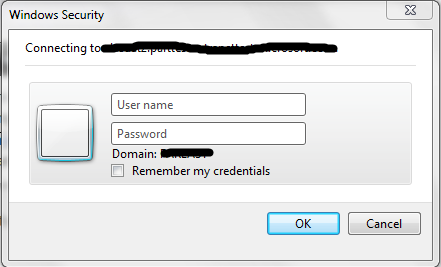
使用Spy++侦测这个对话框的结构如下,我们看到两个Edit就在最后两个节点上。
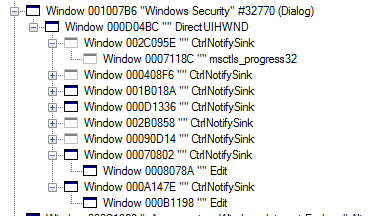
我们现在就可以利用FindWindow以及FindWindowEx这两个函数来帮我们找到这个窗体及窗体上所有的控件,然后帮我们完成自动化测试。
下面这个程序就是帮我们自动输入用户名与密码。

using System;
using System.Collections.Generic;
using System.Linq;
using System.Text;
using System.Runtime.InteropServices;
using System.Threading;

namespace ConsoleApplication79
{
    class Program
    {
        [DllImport("user32.dll", EntryPoint = "FindWindow", CharSet = CharSet.Auto)]
        private extern static IntPtr FindWindow(string classname, string captionName);

        [DllImport("user32.dll", EntryPoint = "FindWindowEx", CharSet = CharSet.Auto)]
        private extern static IntPtr FindWindowEx(IntPtr parent,IntPtr child,string classname, string captionName);

        [DllImport("user32.dll")]
        static extern IntPtr SendMessage(IntPtr hWnd, UInt32 Msg, IntPtr wParam, [MarshalAs(UnmanagedType.LPStr)] string lParam);

        [DllImport("user32.dll")]
        [return: MarshalAs(UnmanagedType.Bool)]
        static extern bool SetForegroundWindow(IntPtr hWnd);

        static void Main(string[] args)
        {

            IntPtr mwh1 = IntPtr.Zero;

            while (mwh1 == IntPtr.Zero)
            {
                Thread.Sleep(1000);
                mwh1 = FindWindow(null, "Windows Security");
            }

            IntPtr panel = FindWindowEx(mwh1, IntPtr.Zero, "DirectUIHWND", null);

            IntPtr CtrlNotifySink = IntPtr.Zero;

            CtrlNotifySink = FindWindowEx(panel, IntPtr.Zero, "CtrlNotifySink", null);

            for (int i = 1; i < 7; i++)
            {
                CtrlNotifySink = FindWindowEx(panel, CtrlNotifySink, "CtrlNotifySink", null);
            }

            IntPtr editor = FindWindowEx(CtrlNotifySink, IntPtr.Zero, null, null);

            uint WM_SETTEXT = 0xC;

            SendMessage(editor, WM_SETTEXT, IntPtr.Zero, "username");

            CtrlNotifySink = FindWindowEx(panel, CtrlNotifySink, "CtrlNotifySink", null);
            editor = FindWindowEx(CtrlNotifySink, IntPtr.Zero, null, null);

            SendMessage(editor, WM_SETTEXT, IntPtr.Zero, "password");
        }
    }
}
主要注意的一点就是代码里使用FindWindowEx循环查找子控件,因为这些控件都是具有相同类名的。
输入好信息后,查找OK那个Button也差不多是这样的方法重复。
下面介绍一下另一种方法:
static void Main(string[] args)
        {

            IntPtr mwh1 = IntPtr.Zero;

            while (mwh1 == IntPtr.Zero)
            {
                Thread.Sleep(1000);
                mwh1 = FindWindow(null, "Windows Security");
            }


            SetForegroundWindow(mwh1);
            System.Windows.Forms.SendKeys.SendWait("username");
            System.Windows.Forms.SendKeys.SendWait("{TAB}");
            System.Windows.Forms.SendKeys.SendWait("password");
            System.Windows.Forms.SendKeys.SendWait("{TAB}");
            System.Windows.Forms.SendKeys.SendWait("{TAB}");
            System.Windows.Forms.SendKeys.SendWait("{ENTER}");


        }
这里再分享一个网站,这个网站非常方便我们查找在C#中调用Win32中的API





 扫一扫
扫一扫


 1964
1964

 被折叠的 条评论
为什么被折叠?
被折叠的 条评论
为什么被折叠?
 到【灌水乐园】发言





