C# 改变控件位置

C#实现WPF中控件随机位置变动,
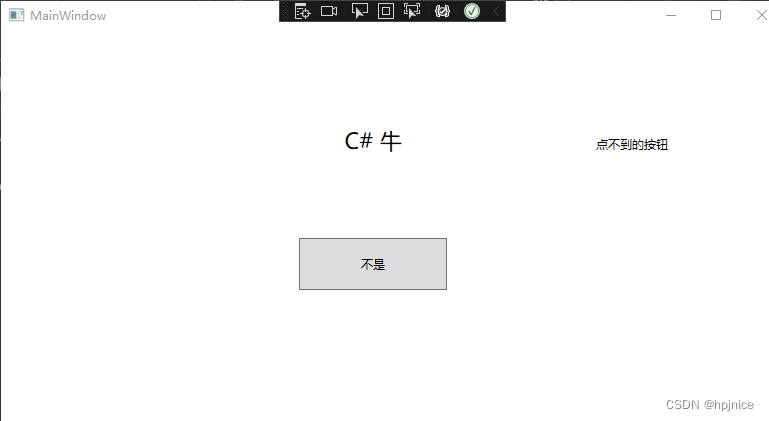
该代码示例展示了在C#的WPF应用中,当鼠标进入Button时,如何利用Random类生成随机数来改变Button的Left和Right属性,从而更新控件的Margin,使控件移动到随机位置。

C# 改变控件位置
随机位置
源代码如下在这里插入图片描述
namespace WPF应用.net_Framework
{
    /// <summary>
    /// MainWindow.xaml 的交互逻辑
    /// </summary>
    public partial class MainWindow : Window
    {
        public MainWindow()
        {
            InitializeComponent();
        }

        private void Button_MouseEnter(object sender, MouseEventArgs e)
        {
            Random random = new Random();
            Double Button_Left = random.Next(600);
            Double Button_Right = random.Next(300);
            Button.Margin=new Thickness(Button_Left, Button_Right, 0,0);
        }
    }
}
C#中,可以通过修改控件的`Location`属性来改变控件位置。`Location`属性是一个`Point`类型的对象,它表示控件左上角相对于其父容器左上角的坐标。 以下是一个简单的示例代码,展示了如何使用C#代码改变控件(这里以`Button`控件为例)的位置: ```csharp using System; using System.Drawing; using System.Windows.Forms; namespace ChangeControlLocation { public partial class Form1 : Form { public Form1() { InitializeComponent(); // 创建一个Button控件 Button myButton = new Button(); myButton.Text = "Click me"; myButton.Location = new Point(100, 100); // 初始位置 myButton.Size = new Size(100, 30); // 将按钮添加到窗体中 this.Controls.Add(myButton); // 当按钮被点击时,改变位置 myButton.Click += (sender, e) => { // 改变按钮的位置 myButton.Location = new Point(myButton.Location.X + 50, myButton.Location.Y); }; } } } ``` 在上述代码中,首先创建了一个`Button`控件,并设置了其初始位置。然后,当按钮被点击时,通过修改`Location`属性来改变按钮的位置。每次点击按钮,按钮会在水平方向上向右移动50个像素。 除了直接修改`Location`属性,还可以分别修改`Left`和`Top`属性来改变控件位置,因为`Left`属性表示控件左边缘相对于其父容器左边缘的距离,`Top`属性表示控件上边缘相对于其父容器上边缘的距离。以下是使用`Left`和`Top`属性改变控件位置的示例代码: ```csharp myButton.Left += 50; // 在水平方向上向右移动50个像素 myButton.Top += 20; // 在垂直方向上向下移动20个像素 ```
评论
添加红包

请填写红包祝福语或标题

红包个数最小为10个

红包金额最低5元

当前余额3.43前往充值 >
需支付:10.00
成就一亿技术人!
领取后你会自动成为博主和红包主的粉丝 规则
hope_wisdom
发出的红包
实付
使用余额支付
点击重新获取
扫码支付
钱包余额 0

抵扣说明:

1.余额是钱包充值的虚拟货币,按照1:1的比例进行支付金额的抵扣。
2.余额无法直接购买下载,可以购买VIP、付费专栏及课程。

余额充值



