 配置中心:微服务的中枢神经



1. 配置中心的核心价值
1.1 什么是配置中心?
配置中心是微服务架构中集中管理所有应用配置的基础设施,它解决了分布式环境下配置管理的四大痛点:配置分散、变更困难、环境隔离、实时生效。
// 配置中心的现实比喻
public class ConfigCenterAnalogy {

    /**
     * 传统配置管理 vs 配置中心
     */
    public class TraditionalVsConfigCenter {
        // 传统方式:每个应用都有自己的配置文件
        // - application.properties
        // - application-dev.properties
        // - application-prod.properties
        // 问题:配置分散,变更需要重新部署

        // 配置中心:所有配置集中管理
        // - 统一管理、实时推送、版本控制
        // - 环境隔离、权限管控、审计日志
    }

    /**
     * 没有配置中心的痛苦
     */
    public class WithoutConfigCenter {
        // 1. 配置散落在各个应用
        // 2. 敏感信息硬编码
        // 3. 配置变更需要重新部署
        // 4. 多环境配置容易出错
        // 5. 配置历史无法追溯
    }
}
1.2 配置中心的核心能力

2. 主流配置中心技术选型
2.1 配置中心对比分析
|
特性 |
Nacos |
Apollo |
Spring Cloud Config |
Consul |
|
配置实时推送 |
支持 |
支持 |
需要配合Bus |
支持 |
|
版本管理 |
支持 |
强大 |
依赖Git |
基础 |
|
权限管理 |
基础 |
完善 |
依赖Git |
完善 |
|
配置格式 |
多种 |
多种 |
多种 |
Key-Value |
|
依赖组件 |
内嵌 |
MySQL+Eureka |
Git+MQ |
独立 |
|
易用性 |
高 |
中 |
中 |
中 |
|
配置加密 |
支持 |
支持 |
支持 |
支持 |
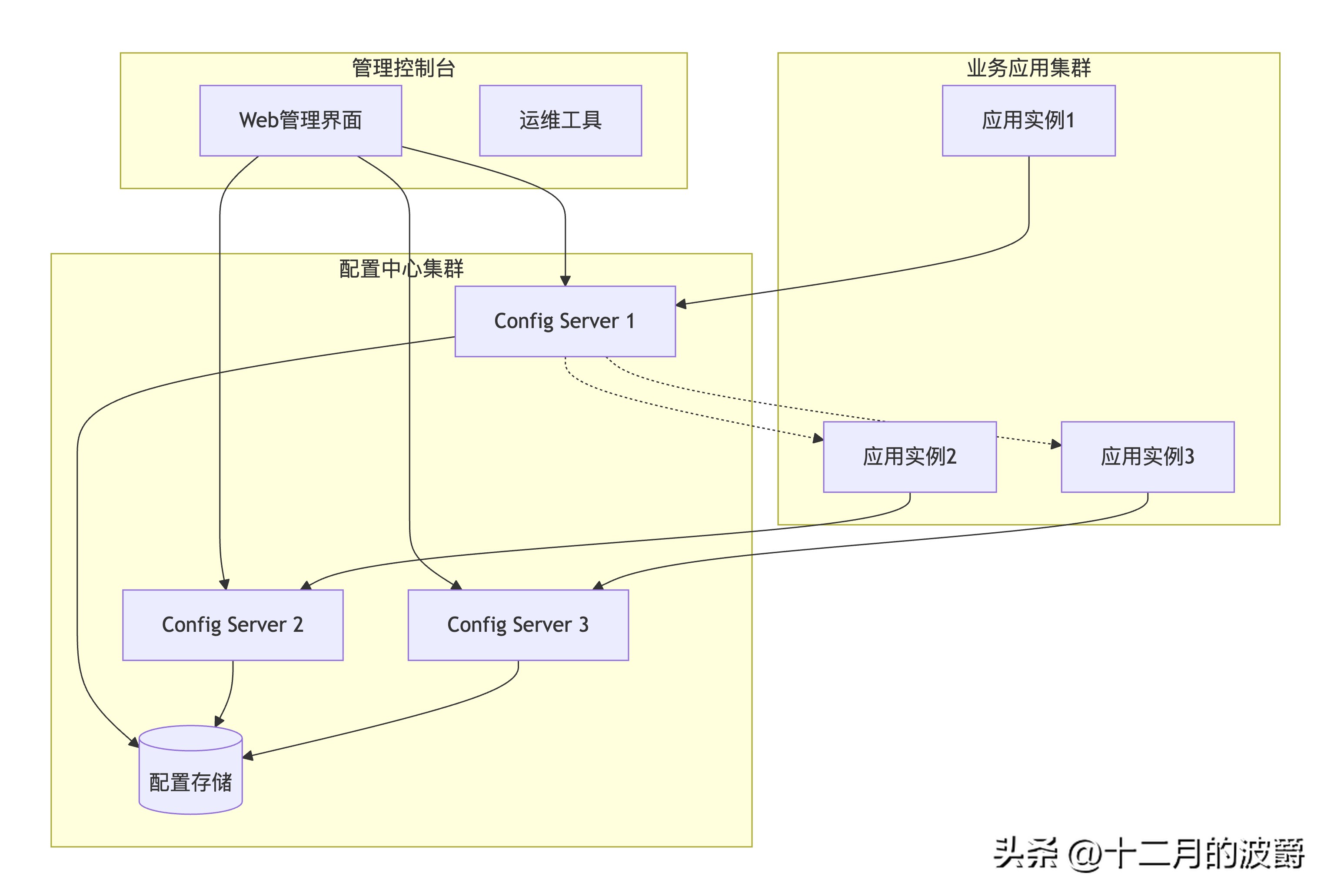
2.2 配置中心架构模式
3. Spring Cloud Alibaba Nacos Config 实战
3.1 环境准备与依赖配置
<!-- pom.xml 配置中心依赖 -->
<dependencies>
    <!-- Nacos Config Starter -->
    <dependency>
        <groupId>com.alibaba.cloud</groupId>
        <artifactId>spring-cloud-starter-alibaba-nacos-config</artifactId>
        <version>2022.0.0.0</version>
    </dependency>

    <!-- Nacos Discovery Starter -->
    <dependency>
        <groupId>com.alibaba.cloud</groupId>
        <artifactId>spring-cloud-starter-alibaba-nacos-discovery</artifactId>
        <version>2022.0.0.0</version>
    </dependency>

    <!-- Spring Boot Actuator -->
    <dependency>
        <groupId>org.springframework.boot</groupId>
        <artifactId>spring-boot-starter-actuator</artifactId>
    </dependency>

    <!-- Spring Boot Web -->
    <dependency>
        <groupId>org.springframework.boot</groupId>
        <artifactId>spring-boot-starter-web</artifactId>
    </dependency>

    <!-- Configuration Processor -->
    <dependency>
        <groupId>org.springframework.boot</groupId>
        <artifactId>spring-boot-configuration-processor</artifactId>
        <optional>true</optional>
    </dependency>
</dependencies>
3.2 基础配置与引导文件
# bootstrap.yml - 引导配置文件
spring:
  application:
    name: order-service  # 应用名称,对应Nacos Data ID
  profiles:
    active: dev          # 环境标识
  cloud:
    nacos:
      config:
        server-addr: 192.168.1.100:8848      # Nacos服务器地址
        namespace: dev-environment           # 命名空间
        group: ORDER_GROUP                   # 配置分组
        file-extension: yaml                 # 配置格式
        prefix: order-service                # 配置前缀
        refresh-enabled: true                # 开启自动刷新
        # 共享配置
        extension-configs:
          - data-id: common-config.yaml
            group: COMMON_GROUP
            refresh: true
          - data-id: datasource-config.yaml
            group: COMMON_GROUP
            refresh: true
        # 配置重试
        retry:
          max-attempts: 3
          initial-interval: 2000ms
        # 配置超时
        timeout: 3000ms
# 应用配置
server:
  port: 8080
# 监控端点
management:
  endpoints:
    web:
      exposure:
        include: refresh,health,configprops
  endpoint:
    refresh:
      enabled: true
3.3 配置数据模型设计
# Nacos配置示例:order-service-dev.yaml
# 应用基础配置
app:
  name: order-service
  version: 1.0.0
  description: 订单服务

# 数据源配置
datasource:
  url: jdbc:mysql://localhost:3306/order_db?useSSL=false&serverTimezone=Asia/Shanghai
  username: order_user
  password: encrypted_password_123
  driver-class-name: com.mysql.cj.jdbc.Driver
  hikari:
    maximum-pool-size: 20
    minimum-idle: 5
    connection-timeout: 30000
    idle-timeout: 600000
    max-lifetime: 1800000
# Redis配置
redis:
  host: 127.0.0.1
  port: 6379
  password: encrypted_redis_password
  database: 0
  timeout: 3000
  lettuce:
    pool:
      max-active: 20
      max-wait: -1
      max-idle: 10
      min-idle: 5
# 业务配置
order:
  max-quantity: 100                    # 最大购买数量
  timeout-cancel-minutes: 30           # 超时取消时间(分钟)
  auto-confirm-days: 7                 # 自动确认收货天数
  retry-times: 3                       # 重试次数
  enable-auto-cancel: true             # 启用自动取消

# 线程池配置
thread-pool:
  core-size: 10
  max-size: 50
  queue-capacity: 100
  keep-alive-seconds: 60

# 熔断器配置
hystrix:
  command:
    default:
      execution:
        isolation:
          thread:
            timeoutInMilliseconds: 5000
      circuitBreaker:
        requestVolumeThreshold: 20
        sleepWindowInMilliseconds: 5000

# 特性开关
feature:
  toggle:
    new-payment: false                 # 新支付功能
    reward-points: true                # 奖励积分功能
    express-discount: false            # 快递折扣功能

# 日志配置
logging:
  level:
    com.example.order: INFO
    org.springframework.web: WARN
  file:
    name: logs/order-service.log
  pattern:
    console: "%d{yyyy-MM-dd HH:mm:ss} [%thread] %-5level %logger{36} - %msg%n"
3.4 配置类与动态刷新
// 配置属性类
@Configuration
@ConfigurationProperties(prefix = "order")
@RefreshScope  // 支持配置动态刷新
@Data
public class OrderConfig {

    private Integer maxQuantity = 50;
    private Integer timeoutCancelMinutes = 30;
    private Integer autoConfirmDays = 7;
    private Integer retryTimes = 3;
    private Boolean enableAutoCancel = true;

    // 配置验证
    @PostConstruct
    public void validate() {
        if (maxQuantity <= 0) {
            throw new IllegalStateException("maxQuantity必须大于0");
        }
        if (timeoutCancelMinutes <= 0) {
            throw new IllegalStateException("timeoutCancelMinutes必须大于0");
        }
    }
}
// 数据源配置类
@Configuration
@ConfigurationProperties(prefix = "datasource")
@RefreshScope
@Data
public class DataSourceConfig {

    private String url;
    private String username;
    private String password;
    private String driverClassName;
    private HikariConfig hikari;

    @Data
    public static class HikariConfig {
        private Integer maximumPoolSize = 10;
        private Integer minimumIdle = 2;
        private Long connectionTimeout = 30000L;
        private Long idleTimeout = 600000L;
        private Long maxLifetime = 1800000L;
    }

    @Bean
    @RefreshScope
    public DataSource dataSource() {
        HikariDataSource dataSource = new HikariDataSource();
        dataSource.setJdbcUrl(url);
        dataSource.setUsername(username);
        dataSource.setPassword(password);
        dataSource.setDriverClassName(driverClassName);
        dataSource.setMaximumPoolSize(hikari.getMaximumPoolSize());
        dataSource.setMinimumIdle(hikari.getMinimumIdle());
        dataSource.setConnectionTimeout(hikari.getConnectionTimeout());
        dataSource.setIdleTimeout(hikari.getIdleTimeout());
        dataSource.setMaxLifetime(hikari.getMaxLifetime());
        return dataSource;
    }
}
// 特性开关配置
@Configuration
@ConfigurationProperties(prefix = "feature.toggle")
@RefreshScope
@Data
public class FeatureToggleConfig {

    private Boolean newPayment = false;
    private Boolean rewardPoints = true;
    private Boolean expressDiscount = false;

    /**
     * 检查特性是否启用
     */
    public boolean isFeatureEnabled(String featureName) {
        switch (featureName) {
            case "new-payment":
                return Boolean.TRUE.equals(newPayment);
            case "reward-points":
                return Boolean.TRUE.equals(rewardPoints);
            case "express-discount":
                return Boolean.TRUE.equals(expressDiscount);
            default:
                return false;
        }
    }
}
3.5 配置动态刷新实战
// 配置变更监听器
@Component
@Slf4j
public class ConfigChangeListener {

    @Autowired
    private OrderConfig orderConfig;

    @Autowired
    private FeatureToggleConfig featureToggleConfig;

    /**
     * 监听配置变更事件
     */
    @EventListener
    public void onConfigChange(EnvironmentChangeEvent event) {
        log.info("配置发生变更: {}", event.getKeys());

        for (String key : event.getKeys()) {
            switch (key) {
                case "order.max-quantity":
                    log.info("订单最大数量变更为: {}", orderConfig.getMaxQuantity());
                    break;
                case "order.timeout-cancel-minutes":
                    log.info("超时取消时间变更为: {}分钟", orderConfig.getTimeoutCancelMinutes());
                    break;
                case "feature.toggle.new-payment":
                    if (featureToggleConfig.isFeatureEnabled("new-payment")) {
                        log.info("新支付功能已启用");
                        initializeNewPaymentSystem();
                    } else {
                        log.info("新支付功能已禁用");
                    }
                    break;
            }
        }
    }

    /**
     * 手动刷新配置端点
     */
    @RestController
    @RequestMapping("/config")
    public class ConfigRefreshController {

        @Autowired
        private ContextRefresher contextRefresher;

        /**
         * 手动刷新配置
         */
        @PostMapping("/refresh")
        public ResponseEntity<Map<String, Object>> refreshConfig() {
            log.info("手动触发配置刷新");

            try {
                Set<String> refreshedKeys = contextRefresher.refresh();

                Map<String, Object> result = new HashMap<>();
                result.put("success", true);
                result.put("refreshedKeys", refreshedKeys);
                result.put("timestamp", Instant.now());

                return ResponseEntity.ok(result);

            } catch (Exception e) {
                log.error("配置刷新失败", e);
                return ResponseEntity.status(HttpStatus.INTERNAL_SERVER_ERROR)
                    .body(Map.of("success", false, "error", e.getMessage()));
            }
        }

        /**
         * 查看当前配置
         */
        @GetMapping("/current")
        public ResponseEntity<Map<String, Object>> getCurrentConfig() {
            Map<String, Object> config = new HashMap<>();
            config.put("orderConfig", orderConfig);
            config.put("featureToggle", featureToggleConfig);
            config.put("timestamp", Instant.now());

            return ResponseEntity.ok(config);
        }
    }

    private void initializeNewPaymentSystem() {
        // 初始化新支付系统
        log.info("初始化新支付系统...");
        // 实现初始化逻辑
    }
}
// 配置健康检查
@Component
public class ConfigHealthIndicator implements HealthIndicator {

    @Autowired
    private NacosConfigProperties nacosConfigProperties;

    @Override
    public Health health() {
        try {
            // 检查配置中心连接状态
            ConfigService configService = nacosConfigProperties.configServiceInstance();

            // 尝试获取配置
            String content = configService.getConfig(
                nacosConfigProperties.getName(),
                nacosConfigProperties.getGroup(),
                3000
            );

            if (content != null) {
                return Health.up()
                    .withDetail("configServer", nacosConfigProperties.getServerAddr())
                    .withDetail("namespace", nacosConfigProperties.getNamespace())
                    .withDetail("dataId", nacosConfigProperties.getName())
                    .build();
            } else {
                return Health.down()
                    .withDetail("error", "无法从配置中心获取配置")
                    .build();
            }

        } catch (Exception e) {
            return Health.down(e)
                .withDetail("configServer", nacosConfigProperties.getServerAddr())
                .build();
        }
    }
}
4. 高级配置管理特性
4.1 多环境配置管理
# 共享配置:common-config.yaml
# 公共数据库配置
spring:
  datasource:
    type: com.zaxxer.hikari.HikariDataSource
    hikari:
      connection-test-query: SELECT 1
      validation-timeout: 3000
# 公共Redis配置
redis:
  jedis:
    pool:
      max-wait: 1000ms
  connect-timeout: 2000ms
# 公共日志配置
logging:
  level:
    root: INFO
  pattern:
    dateformat: yyyy-MM-dd HH:mm:ss.SSS
---
# 开发环境配置:order-service-dev.yaml
# 继承共享配置,覆盖开发环境特定配置
app:
  env: dev
  debug: true
datasource:
  url: jdbc:mysql://dev-db:3306/order_db
  username: dev_user
  password: dev_password_123
redis:
  host: dev-redis
  port: 6379
feature:
  toggle:
    new-payment: true    # 开发环境开启新功能测试
---
# 测试环境配置:order-service-test.yaml
app:
  env: test
  debug: false
datasource:
  url: jdbc:mysql://test-db:3306/order_db
  username: test_user
  password: test_password_123
redis:
  host: test-redis
  port: 6379
feature:
  toggle:
    new-payment: true
---
# 生产环境配置:order-service-prod.yaml
app:
  env: prod
  debug: false
datasource:
  url: jdbc:mysql://prod-db:3306/order_db
  username: prod_user
  password: ${DB_PASSWORD:default_prod_password}
redis:
  host: prod-redis
  port: 6379
  password: ${REDIS_PASSWORD:default_redis_password}
feature:
  toggle:
    new-payment: false   # 生产环境默认关闭新功能
4.2 配置加密与安全
// 配置加密处理器
@Component
public class ConfigEncryptionProcessor {

    private static final String ENCRYPTION_PREFIX = "encrypted:";
    private final StringEncryptor encryptor;

    public ConfigEncryptionProcessor() {
        // 使用Jasypt进行配置加密
        PooledPBEStringEncryptor pooledEncryptor = new PooledPBEStringEncryptor();
        SimpleStringPBEConfig config = new SimpleStringPBEConfig();
        config.setPassword(System.getenv("CONFIG_ENCRYPTION_PASSWORD"));
        config.setAlgorithm("PBEWithMD5AndDES");
        config.setKeyObtentionIterations("1000");
        config.setPoolSize("1");
        config.setProviderName("SunJCE");
        config.setSaltGeneratorClassName("org.jasypt.salt.RandomSaltGenerator");
        config.setStringOutputType("base64");
        pooledEncryptor.setConfig(config);
        this.encryptor = pooledEncryptor;
    }

    /**
     * 加密配置值
     */
    public String encrypt(String value) {
        if (value == null) {
            return null;
        }
        return ENCRYPTION_PREFIX + encryptor.encrypt(value);
    }

    /**
     * 解密配置值
     */
    public String decrypt(String encryptedValue) {
        if (encryptedValue == null || !encryptedValue.startsWith(ENCRYPTION_PREFIX)) {
            return encryptedValue;
        }

        String realEncryptedValue = encryptedValue.substring(ENCRYPTION_PREFIX.length());
        try {
            return encryptor.decrypt(realEncryptedValue);
        } catch (Exception e) {
            throw new RuntimeException("配置解密失败: " + encryptedValue, e);
        }
    }

    /**
     * 配置值解密器(用于@Value注解)
     */
    @Component
    public static class DecryptPropertyProcessor implements BeanFactoryPostProcessor {

        @Override
        public void postProcessBeanFactory(ConfigurableListableBeanFactory beanFactory) throws BeansException {
            ConfigurableEnvironment environment = beanFactory.getBean(ConfigurableEnvironment.class);
            ConfigEncryptionProcessor encryptionProcessor = new ConfigEncryptionProcessor();

            // 遍历所有配置属性并解密
            for (PropertySource<?> propertySource : environment.getPropertySources()) {
                if (propertySource instanceof EnumerablePropertySource) {
                    EnumerablePropertySource<?> enumerable = (EnumerablePropertySource<?>) propertySource;
                    for (String key : enumerable.getPropertyNames()) {
                        Object value = propertySource.getProperty(key);
                        if (value instanceof String) {
                            String stringValue = (String) value;
                            if (stringValue.startsWith("encrypted:")) {
                                String decryptedValue = encryptionProcessor.decrypt(stringValue);
                                // 创建新的PropertySource包含解密后的值
                                Map<String, Object> decryptedProperties = new HashMap<>();
                                decryptedProperties.put(key, decryptedValue);
                                environment.getPropertySources().addAfter(
                                    propertySource.getName(),
                                    new MapPropertySource("decrypted-" + propertySource.getName(), decryptedProperties)
                                );
                            }
                        }
                    }
                }
            }
        }
    }
}
// 敏感配置管理
@Configuration
public class SensitiveConfigManager {

    @Value("${datasource.password}")
    private String dbPassword;

    @Value("${redis.password}")
    private String redisPassword;

    @Autowired
    private ConfigEncryptionProcessor encryptionProcessor;

    /**
     * 获取解密的数据库密码
     */
    public String getDecryptedDbPassword() {
        return encryptionProcessor.decrypt(dbPassword);
    }

    /**
     * 获取解密的Redis密码
     */
    public String getDecryptedRedisPassword() {
        return encryptionProcessor.decrypt(redisPassword);
    }

    /**
     * 检查配置安全性
     */
    @PostConstruct
    public void checkSecurity() {
        if (!dbPassword.startsWith("encrypted:")) {
            log.warn("数据库密码未加密,建议使用加密配置");
        }
        if (!redisPassword.startsWith("encrypted:")) {
            log.warn("Redis密码未加密,建议使用加密配置");
        }
    }
}
4.3 配置版本管理与回滚
// 配置版本管理服务
@Service
@Slf4j
public class ConfigVersionService {

    @Autowired
    private NacosConfigProperties nacosConfigProperties;

    /**
     * 发布新配置版本
     */
    public boolean publishConfig(String dataId, String group, String content, String versionDesc) {
        try {
            ConfigService configService = nacosConfigProperties.configServiceInstance();

            // 发布配置
            boolean success = configService.publishConfig(dataId, group, content);

            if (success) {
                log.info("配置发布成功: {}/{}, 描述: {}", dataId, group, versionDesc);

                // 记录配置发布历史
                recordConfigHistory(dataId, group, content, versionDesc);

                return true;
            } else {
                log.error("配置发布失败: {}/{}", dataId, group);
                return false;
            }

        } catch (Exception e) {
            log.error("配置发布异常: {}/{}", dataId, group, e);
            return false;
        }
    }

    /**
     * 回滚配置到指定版本
     */
    public boolean rollbackConfig(String dataId, String group, String version) {
        try {
            ConfigService configService = nacosConfigProperties.configServiceInstance();

            // 获取历史版本配置
            String historyConfig = getConfigHistory(dataId, group, version);
            if (historyConfig == null) {
                log.error("找不到指定版本的配置: {}/{}@{}", dataId, group, version);
                return false;
            }

            // 发布历史版本
            boolean success = configService.publishConfig(dataId, group, historyConfig);

            if (success) {
                log.info("配置回滚成功: {}/{}@{}", dataId, group, version);
                return true;
            } else {
                log.error("配置回滚失败: {}/{}@{}", dataId, group, version);
                return false;
            }

        } catch (Exception e) {
            log.error("配置回滚异常: {}/{}@{}", dataId, group, version, e);
            return false;
        }
    }

    /**
     * 获取配置变更历史
     */
    public List<ConfigHistory> getConfigHistoryList(String dataId, String group) {
        try {
            ConfigService configService = nacosConfigProperties.configServiceInstance();

            // 这里需要调用Nacos的配置历史API
            // 实际实现可能依赖于具体的配置中心

            List<ConfigHistory> historyList = new ArrayList<>();
            // 模拟实现
            historyList.add(new ConfigHistory("v1", "初始配置", "admin", Instant.now().minusSeconds(3600)));
            historyList.add(new ConfigHistory("v2", "优化数据库配置", "admin", Instant.now().minusSeconds(1800)));
            historyList.add(new ConfigHistory("v3", "开启新功能", "admin", Instant.now().minusSeconds(600)));

            return historyList;

        } catch (Exception e) {
            log.error("获取配置历史异常: {}/{}", dataId, group, e);
            return Collections.emptyList();
        }
    }

    private void recordConfigHistory(String dataId, String group, String content, String description) {
        // 记录配置发布历史到数据库或文件
        log.debug("记录配置历史: {}/{}, 描述: {}", dataId, group, description);
    }

    private String getConfigHistory(String dataId, String group, String version) {
        // 从历史记录中获取指定版本的配置内容
        // 这里需要实现具体的历史配置存储和检索逻辑
        return "模拟历史配置内容";
    }

    @Data
    @AllArgsConstructor
    public static class ConfigHistory {
        private String version;
        private String description;
        private String operator;
        private Instant updateTime;
    }
}
5. 配置中心最佳实践
5.1 配置分类与命名规范
// 配置分类管理
public class ConfigClassification {

    /**
     * 配置分类规范
     */
    public enum ConfigCategory {
        // 基础配置
        DATASOURCE("数据源配置"),
        REDIS("缓存配置"),
        MQ("消息队列配置"),

        // 业务配置
        BUSINESS_RULE("业务规则配置"),
        FEATURE_TOGGLE("特性开关配置"),
        LIMIT_CONFIG("限流配置"),

        // 运维配置
        MONITOR_CONFIG("监控配置"),
        LOG_CONFIG("日志配置"),
        ALERT_CONFIG("告警配置");

        private final String description;

        ConfigCategory(String description) {
            this.description = description;
        }
    }

    /**
     * 配置命名规范
     */
    public class NamingConvention {
        // 格式: {应用名}-{环境}-{配置类型}.{扩展名}
        // 示例:
        public static final String ORDER_SERVICE_DEV_DB = "order-service-dev-db.yaml";
        public static final String ORDER_SERVICE_PROD_BUSINESS = "order-service-prod-business.yaml";
        public static final String COMMON_REDIS_CONFIG = "common-redis-config.yaml";

        // 分组命名规范
        public static final String GROUP_DATASOURCE = "DATASOURCE_GROUP";
        public static final String GROUP_BUSINESS = "BUSINESS_GROUP";
        public static final String GROUP_COMMON = "COMMON_GROUP";
    }

    /**
     * 配置模板管理
     */
    @Component
    public class ConfigTemplateManager {

        private final Map<String, String> configTemplates = new HashMap<>();

        public ConfigTemplateManager() {
            // 初始化配置模板
            configTemplates.put("mysql-datasource", loadTemplate("templates/mysql-datasource.yaml"));
            configTemplates.put("redis-config", loadTemplate("templates/redis-config.yaml"));
            configTemplates.put("business-rules", loadTemplate("templates/business-rules.yaml"));
        }

        /**
         * 根据模板创建配置
         */
        public String createConfigFromTemplate(String templateName, Map<String, Object> variables) {
            String template = configTemplates.get(templateName);
            if (template == null) {
                throw new IllegalArgumentException("未知的配置模板: " + templateName);
            }

            // 简单的变量替换
            String result = template;
            for (Map.Entry<String, Object> entry : variables.entrySet()) {
                result = result.replace("${" + entry.getKey() + "}",
                    String.valueOf(entry.getValue()));
            }

            return result;
        }

        private String loadTemplate(String templatePath) {
            // 从资源文件加载模板
            try {
                return new String(Files.readAllBytes(
                    Paths.get(getClass().getClassLoader().getResource(templatePath).toURI())));
            } catch (Exception e) {
                throw new RuntimeException("加载配置模板失败: " + templatePath, e);
            }
        }
    }
}
5.2 配置变更管控流程
// 配置变更管控服务
@Service
@Slf4j
public class ConfigChangeGovernance {

    @Autowired
    private ConfigVersionService configVersionService;

    /**
     * 配置变更审批流程
     */
    public boolean submitConfigChange(ConfigChangeRequest request) {
        log.info("提交配置变更请求: {}", request);

        // 1. 配置语法检查
        if (!validateConfigSyntax(request.getContent())) {
            throw new IllegalArgumentException("配置语法错误");
        }

        // 2. 配置冲突检查
        if (hasConfigConflict(request)) {
            throw new IllegalStateException("存在配置冲突");
        }

        // 3. 风险评估
        ConfigRiskAssessment risk = assessConfigRisk(request);
        if (risk.isHighRisk()) {
            // 高风险变更需要额外审批
            if (!request.isForce()) {
                throw new HighRiskConfigChangeException("高风险配置变更需要强制审批");
            }
        }

        // 4. 等待审批
        if (!waitForApproval(request)) {
            log.warn("配置变更审批未通过: {}", request.getId());
            return false;
        }

        // 5. 执行变更
        return executeConfigChange(request);
    }

    /**
     * 灰度发布配置
     */
    public void grayReleaseConfig(ConfigChangeRequest request, List<String> grayInstances) {
        log.info("开始灰度发布配置: {} 到实例: {}", request.getId(), grayInstances);

        // 1. 创建灰度配置
        String grayDataId = request.getDataId() + "-gray";
        configVersionService.publishConfig(grayDataId, request.getGroup(),
            request.getContent(), "灰度发布");

        // 2. 将灰度配置推送到指定实例
        pushConfigToInstances(grayDataId, request.getGroup(), grayInstances);

        // 3. 监控灰度实例状态
        monitorGrayInstances(grayInstances);

        // 4. 根据监控结果决定是否全量发布
        if (isGrayReleaseSuccessful(grayInstances)) {
            log.info("灰度发布成功,开始全量发布");
            configVersionService.publishConfig(request.getDataId(), request.getGroup(),
                request.getContent(), "全量发布");

            // 清理灰度配置
            cleanGrayConfig(grayDataId, request.getGroup());
        } else {
            log.warn("灰度发布失败,回滚配置");
            rollbackGrayConfig(grayDataId, request.getGroup(), grayInstances);
        }
    }

    /**
     * 配置变更回滚机制
     */
    public boolean rollbackConfigChange(String changeId) {
        log.info("回滚配置变更: {}", changeId);

        // 1. 获取变更记录
        ConfigChangeRecord record = getChangeRecord(changeId);
        if (record == null) {
            throw new IllegalArgumentException("找不到变更记录: " + changeId);
        }

        // 2. 执行回滚
        boolean success = configVersionService.rollbackConfig(
            record.getDataId(), record.getGroup(), record.getPreviousVersion());

        if (success) {
            // 3. 记录回滚操作
            recordRollbackOperation(changeId, record);
            log.info("配置变更回滚成功: {}", changeId);
        } else {
            log.error("配置变更回滚失败: {}", changeId);
        }

        return success;
    }

    private boolean validateConfigSyntax(String content) {
        // 验证YAML/JSON语法
        try {
            Yaml yaml = new Yaml();
            yaml.load(content);
            return true;
        } catch (Exception e) {
            log.error("配置语法验证失败", e);
            return false;
        }
    }

    private boolean hasConfigConflict(ConfigChangeRequest request) {
        // 检查配置冲突
        // 实现具体的冲突检测逻辑
        return false;
    }

    private ConfigRiskAssessment assessConfigRisk(ConfigChangeRequest request) {
        // 评估配置变更风险
        return new ConfigRiskAssessment();
    }

    private boolean waitForApproval(ConfigChangeRequest request) {
        // 等待审批流程
        // 实现具体的审批逻辑
        return true;
    }

    private boolean executeConfigChange(ConfigChangeRequest request) {
        return configVersionService.publishConfig(
            request.getDataId(), request.getGroup(),
            request.getContent(), request.getDescription());
    }

    // 内部类定义
    @Data
    public static class ConfigChangeRequest {
        private String id;
        private String dataId;
        private String group;
        private String content;
        private String description;
        private String applicant;
        private boolean force;
        private Instant submitTime;
    }

    @Data
    public static class ConfigRiskAssessment {
        private boolean highRisk;
        private String riskDescription;
        private List<String> riskItems;
    }

    @Data
    public static class ConfigChangeRecord {
        private String changeId;
        private String dataId;
        private String group;
        private String previousVersion;
        private String newVersion;
        private String operator;
        private Instant changeTime;
    }
}
6. 生产环境运维指南
6.1 配置中心监控告警
// 配置中心监控服务
@Component
@Slf4j
public class ConfigCenterMonitor {

    @Autowired
    private NacosConfigProperties nacosConfigProperties;

    @Value("${spring.application.name}")
    private String applicationName;

    /**
     * 配置健康监控
     */
    @Scheduled(fixedRate = 60000) // 每分钟检查一次
    public void monitorConfigHealth() {
        try {
            ConfigService configService = nacosConfigProperties.configServiceInstance();

            // 检查配置可访问性
            String content = configService.getConfig(
                applicationName,
                nacosConfigProperties.getGroup(),
                5000
            );

            if (content == null) {
                log.warn("配置中心连接异常,无法获取配置");
                sendAlert("配置中心连接异常", "无法获取应用配置");
            } else {
                log.debug("配置中心连接正常,配置大小: {} bytes", content.length());
            }

        } catch (Exception e) {
            log.error("配置中心健康检查失败", e);
            sendAlert("配置中心健康检查失败", e.getMessage());
        }
    }

    /**
     * 配置变更监控
     */
    public void monitorConfigChanges() {
        // 监听配置变更事件
        // 记录变更历史、发送变更通知等
    }

    /**
     * 配置一致性检查
     */
    @Scheduled(cron = "0 0 2 * * ?") // 每天凌晨2点执行
    public void checkConfigConsistency() {
        log.info("开始配置一致性检查");

        try {
            // 检查所有环境的配置一致性
            checkEnvironmentConsistency();

            // 检查配置依赖关系
            checkConfigDependencies();

            // 检查配置引用完整性
            checkConfigReferences();

        } catch (Exception e) {
            log.error("配置一致性检查失败", e);
            sendAlert("配置一致性检查失败", e.getMessage());
        }
    }

    private void checkEnvironmentConsistency() {
        // 检查不同环境间的配置一致性
        // 比如开发、测试、生产环境的配置差异
    }

    private void checkConfigDependencies() {
        // 检查配置间的依赖关系
        // 比如数据库配置依赖连接池配置
    }

    private void checkConfigReferences() {
        // 检查配置引用完整性
        // 比如特性开关引用的功能是否存在
    }

    private void sendAlert(String title, String message) {
        // 发送告警通知
        // 可以集成邮件、钉钉、企业微信等
        log.error("发送配置中心告警: {} - {}", title, message);
    }
}
// 配置审计服务
@Service
@Slf4j
public class ConfigAuditService {

    /**
     * 记录配置操作审计日志
     */
    public void auditConfigOperation(String operation, String dataId, String group,
                                   String operator, String details) {
        ConfigAuditLog auditLog = new ConfigAuditLog();
        auditLog.setOperation(operation);
        auditLog.setDataId(dataId);
        auditLog.setGroup(group);
        auditLog.setOperator(operator);
        auditLog.setDetails(details);
        auditLog.setOperationTime(Instant.now());
        auditLog.setClientIp(getClientIp());

        // 保存审计日志
        saveAuditLog(auditLog);

        log.info("配置操作审计: {} - {}/{} by {}", operation, dataId, group, operator);
    }

    /**
     * 查询配置审计日志
     */
    public List<ConfigAuditLog> queryAuditLogs(String dataId, String group,
                                              Instant startTime, Instant endTime) {
        // 查询指定条件下的审计日志
        return findAuditLogs(dataId, group, startTime, endTime);
    }

    /**
     * 生成配置审计报告
     */
    public ConfigAuditReport generateAuditReport(Instant startTime, Instant endTime) {
        ConfigAuditReport report = new ConfigAuditReport();
        report.setReportPeriod(startTime + " - " + endTime);
        report.setTotalOperations(countOperations(startTime, endTime));
        report.setTopOperators(getTopOperators(startTime, endTime));
        report.setRiskOperations(findRiskOperations(startTime, endTime));

        return report;
    }

    private void saveAuditLog(ConfigAuditLog auditLog) {
        // 保存审计日志到数据库或文件
    }

    private List<ConfigAuditLog> findAuditLogs(String dataId, String group,
                                             Instant startTime, Instant endTime) {
        // 查询审计日志
        return Collections.emptyList();
    }

    private String getClientIp() {
        // 获取客户端IP
        return "127.0.0.1";
    }

    // 审计相关类定义
    @Data
    public static class ConfigAuditLog {
        private String id;
        private String operation;
        private String dataId;
        private String group;
        private String operator;
        private String details;
        private Instant operationTime;
        private String clientIp;
    }

    @Data
    public static class ConfigAuditReport {
        private String reportPeriod;
        private Long totalOperations;
        private Map<String, Long> topOperators;
        private List<ConfigAuditLog> riskOperations;
        private Instant generateTime = Instant.now();
    }
}
总结
配置中心作为微服务架构的核心基础设施,为分布式系统提供了统一、动态、安全的配置管理能力。通过本文的实战指南,我们掌握了:
核心价值:
- 配置集中化:统一管理所有环境、所有应用的配置
- 动态更新:配置变更实时推送到应用,无需重启
- 环境隔离:支持多环境配置管理,避免配置冲突
- 版本控制:配置变更可追溯,支持快速回滚
关键技术点:
- 配置的读取、解析和动态刷新机制
- 多环境、多租户的配置隔离策略
- 配置加密和敏感信息保护
- 配置变更的审批和灰度发布流程
生产实践:
- 建立配置分类和命名规范
- 实施配置变更管控流程
- 配置监控和审计体系
- 容灾和降级方案
配置中心的正确使用能够显著提升微服务架构的灵活性和可维护性,是现代化分布式系统不可或缺的基础设施。





 扫一扫
扫一扫


 1013
1013

 被折叠的 条评论
为什么被折叠?
被折叠的 条评论
为什么被折叠?
 到【灌水乐园】发言





