



 该篇博客详细介绍了如何在目标端安装19c CDB,并通过一系列步骤将19c Non-CDB转换为PDB,包括检查兼容性、生成XML描述文件、创建PDB以及使用noncdb_to_pdb.sql脚本进行转换。同时,还涉及到ADG的搭建和switchover切换主备操作,确保数据库的安全性和高可用性。
操作步骤
- 目标端安装19c CDB
- 19c Non-CDB搭建ADG,switchover切换主备
- 19c non-CDB生成PDB的xml描述文件
- 19c CDB跑一个noncdb_to_pdb.sql的脚本
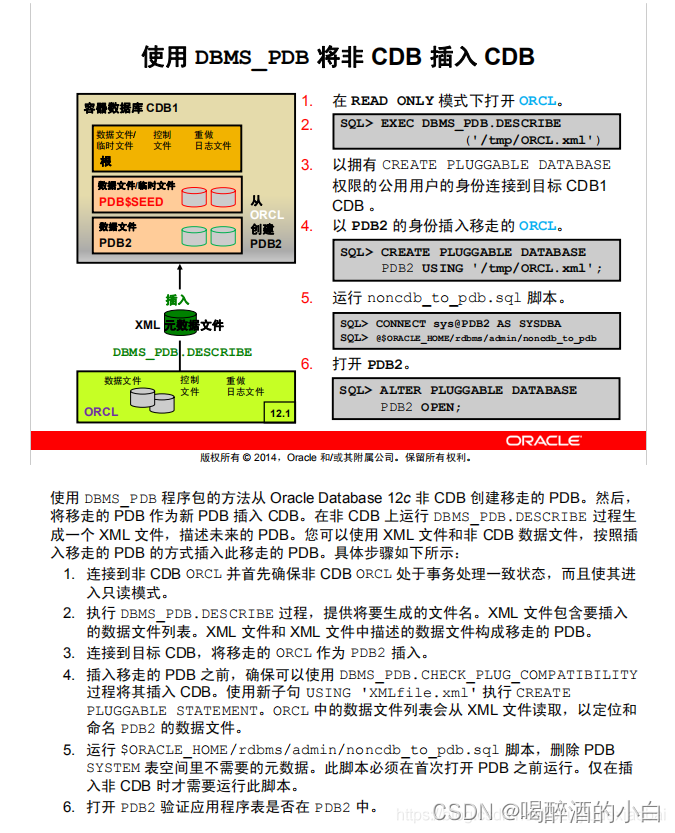
Non-CDB -> PDB
How to Convert Non-CDB to PDB Database on same local host machine in 12c - Testcase (Doc ID 2012448.1)
1. To convert non-CDB to PDB, you have to cleanly shutdown the DB:
. oraenv
set environment to 12cNonPDB
sqlplus / as sysdba
sql> shutdown immediate


2. Once the DB is shutdown cleanly, open it in read only mode:
sql> startup open read only

3. Describe the database and generate the xml file:
BEGIN
DBMS_PDB.DESCRIBE(pdb_descr_file => '/tmp/12cNonPDB.xml');
END;
/

4. Shutdown the database.

sql> shutdown immediate

5. Check if it is compatible with cdb, run below in target CDB

SET SERVEROUTPUT ON;
DECLARE
compatible CONSTANT VARCHAR2(3) := CASE DBMS_PDB.CHECK_PLUG_COMPATIBILITY(pdb_descr_file => '/tmp/12cNonPDB.xml')
WHEN TRUE THEN 'YES'
ELSE 'NO'
END;
BEGIN
DBMS_OUTPUT.PUT_LINE(compatible);
END;
/

Check PDB_PLUG_IN_VIOLATIONS view from cdb database if error raised

SQL> col cause for a20
SQL> col name for a20
SQL> col message for a35 word_wrapped
SQL> select name,cause,type,message,status from PDB_PLUG_IN_VIOLATIONS where name='<noncdb database name>';

In case you got errors like below:

ERROR PSU bundle patch 1 (PSU Patch 12345): Installed in the CDB but not in the PDB.

ERROR PSU bundle patch 1 (PSU Patch 12345): Installed in the PDB but not in the CDB.

You have to refer to Note 1935365.1 to fix them.

6. Connect to the CDB where database has to be plugged in:

. oraen
set environment to ACDB
sqlplus / as sysdba

7. Create a pluggable database
CREATE PLUGGABLE DATABASE APDB USING '/tmp/12cNonPDB.xml'
COPY
FILE_NAME_CONVERT = ('/u01/app/oracle/12c/oradata/12cNonPDB/', '/u01/app/oracle/oradata/12c/ACDB/APDB/');

8. Switch to the PDB container and run the "$ORACLE_HOME/rdbms/admin/noncdb_to_pdb.sql"

sql> ALTER SESSION SET CONTAINER=APDB;

sql> @$ORACLE_HOME/rdbms/admin/noncdb_to_pdb.sql

9. Startup the PDB and check the open mode.

ALTER PLUGGABLE DATABASE OPEN;

SELECT name, open_mode FROM v$pdbs;

NAME OPEN_MODE
------------------------------ ----------
APDB READ WRITE

1 row selected.

SQL>





 扫一扫
扫一扫


 213
213

 被折叠的 条评论
为什么被折叠?
被折叠的 条评论
为什么被折叠?
 到【灌水乐园】发言





