



 本文详细介绍了Revit二次开发中关于View的各个方面,包括视图类型(如ViewPlan、View3D等)、规程DisCipline、View的继承结构以及如何获取视图的具体信息,如名称、裁剪区域、坐标方向和缩放比例等。通过实例展示了如何利用API操作和获取视图数据。
1.viewType 视图类型(枚举)
API
| ViewType Enumeration | |
| Member name | Description |
|---|---|
| Undefined | Undefined/unspecified type of view. 未定义未指定的视图类型。 |
| FloorPlan | Floor plan type of view. 平面图平面图类型的视图。 |
| CeilingPlan | Reflected ceiling plan type of view. 反映天花板平面类型的视图。 |
| Elevation | Elevation type of view. 仰角类型的视图 |
| ThreeD | 3-D type of view. 三维类型的视图 |
| Schedule | Schedule type of view. Schedule调度视图类型 |
| DrawingSheet | Drawing sheet type of view. 绘图表视图类型 |
| ProjectBrowser | The project browser view. ProjectBrowser项目浏览器视图 |
| Report | Report type of view. Report报表视图类型 |
| DraftingView | Drafting type of view. DraftingView视图的绘图类型 |
| Legend | Legend type of view. 传说类型的视图。 |
| SystemBrowser | The MEP system browser view. MEP系统浏览器视图 |
| EngineeringPlan | Structural plan or Engineering plan type of view. 计划或工程计划类型的视图 |
| AreaPlan | Area plan type of view. 区域规划视图类型。 |
| Section | Cross section type of view. 横截面视图类型 |
| Detail | Detail type of view. 视图的详细类型 |
| CostReport | Cost Report view. 成本报表视图 |
| LoadsReport | Loads Report view. 负载报表视图 |
| PresureLossReport | Pressure Loss Report view. 压力损失报表视图 |
| ColumnSchedule | Column Schedule type of view. 列调度视图类型 |
| PanelSchedule | Panel Schedule Report view. 面板进度报表视图 |
| Walkthrough | Walk-Through type of 3D view. 渲染类型的3D视图 |
| Rendering | Rendering type of view. 视图的渲染类型 |
| Internal | Revit's internal type of view Revit的内部类型的视图 |
例子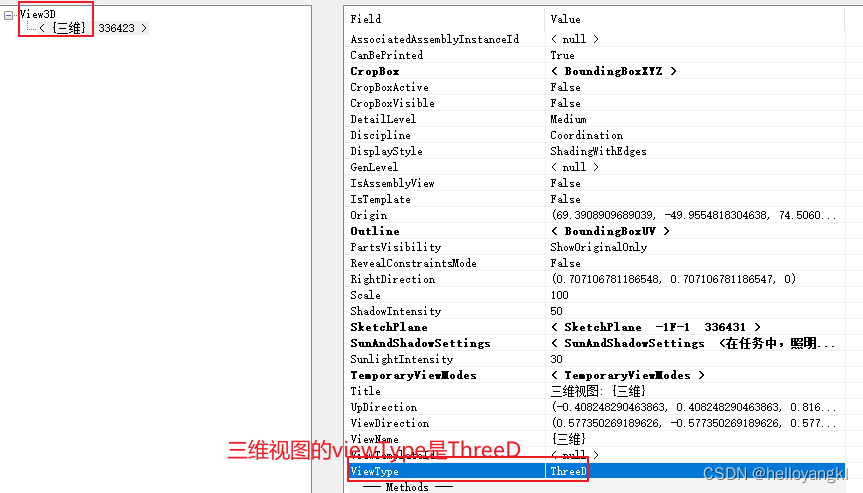
2.规程DisCipline
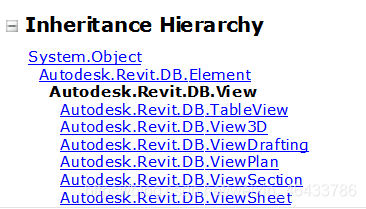
3.View 继承结构
所有的视图都是继承自 Autodesk.Revit.DB.View,分别对应各种视图类型

4.View 的实例
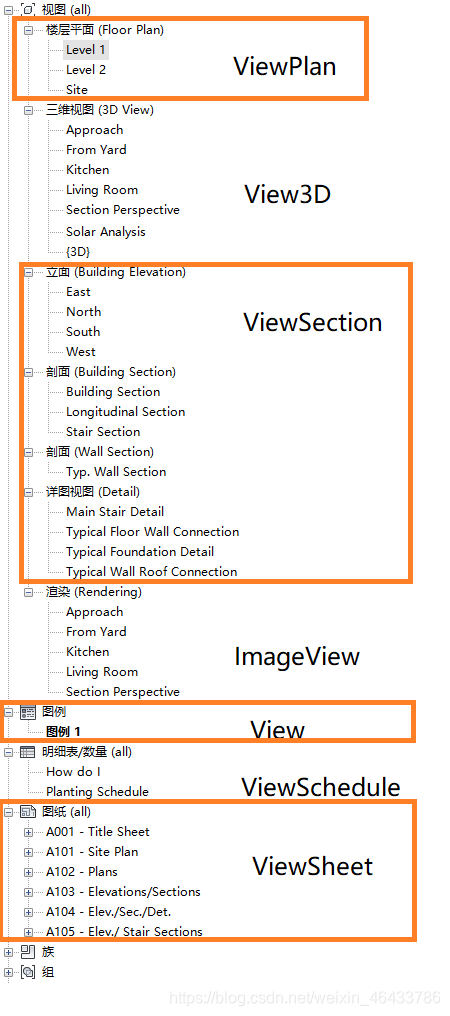
以官方给的文件为例:
楼层平面:ViewPlan
三维视图:View3D
立面、剖面、详细视图:ViewSection
渲染:ImageView
图例:View
明细表:ViewSchedule
图纸:ViewSheet
5.获取 View 的信息
视图的基本信息,包括:
视图名称,view.Name
视图裁剪区域,view.CropBox
视图起始点,view.Origin
视图平面投影区域,view.Outline
视图往右、往上、指向观察者的方向,view.RightDirection,view.UpDirection,view.ViewDirection
视图缩放比例,view.Scale
方法示例:
        private void Getinfo_View(Autodesk.Revit.DB.View view)
        {
            string message = "View: ";

            // 得到视图的名称
            message += "\nView name: " + view.Name;

            // 视图裁剪区域包围盒
            BoundingBoxXYZ cropBox = view.CropBox;
            XYZ max = cropBox.Max; // 最大值,包围盒右上角
            XYZ min = cropBox.Min; // 最小值,包围盒左下角
            message += "\nCrop Box: ";
            message += "\nMaximum coordinates: (" + max.X + ", " + max.Y + ", " + max.Z + ")";
            message += "\nMinimum coordinates: (" + min.X + ", " + min.Y + ", " + min.Z + ")";


            // 视图的起始点(想象一下透视视图)
            XYZ origin = view.Origin;
            message += "\nOrigin: (" + origin.X + ", " + origin.Y + ", " + origin.Z + ")";


            //视图投影到平面的范围框
            BoundingBoxUV outline = view.Outline;
            UV maxUv = outline.Max; // 最大值,包围盒右上角
            UV minUv = outline.Min; // 最小值,包围盒左下角
            message += "\nOutline: ";
            message += "\nMaximum coordinates: (" + maxUv.U + ", " + maxUv.V + ")";
            message += "\nMinimum coordinates: (" + minUv.U + ", " + minUv.V + ")";

            // 视图往右的方向
            XYZ rightDirection = view.RightDirection;
            message += "\nRight direction: (" + rightDirection.X + ", " +
                           rightDirection.Y + ", " + rightDirection.Z + ")";

            // 视图往上的方向
            XYZ upDirection = view.UpDirection;
            message += "\nUp direction: (" + upDirection.X + ", " +
                           upDirection.Y + ", " + upDirection.Z + ")";

            // 视图指向观察者(即我)的方向
            XYZ viewDirection = view.ViewDirection;
            message += "\nView direction: (" + viewDirection.X + ", " +
                           viewDirection.Y + ", " + viewDirection.Z + ")";

            // 视图的缩放比例
            message += "\nScale: " + view.Scale;
            // Scale is meaningless for Schedules
            if (view.ViewType != ViewType.Schedule)
            {
                int testScale = 5;
                //设置视图比例,需要 Transaction
                view.Scale = testScale;
                message += "\nScale after set: " + view.Scale;
            }

            TaskDialog.Show("Revit", message);
        }
主程序调用:
using System;
using System.Collections.Generic;
using System.Text;
using Autodesk.Revit.Attributes;
using Autodesk.Revit.DB;
using Autodesk.Revit.UI;

namespace PersonalTools
{
    [Transaction(TransactionMode.Manual)]
    public class Command : IExternalCommand
    {
        public Result Execute(ExternalCommandData commandData, ref string message, ElementSet elements)
        {
            UIApplication uiApp = commandData.Application;
            UIDocument uiDoc = uiApp.ActiveUIDocument;
            Document doc = uiDoc.Document;

            using(Transaction transaction = new Transaction(doc, "View"))
            {
                transaction.Start();
                View view = doc.ActiveView;
                Getinfo_View(view);
                transaction.Commit();
            }
            return Result.Succeeded;
        }
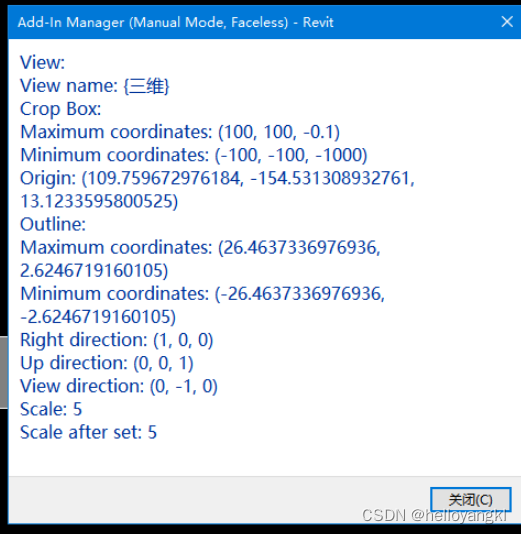
前视图数据:可知 Revit 中的坐标系,往右是 X 方向,往上是 Z 方向。因此前视图是从 Y 方向从屏幕外指向屏幕里面。





 扫一扫
扫一扫


 3299
3299

 被折叠的 条评论
为什么被折叠?
被折叠的 条评论
为什么被折叠?
 到【灌水乐园】发言





