



 本文介绍了如何在Spring Boot项目中结合Redisson进行集成,详细讲述了在单机Redis场景下的配置与使用步骤,包括依赖引入、配置文件设置以及简单使用示例。
1 redisson
2 spring boot + reddison
2.1 单机redis场景
1 引入依赖
        <dependency>
            <groupId>org.springframework.boot</groupId>
            <artifactId>spring-boot-starter-web</artifactId>
        </dependency>
        <dependency>
            <groupId>org.redisson</groupId>
            <artifactId>redisson</artifactId>
            <version>3.20.0</version>
        </dependency>
2 redisson 配置
@Slf4j
@Configuration
public class RedissonConfig {

    @Resource
    private RedisProperties redisProperties;
    private static int CURRENT = 2;
    private static final int MINI_MUM_IDLE_SIZE = 4;
    private static final int POOL_SIZE = 8;

    @Bean
    public RedissonClient redissonClient() throws InterruptedException {
        Config config = new Config();
        config.useSingleServer()
                .setAddress("redis://" + redisProperties.getHost() + redisProperties.getPort())
                .setPassword(redisProperties.getPassword())
                .setRetryInterval(RETRY_INTERVAL)
                .setRetryInterval(RETRY_INTERVAL)
                .setConnectionMinimumIdleSize(MINI_MUM_IDLE_SIZE)
                .setConnectionPoolSize(POOL_SIZE)
                .setDatabase(redisProperties.getDatabase());

        try {
            if (CURRENT < RETRY_INTERVAL) {
                return Redisson.create(config);
            }
        } catch (Exception e) {
            log.error("failed to create redissonClient : ", e);
            CURRENT++;
            log.info("waited to create redissonClient");
            Thread.sleep(1500);
            return redissonClient();
        }
        throw new ServiceException(ServiceCode.SYS_BEAN_EXCEPTION);
    }
}
3 简单使用
	@Resource
	private RedissonClient redissonClient;

       public void lockTest(UserAddReq userAddReq) {
        String key = "lock:key";
        RLock lock = redissonClient.getLock(key);
        try {
            // 尝试获取锁的时间, 如果在该时间段获取不到, 将返回false, redisson会续锁
            if (lock.tryLock(RedisConstant.LOCK_WAIT_TIME, TimeUnit.SECONDS)) {
                // TODO
            }
            throw new ServiceException(ServiceCode.FAILED);
        } catch (InterruptedException e) {
           log.error("failed tod get the lock, because: ", e);
        } finally {
            lock.unlock();
        }
    }
3 spring boot + redisson-springboot-starter
3.1 单机模式
1 引入依赖
根据官方文件介绍,最好指定redisson-spring-data 的版本,因其对redis的使用差异较大,可能会出现启动失败问题,redisson-springboot-starter 包含redisson-spring-data根据情况是否需要移除
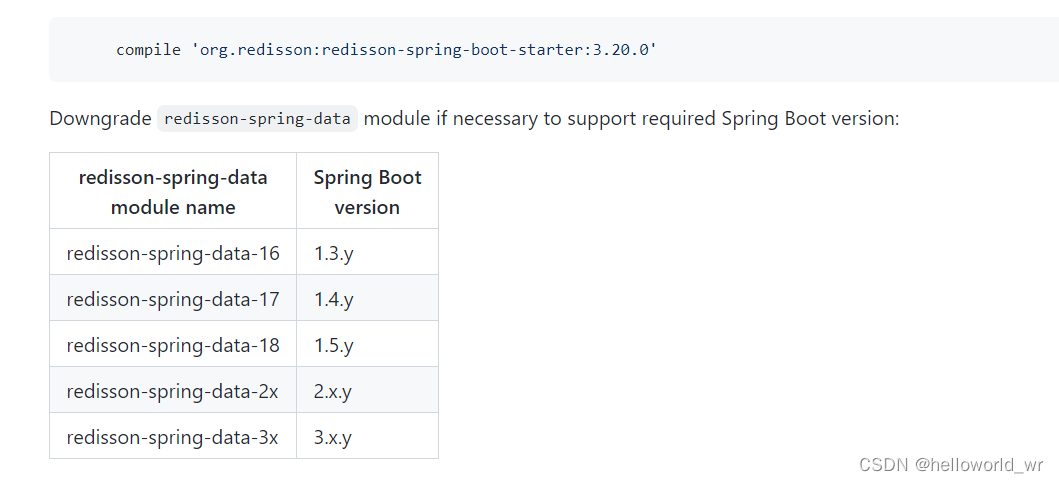
spring boot 依赖省略,此处使用spring-boot版本为 2.5.6
        <!-- https://mvnrepository.com/artifact/org.redisson/redisson-spring-boot-starter -->
        <dependency>
            <groupId>org.redisson</groupId>
            <artifactId>redisson-spring-boot-starter</artifactId>
            <version>3.20.0</version>
            <exclusions>
                <exclusion>
                    <groupId>org.redisson</groupId>
                    <artifactId>redisson-spring-data-30</artifactId>
                </exclusion>
            </exclusions>
        </dependency>
        <dependency>
            <groupId>org.redisson</groupId>
            <artifactId>redisson-spring-data-25</artifactId>
            <version>3.20.0</version>
        </dependency>
2 配置
使用springboot 集成的redis配置即可,将读取其配置
spring:
  redis:
    database:
    host:
    password:
    lettuce:
      pool:
        max-idle:
        min-idle:
        max-active:
3 使用
注入RedissonClient 即可使用





 扫一扫
扫一扫


 4031
4031

 被折叠的 条评论
为什么被折叠?
被折叠的 条评论
为什么被折叠?
 到【灌水乐园】发言





