



一、获取待映射文件
创建nginx根目录 D:/nginx
#1.拉取镜像
docker pull nginx:1.28.0

#2.启动容器
docker run --name nginx -p 8080:8080 -d nginx:1.28.0

#3.复制文件(根据需要选择复制文件)
docker cp nginx:/usr/share/nginx/html D:/nginx/html
docker cp nginx:/etc/nginx/nginx.conf D:/nginx/nginx.conf
docker cp nginx:/etc/nginx/conf.d D:/nginx/conf.d
docker cp nginx:/var/log/nginx D:/nginx/logs

#4.删除镜像
docker rm [id]

#5.删除容器
docker rmi [id]
二、编写docker-compose.yml
version: '3.8'
services:
  nginx:
    image: nginx:1.28.0
    container_name: nginx
    restart: always
    ports:
      - "7132:7132"
    volumes:
      - D:/nginx/html:/usr/share/nginx/html
      - D:/nginx/nginx.conf:/etc/nginx/nginx.conf
      - D:/nginx/conf.d:/etc/nginx/conf.d
      - D:/nginx/logs:/var/log/nginx
三、启动docker-compose.yml
此时 D:/nginx下应当有如图这些文件:
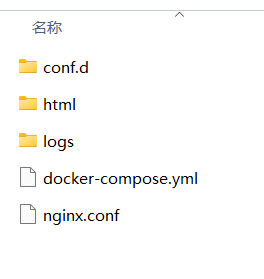
在docker-compose.yml所在目录下打开cmd
#启动
docker-compose up -d

#停止
docker-compose down

四、测试nginx是否正常
如现在本地有一个测试接口可供请求:
http://192.168.xxx.xxx:7131/item/test
#1.修改conf.d下的default.conf
server {
    listen       7132;
    server_name  localhost;

    location /item {
        proxy_pass   http://192.168.xxx.xxx:7131;
    }
}

#2.启动
docker-compose up -d

#3.端口是否被监听
netstat -ano | findstr "7132"

#4.浏览器中请求接口
http://192.168.xxx.xxx:7132/item/test
注意:proxy_pass后面的ip不要写成127.0.0.1,在 docker 容器中,127.0.0.1 指向容器自身,而不是宿主机,应该使用ipconfig查询出的ip
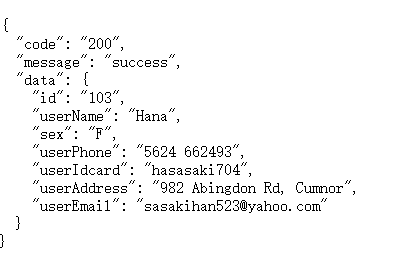
请求成功,nginx可正常使用~





 扫一扫
扫一扫


 2074
2074

 被折叠的 条评论
为什么被折叠?
被折叠的 条评论
为什么被折叠?
 到【灌水乐园】发言





