

卷积神经网络服装图片分类

该博客介绍如何利用TensorFlow和Keras处理Fashion-MNIST数据集,包括数据加载、预处理、构建全连接神经网络、训练和评估模型。通过19个epoch的训练,模型在训练集上的准确率达到0.8878。

一.使用Keras和TensorFlow加载和初步了解Fashion-MNIST数据集

导入和预处理Fashion-MNIST数据集,并设置TensorFlow的日志级别。
Fashion-MNIST是一个包含60,000个28x28像素服装类别图像的训练集和10,000个图像的测试集的数据集。

import tensorflow as tf
from tensorflow import keras
from tensorflow.keras import datasets,layers,optimizers,Sequential,metrics
# 导入数据集管理库,层级,优化器,全连接层容器,测试度量器
import os  # 设置一下输出框打印的内容
os.environ['TF_CPP_MIN_LOG_LEVEL'] = '2'  
# '2'输出栏只打印error信息,其他乱七八糟的信息不打印
 
#导入数据集,数组类型
(x,y),(x_test,y_test) = datasets.fashion_mnist.load_data()
# 查看数据集信息
print(f'x.shape={
   
   x.shape},y.shape={
   
   y.shape}') # 查看训练集xy的大小
print(f'x_test.shape={
   
   x_test.shape},y_test.shape={
   
   y_test.shape}') #查看测试集的大小
print(f'y[:5]={y[:5]}') # 查看y的前5项数据

首先,导入所需的库,包括TensorFlow、Keras和os。

接下来,我们使用tf.keras.datasets.fashion_mnist.load_data()函数加载Fashion-MNIST数据集。这个函数返回四个NumPy数组:(x_train, y_train)(x_test, y_test),其中x_trainx_test包含图像数据,y_trainy_test包含相应的标签。

然后,我们打印这些数组的形状,以了解数据集的大小。x_trainx_test都是(60000, 28, 28)的形状,表示60000个28x28像素的图像。y_trainy_test都是(60000,)的形状,表示60000个标签。

最后,我们通过打印y[:5]来查看前五个标签。这里的标签是整数,表示图像对应的服装类别,比如0表示T恤,1表示裤子等。
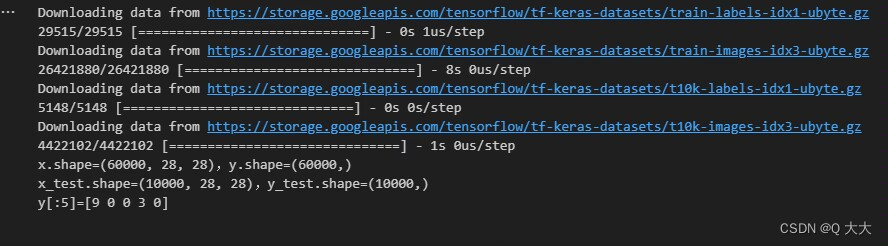

在这里插入图片描述

*查看数据集

# 数据集展示
import matplotlib.pyplot as plt
import numpy as np
# 每个类别的名称
class_names = ['Tshirt','Trouser','Pullover','Dress','Coat','Sandal','Shirt','Sneaker','Bag','Ankle boot']
# 绘制图像
for i in range(0,10):
    plt.subplot(2,5,i+1) # 当前的图绘制在25列的第i+1个位置
    plt.imshow(x[i]) 
    plt.xlabel(class_names[y[i]]) #y[i]代表所属分类的标签值
    plt.xticks([])  # 不显示x和y轴坐标
    plt.yticks([
boston_housing module: Boston housing price regression dataset. cifar10 module: CIFAR10 small images classification dataset. cifar100 module: CIFAR100 small images classification dataset. fashion_mnist module: Fashion-MNIST dataset. imdb module: IMDB sentiment classification dataset. mnist module: MNIST handwritten digits dataset. reuters module: Reuters topic classification dataset. import tensorflow as tf from tensorflow import keras fashion_mnist = keras.datasets.fashion_mnist (x_train, y_train), (x_test, y_test) = fashion_mnist.load_data() mnist = keras.datasets.mnist (x_train, y_train), (x_test, y_test) = mnist.load_data() cifar100 = keras.datasets.cifar100 (x_train, y_train), (x_test, y_test) = cifar100.load_data() cifar10 = keras.datasets.cifar10 (x_train, y_train), (x_test, y_test) = cifar10.load_data() imdb = keras.datasets.imdb (x_train, y_train), (x_test, y_test) = imdb.load_data() # word_index is a dictionary mapping words to an integer index word_index = imdb.get_word_index() # We reverse it, mapping integer indices to words reverse_word_index = dict([(value, key) for (key, value) in word_index.items()]) # We decode the review; note that our indices were offset by 3 # because 0, 1 and 2 are reserved indices for "padding", "start of sequence", and "unknown". decoded_review = ' '.join([reverse_word_index.get(i - 3, '?') for i in x_train[0]]) print(decoded_review) boston_housing = keras.datasets.boston_housing (x_train, y_train), (x_test, y_test) = boston_housing.load_data() reuters= keras.datasets.reuters (x_train, y_train), (x_test, y_test) = reuters.load_data() tf.keras.datasets.reuters.get_word_index( path='reuters_word_index.json' )
评论 1
添加红包

请填写红包祝福语或标题

红包个数最小为10个

红包金额最低5元

当前余额3.43前往充值 >
需支付:10.00
成就一亿技术人!
领取后你会自动成为博主和红包主的粉丝 规则
hope_wisdom
发出的红包
实付
使用余额支付
点击重新获取
扫码支付
钱包余额 0

抵扣说明:

1.余额是钱包充值的虚拟货币,按照1:1的比例进行支付金额的抵扣。
2.余额无法直接购买下载,可以购买VIP、付费专栏及课程。

余额充值



