


首先引入必要的包:
	<ItemGroup>
		<PackageReference Include="CommunityToolkit.Mvvm" Version="8.2.2" />
		<PackageReference Include="Microsoft.Extensions.Hosting" Version="8.0.0" />
		<PackageReference Include="Serilog" Version="4.0.0" />
		<PackageReference Include="Serilog.Extensions.Logging" Version="8.0.0" />
		<PackageReference Include="Serilog.Sinks.Console" Version="6.0.0" />
		<PackageReference Include="Serilog.Sinks.File" Version="6.0.0" />
	</ItemGroup>
将app.xaml 的属性-生成操作改为"页"
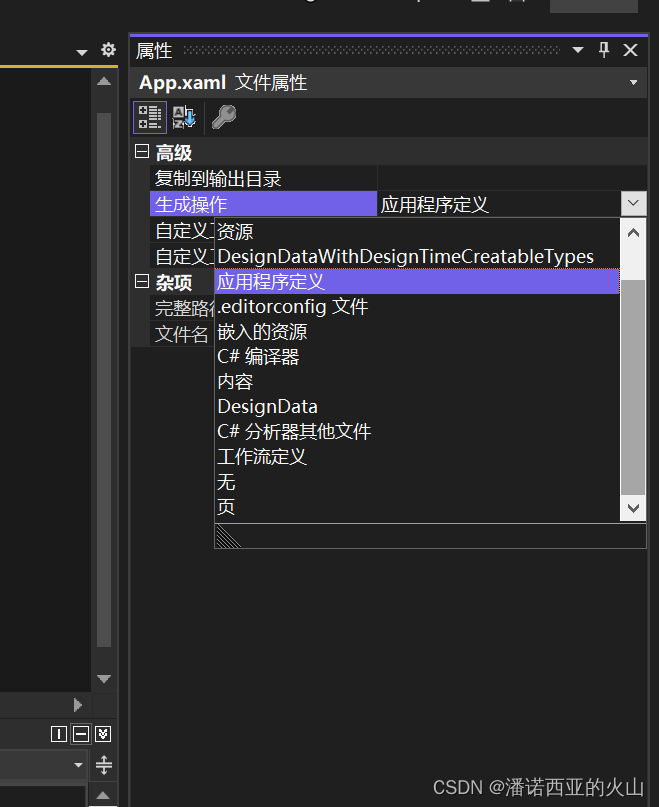
此时弹出:
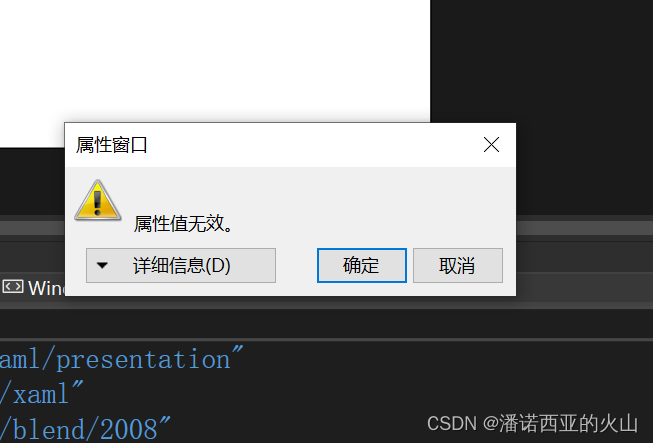
点击"取消"
点击显示所有文件, 将app.xaml包含在项目中
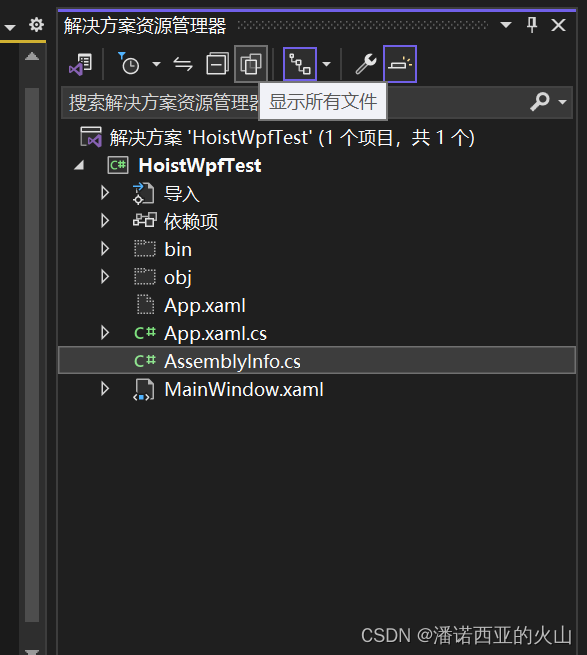
此时, 在csproj中,
  <ItemGroup>
    <ApplicationDefinition Remove="App.xaml" />
  </ItemGroup>

  <ItemGroup>
    <Page Include="App.xaml" />
  </ItemGroup>
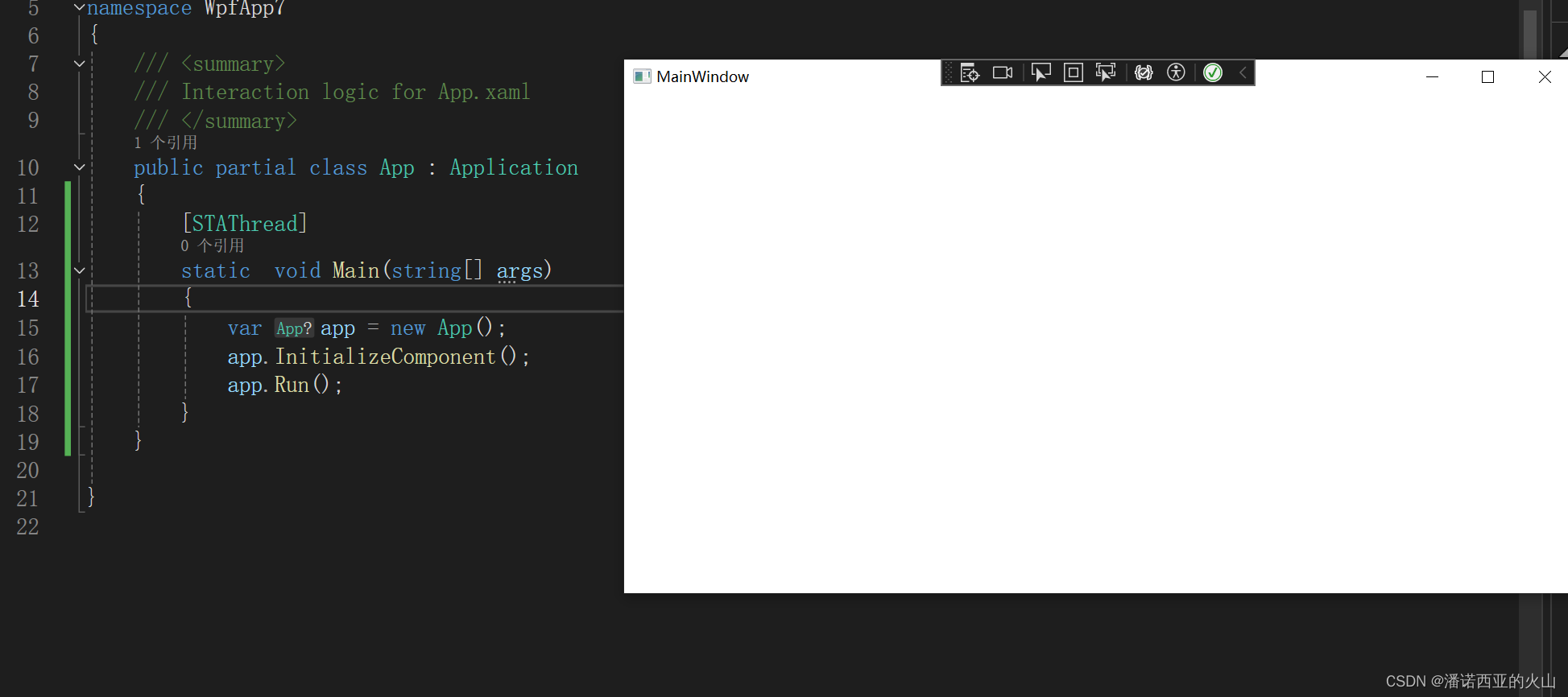
在app.xaml.cs中 写入
    public partial class App : Application
    {
        [STAThread]
        static  void Main(string[] args)
        {
            var app = new App();
            app.InitializeComponent();
            app.Run();
        }
    }
点击运行, 此时项目已经可以运行起来了
在app.xaml中 删除
StartupUri="MainWindow.xaml"
改为
<Application x:Class="HoistWpfTest.App"
             xmlns="http://schemas.microsoft.com/winfx/2006/xaml/presentation"
             xmlns:x="http://schemas.microsoft.com/winfx/2006/xaml"
             xmlns:local="clr-namespace:HoistWpfTest">
    <Application.Resources>

    </Application.Resources>
</Application>
        [STAThread]
        static void Main(string[] args)
        {
            using var host = CreateHostBuilder(args).Build();
             host.Start();
            var app = new App();
            app.InitializeComponent();
            app.MainWindow = host.Services.GetRequiredService<MainWindow>();
            //app.MainWindow.Show();
            app.MainWindow.Visibility = Visibility.Visible;
            app.Run();
        }

        private static IHostBuilder CreateHostBuilder(string[] args)
        {
            return Host.CreateDefaultBuilder(args).ConfigureServices(services =>
            {
                services.AddSingleton<MainWindow>();
            });
        }
此时 已经用Host管理了wpf项目.
较为完整的配置:
using System.Windows;
using CommunityToolkit.Mvvm.Messaging;
using Microsoft.Extensions.DependencyInjection;
using Microsoft.Extensions.Hosting;
using Microsoft.Extensions.Logging;
using Serilog;
using Serilog.Formatting.Json;
using WpfApp6.ViewModels;
using WpfApp6.Views;

namespace WpfApp6
{
    /// <summary>
    /// Interaction logic for App.xaml
    /// </summary>
    public partial class App : Application
    {
        [STAThread]
        static void Main(string[] args)
        {
            using IHost? host = CreateHostBuilder(args).Build();
            host.Start();
            var app = new App();
            app.InitializeComponent();
            app.MainWindow = host.Services.GetRequiredService<MainView>();
            //app.MainWindow.Show();
            app.MainWindow.Visibility = Visibility.Visible;
            app.Run();
        }

        private static IHostBuilder CreateHostBuilder(string[] args)
        {
            return Host.CreateDefaultBuilder(args)
                .ConfigureServices(services =>
                {
                    services.AddSingleton<MainViewModel>();
                    services.AddSingleton(sp => new MainView
                    {
                        DataContext = sp.GetRequiredService<MainViewModel>()
                    });

                    services.AddSingleton<WeakReferenceMessenger>();
                    services.AddSingleton<IMessenger, WeakReferenceMessenger>(sp =>
                        sp.GetRequiredService<WeakReferenceMessenger>()
                    );
                    services.AddSingleton(_ => Current.Dispatcher);
                    services.AddHostedService<StartupInitializationService>();
                })

                .ConfigureLogging(logging =>
                {
                    logging.ClearProviders();
                    Log.Logger  = new LoggerConfiguration()
                    .MinimumLevel.Debug()
                    .Enrich.FromLogContext()
                    .WriteTo.Console(new JsonFormatter())
                    .WriteTo.File("log.txt",rollingInterval:RollingInterval.Day)
                    .CreateLogger();
                    logging.AddSerilog(Log.Logger);
                });
        }
    }
}
    public class StartupInitializationService : IHostedLifecycleService
    {
        private readonly ILogger<StartupInitializationService> logger;

        public StartupInitializationService(ILogger<StartupInitializationService> logger)
        {
            this.logger = logger;
        }
        public Task StartAsync(CancellationToken cancellationToken)
        {
            return Task.CompletedTask;
        }

        public Task StartedAsync(CancellationToken cancellationToken)
        {
            Task.Run(async () =>
            {
                while (true)
                {
                    logger.LogWarning($"输出日志:{DateTime.Now}");
                    await Task.Delay(1000);
                }
            });
            return Task.CompletedTask;
        }

        public Task StartingAsync(CancellationToken cancellationToken)
        {
            return Task.CompletedTask;
        }

        public Task StopAsync(CancellationToken cancellationToken)
        {
            return Task.CompletedTask;
        }

        public Task StoppedAsync(CancellationToken cancellationToken)
        {
            return Task.CompletedTask;
        }

        public Task StoppingAsync(CancellationToken cancellationToken)
        {
            return Task.CompletedTask;
        }
    }
handycontrol :
xmlns:hc="https://handyorg.github.io/handycontrol"
<Application.Resources>
        <ResourceDictionary>
            <ResourceDictionary.MergedDictionaries>
                <ResourceDictionary Source="pack://application:,,,/HandyControl;component/Themes/SkinDefault.xaml"/>
                <ResourceDictionary Source="pack://application:,,,/HandyControl;component/Themes/Theme.xaml"/>
            </ResourceDictionary.MergedDictionaries>
        </ResourceDictionary>
    </Application.Resources>





 扫一扫
扫一扫


 3万+
3万+

 被折叠的 条评论
为什么被折叠?
被折叠的 条评论
为什么被折叠?
 到【灌水乐园】发言





