


首先在App.xaml中引入命名空间
<prism:PrismApplication
    x:Class="PrismFWDemon.App"
    xmlns="http://schemas.microsoft.com/winfx/2006/xaml/presentation"
    xmlns:x="http://schemas.microsoft.com/winfx/2006/xaml"
    xmlns:local="clr-namespace:PrismFWDemon"
    xmlns:materialDesign="http://materialdesigninxaml.net/winfx/xaml/themes"
    xmlns:prism="http://prismlibrary.com/">
    <Application.Resources />
</prism:PrismApplication>
后台注册启动项,区域,对话框
using Prism.DryIoc;
using Prism.Ioc;
using PrismFWDemon.ViewModels;
using PrismFWDemon.Views;
using System;
using System.Collections.Generic;
using System.Configuration;
using System.Data;
using System.Linq;
using System.Threading.Tasks;
using System.Windows;

namespace PrismFWDemon
{
    /// <summary>
    /// App.xaml 的交互逻辑
    /// </summary>
    ///

    /*
    App.xaml 添加 xmlns:prism="http://prismlibrary.com/" 命名空间
    修改继承 PrismApplication
    App.xaml修改为prism:PrismApplication
    创建 启动项
        protected override Window CreateShell()
        {
            return Container.Resolve<MainWindow>();
        }
    创建IOC容器
    protected override Window CreateShell() //启动页
     protected override void RegisterTypes 依赖注入


     */

    public partial class App : PrismApplication
    {
        protected override Window CreateShell()
        {
            return Container.Resolve<MainView>();
        }


        protected override void RegisterTypes(IContainerRegistry containerRegistry)
        {
            //注册导航
            containerRegistry.RegisterForNavigation<ViewA>("PageA"); //PageA 区域名称,别名
            containerRegistry.RegisterForNavigation<BView>();

            //注册对话框
            containerRegistry.RegisterDialog<MsgView, MsgViewModel>();//也可以加别名("Question")
        }
    }
}
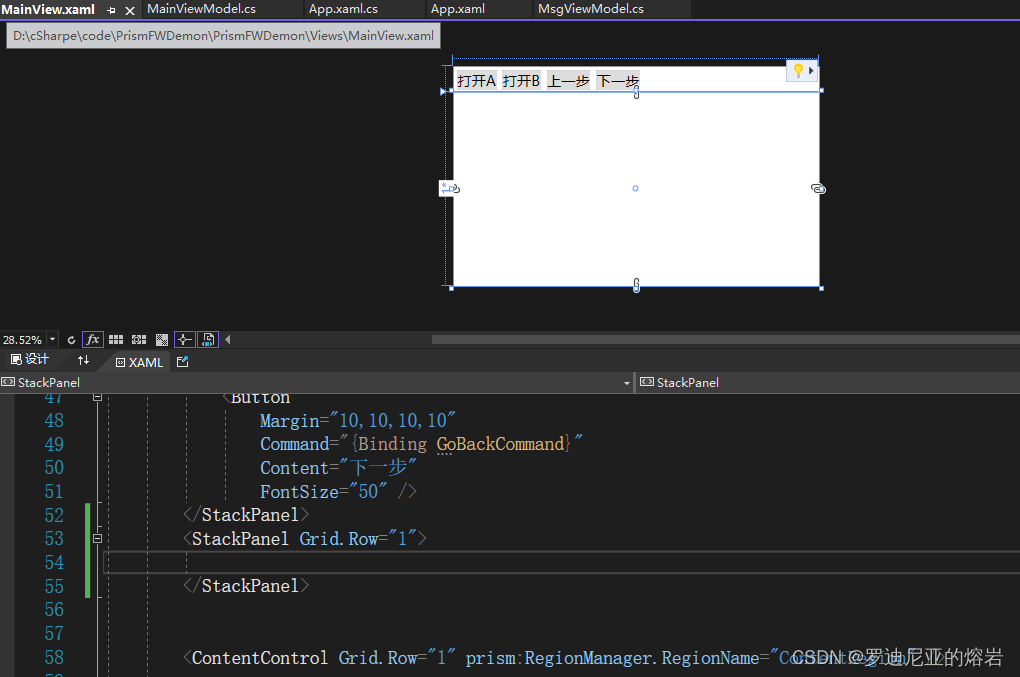
主页,设置导航区域
<Window
    x:Class="PrismFWDemon.Views.MainView"
    xmlns="http://schemas.microsoft.com/winfx/2006/xaml/presentation"
    xmlns:x="http://schemas.microsoft.com/winfx/2006/xaml"
    xmlns:d="http://schemas.microsoft.com/expression/blend/2008"
    xmlns:i="http://schemas.microsoft.com/xaml/behaviors"
    xmlns:local="clr-namespace:PrismFWDemon.Views"
    xmlns:materialDesign="http://materialdesigninxaml.net/winfx/xaml/themes"
    xmlns:mc="http://schemas.openxmlformats.org/markup-compatibility/2006"
    xmlns:prism="http://prismlibrary.com/"
    Title="MainView"
    Width="1280"
    Height="768"
    prism:ViewModelLocator.AutoWireViewModel="True"
    Background="{DynamicResource MaterialDesignPaper}"
    FontFamily="微软雅黑"
    TextElement.FontSize="16"
    TextElement.FontWeight="Regular"
    TextElement.Foreground="{DynamicResource MaterialDesignBody}"
    TextOptions.TextFormattingMode="Ideal"
    TextOptions.TextRenderingMode="Auto"
    WindowStartupLocation="CenterScreen"
    WindowStyle="None"
    mc:Ignorable="d">

    <Grid>
        <Grid.RowDefinitions>
            <RowDefinition Height="auto" />
            <RowDefinition />
        </Grid.RowDefinitions>
        <StackPanel Orientation="Horizontal">
            <Button
                Margin="10,10,10,10"
                Command="{Binding OpenACommand}"
                Content="打开A"
                FontSize="50" />
            <Button
                Margin="10,10,10,10"
                Command="{Binding OpenBCommand}"
                Content="打开B"
                FontSize="50" />
            <Button
                Margin="10,10,10,10"
                Command="{Binding GoForwordCommand}"
                Content="上一步"
                FontSize="50" />
            <Button
                Margin="10,10,10,10"
                Command="{Binding GoBackCommand}"
                Content="下一步"
                FontSize="50" />
        </StackPanel>


        <ContentControl Grid.Row="1" prism:RegionManager.RegionName="ContentRegion" />

    </Grid>
</Window>
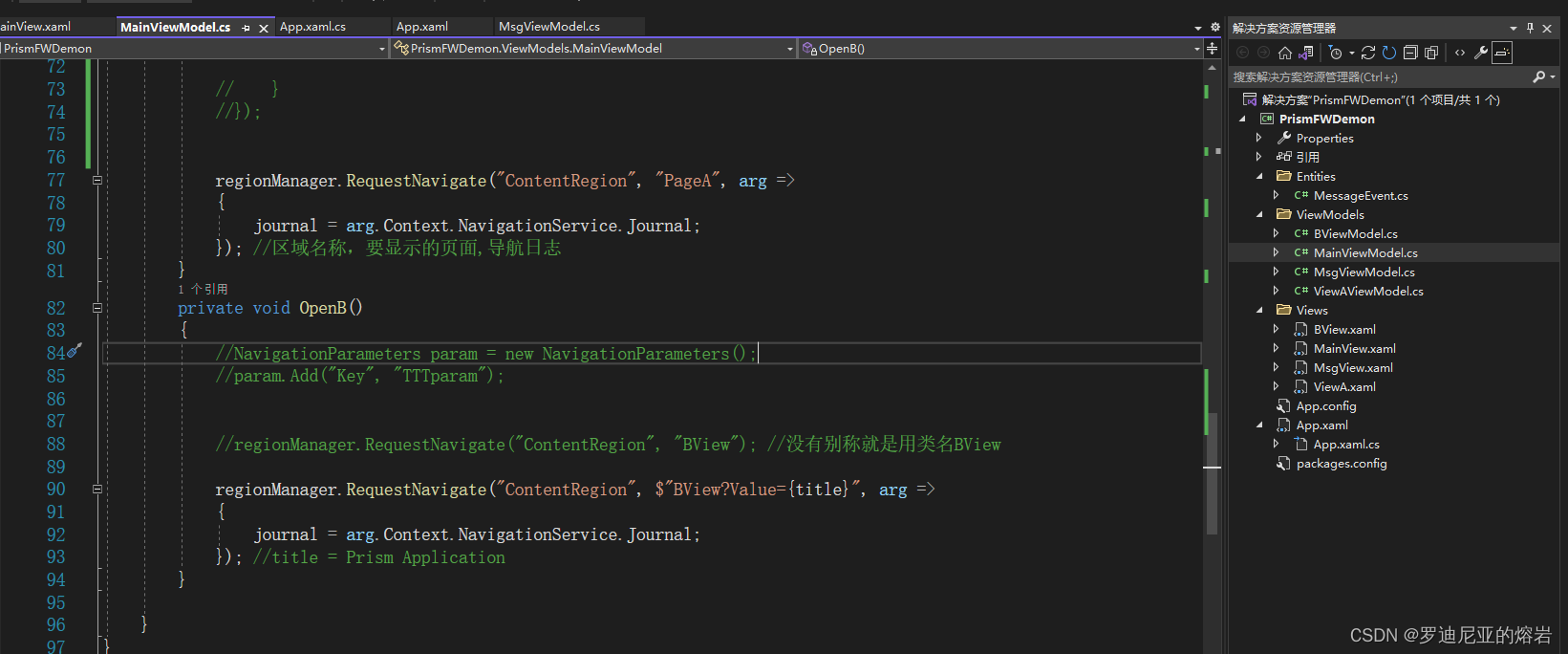
对主页建立viewmodel
using Prism.Commands;
using Prism.Mvvm;
using Prism.Regions;
using Prism.Services.Dialogs;
using PrismFWDemon.Views;
using System;
using System.Collections.Generic;
using System.Linq;
using System.Text;
using System.Threading.Tasks;

namespace PrismFWDemon.ViewModels
{
    public class MainViewModel:BindableBase
    {
        private readonly IRegionManager regionManager;
        private readonly IDialogService dialog;
        IRegionNavigationJournal journal; //导航日志

        private string title = "Prism Application";

        public string Title
        {
            get { return title = "Prism Application"; }
            set { title = value; }
        }

        //设置了控件<ContentControl prism:RegionManager.RegionName="ContentRegion" />
        //IRegionManager区域,IDialogService对话服务
        public MainViewModel(IRegionManager regionManager,IDialogService dialog)
        {

            //regionManager.RegisterViewWithRegion("ContentRegion", typeof(ViewA));

            //对区域的访问
            //var region = regionManager.Regions["ContentRegion"];

            OpenACommand = new DelegateCommand(OpenA);
            OpenBCommand = new DelegateCommand(OpenB);
            GoForwordCommand = new DelegateCommand(GoForword);
            GoBackCommand = new DelegateCommand(GoBack);
            this.regionManager = regionManager;
            this.dialog = dialog;
        }


        public DelegateCommand OpenACommand { get; private set; }
        public DelegateCommand OpenBCommand { get; private set; }
        public DelegateCommand GoForwordCommand { get; private set; }
        public DelegateCommand GoBackCommand { get; private set; }


        private void GoForword()
        {
            journal.GoForward();
        }

        private void GoBack()
        {
            journal.GoBack();
        }
        private void OpenA()
        {
            ////对话框设置
            //DialogParameters param = new DialogParameters();
            //param.Add("Value", "Test1");//键值对的方式传参
            //dialog.ShowDialog("MsgView",param, arg=>
            //{
            //    if (arg.Result == ButtonResult.OK)
            //    {

            //    }
            //});


            regionManager.RequestNavigate("ContentRegion", "PageA", arg =>
            {
                journal = arg.Context.NavigationService.Journal;
            }); //区域名称,要显示的页面,导航日志
        }
        private void OpenB()
        {
            //NavigationParameters param = new NavigationParameters();
            //param.Add("Key", "TTTparam");


            //regionManager.RequestNavigate("ContentRegion", "BView"); //没有别称就是用类名BView

            regionManager.RequestNavigate("ContentRegion", $"BView?Value={title}", arg =>
            {
                journal = arg.Context.NavigationService.Journal;
            }); //title = Prism Application
        }

    }
}
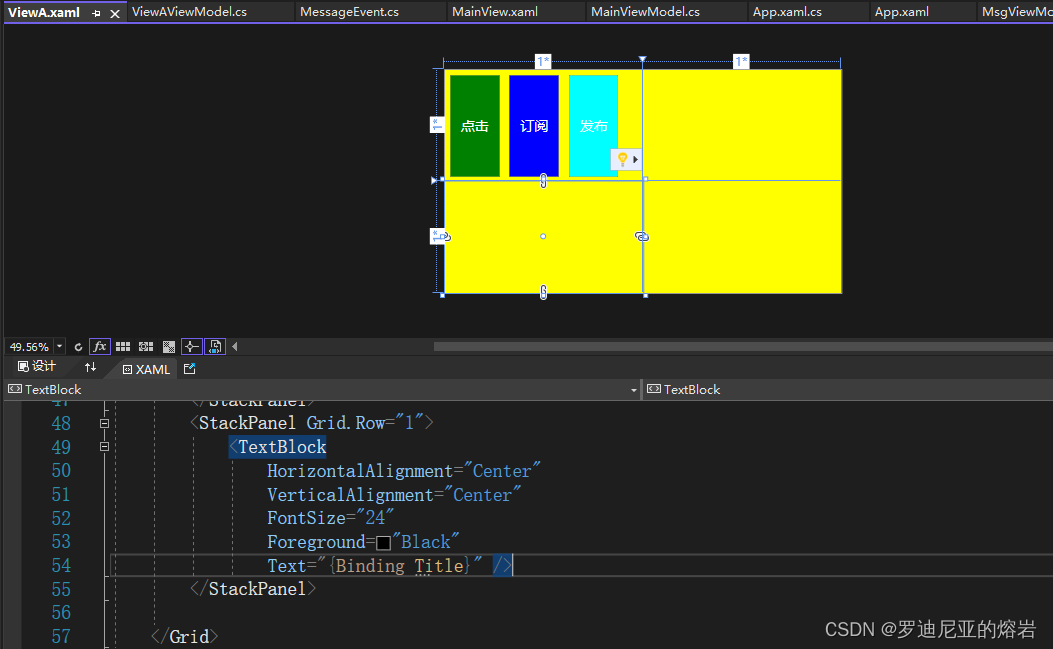
导航区域的A和B,前台和后端代码
<UserControl
    x:Class="PrismFWDemon.Views.ViewA"
    xmlns="http://schemas.microsoft.com/winfx/2006/xaml/presentation"
    xmlns:x="http://schemas.microsoft.com/winfx/2006/xaml"
    xmlns:d="http://schemas.microsoft.com/expression/blend/2008"
    xmlns:local="clr-namespace:PrismFWDemon.Views"
    xmlns:mc="http://schemas.openxmlformats.org/markup-compatibility/2006"
    xmlns:prism="http://prismlibrary.com/"
    d:DesignHeight="450"
    d:DesignWidth="800"
    prism:ViewModelLocator.AutoWireViewModel="True"
    mc:Ignorable="d">
    <Grid Background="Yellow">
        <Grid.ColumnDefinitions>
            <ColumnDefinition />
            <ColumnDefinition />
        </Grid.ColumnDefinitions>
        <Grid.RowDefinitions>
            <RowDefinition />
            <RowDefinition />
        </Grid.RowDefinitions>
        <StackPanel Orientation="Horizontal">
            <Button
                Width="100"
                Margin="10,10,10,10"
                Background="Green"
                Command="{Binding OpenAll}"
                Content="点击"
                FontSize="28"
                Foreground="White" />
            <Button
                Width="100"
                Margin="10,10,10,10"
                Background="Blue"
                Command="{Binding OpenAggregator}"
                Content="订阅"
                FontSize="28"
                Foreground="White" />
            <Button
                Width="100"
                Margin="10,10,10,10"
                Background="Cyan"
                Command="{Binding SendAggregator}"
                Content="发布"
                FontSize="28"
                Foreground="White" />
        </StackPanel>
        <StackPanel Grid.Row="1">
            <TextBlock
                HorizontalAlignment="Center"
                VerticalAlignment="Center"
                FontSize="24"
                Foreground="Black"
                Text="{Binding Title}" />
        </StackPanel>

    </Grid>
</UserControl>
using Prism.Commands;
using Prism.Events;
using Prism.Mvvm;
using Prism.Regions;
using PrismFWDemon.Entities;
using System;
using System.Collections.Generic;
using System.Linq;
using System.Text;
using System.Threading.Tasks;

namespace PrismFWDemon.ViewModels
{
    public class ViewAViewModel:BindableBase
    {
        private string title;
        private readonly IEventAggregator eventAggregator;

        public string Title
        {
            get { return title; }
            set { title = value; RaisePropertyChanged(); }
        }

        //public DelegateCommand OpenCommand
        //{
        //    get
        //    {
        //        return new DelegateCommand(() =>
        //       {
        //           Title = "Prism!";
        //       });
        //    }
        //}

        //订阅
        public DelegateCommand OpenAggregator { get; private set; }

        //发布
        public DelegateCommand SendAggregator { get; private set; }

        public DelegateCommand OpenCommand { get; private set; }

        public DelegateCommand OpenCommand1 { get; private set; }

        public CompositeCommand OpenAll { get; private set; }

        //订阅消息eventAggregator
        public ViewAViewModel(IEventAggregator eventAggregator)
        {
            //this.title = "Hello";
            this.eventAggregator = eventAggregator;
            OpenCommand = new DelegateCommand(() =>
            {
                this.Title += "哈哈! \r\n";
            });

            OpenCommand1 = new DelegateCommand(() =>
            {
                this.Title += "呵呵!!! \r\n";
            });

            //订阅
            OpenAggregator = new DelegateCommand(() =>
            {
                this.eventAggregator.GetEvent<MessageEvent>().Subscribe(OnMessageRecived);
            });

            //发布

            SendAggregator = new DelegateCommand(() =>
            {
                this.eventAggregator.GetEvent<MessageEvent>().Publish("Hello World!!!!");
            });

            ////复合命令,一次执行2个委托
            //OpenAll = new CompositeCommand();
            //OpenAll.RegisterCommand(OpenCommand);
            //OpenAll.RegisterCommand(OpenCommand1);

        }

        private void OnMessageRecived(string message)
        {
            Title += message + "\r\n";
        }

    }
}
导航B的前台和后端代码
<UserControl
    x:Class="PrismFWDemon.Views.BView"
    xmlns="http://schemas.microsoft.com/winfx/2006/xaml/presentation"
    xmlns:x="http://schemas.microsoft.com/winfx/2006/xaml"
    xmlns:d="http://schemas.microsoft.com/expression/blend/2008"
    xmlns:local="clr-namespace:PrismFWDemon.Views"
    xmlns:mc="http://schemas.openxmlformats.org/markup-compatibility/2006"
    xmlns:prism="http://prismlibrary.com/"
    d:DesignHeight="450"
    d:DesignWidth="800"
    prism:ViewModelLocator.AutoWireViewModel="True"
    mc:Ignorable="d">
    <Grid Background="Cyan">
        <Grid.RowDefinitions>
            <RowDefinition />
            <RowDefinition />
            <RowDefinition />
        </Grid.RowDefinitions>
        <StackPanel>
            <TextBlock
                Margin="10,10,10,10"
                FontSize="40"
                Text="测试一下" />
            <TextBlock
                Margin="10,10,10,10"
                FontSize="40"
                Text="{Binding Title}" />
        </StackPanel>
    </Grid>
</UserControl>
using Prism.Mvvm;
using Prism.Regions;
using System;
using System.Collections.Generic;
using System.Linq;
using System.Text;
using System.Threading.Tasks;
using System.Windows;
using System.Windows.Data;

namespace PrismFWDemon.ViewModels
{
    public class BViewModel : BindableBase, IConfirmNavigationRequest//INavigationAware
    {
        /// <summary>
        /// 导航完成之前,接收用户传递的参数以及是否允许导航
        /// </summary>
        /// <param name="navigationContext"></param>
        /// <exception cref="NotImplementedException"></exception>
        public void OnNavigatedTo(NavigationContext navigationContext)
        {
            Title = navigationContext.Parameters.GetValue<string>("Value");
        }

        /// <summary>
        /// 判断是否打开过
        /// </summary>
        /// <param name="navigationContext"></param>
        /// <returns></returns>
        /// <exception cref="NotImplementedException"></exception>

        public bool IsNavigationTarget(NavigationContext navigationContext)
        {
            return true;
        }

        /// <summary>
        /// 导航离开当前页触发
        /// </summary>
        /// <param name="navigationContext"></param>
        /// <exception cref="NotImplementedException"></exception>

        public void OnNavigatedFrom(NavigationContext navigationContext)
        {

        }

        public void ConfirmNavigationRequest(NavigationContext navigationContext, Action<bool> continuationCallback)
        {
            bool result = true;

            //确认导航:中间
            //温馨提示:左上
            //如果是No,则为false不导航

            if (MessageBox.Show("确认导航?","温馨提示",MessageBoxButton.YesNo)==MessageBoxResult.No)
            {
                result = false;
            }
            continuationCallback(result);
        }

        private string title;

        public string Title
        {
            get { return title; }
            set { title = value; RaisePropertyChanged(); }
        }

    }
}
对话框页面:
using Prism.Services.Dialogs;
using System;
using System.Collections.Generic;
using System.Linq;
using System.Text;
using System.Threading.Tasks;

namespace PrismFWDemon.ViewModels
{
    public class MsgViewModel : IDialogAware
    {
        public string Title { get; set; }

        public event Action<IDialogResult> RequestClose;

        public bool CanCloseDialog()
        {
            return true;
        }

        public void OnDialogClosed()
        {

        }

        //对话框设置
        public void OnDialogOpened(IDialogParameters parameters)
        {

        }
    }
}
订阅和发布
using Prism.Events;
using System;
using System.Collections.Generic;
using System.Linq;
using System.Text;
using System.Threading.Tasks;

namespace PrismFWDemon.Entities
{
    public class MessageEvent : PubSubEvent<string>
    {

    }
}
资源字典的使用:
App.xaml中定义
<prism:PrismApplication
    x:Class="PrismFWDemon.App"
    xmlns="http://schemas.microsoft.com/winfx/2006/xaml/presentation"
    xmlns:x="http://schemas.microsoft.com/winfx/2006/xaml"
    xmlns:local="clr-namespace:PrismFWDemon"
    xmlns:materialDesign="http://materialdesigninxaml.net/winfx/xaml/themes"
    xmlns:prism="http://prismlibrary.com/">
    <Application.Resources>
        <ResourceDictionary>
            <ResourceDictionary.MergedDictionaries>
                <ResourceDictionary Source="UICore/Styles/Btns.xaml" />
            </ResourceDictionary.MergedDictionaries>
        </ResourceDictionary>
    </Application.Resources>

</prism:PrismApplication>
创建资源字典:(UICore/Styles/Btns.xaml)
<ResourceDictionary xmlns="http://schemas.microsoft.com/winfx/2006/xaml/presentation" xmlns:x="http://schemas.microsoft.com/winfx/2006/xaml">
<Style x:Key="FocusVisual">
<Setter Property="Control.Template">
<Setter.Value>
<ControlTemplate>
<Rectangle
Margin="2"
SnapsToDevicePixels="true"
Stroke="{DynamicResource {x:Static SystemColors.ControlTextBrushKey}}"
StrokeDashArray="1 2"
StrokeThickness="1" />
</ControlTemplate>
</Setter.Value>
</Setter>
</Style>
<SolidColorBrush x:Key="Button.Static.Foreground" Color="#FF1DAAF3" />
<SolidColorBrush x:Key="Button.Static.Background" Color="#FF6C2075" />
<SolidColorBrush x:Key="Button.Static.Border" Color="#FF707070" />
<SolidColorBrush x:Key="Button.MouseOver.Foreground" Color="#FF131315" />
<SolidColorBrush x:Key="Button.MouseOver.Border" Color="#FF3C7FB1" />
<SolidColorBrush x:Key="Button.Pressed.Background" Color="#FFC4E5F6" />
<SolidColorBrush x:Key="Button.Pressed.Foreground" Color="#FF26DC42" />
<SolidColorBrush x:Key="Button.Pressed.Border" Color="#FF2C628B" />
<SolidColorBrush x:Key="Button.Disabled.Background" Color="#FFF4F4F4" />
<SolidColorBrush x:Key="Button.Disabled.Border" Color="#FFADB2B5" />
<SolidColorBrush x:Key="Button.Disabled.Foreground" Color="#FF838383" />
<Style x:Key="TextOnlyBtn" TargetType="{x:Type Button}">
<Setter Property="FocusVisualStyle" Value="{StaticResource FocusVisual}" />
<Setter Property="Background" Value="{StaticResource Button.Static.Background}" />
<Setter Property="BorderBrush" Value="{StaticResource Button.Static.Border}" />
<Setter Property="Foreground" Value="{StaticResource Button.Static.Foreground}" />
<Setter Property="BorderThickness" Value="1" />
<Setter Property="HorizontalContentAlignment" Value="Center" />
<Setter Property="VerticalContentAlignment" Value="Center" />
<Setter Property="Padding" Value="1" />
<Setter Property="Template">
<Setter.Value>
<ControlTemplate TargetType="{x:Type Button}">
<Border
x:Name="border"
Background="{TemplateBinding Background}"
BorderBrush="{TemplateBinding BorderBrush}"
BorderThickness="{TemplateBinding BorderThickness}"
SnapsToDevicePixels="true">
<ContentPresenter
x:Name="contentPresenter"
Margin="{TemplateBinding Padding}"
HorizontalAlignment="{TemplateBinding HorizontalContentAlignment}"
VerticalAlignment="{TemplateBinding VerticalContentAlignment}"
Focusable="False"
RecognizesAccessKey="True"
SnapsToDevicePixels="{TemplateBinding SnapsToDevicePixels}" />
</Border>
<ControlTemplate.Triggers>
<Trigger Property="IsDefaulted" Value="true">
<Setter TargetName="contentPresenter" Property="TextElement.Foreground" Value="{DynamicResource {x:Static SystemColors.HighlightBrushKey}}" />
</Trigger>
<Trigger Property="IsMouseOver" Value="true">
<Setter TargetName="contentPresenter" Property="TextElement.Foreground" Value="{StaticResource Button.MouseOver.Foreground}" />
</Trigger>
<Trigger Property="IsPressed" Value="true">
<Setter TargetName="contentPresenter" Property="TextElement.Foreground" Value="{StaticResource Button.Pressed.Foreground}" />
<Setter TargetName="contentPresenter" Property="TextElement.Foreground" Value="{StaticResource Button.Pressed.Border}" />
</Trigger>
<Trigger Property="IsEnabled" Value="false">
<Setter TargetName="contentPresenter" Property="TextElement.Foreground" Value="{StaticResource Button.Disabled.Background}" />
<Setter TargetName="contentPresenter" Property="TextElement.Foreground" Value="{StaticResource Button.Disabled.Foreground}" />
</Trigger>
</ControlTemplate.Triggers>
</ControlTemplate>
</Setter.Value>
</Setter>
</Style>
<Style x:Key="NormalButtonStyle" TargetType="Button">
<Setter Property="Template">
<Setter.Value>
<ControlTemplate TargetType="Button">
<Grid>
<Border Background="{TemplateBinding Background}" CornerRadius="5">
<ContentPresenter HorizontalAlignment="{TemplateBinding HorizontalContentAlignment}" VerticalAlignment="{TemplateBinding VerticalContentAlignment}" />
</Border>
<Border Name="mask" Background="Transparent" />
</Grid>
<ControlTemplate.Triggers>
<Trigger Property="IsMouseOver" Value="True">
<Setter TargetName="mask" Property="Background" Value="#11FFFFFF" />
</Trigger>
<Trigger Property="IsPressed" Value="True">
<Setter TargetName="mask" Property="Background" Value="#11000000" />
</Trigger>
</ControlTemplate.Triggers>
</ControlTemplate>
</Setter.Value>
</Setter>
</Style>
<Style x:Key="btn2" TargetType="Button">
<Setter Property="Foreground" Value="Black" />
<!-- 修改模板属性 -->
<Setter Property="Template">
<Setter.Value>
<!-- 控件模板 -->
<ControlTemplate TargetType="Button">
<!-- 背景色 -->
<Border
x:Name="back"
CornerRadius="3"
Opacity="0.8">
<Border.BitmapEffect>
<OuterGlowBitmapEffect
GlowColor="{Binding RelativeSource={RelativeSource TemplatedParent}, Path=(Button.Background).(SolidColorBrush.Color)}"
GlowSize="0"
Opacity="0.7" />
</Border.BitmapEffect>
<Border.Background>
<LinearGradientBrush StartPoint="0,0" EndPoint="0,1.5">
<GradientBrush.GradientStops>
<GradientStopCollection>
<GradientStop Offset="0" Color="{Binding RelativeSource={RelativeSource TemplatedParent}, Path=(Button.Background).(SolidColorBrush.Color)}" />
<GradientStop Offset="0.4" Color="{Binding RelativeSource={RelativeSource TemplatedParent}, Path=(Button.Background).(SolidColorBrush.Color)}" />
<GradientStop Offset="1" Color="#FFF" />
</GradientStopCollection>
</GradientBrush.GradientStops>
</LinearGradientBrush>
</Border.Background>
<!-- 前景色及边框 -->
<Border
x:Name="fore"
BorderBrush="#5555"
BorderThickness="1"
CornerRadius="3">
<Border.Background>
<LinearGradientBrush StartPoint="0,0" EndPoint="0,1">
<GradientBrush.GradientStops>
<GradientStopCollection>
<GradientStop Offset="0.5" Color="#6FFF" />
<GradientStop Offset="0.51" Color="#1111" />
</GradientStopCollection>
</GradientBrush.GradientStops>
</LinearGradientBrush>
</Border.Background>
<!-- 按钮内容 -->
<ContentPresenter
x:Name="content"
HorizontalAlignment="Center"
VerticalAlignment="Center"
Content="{TemplateBinding Content}">
<ContentPresenter.BitmapEffect>
<DropShadowBitmapEffect
Direction="-90"
Opacity="0.3"
ShadowDepth="2"
Softness="0.1"
Color="#000" />
</ContentPresenter.BitmapEffect>
</ContentPresenter>
</Border>
</Border>
<!-- 触发器 -->
<ControlTemplate.Triggers>
<!-- 鼠标移入移出 -->
<Trigger Property="IsMouseOver" Value="True">
<Trigger.EnterActions>
<BeginStoryboard>
<Storyboard>
<DoubleAnimation
Storyboard.TargetName="back"
Storyboard.TargetProperty="(Border.BitmapEffect).(OuterGlowBitmapEffect.GlowSize)"
To="6"
Duration="0:0:0.2" />
<ColorAnimation
BeginTime="0:0:0.2"
Storyboard.TargetName="fore"
Storyboard.TargetProperty="(Border.Background).(LinearGradientBrush.GradientStops)[0].(GradientStop.Color)"
To="#AFFF"
Duration="0:0:0.2" />
<ColorAnimation
BeginTime="0:0:0.2"
Storyboard.TargetName="fore"
Storyboard.TargetProperty="(Border.Background).(LinearGradientBrush.GradientStops)[1].(GradientStop.Color)"
To="#3FFF"
Duration="0:0:0.2" />
</Storyboard>
</BeginStoryboard>
</Trigger.EnterActions>
<Trigger.ExitActions>
<BeginStoryboard>
<Storyboard>
<DoubleAnimation
Storyboard.TargetName="back"
Storyboard.TargetProperty="(Border.BitmapEffect).(OuterGlowBitmapEffect.GlowSize)"
Duration="0:0:0.2" />
<ColorAnimation
Storyboard.TargetName="fore"
Storyboard.TargetProperty="(Border.Background).(LinearGradientBrush.GradientStops)[0].(GradientStop.Color)"
Duration="0:0:0.2" />
<ColorAnimation
Storyboard.TargetName="fore"
Storyboard.TargetProperty="(Border.Background).(LinearGradientBrush.GradientStops)[1].(GradientStop.Color)"
Duration="0:0:0.2" />
</Storyboard>
</BeginStoryboard>
</Trigger.ExitActions>
</Trigger>
<!-- 按钮按下弹起 -->
<Trigger Property="IsPressed" Value="True">
<Trigger.EnterActions>
<BeginStoryboard>
<Storyboard>
<DoubleAnimation
Storyboard.TargetName="back"
Storyboard.TargetProperty="(Border.BitmapEffect).(OuterGlowBitmapEffect.GlowSize)"
To="3"
Duration="0:0:0.1" />
<ColorAnimation
Storyboard.TargetName="fore"
Storyboard.TargetProperty="(Border.Background).(LinearGradientBrush.GradientStops)[0].(GradientStop.Color)"
To="#3AAA"
Duration="0:0:0.1" />
<ColorAnimation
Storyboard.TargetName="fore"
Storyboard.TargetProperty="(Border.Background).(LinearGradientBrush.GradientStops)[1].(GradientStop.Color)"
To="#2111"
Duration="0:0:0.1" />
</Storyboard>
</BeginStoryboard>
</Trigger.EnterActions>
<Trigger.ExitActions>
<BeginStoryboard>
<Storyboard>
<DoubleAnimation
Storyboard.TargetName="back"
Storyboard.TargetProperty="(Border.BitmapEffect).(OuterGlowBitmapEffect.GlowSize)"
Duration="0:0:0.1" />
<ColorAnimation
Storyboard.TargetName="fore"
Storyboard.TargetProperty="(Border.Background).(LinearGradientBrush.GradientStops)[0].(GradientStop.Color)"
Duration="0:0:0.1" />
<ColorAnimation
Storyboard.TargetName="fore"
Storyboard.TargetProperty="(Border.Background).(LinearGradientBrush.GradientStops)[1].(GradientStop.Color)"
Duration="0:0:0.1" />
</Storyboard>
</BeginStoryboard>
</Trigger.ExitActions>
</Trigger>
<!-- 按钮失效 -->
<Trigger Property="IsEnabled" Value="False">
<Setter Property="Foreground" Value="#B444" />
<Trigger.EnterActions>
<BeginStoryboard>
<Storyboard>
<DoubleAnimation
Storyboard.TargetName="back"
Storyboard.TargetProperty="(Border.BitmapEffect).(OuterGlowBitmapEffect.GlowSize)"
To="0"
Duration="0:0:0.3" />
<DoubleAnimation
Storyboard.TargetName="content"
Storyboard.TargetProperty="(ContentPresenter.BitmapEffect).(DropShadowBitmapEffect.Opacity)"
To="1"
Duration="0:0:0.1" />
<DoubleAnimation
Storyboard.TargetName="content"
Storyboard.TargetProperty="(ContentPresenter.BitmapEffect).(DropShadowBitmapEffect.Direction)"
To="-135"
Duration="0:0:0.1" />
<ColorAnimation
Storyboard.TargetName="content"
Storyboard.TargetProperty="(ContentPresenter.BitmapEffect).(DropShadowBitmapEffect.Color)"
To="#FFF"
Duration="0:0:0.3" />
<ColorAnimation
Storyboard.TargetName="fore"
Storyboard.TargetProperty="(Border.BorderBrush).(SolidColorBrush.Color)"
To="#D555"
Duration="0:0:0.3" />
<ColorAnimation
Storyboard.TargetName="fore"
Storyboard.TargetProperty="(Border.Background).(LinearGradientBrush.GradientStops)[0].(GradientStop.Color)"
To="#CEEE"
Duration="0:0:0.3" />
<ColorAnimation
Storyboard.TargetName="fore"
Storyboard.TargetProperty="(Border.Background).(LinearGradientBrush.GradientStops)[1].(GradientStop.Color)"
To="#CDDD"
Duration="0:0:0.3" />
</Storyboard>
</BeginStoryboard>
</Trigger.EnterActions>
<Trigger.ExitActions>
<BeginStoryboard>
<Storyboard>
<DoubleAnimation
Storyboard.TargetName="back"
Storyboard.TargetProperty="(Border.BitmapEffect).(OuterGlowBitmapEffect.GlowSize)"
Duration="0:0:0.1" />
<DoubleAnimation
Storyboard.TargetName="content"
Storyboard.TargetProperty="(ContentPresenter.BitmapEffect).(DropShadowBitmapEffect.Opacity)"
Duration="0:0:0.1" />
<DoubleAnimation
Storyboard.TargetName="content"
Storyboard.TargetProperty="(ContentPresenter.BitmapEffect).(DropShadowBitmapEffect.Direction)"
Duration="0:0:0.1" />
<ColorAnimation
Storyboard.TargetName="content"
Storyboard.TargetProperty="(ContentPresenter.BitmapEffect).(DropShadowBitmapEffect.Color)"
Duration="0:0:0.1" />
<ColorAnimation
Storyboard.TargetName="fore"
Storyboard.TargetProperty="(Border.BorderBrush).(SolidColorBrush.Color)"
Duration="0:0:0.1" />
<ColorAnimation
Storyboard.TargetName="fore"
Storyboard.TargetProperty="(Border.Background).(LinearGradientBrush.GradientStops)[0].(GradientStop.Color)"
Duration="0:0:0.1" />
<ColorAnimation
Storyboard.TargetName="fore"
Storyboard.TargetProperty="(Border.Background).(LinearGradientBrush.GradientStops)[1].(GradientStop.Color)"
Duration="0:0:0.1" />
</Storyboard>
</BeginStoryboard>
</Trigger.ExitActions>
</Trigger>
</ControlTemplate.Triggers>
</ControlTemplate>
</Setter.Value>
</Setter>
</Style>
</ResourceDictionary>





 扫一扫
扫一扫


 4136
4136

 被折叠的 条评论
为什么被折叠?
被折叠的 条评论
为什么被折叠?
 到【灌水乐园】发言





