



 本文介绍了如何在Spring Boot项目中创建一个名为S08的Controller,通过@Autowired和@Value注解读取yml配置文件,包括application.yml和res.yml。重点展示了如何使用YmlResourceFactory来加载自定义YAML配置并操作其中的数据。
新建controller
package com.zg.sboot.S08;

import org.springframework.beans.factory.annotation.Autowired;
import org.springframework.beans.factory.annotation.Value;
import org.springframework.stereotype.Controller;
import org.springframework.web.bind.annotation.RequestMapping;
import org.springframework.web.bind.annotation.ResponseBody;

@Controller
@RequestMapping("S08")  //[Route("api/[controller]/[action]")]
public class S08Controller {

    @Value("${com.zg.name}")
    public String name;

    @Autowired
    public ResConfig res;

    @RequestMapping("index")
    @ResponseBody //返回字符串 json
    public String index() {
        System.out.println("name="+name);
        return "Success!"+name+res.getDate()+res.getName()+res.getUrl();
    }
}
系统自带yml和新建yml
application.yml:
# 应用名称
#spring.application.name=sboot
# 应用服务 WEB 访问端口
server: {port: 8080}

com.zg: {name: 赵光}
res.yml:
com.wesite:
  name: HelloSpringBoot
  url: springboot
  date: 2021
读取Yml工具类:
package com.zg.sboot.S08;

import org.springframework.beans.factory.config.YamlPropertiesFactoryBean;
import org.springframework.core.env.PropertiesPropertySource;
import org.springframework.core.env.PropertySource;
import org.springframework.core.io.support.DefaultPropertySourceFactory;
import org.springframework.core.io.support.EncodedResource;

import java.io.IOException;
import java.util.Properties;


public class YmlResourceFactory extends DefaultPropertySourceFactory {

    @Override
    public PropertySource<?> createPropertySource(String name, EncodedResource resource) throws IOException {
        YamlPropertiesFactoryBean factory = new YamlPropertiesFactoryBean();
        factory.setResources(resource.getResource());
        factory.afterPropertiesSet();
        Properties ymlProperties = factory.getObject();
        String propertyName = name != null ? name : resource.getResource().getFilename();
        return new PropertiesPropertySource(propertyName, ymlProperties);
    }

}
结果配置:
package com.zg.sboot.S08;


import org.springframework.boot.context.properties.ConfigurationProperties;
import org.springframework.context.annotation.Configuration;
import org.springframework.context.annotation.PropertySource;
import org.springframework.stereotype.Component;

@Configuration
@Component
@ConfigurationProperties(prefix = "com.wesite")
@PropertySource(value = "classpath:res.yml",factory = YmlResourceFactory.class)
public class ResConfig {

    private String name;
    private String url;
    private String date;

    public String getName() {
        return name;
    }

    public void setName(String name) {
        this.name = name;
    }

    public String getUrl() {
        return url;
    }

    public void setUrl(String url) {
        this.url = url;
    }

    public String getDate() {
        return date;
    }

    public void setDate(String date) {
        this.date = date;
    }


}
=========================================================
SSM配置:
maven的pom引入依赖包
<?xml version="1.0" encoding="UTF-8"?>
<project xmlns="http://maven.apache.org/POM/4.0.0" xmlns:xsi="http://www.w3.org/2001/XMLSchema-instance"
         xsi:schemaLocation="http://maven.apache.org/POM/4.0.0 https://maven.apache.org/xsd/maven-4.0.0.xsd">
    <modelVersion>4.0.0</modelVersion>
    <groupId>com.zg</groupId>
    <artifactId>myssm</artifactId>
    <version>0.0.1-SNAPSHOT</version>
    <name>myssm</name>
    <description>Demo project for Spring Boot</description>

    <properties>
        <java.version>11</java.version>
        <project.build.sourceEncoding>UTF-8</project.build.sourceEncoding>
        <project.reporting.outputEncoding>UTF-8</project.reporting.outputEncoding>
        <spring-boot.version>2.3.7.RELEASE</spring-boot.version>
    </properties>

    <dependencies>
        <dependency>
            <groupId>org.springframework.boot</groupId>
            <artifactId>spring-boot-starter-web</artifactId>
        </dependency>

        <dependency>
            <groupId>org.springframework.boot</groupId>
            <artifactId>spring-boot-starter-test</artifactId>
            <scope>test</scope>
            <exclusions>
                <exclusion>
                    <groupId>org.junit.vintage</groupId>
                    <artifactId>junit-vintage-engine</artifactId>
                </exclusion>
            </exclusions>
        </dependency>

        <!--热部署-->
        <dependency>
            <groupId>org.springframework.boot</groupId>
            <artifactId>spring-boot-devtools</artifactId>
            <optional>true</optional>
        </dependency>

        <!--json-->
        <dependency>
            <groupId>com.alibaba</groupId>
            <artifactId>fastjson</artifactId>
            <version>1.2.78</version>
        </dependency>

        <!--freemarker模板-->
        <dependency>
            <groupId>org.springframework.boot</groupId>
            <artifactId>spring-boot-starter-freemarker</artifactId>
        </dependency>

        <!--Spring连接Mysql驱动-->
        <dependency>
            <groupId>mysql</groupId>
            <artifactId>mysql-connector-java</artifactId>
            <version>8.0.26</version>
        </dependency>
        <dependency>
            <groupId>org.springframework.boot</groupId>
            <artifactId>spring-boot-starter-jdbc</artifactId>
        </dependency>

        <!--MyBatis驱动-->
        <dependency>
            <groupId>org.mybatis.spring.boot</groupId>
            <artifactId>mybatis-spring-boot-starter</artifactId>
            <version>2.1.4</version>
        </dependency>

        <!--Redis-->
        <dependency>
            <groupId>org.springframework.boot</groupId>
            <artifactId>spring-boot-starter-data-redis</artifactId>
        </dependency>

    </dependencies>

    <dependencyManagement>
        <dependencies>
            <dependency>
                <groupId>org.springframework.boot</groupId>
                <artifactId>spring-boot-dependencies</artifactId>
                <version>${spring-boot.version}</version>
                <type>pom</type>
                <scope>import</scope>
            </dependency>
        </dependencies>
    </dependencyManagement>

    <build>
        <plugins>
            <plugin>
                <groupId>org.apache.maven.plugins</groupId>
                <artifactId>maven-compiler-plugin</artifactId>
                <version>3.8.1</version>
                <configuration>
                    <source>11</source>
                    <target>11</target>
                    <encoding>UTF-8</encoding>
                </configuration>
            </plugin>
            <plugin>
                <groupId>org.springframework.boot</groupId>
                <artifactId>spring-boot-maven-plugin</artifactId>
                <version>2.3.7.RELEASE</version>
                <configuration>
                    <mainClass>com.zg.myssm.MyssmApplication</mainClass>
                </configuration>
                <executions>
                    <execution>
                        <id>repackage</id>
                        <goals>
                            <goal>repackage</goal>
                        </goals>
                    </execution>
                </executions>
            </plugin>
        </plugins>
    </build>

</project>
application.yml的配置:yml非常重视缩进,缩进错误,则层级关系错误,Spring 将扫不到
# 应用名称
#spring.application.name=sboot
# 应用服务 WEB 访问端口
server: {port: 8080}

com.zg: {name: zg}

# FreeMarker
spring:
  freemarker:
    cache: false
    checkTemplateLocation: true
    contentType: text/html
    suffix: .html
    templateEncoding: UTF-8
    templateLoaderPath: classpath:templates

  datasource:
    driverClassName: com.mysql.cj.jdbc.Driver
    #url: jdbc:mysql://192.168.153.101:3306/Book666
    url: jdbc:mysql://192.168.153.101:3306/Book666?useUnicode=true&characterEncoding=utf-8&useSSL=false&serverTimezone=GMT%2B8
    #url: jdbc:mysql://92.168.153.101:3306/Book666?useUnicode=true&characterEncoding=UTF-8&serverTimezone=Asia/Shanghai
    username: root
    password: 123456

  redis:
    host: 127.0.0.1
    password: 123456
    port: 6379

mybatis:
  type-aliases-package: com.zg
  config-locations: classpath:mybatis/mybatis-config.xml
  mapper-locations: classpath:mybatis/mapper/*.xml
配置mybatis的config和mapper
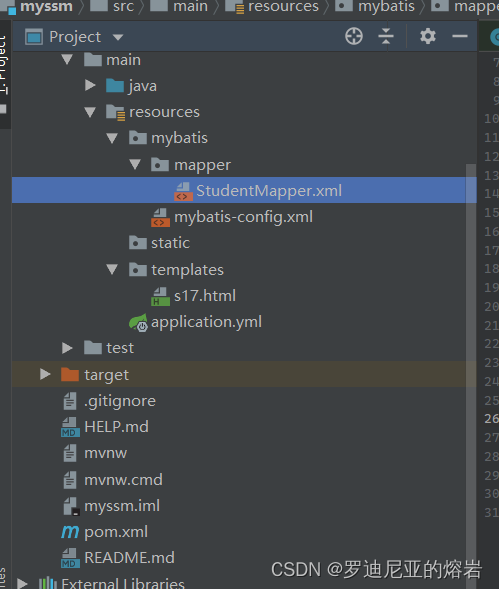
<?xml version="1.0" encoding="UTF-8" ?>
<!DOCTYPE configuration PUBLIC "-//mybatis.org//DTD Config 3.0//EN" "http://mybatis.org/dtd/mybatis-3-config.dtd">
<configuration>
    <settings>
        <setting name="mapUnderscoreToCamelCase" value="true" />
    </settings>
</configuration>
<?xml version="1.0" encoding="UTF-8" ?>
<!DOCTYPE mapper PUBLIC "-//mybatis.org//DTD Mapper 3.0//EN" "http://10.20.91.130/dtd/mybatis-3-mapper.dtd" >

<!--关联DAO-->

<mapper namespace="com.zg.myssm.s17.StudentDao">

    <select id="getCurDate" resultType="java.lang.String">
        SELECT CURDATE() FROM DUAL
    </select>

    <select id="getStudents" resultType="com.zg.myssm.s17.Student">
        SELECT * FROM student
    </select>
</mapper>
建立实体类,Dao,Service, Controller
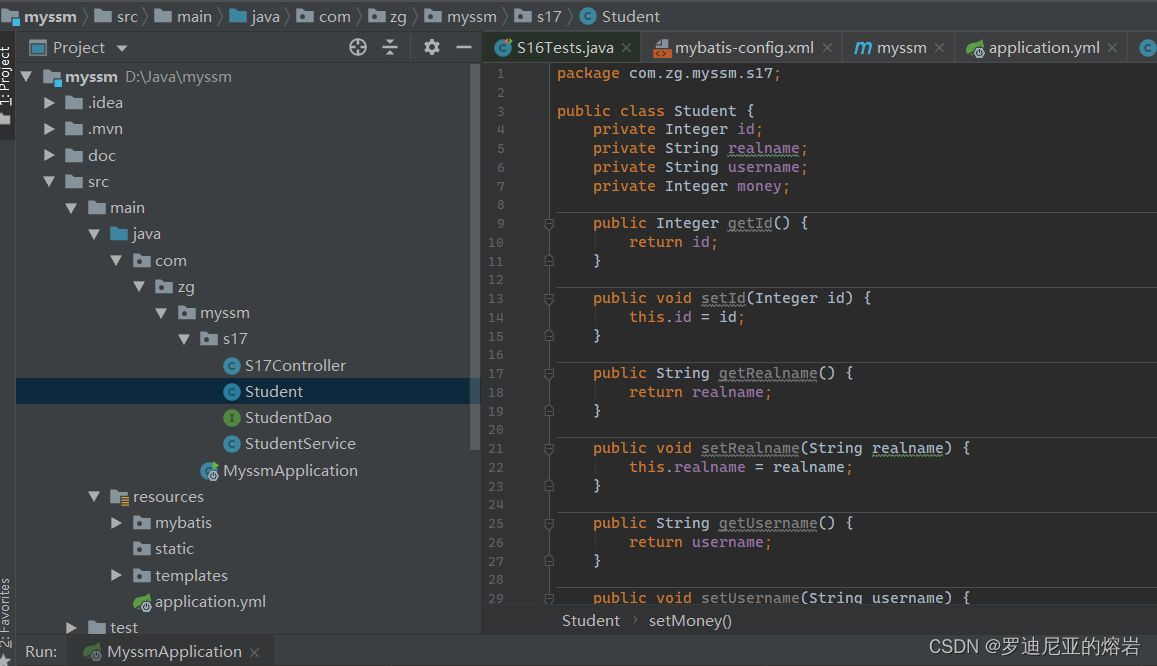
package com.zg.myssm.s17;

public class Student {
    private Integer id;
    private String realname;
    private String username;
    private Integer money;

    public Integer getId() {
        return id;
    }

    public void setId(Integer id) {
        this.id = id;
    }

    public String getRealname() {
        return realname;
    }

    public void setRealname(String realname) {
        this.realname = realname;
    }

    public String getUsername() {
        return username;
    }

    public void setUsername(String username) {
        this.username = username;
    }

    public Integer getMoney() {
        return money;
    }

    public void setMoney(Integer money) {
        this.money = money;
    }
}
package com.zg.myssm.s17;

import org.apache.ibatis.annotations.Mapper;

import java.util.List;

@Mapper
public interface StudentDao {

    public String getCurDate();

    public List<Student> getStudents();

}
package com.zg.myssm.s17;

import org.springframework.beans.factory.annotation.Autowired;
import org.springframework.stereotype.Service;

import java.util.List;

@Service
public class StudentService {

    @Autowired
    StudentDao studentDao;

    public String getCurDate(){
        return studentDao.getCurDate();
    }

    public List<Student> getStudents(){
        return studentDao.getStudents();
    }

}
package com.zg.myssm.s17;

import org.springframework.beans.factory.annotation.Autowired;
import org.springframework.stereotype.Controller;
import org.springframework.web.bind.annotation.RequestMapping;
import org.springframework.web.servlet.ModelAndView;

import java.util.List;

@Controller
@RequestMapping("s17")
public class S17Controller {

    @Autowired
    private StudentService studentService;

    @RequestMapping("index")
    public ModelAndView index(){
        ModelAndView mv = new ModelAndView("s17");
        List<Student> studentList =  studentService.getStudents();
        mv.addObject("studentList",studentList);
        return mv;
    }
}
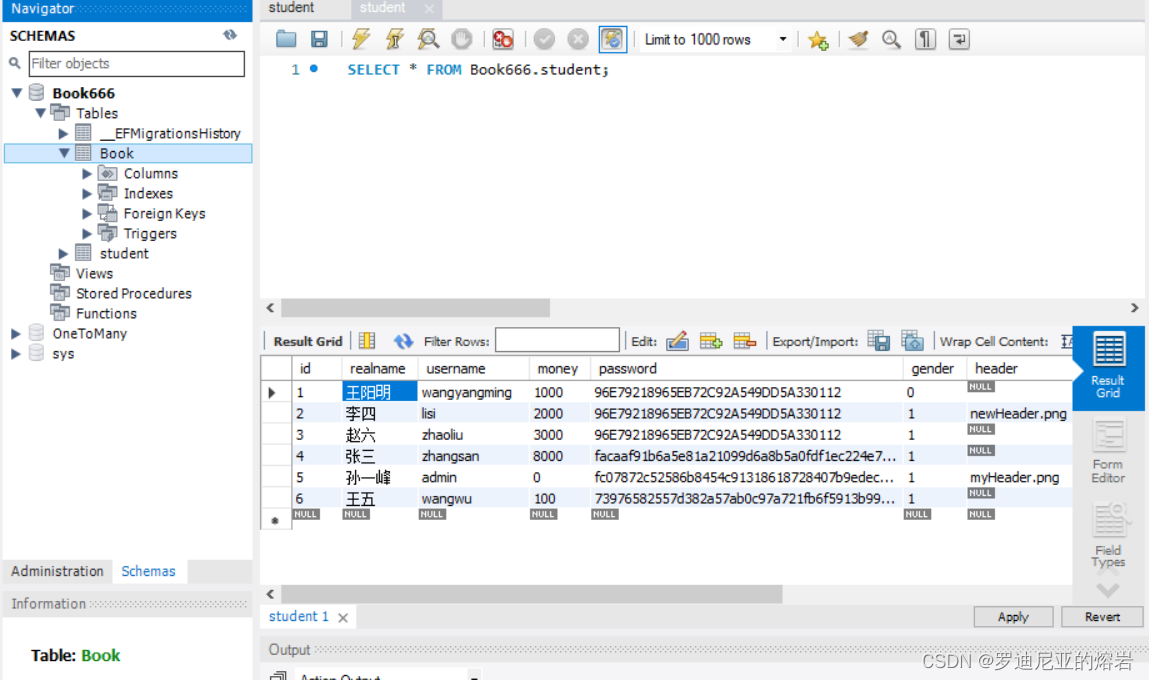
数据库:
建立freemarker模板
<!DOCTYPE html>
<html lang="en">
    <head>
        <meta charset="UTF-8">
        <title>Title</title>
    </head>
    <body>
        <#list studentList as student>
        ${(student.id)!},${(student.realname)!},${(student.username)!} <br/>
        </#list>
    </body>
</html>
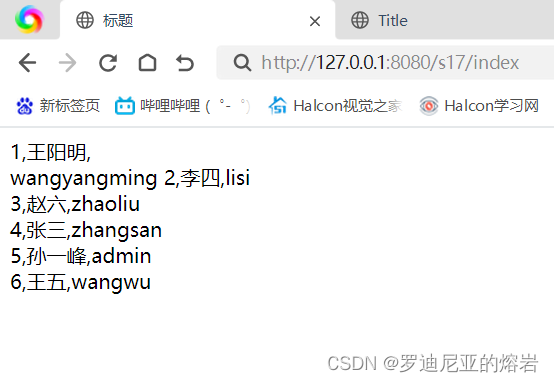
访问:
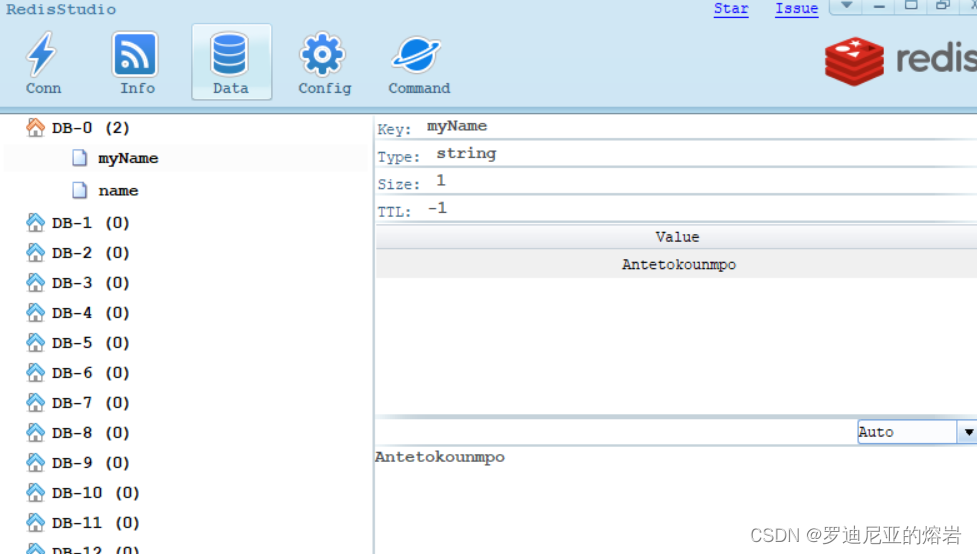
Redis的测试用例
package com.zg.myssm;

import org.junit.jupiter.api.Test;
import org.springframework.beans.factory.annotation.Autowired;
import org.springframework.boot.test.context.SpringBootTest;
import org.springframework.data.redis.core.StringRedisTemplate;

@SpringBootTest
public class S18RedisTest {

    @Autowired
    private StringRedisTemplate redisTemplate;

    @Test
    public void testRedis()
    {
        String userName = redisTemplate.opsForValue().get("name");
        System.out.println("userName = "+ userName);

        redisTemplate.opsForValue().set("myName","Antetokounmpo");
    }
}





 扫一扫
扫一扫


 1万+
1万+

 被折叠的 条评论
为什么被折叠?
被折叠的 条评论
为什么被折叠?
 到【灌水乐园】发言





