


 本文探讨了在Android应用中,如何使用Lifecycle.repeatOnLifecycle和Flow.flowWithLifecycle API来避免资源浪费,尤其是在UI流收集时。通过理解这些问题和解决方案,开发者可以确保流在后台不会过度工作,提高性能并减少数据泄漏。
原文:https://medium.com/androiddevelopers/a-safer-way-to-collect-flows-from-android-uis-23080b1f8bda
在 Android 应用程序中,Kotlin 流通常从 UI 层收集以在屏幕上显示数据更新。但是,您希望收集这些流,以确保在视图转到后台时不会做多余的工作、浪费资源(CPU 和内存)或泄漏数据。
在本文中,您将了解 Lifecycle.repeatOnLifecycle, 和 Flow.flowWithLifecycle API 如何保护您免于浪费资源,以及为什么它们是用于 UI 层中的流收集的良好默认设置。
资源浪费
建议从你的应用层次中的较低层暴露 Flow<T> API 而不管流量生产者实现细节。但是,您也应该安全地收集它们。
由通道支持或使用带有缓冲区(例如 buffer、conflate、flowOn 或 shareIn)的运算符的冷流不能安全地使用某些现有 API(例如 CoroutineScope.launch、Flow<T>.launchIn 或 LifecycleCoroutineScope.launchWhenX)来收集 ,除非你在 Activity 进入后台时手动取消启动协程的 Job。 这些 API 将保持底层流生产者处于活跃状态,同时在后台将元素发送到缓冲区中,从而浪费资源。
注意:冷流是一种在新订阅者收集时按需执行生产者代码块的流。
例如,考虑这个使用 callbackFlow 发出位置更新的流:
// Implementation of a cold flow backed by a Channel that sends Location updates
fun FusedLocationProviderClient.locationFlow() = callbackFlow<Location> {
    val callback = object : LocationCallback() {
        override fun onLocationResult(result: LocationResult?) {
            result ?: return
            try { offer(result.lastLocation) } catch(e: Exception) {}
        }
    }
    requestLocationUpdates(createLocationRequest(), callback, Looper.getMainLooper())
        .addOnFailureListener { e ->
            close(e) // in case of exception, close the Flow
        }
    // clean up when Flow collection ends
    awaitClose {
        removeLocationUpdates(callback)
    }
}
注意:在内部,callbackFlow 使用 channel,它在概念上与阻塞队列非常类似,并且默认容量为 64 个元素。
使用上述任何 API 从 UI 层收集此流,即使视图未在 UI 中显示它们,也会保持流发射位置数据!请参阅下面的示例:
class LocationActivity : AppCompatActivity() {
    override fun onCreate(savedInstanceState: Bundle?) {
        super.onCreate(savedInstanceState)

        // Collects from the flow when the View is at least STARTED and
        // SUSPENDS the collection when the lifecycle is STOPPED.
        // Collecting the flow cancels when the View is DESTROYED.
        lifecycleScope.launchWhenStarted {
            locationProvider.locationFlow().collect {
                // New location! Update the map
            }
        }
        // Same issue with:
        // - lifecycleScope.launch { /* Collect from locationFlow() here */ }
        // - locationProvider.locationFlow().onEach { /* ... */ }.launchIn(lifecycleScope)
    }
}
lifecycleScope.launchWhenStarted 挂起协程的执行。新位置数据不会被处理,但 callbackFlow 生产者仍然会继续发送位置数据。使用 lifecycleScope.launch 或 launchIn API 甚至更加危险,因为即使在后台,视图也会不断消耗位置数据!这可能会使您的应用程序崩溃。
要解决使用这些 API 的问题,您需要在视图转到后台时手动取消收集以取消 callbackFlow 并避免位置提供程序发出元素并浪费资源。例如,您可以执行以下操作:
转载请说明出处:https://blog.youkuaiyun.com/hegan2010/article/details/121330646
class LocationActivity : AppCompatActivity() {

    // Coroutine listening for Locations
    private var locationUpdatesJob: Job? = null

    override fun onStart() {
        super.onStart()
        locationUpdatesJob = lifecycleScope.launch {
            locationProvider.locationFlow().collect {
                // New location! Update the map
            }
        }
    }

    override fun onStop() {
        // Stop collecting when the View goes to the background
        locationUpdatesJob?.cancel()
        super.onStop()
    }
}
这是一个很好的解决方案,但这是样板,朋友们!如果 Android 开发人员有一个普遍的真理,那就是我们绝对讨厌编写样板代码。不必编写样板代码的最大好处之一是代码越少,出错的机会就越少!
Lifecycle.repeatOnLifecycle
既然我们都在同一层面上并且知道问题出在哪里,是时候想出一个解决方案了。解决方案需要
- 简单
- 友好或易于记忆/理解
- 安全(更重要)!
无论流程实现细节如何,它都应该适用于所有用例。
不用多说,您应该使用的 API Lifecycle.repeatOnLifecycle 可以在 lifecycle-runtime-ktx 库中找到。
注意:这些 API 在 lifecycle:lifecycle-runtime-ktx:2.4.0 库中或更高版本中可用。
看看下面的代码:
class LocationActivity : AppCompatActivity() {
    override fun onCreate(savedInstanceState: Bundle?) {
        super.onCreate(savedInstanceState)

        // Create a new coroutine since repeatOnLifecycle is a suspend function
        lifecycleScope.launch {
            // The block passed to repeatOnLifecycle is executed when the lifecycle
            // is at least STARTED and is cancelled when the lifecycle is STOPPED.
            // It automatically restarts the block when the lifecycle is STARTED again.
            repeatOnLifecycle(Lifecycle.State.STARTED) {
                // Safely collect from locationFlow when the lifecycle is STARTED
                // and stops collection when the lifecycle is STOPPED
                locationProvider.locationFlow().collect {
                    // New location! Update the map
                }
            }
        }
    }
}
repeatOnLifecycle 是一个挂起函数,它以 Lifecycle.State 作为参数,用于在生命周期达到 state 状态时使用传递给它的块来自动创建和启动一个新的协程,并在生命周期低于 state 状态时取消正在执行块的正在进行的协程 。
这避免了任何样板代码,因为在不再需要协程时取消协程的相关代码是由 repeatOnLifecycle 自动完成的。 如您所料,建议在 Activity 的 onCreate 或 Fragment 的 onViewCreated 方法中调用此 API 以避免意外行为。 请参阅以下使用 Fragment 的示例:
class LocationFragment: Fragment() {
    override fun onViewCreated(view: View, savedInstanceState: Bundle?) {
        // ...
        viewLifecycleOwner.lifecycleScope.launch {
            viewLifecycleOwner.repeatOnLifecycle(Lifecycle.State.STARTED) {
                locationProvider.locationFlow().collect {
                    // New location! Update the map
                }
            }
        }
    }
}
重要提示:Fragment 应始终使用 viewLifecycleOwner 来触发 UI 更新。 但是,有时可能没有视图的 DialogFragments 并非如此。 对于 DialogFragments,您可以使用 lifecycleOwner。
注意:这些 API 在 lifecycle:lifecycle-runtime-ktx:2.4.0 库中或更高版本中可用。
底层原理!
当生命周期移入和移出目标 state 状态时,repeatOnLifecycle 挂起调用协程和在新协程中重新启动块,并在生命周期销毁时恢复调用协程。 最后一点非常重要:调用 repeatOnLifecycle 的协程在生命周期被销毁之前不会恢复执行。
class LocationActivity : AppCompatActivity() {
    override fun onCreate(savedInstanceState: Bundle?) {
        super.onCreate(savedInstanceState)

        // Create a coroutine
        lifecycleScope.launch {
            repeatOnLifecycle(Lifecycle.State.RESUMED) {
                // Repeat when the lifecycle is RESUMED, cancel when PAUSED
            }

            // `lifecycle` is DESTROYED when the coroutine resumes. repeatOnLifecycle
            // suspends the execution of the coroutine until the lifecycle is DESTROYED.
        }
    }
}
可视图
回到开头,直接从以 lifecycleScope.launch 启动的协程收集 locationFlow 是危险的,因为即使 View 在后台,收集也会继续发生。
repeatOnLifecycle 可防止您浪费资源和应用程序崩溃,因为它会在生命周期移入和移出目标状态时停止并重新启动流收集。
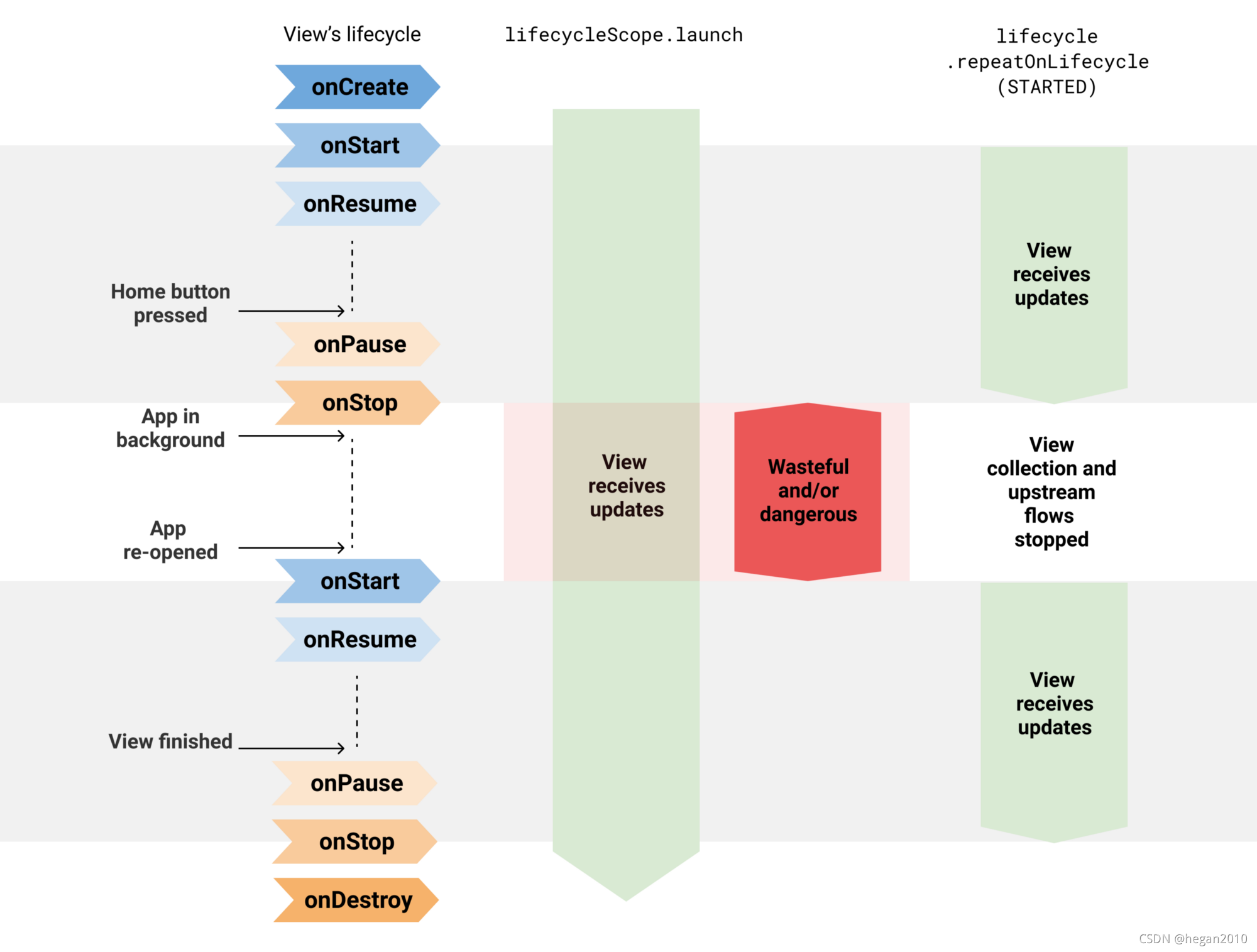
使用和不使用 repeatOnLifecycle API 的区别
Flow.flowWithLifecycle
当您只有一个流要收集时,您也可以使用 Flow.flowWithLifecycle 运算符。此 API 在底层使用repeatOnLifecycle API,并在 Lifecycle 进入和离开目标状态时发出元素和取消底层生产者。
class LocationActivity : AppCompatActivity() {
    override fun onCreate(savedInstanceState: Bundle?) {
        super.onCreate(savedInstanceState)

        // Listen to one flow in a lifecycle-aware manner using flowWithLifecycle
        lifecycleScope.launch {
            locationProvider.locationFlow()
                .flowWithLifecycle(lifecycle, Lifecycle.State.STARTED)
                .collect {
                    // New location! Update the map
                }
        }

        // Listen to multiple flows
        lifecycleScope.launch {
            repeatOnLifecycle(Lifecycle.State.STARTED) {
                // As collect is a suspend function, if you want to collect
                // multiple flows in parallel, you need to do so in
                // different coroutines
                launch {
                    flow1.collect { /* Do something */ }
                }

                launch {
                    flow2.collect { /* Do something */ }
                }
            }
        }
    }
}
注意:此 API 名称以 Flow.flowOn(CoroutineContext) 运算符为先例,因为 Flow.flowWithLifecycle 更改了用于收集上游流的 CoroutineContext,同时不影响下游。 此外,类似于 flowOn,Flow.flowWithLifecycle 添加了一个缓冲区,以防消费者跟不上生产者。 这是因为它的实现使用了 callbackFlow。
配置底层生产者
即使您使用这些 API,也要注意可能浪费资源的热流,即使它们没有被任何人收集! 它们有一些有效的用例,但请记住这一点并在需要时记录下来。 让底层流生产者在后台处于活跃状态,即使浪费资源,对某些用例也是有益的:您可以立即获得可用的新数据,而不是赶上并暂时显示陈旧数据。 根据用例,决定生产者是否需要始终处于活跃状态。
MutableStateFlow 和 MutableSharedFlow API 暴露了一个 subscriptionCount 字段,您可以使用该字段在 subscriptionCount 为零时停止底层生产者。 默认情况下,只要持有流实例的对象在内存中,它们就会使生产者保持活跃状态。 但是,有一些有效的用例,例如,使用 StateFlow 从 ViewModel 向 UI 暴露的 UiState。这是正确的! 此用例要求 ViewModel 始终向 View 提供最新的 UI 状态。
同样, Flow.stateIn 和 Flow.shareIn 运算符可以为此配置共享启动策略(kotlinx.coroutines.flow/SharingStarted)。 WhileSubscribed() 将在没有活跃观察者时停止底层生产者! 相反,只要他们使用的 CoroutineScope 处于活跃状态,Eagerly 或 Lazily 就会使底层生产者保持活跃状态。
注意:本文中显示的 API 是从 UI 收集流的良好默认设置,无论流实现细节如何,都应使用。 这些 API 做他们需要做的事情:如果 UI 在屏幕上不可见,则停止收集。 它是否应该始终处于活跃状态取决于流实现。
Jetpack Compose 中的安全流集合
Flow.collectAsState 函数在 Compose 中用于从 composables 收集流并将值表示为 State<T> 以便能够更新 Compose UI。 即使当宿主 Activity 或 Fragment 在后台时 Compose 没有重构 UI,流生产者仍然处于活跃状态并且可能会浪费资源。 Compose 可能会遇到与 View 系统相同的问题。
在 Compose 中收集流时,请使用 Flow.flowWithLifecycle 运算符,如下所示:
@Composable
fun LocationScreen(locationFlow: Flow<Flow>) {

    val lifecycleOwner = LocalLifecycleOwner.current
    val locationFlowLifecycleAware = remember(locationFlow, lifecycleOwner) {
        locationFlow.flowWithLifecycle(lifecycleOwner.lifecycle, Lifecycle.State.STARTED)
    }

    val location by locationFlowLifecycleAware.collectAsState()

    // Current location, do something with it
请注意,您需要记住以 locationFlow 和 lifecycleOwner 作为键的生命周期的流,以始终使用相同的流,除非其中一个键发生更改。
在 Compose 中,副作用必须在受控环境中执行。 为此,使用 LaunchedEffect 创建一个遵循 composable 生命周期的协程。 在其块中,如果您需要在宿主生命周期处于某个状态时重新启动代码块,您可以调用 Lifecycle.repeatOnLifecycle 挂起函数。
与 LiveData 的比较
您可能已经注意到这个 API 的行为与 LiveData 类似,这是真的! LiveData 知道 Lifecycle,它的重启行为使其非常适合从 UI 观察数据流。 Lifecycle.repeatOnLifecycle 和 Flow.flowWithLifecycle API 也是如此!
使用这些 API 收集流是纯 Kotlin 应用程序中 LiveData 的自然替代品。 如果您使用这些 API 进行流收集,LiveData 不会比协程和流提供任何好处。 更重要的是,流更加灵活,因为它们可以从任何 Dispatcher 收集,并且可以由所有运算符提供支持。 与 LiveData 不同,LiveData 的可用运算符有限,并且始终从 UI 线程观察其值。
Data Binding 中的 StateFlow 支持
另一方面,您可能使用 LiveData 的原因之一是 Data Binding 支持它。 那么,StateFlow 也是如此! 有关 Data Binding 中 StateFlow 支持的更多信息,请查看官方文档。
使用 Lifecycle.repeatOnLifecycle 或 Flow.flowWithLifecycle API 从 Android 的 UI 层安全地收集流。





 扫一扫
扫一扫


 16万+
16万+

 被折叠的 条评论
为什么被折叠?
被折叠的 条评论
为什么被折叠?
 到【灌水乐园】发言





