






 本文详细介绍如何在SpringBoot项目中整合Redis,包括使用RedisTemplate替代Jedis的优势,以及具体的代码实现和配置步骤。
之前项目中用到redis缓存,这个在互联网企业中非常常用,这边就建立一个工程基于springboot,数据库用的是mysql连接方式采用的是jpa(也可以是mybits),缓存用的是redis。
Springboot整合Redis有两种方式,分别是Jedis和RedisTemplate,这两者有何区别?
Jedis是Redis官方推荐的面向Java的操作Redis的客户端,而RedisTemplate是SpringDataRedis中对JedisApi的高度封装。其实在Springboot的官网上我们也能看到,官方现在推荐的是SpringDataRedis形式,相对于Jedis来说可以方便地更换Redis的Java客户端,其比Jedis多了自动管理连接池的特性,方便与其他Spring框架进行搭配使用如:SpringCache。
在这之前我在低版本的Springboot项目中一直使用Jedis操作Redis,但是我也意识到这种做法已经过时了,所以在升级了Springboot版本后特地在此篇中详细梳理一下,以后项目都会使用这个版本的整合方案,不再使用Jedis方式,不过我还是会再写一篇使用Jedis操作Redis的文章,因为从中能很清楚的看到其基本的工作方式,对Redis连接池的手动管理都能更清晰地体现出来。
工程源码github地址:源码地址
我这边现在自己mysql中建立一个数据库test_data,建立表user_info;表结构:
CREATE TABLE `user_info` (
  `id` varchar(20) NOT NULL,
  `name` varchar(200) DEFAULT NULL,
  `age` varchar(20) DEFAULT NULL,
  PRIMARY KEY (`id`)
) ENGINE=InnoDB DEFAULT CHARSET=utf8 ROW_FORMAT=DYNAMIC
然后使用idea建立spring boot工程,加入redis依赖,mysql依赖,jpa依赖,我这边最终使用的pom.xml是:
<?xml version="1.0" encoding="UTF-8"?>
<project xmlns="http://maven.apache.org/POM/4.0.0" xmlns:xsi="http://www.w3.org/2001/XMLSchema-instance"
         xsi:schemaLocation="http://maven.apache.org/POM/4.0.0 http://maven.apache.org/xsd/maven-4.0.0.xsd">
    <modelVersion>4.0.0</modelVersion>
    <parent>
        <groupId>org.springframework.boot</groupId>
        <artifactId>spring-boot-starter-parent</artifactId>
        <version>2.1.3.RELEASE</version>
        <relativePath/> <!-- lookup parent from repository -->
    </parent>
    <groupId>com.test</groupId>
    <artifactId>redis</artifactId>
    <version>0.0.1-SNAPSHOT</version>
    <name>redis</name>
    <description>Demo project for Spring Boot</description>

    <properties>
        <java.version>1.8</java.version>
    </properties>

    <dependencies>
        <dependency>
            <groupId>org.springframework.boot</groupId>
            <artifactId>spring-boot-starter-data-jpa</artifactId>
        </dependency>
        <dependency>
            <groupId>org.springframework.boot</groupId>
            <artifactId>spring-boot-starter-data-redis</artifactId>
        </dependency>
        <dependency>
            <groupId>org.springframework.boot</groupId>
            <artifactId>spring-boot-starter-web</artifactId>
        </dependency>

        <dependency>
            <groupId>mysql</groupId>
            <artifactId>mysql-connector-java</artifactId>
            <scope>runtime</scope>
        </dependency>
        <dependency>
            <groupId>org.springframework.boot</groupId>
            <artifactId>spring-boot-starter-test</artifactId>
            <scope>test</scope>
        </dependency>
        <dependency>
            <groupId>commons-io</groupId>
            <artifactId>commons-io</artifactId>
            <version>2.5</version>
        </dependency>

        <dependency>
            <groupId>org.apache.httpcomponents</groupId>
            <artifactId>httpclient</artifactId>
        </dependency>

        <dependency>
            <groupId>org.apache.httpcomponents</groupId>
            <artifactId>httpmime</artifactId>
        </dependency>


        <dependency>
            <groupId>org.apache.poi</groupId>
            <artifactId>poi</artifactId>
            <version>3.13</version>
        </dependency>
        <dependency>
            <groupId>org.apache.poi</groupId>
            <artifactId>poi-ooxml</artifactId>
            <version>3.13</version>
        </dependency>
        <dependency>
            <groupId>org.apache.poi</groupId>
            <artifactId>ooxml-schemas</artifactId>
            <version>1.1</version>
        </dependency>
        <dependency>
            <groupId>com.google.code.gson</groupId>
            <artifactId>gson</artifactId>
            <version>2.8.4</version>
        </dependency>
        <dependency>
            <groupId>com.alibaba</groupId>
            <artifactId>druid</artifactId>
            <version>1.1.9</version>
        </dependency>
        <dependency>
            <groupId>junit</groupId>
            <artifactId>junit</artifactId>
        </dependency>
        <dependency>
            <groupId>junit</groupId>
            <artifactId>junit</artifactId>
            <scope>test</scope>
        </dependency>
    </dependencies>

    <build>
        <plugins>
            <plugin>
                <groupId>org.springframework.boot</groupId>
                <artifactId>spring-boot-maven-plugin</artifactId>
            </plugin>
        </plugins>
    </build>

</project>
这边配置本地redis 端口号在7006 ,ip是127.0.0.1
对应的配置文件是:
#服务启动端口
server :
  port :  9980

#数据库配置
spring:
  datasource:
    name: test
    url: jdbc:mysql://127.0.0.1:3306/test_data?useUnicode=true&characterEncoding=utf-8&autoReconnect=true&allowMultiQueries=true&useSSL=false&zeroDateTimeBehavior=convertToNull
    username: root
    password: 123456
    driver-class-name: com.mysql.jdbc.Driver
    filters: stat
    maxActive: 20
    initialSize: 1
    maxWait: 60000
    minIdle: 1
    timeBetweenEvictionRunsMillis: 60000
    minEvictableIdleTimeMillis: 300000
    validationQuery: select 'x'
    testWhileIdle: true
    testOnBorrow: false
    testOnReturn: false
    poolPreparedStatements: true
    maxOpenPreparedStatements: 20
  redis:
    host: 127.0.0.1
    #redis密码,没有密码的可以用~表示
    password: ~
    port: 7006
#    pool:
#      max-active: 100
#      max-idle: 10
#      max-wait: 100000

# 日志输出
#logging:
#  file: ~/boot.log
#  level:
#    com.ibatis:DEBUG
#    root:DEBUG

task:
  cron:0 0/5 * * * ?
几个比较核心的类有,redisService对外接口,UserInfo,UserInfoService,RedisServiceImpl对redis操作主要依赖于redisTemplate这个工具类。
具体代码如下:
redisService:
package com.test.redis.service;

import java.util.List;

public interface RedisService {

     boolean set(String key, String value) throws Exception;

     String get(String key) throws Exception;

     boolean expire(String key, long expire) throws Exception;

     <T> boolean setList(String key, List<T> list) throws Exception;

     <T> List<T> getList(String key, Class<T> clz) throws Exception;

     long lpush(String key, Object obj) throws Exception;

     long rpush(String key, Object obj) throws Exception;

     void hmset(String key, Object obj) throws Exception;

     <T> T hget(String key, Class<T> clz) throws Exception;


     void del(String key) throws Exception;

     <T> List<T>  hmGetAll(String key, Class<T> clz) throws Exception;

     String lpop(String key) throws Exception;
}
RedisServiceImpl
package com.test.redis.service.impl;

import com.test.redis.service.RedisService;
import com.test.redis.utils.JsonUtil;
import org.springframework.beans.factory.annotation.Autowired;
import org.springframework.dao.DataAccessException;
import org.springframework.data.redis.connection.RedisConnection;
import org.springframework.data.redis.core.RedisCallback;
import org.springframework.data.redis.core.RedisTemplate;
import org.springframework.data.redis.serializer.RedisSerializer;
import org.springframework.stereotype.Service;
import org.springframework.transaction.annotation.Transactional;
import org.springframework.util.Assert;

import java.util.*;
import java.util.concurrent.TimeUnit;

/**
 * Created by xiaour.github.com on 2017/11/8.
 */
@Service("redisService")
@Transactional(rollbackFor = Exception.class)
public class RedisServiceImpl implements RedisService {

    private static int seconds=3600*24;

    @Autowired
    private RedisTemplate<String, ?> redisTemplate;

    @Override
    public boolean set(final String key, final String value) throws Exception {
        Assert.hasText(key,"Key is not empty.");
        boolean result = redisTemplate.execute(new RedisCallback<Boolean>() {
            @Override
            public Boolean doInRedis(RedisConnection connection) throws DataAccessException {
                RedisSerializer<String> serializer = redisTemplate.getStringSerializer();
                connection.set(serializer.serialize(key), serializer.serialize(value));
                return true;
            }
        });
        return result;
    }

    public String get(final String key) throws Exception {
        Assert.hasText(key,"Key is not empty.");
        String result = redisTemplate.execute(new RedisCallback<String>() {
            @Override
            public String doInRedis(RedisConnection connection) throws DataAccessException {
                RedisSerializer<String> serializer = redisTemplate.getStringSerializer();
                byte[] value =  connection.get(serializer.serialize(key));
                return serializer.deserialize(value);
            }
        });
        return result;
    }

    public void del(final String key) throws Exception {
        Assert.hasText(key,"Key is not empty.");

        redisTemplate.execute(new RedisCallback<Long>() {
            @Override
            public Long doInRedis(RedisConnection conn) throws DataAccessException {
                RedisSerializer<String> serializer = redisTemplate.getStringSerializer();
                return conn.del(serializer.serialize(key));
            }
        });
    }


    @Override
    public boolean expire(final String key, long expire) {
        return redisTemplate.expire(key, expire, TimeUnit.SECONDS);
    }

    @Override
    public <T> boolean setList(String key, List<T> list) throws Exception {
        Assert.hasText(key,"Key is not empty.");

        String value = JsonUtil.getJsonString(list);
        return set(key,value);
    }

    @Override
    public <T> List<T> getList(String key,Class<T> clz)  throws Exception{

        Assert.hasText(key,"Key is not empty.");

        String json = get(key);
        if(json!=null){
            List<T> list = JsonUtil.readJson2Array(json,clz);
            return list;
        }
        return null;
    }

    @Override
    public long lpush(final String key, Object obj)throws Exception {
        Assert.hasText(key,"Key is not empty.");

        final String value = JsonUtil.getJsonString(obj);
        long result = redisTemplate.execute(new RedisCallback<Long>() {
            @Override
            public Long doInRedis(RedisConnection connection) throws DataAccessException {
                RedisSerializer<String> serializer = redisTemplate.getStringSerializer();
                long count = connection.lPush(serializer.serialize(key), serializer.serialize(value));
                return count;
            }
        });
        return result;
    }

    @Override
    public long rpush(final String key, Object obj) throws Exception{
        Assert.hasText(key,"Key is not empty.");

        final String value = JsonUtil.getJsonString(obj);
        long result = redisTemplate.execute(new RedisCallback<Long>() {
            @Override
            public Long doInRedis(RedisConnection connection) throws DataAccessException {
                RedisSerializer<String> serializer = redisTemplate.getStringSerializer();
                long count = connection.rPush(serializer.serialize(key), serializer.serialize(value));
                return count;
            }
        });
        return result;
    }

    @Override
    public void hmset(String key, Object obj)  throws Exception{
        Assert.hasText(key,"Key is not empty.");

        Map<byte[], byte[]> data=JsonUtil.readJsonByteMap(JsonUtil.getJsonString(obj));
        redisTemplate.execute(new RedisCallback<String>() {
            @Override
            public String doInRedis(RedisConnection connection) throws DataAccessException {
                RedisSerializer<String> serializer = redisTemplate.getStringSerializer();
                connection.hMSet(serializer.serialize(key),data);
                return "";
            }
        });
    }

    @Override
    public <T> T hget(String key, Class<T> clz)  throws Exception{
        Assert.hasText(key,"Key is not empty.");

        return redisTemplate.execute(new RedisCallback<T>() {

            @Override
            public T doInRedis(RedisConnection connection) throws DataAccessException {
                RedisSerializer<String> serializer = redisTemplate.getStringSerializer();

                Map<String,Object> result;

                Map<byte[],byte[]> data=connection.hGetAll(serializer.serialize(key));
                result= new HashMap<>();
                for (Map.Entry<byte[], byte[]> entry: data.entrySet()) {
                    result.put(serializer.deserialize(entry.getKey()),serializer.deserialize(entry.getValue()));
                }

                return JsonUtil.json2Obj(JsonUtil.getJsonString(result),clz);
            }
        });
    }

    @Override
    public<T> List<T>  hmGetAll(String key,Class<T> clz) throws Exception{
        Assert.hasText(key,"Key is not empty.");

        List<Map<String,Object>> dataList= new ArrayList<>();
        return redisTemplate.execute(new RedisCallback<List<T>>() {
            @Override
            public List<T> doInRedis(RedisConnection connection) throws DataAccessException {
                RedisSerializer<String> serializer = redisTemplate.getStringSerializer();

                Set<String> keysSet=redisTemplate.keys(key);
                Map<byte[],byte[]> data;
                Map<String,Object> result;
                for(String newKey:keysSet) {
                    data=connection.hGetAll(serializer.serialize(newKey));
                    result= new HashMap<>();
                    for (Map.Entry<byte[], byte[]> entry: data.entrySet()) {
                        result.put(serializer.deserialize(entry.getKey()),serializer.deserialize(entry.getValue()));
                    }
                    dataList.add(result);
                }
                return JsonUtil.readJson2Array(JsonUtil.getJsonString(dataList),clz);
            }
        });
    }

    @Override
    public String lpop(final String key) throws Exception{
        Assert.hasText(key,"Key is not empty.");

        String result = redisTemplate.execute(new RedisCallback<String>() {
            @Override
            public String doInRedis(RedisConnection connection) throws DataAccessException {
                RedisSerializer<String> serializer = redisTemplate.getStringSerializer();
                byte[] res =  connection.lPop(serializer.serialize(key));
                return serializer.deserialize(res);
            }
        });
        return result;
    }
}
UserInfo
package com.test.redis.domain;


import javax.persistence.Entity;
import javax.persistence.*;
import java.io.Serializable;

@Entity
@Table(name="UserInfo")
public class UserInfo {

    @Id
    private String id;

    private String name;

    private int age;

    public UserInfo() {
    }

    public UserInfo(String id, String name, int age) {
        this.id = id;
        this.name = name;
        this.age = age;
    }

    public String getId() {
        return id;
    }

    public void setId(String id) {
        this.id = id;
    }

    public String getName() {
        return name;
    }

    public void setName(String name) {
        this.name = name;
    }

    public int getAge() {
        return age;
    }

    public void setAge(int age) {
        this.age = age;
    }


}
UserInfoRepository:
package com.test.redis.domain;

import org.springframework.data.repository.PagingAndSortingRepository;

public interface UserInfoRepository extends PagingAndSortingRepository<UserInfo, String> {
    public UserInfo findOneById(String id);

}
对外测试接口
package com.test.redis.web;


import com.test.redis.domain.UserInfo;
import com.test.redis.service.UserInfoService;
import com.test.redis.service.RedisService;
import com.test.redis.utils.JsonUtil;
import org.springframework.beans.factory.annotation.Autowired;
import org.springframework.web.bind.annotation.*;

import java.util.Arrays;
import java.util.HashMap;
import java.util.Map;

@RestController
@RequestMapping(value="/test")
public class TestController {

	@Autowired
	private RedisService redisService;

	@Autowired
    private UserInfoService userInfoService;

    @RequestMapping(value="/index")
    public String index(){
        return "hello world";
    }

    /**
     * 向redis存储值
     * @param key
     * @param value
     * @return
     * @throws Exception
     */
    @RequestMapping("/set/{key}/{value}")
    public String set(@PathVariable("key")String key, @PathVariable("value")String value) throws Exception{

        redisService.set(key, value);
        return "success";
    }

    /**
     * 获取redis中的值
     * @param key
     * @return
     */
    @RequestMapping("/get/{key}")
    public String get(@PathVariable("key")String key){
        try {
			return redisService.get(key);
		} catch (Exception e) {
			e.printStackTrace();
		}
		return "";
    }

    /**
     * 获取数据库中的用户
     * @param id
     * @return
     */
    @RequestMapping("/getUser/{id}")
    public String getUser(@PathVariable String id){
        try {
        	UserInfo user= userInfoService.findById(id);
			return JsonUtil.getJsonString(user);
		} catch (Exception e) {
			e.printStackTrace();
		}
		return "";
    }

    @GetMapping( "/getdata")
    public String getData()
    {
        System.out.println("info has been gotten");
        return "info got";
    }


    @RequestMapping(value = "/saveUser/{name}/{age}" , method = RequestMethod.POST)
    public String putUser(@PathVariable String name,@PathVariable int age){
        try {
            userInfoService.saveData(name,age);
        } catch (Exception e) {
            e.printStackTrace();
        }
        return "";
    }


    public static void main(String[] args) {
        Map<String,Object> keyMap= new HashMap<>();
        keyMap.put("id","编号");
        keyMap.put("name","名称");

        String [] cnCloumn={"编号","名称"};

        System.out.println(Arrays.asList(convertMap(keyMap, cnCloumn)));

    }

    public static String[] convertMap(Map<String,Object> keyMap,String [] dataList){

        for(int i=0;i<dataList.length;i++){

            for(Map.Entry<String, Object> m:keyMap.entrySet()){
                if(m.getValue().equals(dataList[i])){
                   dataList[i]=m.getKey();
                }
            }
        }

        return dataList;
    }


    public static String getName(String name,String add){
        return null;
    }

    public static void testGetClassName() {
        // 方法1:通过SecurityManager的保护方法getClassContext()
        String clazzName = new SecurityManager() {
            public String getClassName() {
                return getClassContext()[1].getName();
            }
        }.getClassName();
        System.out.println(clazzName);
        // 方法2:通过Throwable的方法getStackTrace()
        String clazzName2 = new Throwable().getStackTrace()[1].getClassName();
        System.out.println(clazzName2);
        // 方法3:通过分析匿名类名称()
        String clazzName3 = new Object() {
            public String getClassName() {
                String clazzName = this.getClass().getName();
                return clazzName.substring(0, clazzName.lastIndexOf('$'));
            }
        }.getClassName();
        System.out.println(clazzName3);
        //方法4:通过Thread的方法getStackTrace()
        String clazzName4 = Thread.currentThread().getStackTrace()[2].getClassName();
        System.out.println(clazzName4);
    }


}
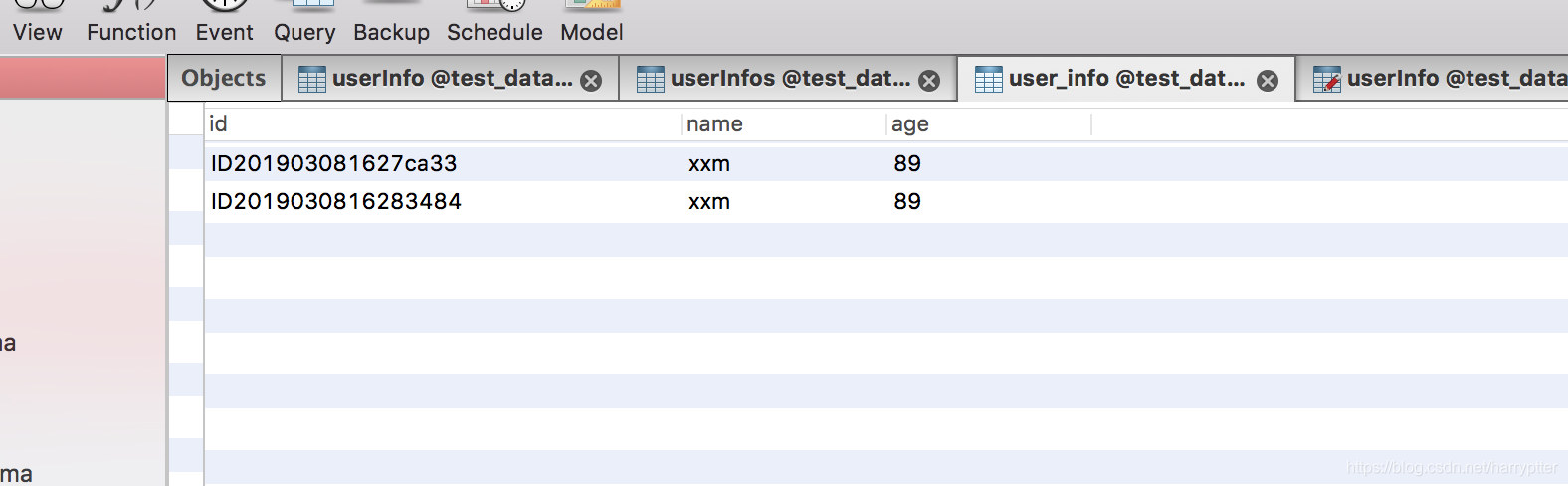
测试在mysql中存储数据:postman或者浏览器中输入: localhost:9980/test/saveUser/xxm/89
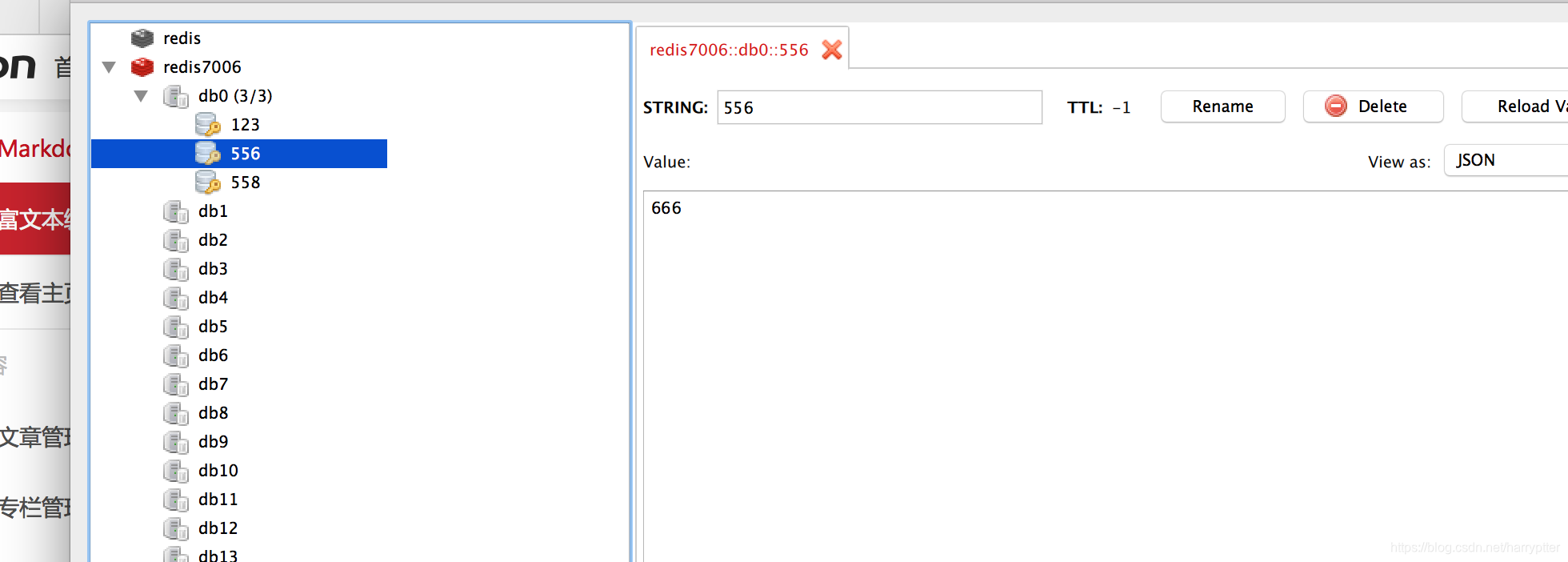
测试在redis中存储数据:postman或者浏览器中输入:http://localhost:9980/test/set/558/666
我这边通过rdm工具可以看到redis中数据:





 扫一扫
扫一扫


 1239
1239

 被折叠的 条评论
为什么被折叠?
被折叠的 条评论
为什么被折叠?
 到【灌水乐园】发言





