



 本文介绍了一种使用Selenium WebDriver抓取网页表格特定列数据并与预期结果进行比对的方法。通过实例演示了如何利用Java编程语言实现这一过程,包括初始化WebDriver、定位元素、获取文本及比较数据等关键步骤。
1、实战问题
Web界面存在1个table,想通过抓取table指定列的数据跟预期结果做对比。table如下:
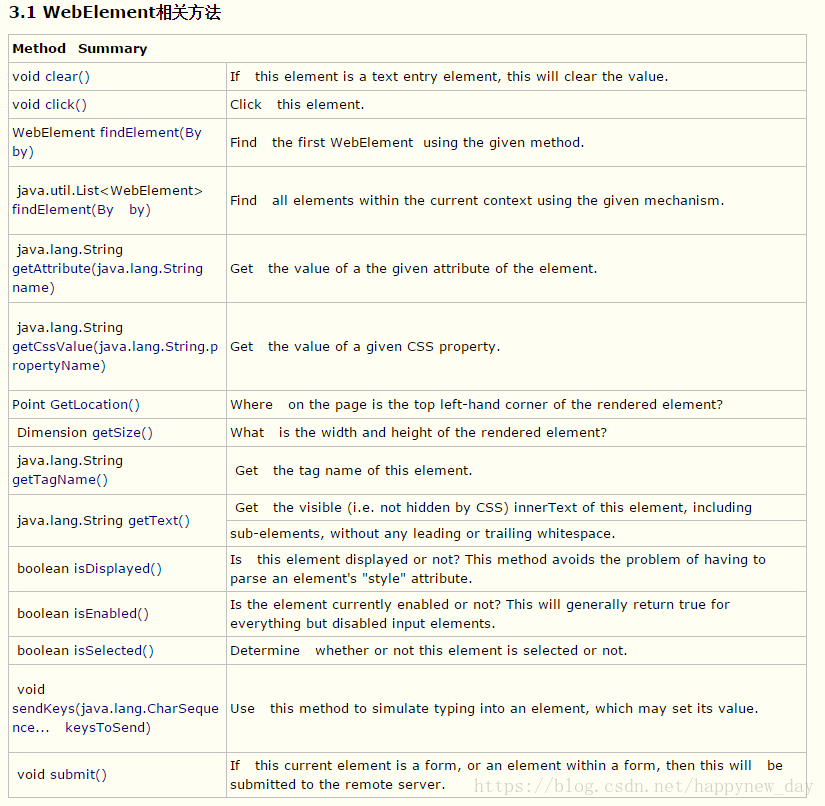
2、解决思路
1)利用driver.findElements抓取对象,存放在List<String> list_element中
2)将预期结果存放在List<String> list中
3)对2个List<String>进行比对
3、源代码
package com.example.tests;

import java.util.ArrayList;
import java.util.List;
import java.util.concurrent.TimeUnit;

import org.junit.After;
import org.junit.Assert;
import org.junit.Before;
import org.junit.Test;
import org.openqa.selenium.By;
import org.openqa.selenium.WebDriver;
import org.openqa.selenium.WebElement;
import org.openqa.selenium.chrome.ChromeDriver;

public class TestCompare {

	WebDriver driver;

	@Before
	public void setUp() throws Exception {

		System.setProperty("webdriver.chrome.driver", ".\\Tools\\chromedriver.exe");

		driver = new ChromeDriver();

		driver.manage().timeouts().implicitlyWait(5, TimeUnit.SECONDS);

		driver.manage().window().maximize();

	}

	@Test
	public void test() {

		driver.get("http://www.cnblogs.com/Ming8006/p/5727542.html#top");

		List<WebElement> element_all = driver
				.findElements(By.xpath("//*[@id='cnblogs_post_body']//table//tbody//td[@class='xl66']"));

		List<String> list = new ArrayList<String>();
		List<String> list_element = new ArrayList<String>();
		list.add("If   this element is a text entry element, this will clear the value.");
		list.add("Click   this element.");
		list.add("Find   the first WebElement  using the given method.");
		list.add("Find   all elements within the current context using the given mechanism.");
		list.add("Get   the value of a the given attribute of the element.");
		list.add("Get   the value of a given CSS property.");
		list.add("Where   on the page is the top left-hand corner of the rendered element?");
		list.add("What   is the width and height of the rendered element?");
		list.add(" Get   the tag name of this element.");
		list.add(
				"Is   this element displayed or not? This method avoids the problem of having to   parse an element's \"style\" attribute.");
		list.add(
				"Is the element currently enabled or not? This will generally return true for everything but disabled input elements.");
		list.add("Determine   whether or not this element is selected or not.");
		list.add("Use   this method to simulate typing into an element, which may set its value.");
		list.add(
				"If   this current element is a form, or an element within a form, then this will   be submitted to the remote server.");

		for (int i = 0; i < element_all.size(); i++) {
			list_element.add(element_all.get(i).getText());
			System.out.println(list.get(i));
			System.out.println(list_element.get(i));
		}

		System.out.println(list_element.equals(list));
		Assert.assertEquals(list_element, list);

	}

	@After
	public void tearDown() throws Exception {

		driver.quit();

	}

}
4、总结
采用最笨的方法实现,学习知识点:WebDriver.findElements(By.xpath)、List<String>、Assert.assertEquals。
--------------------------
若有不同的方法思路,欢迎留言交流





 扫一扫
扫一扫


 1329
1329

 被折叠的 条评论
为什么被折叠?
被折叠的 条评论
为什么被折叠?
 到【灌水乐园】发言





