第12节: kaptcha图片验证码引入

  • Kaptcha 框架介绍 谷歌开源的一个可高度配置的实用验证码生成工具
    • 验证码的字体/大小/颜色
    • 验证码内容的范围(数字,字母,中文汉字!)
    • 验证码图片的大小,边框,边框粗细,边框颜色
    • 验证码的干扰线
    • 验证码的样式(鱼眼样式、3D、普通模糊)

项目引入

  • 聚合工程依赖添加(使用国内baomidou二次封装的springboot整合starter)
<!--kaptcha依赖包-->
            <dependency>
                <groupId>com.baomidou</groupId>
                <artifactId>kaptcha-spring-boot-starter</artifactId>
                <version>1.1.0</version>
            </dependency>

  • shop-user-service模块中引入
        <dependency>
            <groupId>com.baomidou</groupId>
            <artifactId>kaptcha-spring-boot-starter</artifactId>
            <version>1.1.0</version>
        </dependency>

  • 配置类编写
@Configuration
public class CaptchaConfig {

    /**
     * 验证码配置
     * Kaptcha配置类名
     * 
     * @return
     */
    @Bean
    @Qualifier("captchaProducer")
    public DefaultKaptcha kaptcha() {
        DefaultKaptcha kaptcha = new DefaultKaptcha();
        Properties properties = new Properties();
//    properties.setProperty(Constants.KAPTCHA_BORDER, "yes");
//    properties.setProperty(Constants.KAPTCHA_BORDER_COLOR, "220,220,220");
//    //properties.setProperty(Constants.KAPTCHA_TEXTPRODUCER_FONT_COLOR, "38,29,12");
//    properties.setProperty(Constants.KAPTCHA_IMAGE_WIDTH, "147");
//    properties.setProperty(Constants.KAPTCHA_IMAGE_HEIGHT, "34");
//    properties.setProperty(Constants.KAPTCHA_TEXTPRODUCER_FONT_SIZE, "25");
//    //properties.setProperty(Constants.KAPTCHA_SESSION_KEY, "code");
        //验证码个数
        properties.setProperty(Constants.KAPTCHA_TEXTPRODUCER_CHAR_LENGTH, "4");
//    properties.setProperty(Constants.KAPTCHA_TEXTPRODUCER_FONT_NAMES, "Courier");
        //字体间隔
        properties.setProperty(Constants.KAPTCHA_TEXTPRODUCER_CHAR_SPACE,"8");
        //干扰线颜色
//    properties.setProperty(Constants.KAPTCHA_NOISE_COLOR, "white");
        //干扰实现类
        properties.setProperty(Constants.KAPTCHA_NOISE_IMPL, "com.google.code.kaptcha.impl.NoNoise");
        //图片样式
        properties.setProperty(Constants.KAPTCHA_OBSCURIFICATOR_IMPL, "com.google.code.kaptcha.impl.WaterRipple");
        //文字来源
        properties.setProperty(Constants.KAPTCHA_TEXTPRODUCER_CHAR_STRING, "0123456789");
        Config config = new Config(properties);
        kaptcha.setConfig(config);
        return kaptcha;
    }
}

controller层开发

@Api(tags = "通知模块")
@RestController
@RequestMapping("/api/user/v1")
@Slf4j
public class NotifyController {

    @Autowired
    private Producer captchaProducer;

    @RequestMapping("captcha")
    public void getCaptcha(HttpServletRequest request, HttpServletResponse response) {

        String captchaText = captchaProducer.createText();
        log.info("图像验证码:{}",captchaText);
        captchaProducer.createImage(captchaText);

        BufferedImage image = captchaProducer.createImage(captchaText);
        ServletOutputStream outputStream = null;
        try {
           outputStream= response.getOutputStream();
            ImageIO.write(image, "jpg", outputStream);
        } catch (IOException e) {
            throw new RuntimeException(e);
        }
    }
}

单元测试
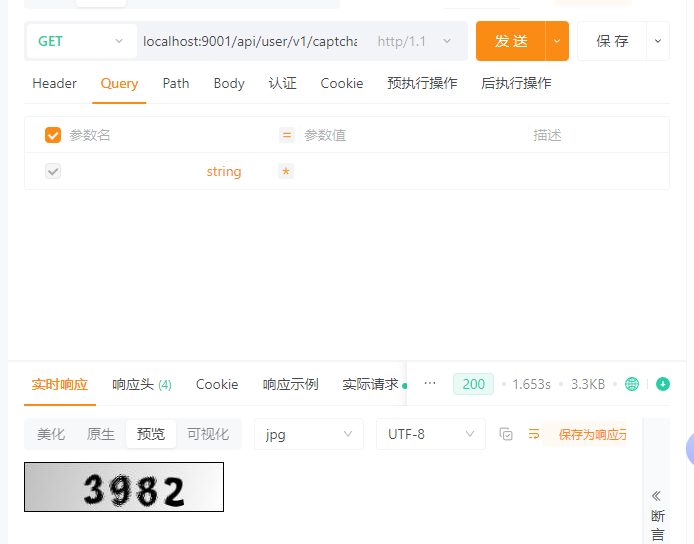
2025-08-06 10:29:46.024  INFO 25780 --- [nio-9001-exec-5] c.guslegend.controller.NotifyController  : 图像验证码:3982
group = 'io.tubo' version = '1.0' // 所有子项目的通用配置 subprojects { apply plugin: 'java' version = '1.0' // JVM 版本号要求 sourceCompatibility = 1.8 targetCompatibility = 1.8 // java编译的时候缺省采用UTF-8 [compileJava, compileTestJava, javadoc]*.options*.encoding = 'UTF-8' System.setProperty("env.ANDROID_HOME", "") // 代码仓库 repositories { maven { url = 'http://jaspersoft.jfrog.io/jaspersoft/third-party-ce-artifacts/'; allowInsecureProtocol= true } maven { url = 'http://maven.aliyun.com/nexus/content/groups/public/'; allowInsecureProtocol= true} maven { url = 'http://mvnrepository.com/'; allowInsecureProtocol= true} maven { url = 'http://mvn.gt.igexin.com/nexus/content/repositories/releases/'; allowInsecureProtocol= true} } configurations.all { // 所有需要忽略的包定义在此 exclude group: 'commons-httpclient' exclude group: 'commons-logging' // exclude group: 'org.springframework.boot', module: 'spring-boot-starter-tomcat' exclude group: 'org.springframework.boot', module: 'spring-boot-starter-logging' resolutionStrategy { force 'org.slf4j:slf4j-api:1.7.36' } } task allDeps(type: DependencyReportTask) { } dependencies { def springBootVersion = "2.7.18" implementation 'javax.servlet:javax.servlet-api:4.0.1' implementation 'mysql:mysql-connector-java:8.0.31' // implementation 'com.microsoft.sqlserver:mssql-jdbc:10.2.0.jre8' // implementation 'com.oracle.database.jdbc:ojdbc8:19.7.0.0' // implementation 'com.oracle.database.nls:orai18n:19.7.0.0' implementation ("org.springframework.boot:spring-boot-starter:$springBootVersion") implementation ("org.springframework.boot:spring-boot-starter-web:$springBootVersion") implementation ("org.springframework.boot:spring-boot-starter-data-jpa:$springBootVersion") implementation ("org.springframework.boot:spring-boot-starter-log4j2:$springBootVersion") // swagger implementation "io.springfox:springfox-swagger2:3.0.0" implementation "io.springfox:springfox-swagger-ui:3.0.0" compileOnly 'org.projectlombok:lombok:1.18.8' annotationProcessor 'org.projectlombok:lombok:1.18.8' implementation 'org.bouncycastle:bcprov-jdk18on:1.78.1' implementation 'org.bouncycastle:bcpkix-jdk18on:1.78.1' implementation 'com.github.ben-manes.caffeine:caffeine:2.9.2' // 图片验证码生成工具kaptcha implementation "com.github.axet:kaptcha:0.0.9" // 包扫描工具 implementation 'io.github.classgraph:classgraph:4.8.154' // google的二维码库 implementation('com.google.zxing:core:3.5.1') implementation('com.google.zxing:javase:3.5.1') // https://mvnrepository.com/artifact/com.google.guava/guava implementation 'com.google.guava:guava:31.1-jre' // apache的http客户端库 implementation('org.apache.httpcomponents:httpcore:4.4.16') implementation('org.apache.httpcomponents:httpmime:4.5.14') implementation('org.apache.httpcomponents:httpclient:4.5.14') implementation 'org.apache.commons:commons-lang3:3.12.0' implementation 'org.apache.commons:commons-collections4:4.4' implementation 'commons-net:commons-net:3.9.0' implementation 'commons-fileupload:commons-fileupload:1.4' testImplementation group: 'junit', name: 'junit', version: '4.12' // jackson库,用来处理json implementation 'com.fasterxml.jackson.core:jackson-annotations:2.13.4' implementation 'com.fasterxml.jackson.core:jackson-databind:2.13.4' implementation 'com.fasterxml.jackson.core:jackson-core:2.13.4' implementation 'com.fasterxml.jackson.dataformat:jackson-dataformat-xml:2.13.4' // slf4j + log4j2 //implementation 'org.apache.logging.log4j:log4j-core:2.19.0' //implementation 'org.apache.logging.log4j:log4j-api:2.19.0' //implementation 'org.apache.logging.log4j:log4j-slf4j-impl:2.19.0' //implementation 'org.slf4j:slf4j-api:1.7.36' //hutool implementation 'cn.hutool:hutool-all:5.7.20' implementation ('com.deepoove:poi-tl:1.12.2'){ exclude group: 'org.apache.logging.log4j', module: 'log4j-api' } } } 这段代码是什么意思,以及怎么改进
最新发布
11-27
评论
成就一亿技术人!
拼手气红包6.0元
还能输入1000个字符
 
红包 添加红包
表情包 插入表情
 条评论被折叠 查看
添加红包

请填写红包祝福语或标题

红包个数最小为10个

红包金额最低5元

当前余额3.43前往充值 >
需支付:10.00
成就一亿技术人!
领取后你会自动成为博主和红包主的粉丝 规则
hope_wisdom
发出的红包
实付
使用余额支付
点击重新获取
扫码支付
钱包余额 0

抵扣说明:

1.余额是钱包充值的虚拟货币,按照1:1的比例进行支付金额的抵扣。
2.余额无法直接购买下载,可以购买VIP、付费专栏及课程。

余额充值




