


大二下新人java实训实现计算器,其中的代码是参考csdn博主的,注释多是为了方便自己理解,结尾会放文章链接。
以下是代码的一些分析:
细节讲解:
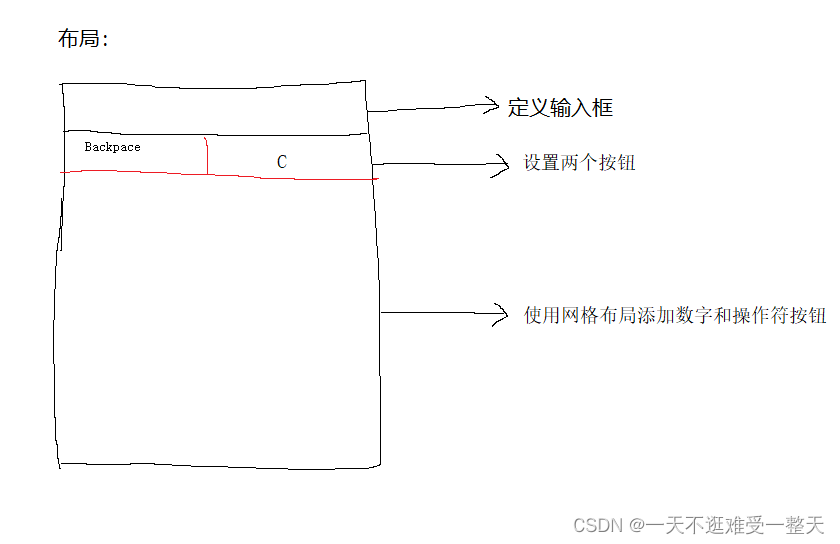
1 单独添加两个按钮Backspace和C:
setLayout()布局管理器,需要精确指定各个组建的大小和位置,就需要用到空布局。
2 网格布局设置按钮:(网上学习的)
使用字符串数组( text2[ ] )存储需要的计算器按钮面板
自定义按钮类数组,定义了一共text2.length个按钮,先用getContentPane()方法获取JFrame的内容面板,然后通过for循环添加按钮,以及实现监听功能。
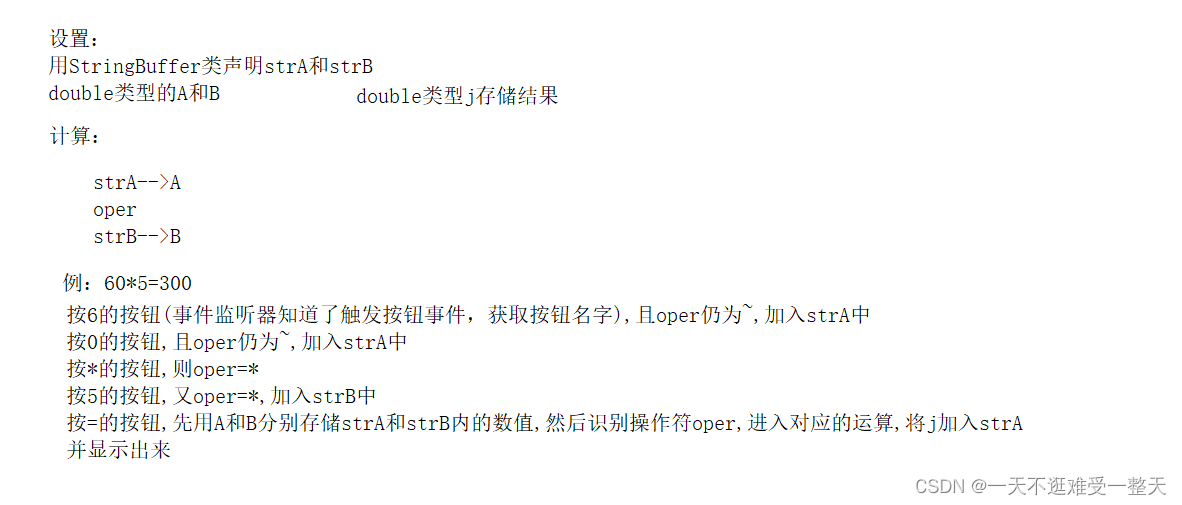
3 act获取被点击按钮的名称,a获取act的第一个字符,如果是数字且操作符为默认值则继续往strA中添加字符;若操作符不为默认值,则往strB中添加字符
对于绝对值、开平方和回退功能,我用al获取它们的第三个字符,分别是-、r和c,如果识别到al等于对应字符,则进入相应功能。
方法:
append()可以把括号内任意类型的数据添加到字符串缓冲区里面,并返回字符串缓冲区本身。
.valueOf()用于将基本数据类型转换为String类型,补充一点,type不能为null,不然会报空指针异常。
charAt(索引):返回对应索引的字符。
将StringBuffer类型的strA转换为string,再转换为double类型。
不足:
不能进行三个数及以上的运算:2+2+2
代码:
import javax.swing.*;
import java.awt.*;
import java.awt.event.ActionEvent;
import java.awt.event.ActionListener;
import java.awt.event.WindowAdapter;
import java.awt.event.WindowEvent;

//异常处理
class munber_Exception  extends Exception{
    String e;
    public munber_Exception(){}
    public munber_Exception(String message){
        this.e=message;
    }
    public String shows(){
        return e;
    }
}

class cal extends JFrame implements ActionListener {
    private JPanel  panel;//定义面板对象名
    private JTextArea show;//文本区(JTextArea),它是窗体中一个放置文本的区域。
    StringBuffer strA;
    StringBuffer strB;


    char oper ='~';
    double  A;
    double  B;
    private String[] text2 =
            {"7", "8", "9", "/",
                    "4", "5", "6", "*",
                    "1", "2", "3", "-",
                    "0","+/-", ".", "+",
                    "1/x", "%","sqrt", "=",};//用字符串数组存储计算器按钮面板
    private JButton[] munButton = new JButton[text2.length];//自定义按钮类数组

    public cal() {
        panel = new JPanel();
        show = new JTextArea();

        strB=new StringBuffer();
        strA=new StringBuffer();
    }


    public void init() {//初始化
        //getContentPane()方法和add()方法添加组件(输入框和B、C按钮),再使用网格布局添加余下的数字和操作符按钮
        this.setTitle("计算器");
        this.setBounds(900, 300, 316, 288);
        this.setResizable(false);

        show.setBounds(0,0,300,30);
        this.getContentPane().add(show);//用getContentPane()方法获得JFrame的内容面板,用add()方法在面板添加输入框


        //单独设置两个按钮 Backpace和C
        JButton btnCe_1 = new JButton("Backspace");//setLayout()布局管理器,需要精确指定各个组建的大小和位置,就需要用到空布局。
        this.getContentPane().setLayout(null);//设置为null布局(空布局)。
        // 在已经接入监听器的类中使用addActionListener事件监听器监听按钮
        btnCe_1.addActionListener(this);


        btnCe_1.setBounds(0, 30, 150, 30);//设置组件在容器中的大小和位置
        this.getContentPane().add(btnCe_1);


        JButton btnCe = new JButton("C");
        btnCe.addActionListener(this);
        btnCe.setBounds(150, 30, 150, 30);
        this.getContentPane().add(btnCe);


        panel.setBounds(0, 60, 300, 190);
        panel.setLayout(new GridLayout(5, 4));
        this.getContentPane().add(panel);//用getContentPane()方法获得JFrame的内容面板,用add()方法在面板添加
        //添加按键
        for (int i = 0; i < text2.length; i++) {
            munButton[i] = new JButton(text2[i] + " ");
            panel.add(munButton[i]);
        }


        for (int i = 0; i < munButton.length; i++)//实现每个按钮的监听功能
            munButton[i].addActionListener(this);

        this.setVisible(true);


        this.addWindowListener(new WindowAdapter() {
            public void windowClosing(WindowEvent e) {
                System.exit(0);
            }
        });

    }

    //乘法运算
    public double division(double x,double y)throws munber_Exception {
        if (y == 0) {
            throw new munber_Exception("除数不能为0!");
        } else {
            return x / y;
        }

    }

    //事件触发ActionEvent事件后,监视器调用接口中的方法actionPerformed(ActionEvent e)对发生的事件做出处理
    /*因为每按一次按钮就进入处理功能一次,所以a一直在接收按钮传递过来的值.strA和strB用来存储值
    如果a仍为~:则为strA继续添加字符;若不为~,则为strB添加字符;
    若识别到按钮输入的是操作符,则把操作符赋值给a
    若识别到按了=号,则开始运算,strA->A,strB->B使用方法获取A B值,j存储结果
     */
    public void actionPerformed(ActionEvent e) {
        try {
            String act=e.getActionCommand();//定义一个字符串获取按钮(组件)名称
            char a=act.charAt(0);//使用一个字符a获取act调用charAt(索引)后返回的值         charAt(索引):返回对应索引的字符
            char al='P';
            if(act.length()>2){
                al=act.charAt(2);//取巧:获取第三个值 c - r x
            }
            if (a=='0' ||a=='1' || a=='2' ||a=='3'||a=='4'||a=='5'||a=='6'||a=='7'||a=='8'||a=='9'||a=='.')
            {
                if(oper=='~'){
                    strA.append(a);//.append()可以把括号内任意类型的数据添加到字符串缓冲区里面,并返回字符串缓冲区本身
                    // .valueOf()用于将基本数据类型转换为String类型,补充一点,type不能为null,不然会报空指针异常
                    show.setText(String.valueOf(strA));
                }

                else {
                    strB.append(a);
                    show.setText(String.valueOf(strA)+oper+String.valueOf(strB));


                }

            }
            else if(a=='r'){
                if(strA.length()>0){
                    double Al=Double.parseDouble(String.valueOf(strA));//将StringBuffer类型的strA转换为string,再转换为double类型
                    strA.delete(0,strA.length());
                    strA.append(Math.sqrt(Al));
                    show.setText(String.valueOf(strA));
                }
            }
            else if(a=='x'){
                if(strA.length()>0){
                    double xl=Double.parseDouble(String.valueOf(strA));
                    if(xl==0){show.setText("除数不能为0");}
                    else{
                        strA.delete(0,strA.length());
                        strA.append(1/xl);
                        show.setText(String.valueOf(strA));}
                }
            }
            else if(al=='-')
            {
                if(oper=='~'){
                if(strA.length()>0){
                    double lA=Double.parseDouble(String.valueOf(strA));
                    if(lA>0){
                        strA.insert(0,'-');
                        show.setText(String.valueOf(strA));
                    }
                    else if(lA==0){show.setText(String.valueOf(strA));}
                    else{strA.deleteCharAt(0);show.setText(String.valueOf(strA));}
                    }
                }
                else{
                    double lB=Double.parseDouble(String.valueOf(strB));
                    if(strB.length()>0){
                        if(lB>0){
                            strB.insert(0,'-');
                            show.setText(String.valueOf(strA)+oper+String.valueOf(strB));
                        }
                        else if(lB==0){show.setText(String.valueOf(strB));}
                        else{strB.deleteCharAt(0);show.setText(String.valueOf(strA)+oper+String.valueOf(strB));}
                    }
                }
            }
            else if(a=='+'||a=='-'||a=='/'||a=='*'||a=='%'){
                oper=a;
                show.setText(String.valueOf(strA)+oper);

            }
            else if(a=='='){
                A = Double.parseDouble(String.valueOf(strA));//.parseDouble(“字符串”)将字符串值转换为double值。
                B = Double.parseDouble(String.valueOf(strB));
                double j;
                int len1=strA.length();
                int len2=strB.length();

                if (oper == '+') {
                    j = A + B;
                    show.setText(Double.toString(j));

                    strA.delete(0,len1);
                    strB.delete(0,len2);
                    strA.append(j);

                } else if (oper == '-') {
                    j = A - B;
                    show.setText(Double.toString(j));//toString(Double值)方法用于获取Double value / object的字符串值

                    strA.delete(0,len1);
                    strB.delete(0,len2);
                    strA.append(j);//支持了运算后再运算
                } else if (oper == '*') {
                    j = A * B;
                    show.setText(Double.toString(j));

                    strA.delete(0,len1);
                    strB.delete(0,len2);
                    strA.append(j);
                } else if (oper == '/') {
                    try{
                        j= division(A, B);show.setText(Double.toString(j));}
                    catch(munber_Exception u){
                        show.setText(u.shows());
                    }
                }
                else if (oper == '%') {
                    j = A % B;
                    show.setText(Double.toString(j));

                    strA.delete(0,len1);
                    strB.delete(0,len2);
                    strA.append(j);

                }
            }
            else if (a=='C') {
                show.setText(" ");
                oper='~';
                int len1=strA.length();
                int len2=strB.length();

                strA.delete(0,len1);
                strB.delete(0,len2);

            }
            else if (a=='c'){
                if(oper!='~'){
                    if(strB.length()>0){//有操作符有B
                        strB.delete(strB.length()-1,strB.length());
                        show.setText(String.valueOf(strA)+oper+String.valueOf(strB));
                    }
                }
                if(oper=='~'){
                    if(strA.length()>0){
                        strA.delete(strA.length()-1,strA.length());
                        show.setText(String.valueOf(strA));
                    }
                }
            }
        }catch(ArithmeticException m){
            System.out.println("除数不能为0");
        }

    }
}

public class Calculator {
    //调用
    public static void main(String[] args) {
        cal Calculator1 = new cal();
        Calculator1.init();
    }
}布局学习:(20条消息) 简单计算器(Java实训)_Chien d'amis的博客-优快云博客
实现学习:(20条消息) java 简易计算器_︱Harvey︱的博客-优快云博客(其实就是两个版本的结合体)





 扫一扫
扫一扫


 747
747


 到【灌水乐园】发言



