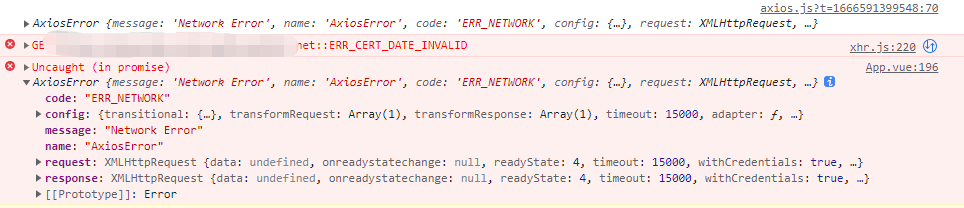
Failed to load resource: the server responded with a status of 500 (Internal Server Error)/dev-api/login:1
Failed to load resource: the server responded with a status of 500 (Internal Server Error)我f12前后端都看出了这个问题'use strict'
const path = require('path')
function resolve(dir) {
return path.join(__dirname, dir)
}
const CompressionPlugin = require('compression-webpack-plugin')
const name = process.env.VUE_APP_TITLE || '知识汇博客论坛' // 网页标题
const port = process.env.port || process.env.npm_config_port || 80 // 端口
// vue.config.js 配置说明
//官方vue.config.js 参考文档 https://cli.vuejs.org/zh/config/#css-loaderoptions
// 这里只列一部分,具体配置参考文档
module.exports = {
// 部署生产环境和开发环境下的URL。
// 默认情况下,Vue CLI 会假设你的应用是被部署在一个域名的根路径上
// 例如 https://www.ruoyi.vip/。如果应用被部署在一个子路径上,你就需要用这个选项指定这个子路径。例如,如果你的应用被部署在 https://www.ruoyi.vip/admin/,则设置 baseUrl 为 /admin/。
publicPath: process.env.NODE_ENV === "production" ? "/" : "/",
// 在npm run build 或 yarn build 时 ,生成文件的目录名称(要和baseUrl的生产环境路径一致)(默认dist)
outputDir: 'dist',
// 用于放置生成的静态资源 (js、css、img、fonts) 的;(项目打包之后,静态资源会放在这个文件夹下)
assetsDir: 'static',
// 是否开启eslint保存检测,有效值:ture | false | 'error'
lintOnSave: process.env.NODE_ENV === 'development',
// 如果你不需要生产环境的 source map,可以将其设置为 false 以加速生产环境构建。
productionSourceMap: false,
// webpack-dev-server 相关配置
devServer: {
host: '0.0.0.0',
port: port,
open: true,
proxy: {
// detail: https://cli.vuejs.org/config/#devserver-proxy
[process.env.VUE_APP_BASE_API]: {
target: `http://localhost:8080`,
changeOrigin: true,
pathRewrite: {
['^' + process.env.VUE_APP_BASE_API]: ''
}
},
"/queryProjectForTest": {
target: `http://10.48.254.155/default/`,
changeOrigin: true,
pathRewrite: {
'^/queryProjectForTest': ''
}
}
},
disableHostCheck: true
},
css: {
loaderOptions: {
sass: {
sassOptions: { outputStyle: "expanded" }
}
}
},
configureWebpack: {
name: name,
resolve: {
alias: {
'@': resolve('src')
}
},
plugins: [
// http://doc.ruoyi.vip/ruoyi-vue/other/faq.html#使用gzip解压缩静态文件
new CompressionPlugin({
cache: false, // 不启用文件缓存
test: /\.(js|css|html|jpe?g|png|gif|svg)?$/i, // 压缩文件格式
filename: '[path][base].gz[query]',
algorithm: 'gzip', // 使用gzip压缩
// threshold: 10240, // 只有大于 10kb 的文件会被压缩
minRatio: 0.8, // 压缩比例,小于 80% 的文件不会被压缩
deleteOriginalAssets: false // 压缩后删除原文件
})
],
},
chainWebpack(config) {
config.plugins.delete('preload') // TODO: need test
config.plugins.delete('prefetch') // TODO: need test
// set svg-sprite-loader
config.module
.rule('svg')
.exclude.add(resolve('src/assets/icons'))
.end()
config.module
.rule('icons')
.test(/\.svg$/)
.include.add(resolve('src/assets/icons'))
.end()
.use('svg-sprite-loader')
.loader('svg-sprite-loader')
.options({
symbolId: 'icon-[name]'
})
.end()
config.when(process.env.NODE_ENV !== 'development', config => {
config
.plugin('ScriptExtHtmlWebpackPlugin')
.after('html')
.use('script-ext-html-webpack-plugin', [{
// `runtime` must same as runtimeChunk name. default is `runtime`
inline: /runtime\..*\.js$/
}])
.end()
config.optimization.splitChunks({
chunks: 'all',
cacheGroups: {
libs: {
name: 'chunk-libs',
test: /[\\/]node_modules[\\/]/,
priority: 10,
chunks: 'initial' // only package third parties that are initially dependent
},
elementUI: {
name: 'chunk-elementUI', // split elementUI into a single package
test: /[\\/]node_modules[\\/]_?element-ui(.*)/, // in order to adapt to cnpm
priority: 20 // the weight needs to be larger than libs and app or it will be packaged into libs or app
},
commons: {
name: 'chunk-commons',
test: resolve('src/components'), // can customize your rules
minChunks: 3, // minimum common number
priority: 5,
reuseExistingChunk: true
}
}
})
config.optimization.runtimeChunk('single')
})
}
}
看看这个'use strict'
const path = require('path')
function resolve(dir) {
return path.join(__dirname, dir)
}
const CompressionPlugin = require('compression-webpack-plugin')
const name = process.env.VUE_APP_TITLE || '博客论坛系统' // 网页标题
const port = process.env.port || process.env.npm_config_port || 90 // 端口
// vue.config.js 配置说明
//官方vue.config.js 参考文档 https://cli.vuejs.org/zh/config/#css-loaderoptions
// 这里只列一部分,具体配置参考文档
module.exports = {
// 部署生产环境和开发环境下的URL。
// 默认情况下,Vue CLI 会假设你的应用是被部署在一个域名的根路径上
// 例如 https://www.ruoyi.vip/。如果应用被部署在一个子路径上,你就需要用这个选项指定这个子路径。例如,如果你的应用被部署在 https://www.ruoyi.vip/admin/,则设置 baseUrl 为 /admin/。
publicPath: process.env.NODE_ENV === "production" ? "/" : "/",
// 在npm run build 或 yarn build 时 ,生成文件的目录名称(要和baseUrl的生产环境路径一致)(默认dist)
outputDir: 'dist',
// 用于放置生成的静态资源 (js、css、img、fonts) 的;(项目打包之后,静态资源会放在这个文件夹下)
assetsDir: 'static',
// 是否开启eslint保存检测,有效值:ture | false | 'error'
lintOnSave: process.env.NODE_ENV === 'development',
// 如果你不需要生产环境的 source map,可以将其设置为 false 以加速生产环境构建。
productionSourceMap: false,
// webpack-dev-server 相关配置
devServer: {
host: '0.0.0.0',
port: port,
open: true,
proxy: {
// detail: https://cli.vuejs.org/config/#devserver-proxy
[process.env.VUE_APP_BASE_API]: {
target: `http://localhost:8080`,
changeOrigin: true,
pathRewrite: {
['^' + process.env.VUE_APP_BASE_API]: ''
}
},
"/queryProjectForTest": {
target: `http://10.48.254.155/default/`,
changeOrigin: true,
pathRewrite: {
'^/queryProjectForTest': ''
}
}
},
disableHostCheck: true
},
css: {
loaderOptions: {
sass: {
sassOptions: { outputStyle: "expanded" }
}
}
},
configureWebpack: {
name: name,
resolve: {
alias: {
'@': resolve('src')
}
},
plugins: [
// http://doc.ruoyi.vip/ruoyi-vue/other/faq.html#使用gzip解压缩静态文件
new CompressionPlugin({
cache: false, // 不启用文件缓存
test: /\.(js|css|html|jpe?g|png|gif|svg)?$/i, // 压缩文件格式
filename: '[path][base].gz[query]',
algorithm: 'gzip', // 使用gzip压缩
// threshold: 10240, // 只有大于 10kb 的文件会被压缩
minRatio: 0.8, // 压缩比例,小于 80% 的文件不会被压缩
deleteOriginalAssets: false // 压缩后删除原文件
})
],
},
chainWebpack(config) {
config.plugins.delete('preload') // TODO: need test
config.plugins.delete('prefetch') // TODO: need test
// set svg-sprite-loader
config.module
.rule('svg')
.exclude.add(resolve('src/assets/icons'))
.end()
config.module
.rule('icons')
.test(/\.svg$/)
.include.add(resolve('src/assets/icons'))
.end()
.use('svg-sprite-loader')
.loader('svg-sprite-loader')
.options({
symbolId: 'icon-[name]'
})
.end()
config.when(process.env.NODE_ENV !== 'development', config => {
config
.plugin('ScriptExtHtmlWebpackPlugin')
.after('html')
.use('script-ext-html-webpack-plugin', [{
// `runtime` must same as runtimeChunk name. default is `runtime`
inline: /runtime\..*\.js$/
}])
.end()
config.optimization.splitChunks({
chunks: 'all',
cacheGroups: {
libs: {
name: 'chunk-libs',
test: /[\\/]node_modules[\\/]/,
priority: 10,
chunks: 'initial' // only package third parties that are initially dependent
},
elementUI: {
name: 'chunk-elementUI', // split elementUI into a single package
test: /[\\/]node_modules[\\/]_?element-ui(.*)/, // in order to adapt to cnpm
priority: 20 // the weight needs to be larger than libs and app or it will be packaged into libs or app
},
commons: {
name: 'chunk-commons',
test: resolve('src/components'), // can customize your rules
minChunks: 3, // minimum common number
priority: 5,
reuseExistingChunk: true
}
}
})
config.optimization.runtimeChunk('single')
})
}
}
还有这个,以及会不会是数据库的问题DONE Compiled successfully in 14097ms 13:35:08
App running at:
- Local: http://localhost:90/
- Network: http://10.225.73.250:90/
Note that the development build is not optimized.
To create a production build, run npm run build.
(node:14604) [DEP0060] DeprecationWarning: The `util._extend` API is deprecated. Please use Object.assign() instead.
(Use `node --trace-deprecation ...` to show where the warning was created)
Proxy error: Could not proxy request /captchaImage from localhost:90 to http://localhost:8080/.
See https://nodejs.org/api/errors.html#errors_common_system_errors for more information (ECONNREFUSED).
Proxy error: Could not proxy request /login from localhost:90 to http://localhost:8080/.
See https://nodejs.org/api/errors.html#errors_common_system_errors for more information (ECONNREFUSED).
Proxy error: Could not proxy request /login from localhost:90 to http://localhost:8080/.
See https://nodejs.org/api/errors.html#errors_common_system_errors for more information (ECONNREFUSED).
Proxy error: Could not proxy request /login from localhost:90 to http://localhost:8080/.
See https://nodejs.org/api/errors.html#errors_common_system_errors for more information (ECONNREFUSED).这个呢 DONE Compiled successfully in 12082ms 13:37:38
App running at:
- Local: http://localhost:80/
- Network: http://10.225.73.250:80/
Note that the development build is not optimized.
To create a production build, run npm run build.
(node:27848) [DEP0060] DeprecationWarning: The `util._extend` API is deprecated. Please use Object.assign() instead.
(Use `node --trace-deprecation ...` to show where the warning was created)
Proxy error: Could not proxy request /captchaImage from localhost to http://localhost:8080/.
See https://nodejs.org/api/errors.html#errors_common_system_errors for more information (ECONNREFUSED).
Proxy error: Could not proxy request /login from localhost to http://localhost:8080/.
See https://nodejs.org/api/errors.html#errors_common_system_errors for more information (ECONNREFUSED).
Proxy error: Could not proxy request /login from localhost to http://localhost:8080/.
See https://nodejs.org/api/errors.html#errors_common_system_errors for more information (ECONNREFUSED).
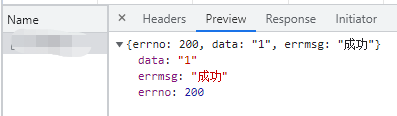
解析一下以上是我遇到的问题的一部分报错情况和一些代码,我在idea上运行的这个项目
最新发布








 扫一扫
扫一扫


 1327
1327

 被折叠的 条评论
为什么被折叠?
被折叠的 条评论
为什么被折叠?
 到【灌水乐园】发言





