


 本文介绍如何使用Word2010编辑并发布博客到不同平台,包括配置BlogEngine.NET、优快云及博客园的具体步骤。通过设置Metaweblog API,可以轻松实现跨平台发布。
Word2010发布博客的测试

 Cnblogs的设置:

要设置:

详细设置这篇文章里有:
使用Word2010直接编辑、发布博客→博客园cnblogs
 Csdn的设置
 BlogEngine.NET的设置
Using the Metaweblog API with BlogEngine.NET
转录一下:
I heard from a few BlogEngine.NET users out there who are starting to take advantage of the power of the Metaweblog API for editing their blog, but I wanted to write something up to show everyone how easy it is to get started with it.
The newest releases of BlogEngine.NET now include RSD (Really Simple Discovery) which allows programs to automatically detect where the metaweblog APIs can be found. This just makes the process of getting started even easier.
I've been using Windows Live Writer (WLW) for posting since finishing the API a few weeks back and it has been a great experience. In order to give you a true start up experience, I decided to download WLW and install it fresh in a Virtual PC I use for testing.
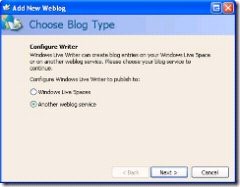
 After installing it and starting it up for the first time, you get this great welcome screen where you are given the opportunity to click Next. Upon doing so you get your first choice of the configuration. It is an easy one, "Do you use Windows Live Spaces or another service?" Of course, BlogEngine.NET is another service, so chose "Other weblog service" and click Next.
Now, you get to the real entry window. You enter the url to your blog, your login and password. Once you click next it will connect to your site, download some site information through the Metaweblog APIs and then come back with a finished dialog box. Click Finish to get started with your first post.
 Once you have gone through the set up you can then use the WLW interface to type up your blog posts in style. It makes handling images, formatting, and basically the whole process a pleasure to work with. It is extremely handy for images as you just add the image to the post, pick a size and WLW will make a small thumbnail image for your post as well as link to the full size image automatically. (You can change this default, but it is a nice time saver.)
There are also a bunch of cool plugins for WLW for inserting all sorts of things into your posts as well as functionality to pull up and edit older posts that need to be cleaned up.
Once you have a blog post typed up, you click Publish from the toolbar and it will upload your blog post and all the images for you automatically.
For those of you who don't have the RSD set up on your site yet or if your tool of choice doesn't auto-detect, you can still take advantage of the Metaweblog API. In the setup, after it asks you for the url of your site, it will come back and ask you how to connect. You want to select "MetaWeblog API" or "Custom Metaweblog API". You will then need to tell it the path to the API which is:
http://www.yourdomain.com/folderpathifneeded/metaweblog.axd
For example, my path is http://www.nyveldt.com/blog/metaweblog.axd. If my blog was in the root of my domain, it would be http://www.nyveldt.com/metaweblog.axd.
You should also be prompted for your username and password as none of the APIs will work without them.
Once you get on to it, it is hard to go back to the standard web entry method.
 其它官方内置的博客提供网设置更方便了
今天测试新增了WordPress.com账号,只可惜访问速度太慢了。
另外,各系统内部对于博客修改的处理是不同的,我观察到blogEngine如果文章改名,图片会换名保存,但换名前的文件并不删除!





 扫一扫
扫一扫


 359
359

 被折叠的 条评论
为什么被折叠?
被折叠的 条评论
为什么被折叠?
 到【灌水乐园】发言





