https://miro.medium.com/max/1400/1*HLGtY3O-RxHbcuZP9zu6Ew.png
Flask Web 开发入门
基础Flask应用
python
复制
下载
from flask import Flask

app = Flask(__name__)

@app.route('/')
def home():
    return "<h1>欢迎来到我的Flask应用!</h1>"

@app.route('/about')
def about():
    return """
    <h1>关于我们</h1>
    <p>这是一个用Python Flask构建的简单网站</p>
    """

if __name__ == '__main__':
    app.run(debug=True)
https://flask.palletsprojects.com/en/2.0.x/_images/flask-logo.png
模板渲染与静态文件
项目结构:
text
复制
下载
myapp/
├── app.py
├── static/
│   └── style.css
└── templates/
    └── index.html
python
复制
下载
# app.py
from flask import Flask, render_template

app = Flask(__name__)

@app.route('/')
def index():
    return render_template('index.html', title='首页')

@app.route('/user/<name>')
def user(name):
    return render_template('user.html', name=name)
html
复制
下载
运行
<!-- templates/index.html -->
<!DOCTYPE html>
<html>
<head>
    <title>{{ title }}</title>
    <link rel="stylesheet" href="{{ url_for('static', filename='style.css') }}">
</head>
<body>
    <h1>Hello, Flask!</h1>
</body>
</html>
数据处理与分析
Pandas 基础
python
复制
下载
import pandas as pd

# 创建DataFrame
data = {
    '姓名': ['张三', '李四', '王五'],
    '年龄': [25, 30, 35],
    '城市': ['北京', '上海', '广州']
}
df = pd.DataFrame(data)

# 基本操作
print(df.head())      # 查看前几行
print(df.describe())  # 统计摘要
print(df['年龄'].mean())  # 计算平均年龄

# 数据筛选
young_people = df[df['年龄'] < 30]
print(young_people)
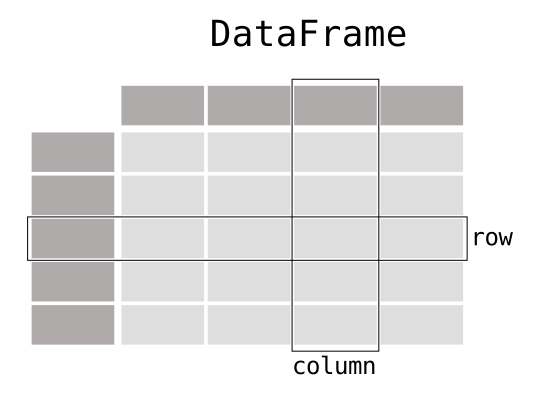
https://pandas.pydata.org/docs/_images/01_table_dataframe.svg
数据可视化
python
复制
下载
import matplotlib.pyplot as plt
import numpy as np

# 创建数据
x = np.linspace(0, 10, 100)
y = np.sin(x)

# 绘制图形
plt.figure(figsize=(8, 4))
plt.plot(x, y, label='sin(x)', color='blue')
plt.title('正弦函数曲线')
plt.xlabel('X轴')
plt.ylabel('Y轴')
plt.legend()
plt.grid(True)
plt.savefig('sin_plot.png')  # 保存图片
plt.show()
https://matplotlib.org/stable/_images/sphx_glr_plot_001.png
数据库交互
SQLite 操作
python
复制
下载
import sqlite3

# 连接数据库
conn = sqlite3.connect('example.db')
cursor = conn.cursor()

# 创建表
cursor.execute('''CREATE TABLE IF NOT EXISTS users
               (id INTEGER PRIMARY KEY AUTOINCREMENT,
                name TEXT NOT NULL,
                age INTEGER)''')

# 插入数据
cursor.execute("INSERT INTO users (name, age) VALUES (?, ?)", ('Alice', 25))
conn.commit()

# 查询数据
cursor.execute("SELECT * FROM users")
for row in cursor.fetchall():
    print(row)

# 关闭连接
conn.close()
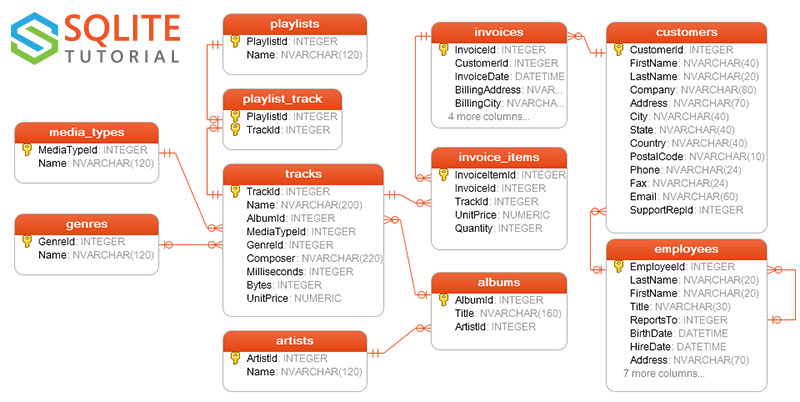
https://www.sqlitetutorial.net/wp-content/uploads/2015/11/sqlite-sample-database-color.jpg
SQLAlchemy ORM
python
复制
下载
from sqlalchemy import create_engine, Column, Integer, String
from sqlalchemy.ext.declarative import declarative_base
from sqlalchemy.orm import sessionmaker

Base = declarative_base()

class User(Base):
    __tablename__ = 'users'

    id = Column(Integer, primary_key=True)
    name = Column(String)
    age = Column(Integer)

    def __repr__(self):
        return f"<User(name='{self.name}', age={self.age})>"

# 创建引擎和会话
engine = create_engine('sqlite:///orm_example.db')
Base.metadata.create_all(engine)
Session = sessionmaker(bind=engine)
session = Session()

# 添加新用户
new_user = User(name='Bob', age=30)
session.add(new_user)
session.commit()

# 查询用户
users = session.query(User).filter(User.age > 25).all()
print(users)
RESTful API 开发
Flask RESTful 服务
python
复制
下载
from flask import Flask, request, jsonify
from flask_restful import Api, Resource

app = Flask(__name__)
api = Api(app)

books = [
    {"id": 1, "title": "Python编程", "author": "John Doe"},
    {"id": 2, "title": "Flask Web开发", "author": "Jane Smith"}
]

class BookList(Resource):
    def get(self):
        return jsonify(books)

    def post(self):
        new_book = request.get_json()
        books.append(new_book)
        return jsonify({"message": "Book added successfully"})

class Book(Resource):
    def get(self, book_id):
        book = next((b for b in books if b["id"] == book_id), None)
        if book:
            return jsonify(book)
        return {"message": "Book not found"}, 404

api.add_resource(BookList, '/books')
api.add_resource(Book, '/books/<int:book_id>')

if __name__ == '__main__':
    app.run(debug=True)
https://www.moesif.com/images/blog/platform/restful-apis/rest-api.png
实战项目:博客系统
项目结构:
text
复制
下载
flask_blog/
├── app.py
├── config.py
├── requirements.txt
├── static/
├── templates/
│   ├── base.html
│   ├── index.html
│   ├── post.html
│   └── auth/
│       ├── login.html
│       └── register.html
└── migrations/
核心代码示例:
python
复制
下载
# app.py
from flask import Flask, render_template, request, redirect, url_for, flash
from flask_sqlalchemy import SQLAlchemy
from flask_login import LoginManager, UserMixin, login_user, logout_user, login_required

app = Flask(__name__)
app.config.from_pyfile('config.py')

db = SQLAlchemy(app)
login_manager = LoginManager(app)

class User(UserMixin, db.Model):
    id = db.Column(db.Integer, primary_key=True)
    username = db.Column(db.String(80), unique=True, nullable=False)
    password = db.Column(db.String(120), nullable=False)

class Post(db.Model):
    id = db.Column(db.Integer, primary_key=True)
    title = db.Column(db.String(100), nullable=False)
    content = db.Column(db.Text, nullable=False)
    user_id = db.Column(db.Integer, db.ForeignKey('user.id'), nullable=False)
    author = db.relationship('User', backref=db.backref('posts', lazy=True))

@app.route('/')
def index():
    posts = Post.query.all()
    return render_template('index.html', posts=posts)

@app.route('/post/<int:post_id>')
def show_post(post_id):
    post = Post.query.get_or_404(post_id)
    return render_template('post.html', post=post)

@app.route('/create', methods=['GET', 'POST'])
@login_required
def create_post():
    if request.method == 'POST':
        title = request.form['title']
        content = request.form['content']
        post = Post(title=title, content=content, author=current_user)
        db.session.add(post)
        db.session.commit()
        flash('文章发布成功!', 'success')
        return redirect(url_for('index'))
    return render_template('create.html')

if __name__ == '__main__':
    app.run(debug=True)
https://blog.miguelgrinberg.com/static/images/flask-mega-tutorial/ch07-users.png
部署Python应用
使用Gunicorn部署Flask应用
bash
复制
下载
# 安装Gunicorn
pip install gunicorn

# 运行应用
gunicorn -w 4 -b 0.0.0.0:8000 app:app

# 使用Nginx作为反向代理
# nginx配置示例:
"""
server {
    listen 80;
    server_name yourdomain.com;

    location / {
        proxy_pass http://127.0.0.1:8000;
        proxy_set_header Host $host;
        proxy_set_header X-Real-IP $remote_addr;
    }
}
"""
https://testdriven.io/static/images/blog/flask-docker/final_architecture.png
Python最佳实践
-
代码风格:遵循PEP 8规范
-
文档编写:使用docstring和Sphinx
-
单元测试:使用unittest或pytest
-
日志记录:使用logging模块
-
性能分析:使用cProfile或Py-Spy
python
复制
下载
# 单元测试示例
import unittest

def add(a, b):
    return a + b

class TestMathFunctions(unittest.TestCase):
    def test_add(self):
        self.assertEqual(add(2, 3), 5)
        self.assertEqual(add(-1, 1), 0)
        self.assertEqual(add(0, 0), 0)

if __name__ == '__main__':
    unittest.main()

# 日志记录示例
import logging

logging.basicConfig(
    level=logging.INFO,
    format='%(asctime)s - %(name)s - %(levelname)s - %(message)s',
    filename='app.log'
)

logger = logging.getLogger(__name__)
logger.info('程序启动')
try:
    1 / 0
except ZeroDivisionError:
    logger.error('除零错误', exc_info=True)
学习资源推荐
-
进阶书籍:
-
《Fluent Python》
-
《Python Cookbook》
-
《Effective Python》
-
-
在线课程:
-
Coursera: Python for Everybody
-
Udemy: Complete Python Bootcamp
-
Real Python教程
-
-
开发工具:
-
PyCharm专业版
-
VS Code + Python插件
-
Jupyter Notebook
-
-
社区资源:
-
Python官方论坛
-
Stack Overflow
-
GitHub开源项目
-
https://www.python.org/static/community_logos/python-logo-master-v3-TM.png
通过这四篇系列教程,你已经从Python新手成长为能够开发实际应用的Python开发者。接下来,选择一个你感兴趣的领域深入钻研,不断实践,你将成为真正的Python专家!





 扫一扫
扫一扫


 17万+
17万+

 被折叠的 条评论
为什么被折叠?
被折叠的 条评论
为什么被折叠?
 到【灌水乐园】发言