



 本文介绍了如何使用C#中的M2Mqtt库进行MQTT通信,包括连接、发布和订阅主题的操作。通过M2Mqtt库,可以方便地发送和接收MQTT消息,同时在小工具界面上展示接收到的消息。
C#使用M2Mqtt库进行MQTT简单通讯
M2Mqtt库资源
一开始有查找Mqttnet的源码,但是比较乱,编译不过去,后来选择了M2Mqtt。源码清晰简洁,使用靠谱。
1、M2Mqtt 下载代码自己生成一下就可以在BIN文件夹里面找到相关的库。
2、在NuGet库里面直接查找M2Mqtt也可以安装库。
MQTT连接
public MqttClient mqttClient { get; set; }
private static string EMQX_BROKER_IP = "192.168.10.165";
private static int EMQX_BROKER_PORT = 1884;
// 建立MQTT连接
private void mqttConnect()
        {
            EMQX_CLIENT_ID = Guid.NewGuid().ToString();
            try
            {
                //建立连接
                mqttClient = new MqttClient(EMQX_BROKER_IP, EMQX_BROKER_PORT, false, null, null, MqttSslProtocols.TLSv1_2);
                //下面这种方法是个坑,并不能正常访问到MQTT服务器
                // mqttClient = new MqttClient(IPAddress.Parse(EMQX_BROKER_IP));
                mqttClient.Connect(EMQX_CLIENT_ID);
                mqttClient.MqttMsgPublishReceived += Client_MqttMsgPublishReceived;
                connectbtn.BackColor = Color.Green;
            }
            catch (Exception ex)
            {
                MessageBox.Show(ex.Message);
            }

        }
        //这段定义了收到消息之后做什么事情
        private void Client_MqttMsgPublishReceived(object sender, MqttMsgPublishEventArgs e)
        {
            string topic = e.Topic.ToString();
            string message = System.Text.Encoding.Default.GetString(e.Message);
            //同时订阅两个或者以上主题时,分类收集收到的信息
            if (topic == subscribetopictxt.Text)
            {
                messageArray.Add(message);
            }
            if (topic == subscribetopictxt1.Text)
            {
                messageArray1.Add(message);
            }
            //reciveTopic.Text = topic;
            //reciveMessagetxt.Text = message;

        }
MQTT主题发布–发消息
public void publishTopic(string currentTopic, string content)
        {
            if (mqttClient != null && !string.IsNullOrEmpty(currentTopic) && !string.IsNullOrEmpty(content))
            {
                mqttClient.Publish(currentTopic, System.Text.Encoding.UTF8.GetBytes(content), qos, true);
            }
        }
MQTT订阅主题–收消息
 private void subscribebtn_Click(object sender, EventArgs e)
        {
            mqttClient.Subscribe(new string[] { subscribetopictxt.Text }, new byte[] { MqttMsgBase.QOS_LEVEL_EXACTLY_ONCE });

        }
小工具界面
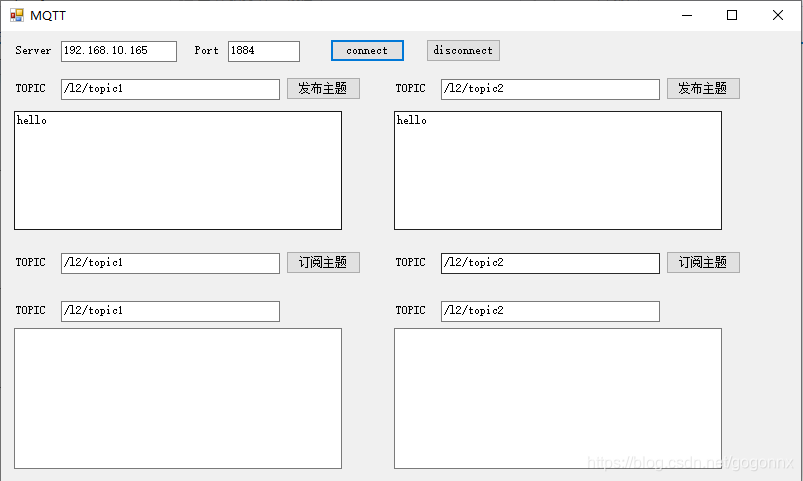
同时发布了两个主题,然后订阅两个主题。分别收两个主题的消息并显示出来。
收到消息后存起来,显示的时候另外起定时器去扫才能正常显示。





 扫一扫
扫一扫


 1万+
1万+

 被折叠的 条评论
为什么被折叠?
被折叠的 条评论
为什么被折叠?
 到【灌水乐园】发言





