


 WebStorm的Live Template(热加载模板)通过预定义代码缩写提升开发效率。本文介绍了如何自定义JavaScript注释模板,并重点讲解了在Live Template变量中使用的预定义函数及其参数。
Live Template
用中文应该叫做热加载模板。它的原理就是配置一些常用代码字母缩写,在输入简写时可以出现你预制的模板内容,使得开发效率大大提高。
Webstorm js中,自定义js说明注释(文档描述、作者、创建日期等):
快捷键 Ctrl + Shift + S 打开Webstorm设置,搜索‘Live Template’,找到JavaScript,如下:

点击右上角“+”-> Live Template,添加注释模板,出现以下界面,填写相关的信息:
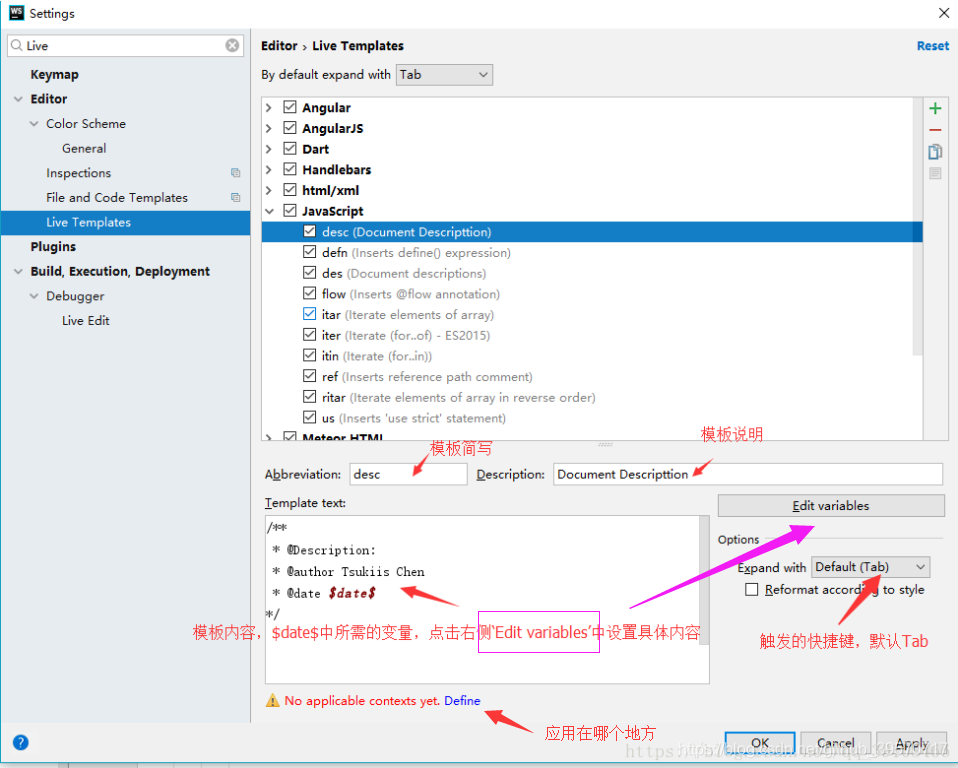
下面我要介绍的是 Edit variables
Predefined Functions to Use in Live Template Variables 的参数如下:
| Item |
Description |
|---|---|
|
|
Returns the characters that indicate the end of a block comment in the current language context.返回指示当前语言上下文中块注释结尾的字符。 |
|
|
Returns the characters that indicate the start of a block comment in the current language context.返回指示当前语言上下文中块注释开头的字符。 |
camelCase(String) |
Converts a string into camelCase. For example, 将字符串转换为驼色大小写。例如, camelCase(my-text-file), camelCase(my text file), and camelCase(my_text_file) 这三种都返回 myTextFile. |
capitalize(String) |
Capitalizes the first letter of the parameter. 将参数的第一个字母大写。 |
capitalizeAndUnderscore(sCamelCaseName) |
Capitalizes all the letters of a CamelCase name passed as the parameter, and inserts an underscore between the parts. For example, 将参数所有字母大写,并在各部分之间插入下划线。例如,如 |
classNameComplete() |
This expression substitutes for the class name completion at the variable position. 此表达式在变量位置替换类名完成。 |
clipboard() |
Returns the contents of the system clipboard. |
 最低0.47元/天 解锁文章






 扫一扫
扫一扫


 752
752

 被折叠的 条评论
为什么被折叠?
被折叠的 条评论
为什么被折叠?
 到【灌水乐园】发言





