





1.html形式,支持所有文件夹,不需要考虑cocos版本
上代码
<!-- file: analyze-folder.html -->
<!DOCTYPE html>
<html lang="zh-CN">
<head>
  <meta charset="UTF-8">
  <title>本地文件夹文件大小分析</title>
  <style>
    body { font-family: Arial, sans-serif; margin: 30px; background: #f8f8f8; }
    h2 { color: #333; }
    .controls { margin-bottom: 20px; background: #fff; padding: 12px; border-radius: 6px; box-shadow: 0 1px 4px #ccc; display: flex; gap: 20px; align-items: center; }
    label { font-size: 14px; }
    input[type="number"] { width: 60px; margin: 0 5px; }
    button { padding: 6px 16px; background: #409eff; color: #fff; border: none; border-radius: 4px; cursor: pointer; }
    button:hover { background: #66b1ff; }
    #result { margin-top: 20px; background: #fff; padding: 12px; border-radius: 6px; min-height: 60px; box-shadow: 0 1px 4px #ccc; }
    table { width: 100%; border-collapse: collapse; margin-top: 10px; }
    th, td { border: 1px solid #e0e0e0; padding: 6px 10px; text-align: left; }
    th { background: #f0f0f0; }
    tr:nth-child(even) { background: #fafafa; }
    .summary { margin-bottom: 10px; font-weight: bold; }
    .error { color: #e74c3c; font-weight: bold; }
    .path { font-size: 15px; color: #888; }
  </style>
</head>
<body>
  <h2>本地文件夹文件大小分析</h2>
  <div class="controls">
    <label>
      选择文件夹:
      <input type="file" id="folder" webkitdirectory directory multiple>
    </label>
    <label>
      最小文件大小:
      <input type="number" id="threshold" value="100"> KB
    </label>
    <label>
      显示前
      <input type="number" id="limit" value="20"> 个文件
    </label>
    <button id="analyze-btn">开始分析</button>
  </div>
  <div id="result"></div>
  <script>
    function formatSize(bytes) {
      if (bytes < 1024) return bytes + ' B';
      if (bytes < 1024 * 1024) return (bytes / 1024).toFixed(2) + ' KB';
      return (bytes / (1024 * 1024)).toFixed(2) + ' MB';
    }

    document.getElementById('analyze-btn').onclick = function () {
      const input = document.getElementById('folder');
      const files = input.files;
      const threshold = parseInt(document.getElementById('threshold').value) * 1024 || 0;
      const limit = parseInt(document.getElementById('limit').value) || 20;
      const resultDiv = document.getElementById('result');

      if (!files || files.length === 0) {
        resultDiv.innerHTML = '<div class="error">请先选择一个文件夹!</div>';
        return;
      }

      let fileList = [];
      for (let i = 0; i < files.length; i++) {
        const f = files[i];
        if (f.size >= threshold) {
          fileList.push({
            name: f.name,
            path: f.webkitRelativePath,
            size: f.size,
            ext: f.name.substring(f.name.lastIndexOf('.') + 1).toLowerCase()
          });
        }
      }

      fileList.sort((a, b) => b.size - a.size);
      const topFiles = fileList.slice(0, limit);
      const totalSize = fileList.reduce((sum, f) => sum + f.size, 0);

      let html = `
        <div class="summary">
          总文件数: ${fileList.length} (≥${formatSize(threshold)})<br>
          总大小: ${formatSize(totalSize)}
        </div>
        <table>
          <thead>
            <tr>
              <th>排名</th>
              <th>文件名</th>
              <th>大小</th>
              <th>类型</th>
              <th>路径</th>
            </tr>
          </thead>
          <tbody>
      `;
      topFiles.forEach((file, idx) => {
        html += `
          <tr>
            <td>${idx + 1}</td>
            <td>${file.name}</td>
            <td>${formatSize(file.size)}</td>
            <td>${file.ext}</td>
            <td class="path">${file.path}</td>
          </tr>
        `;
      });
      html += '</tbody></table>';
         // 添加文件类型统计
          const typeStats = getFileTypeStats(files);
          html += '<div class="type-stats"><h3>按类型统计</h3><ul>';
          for (const [type, size] of Object.entries(typeStats)) {
              html += `<li class="textCls">${type}: ${formatSize(size)} (${Math.round(size / totalSize * 100)}%)</li>`;
          }
          html += '</ul></div>';

      resultDiv.innerHTML = html;

     function getFileTypeStats(files) {
            const stats = {};
            for(let i=0;i<fileList.length;i++){
                const file = fileList[i];
                const type = file.ext || 'other';
                stats[type] = (stats[type] || 0) + file.size;
            }
            return stats;
        }
    };
  </script>
</body>
</html>
将上面html文件下载到本地,直接浏览器运行,选择要分析的文件夹即可
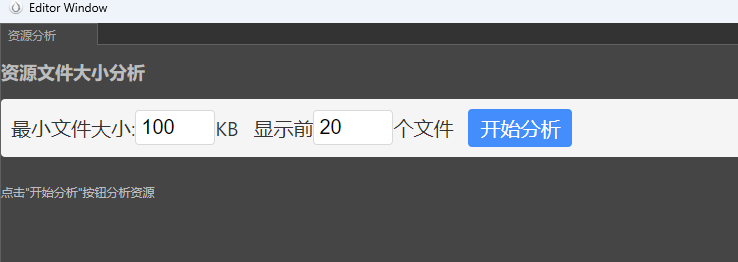
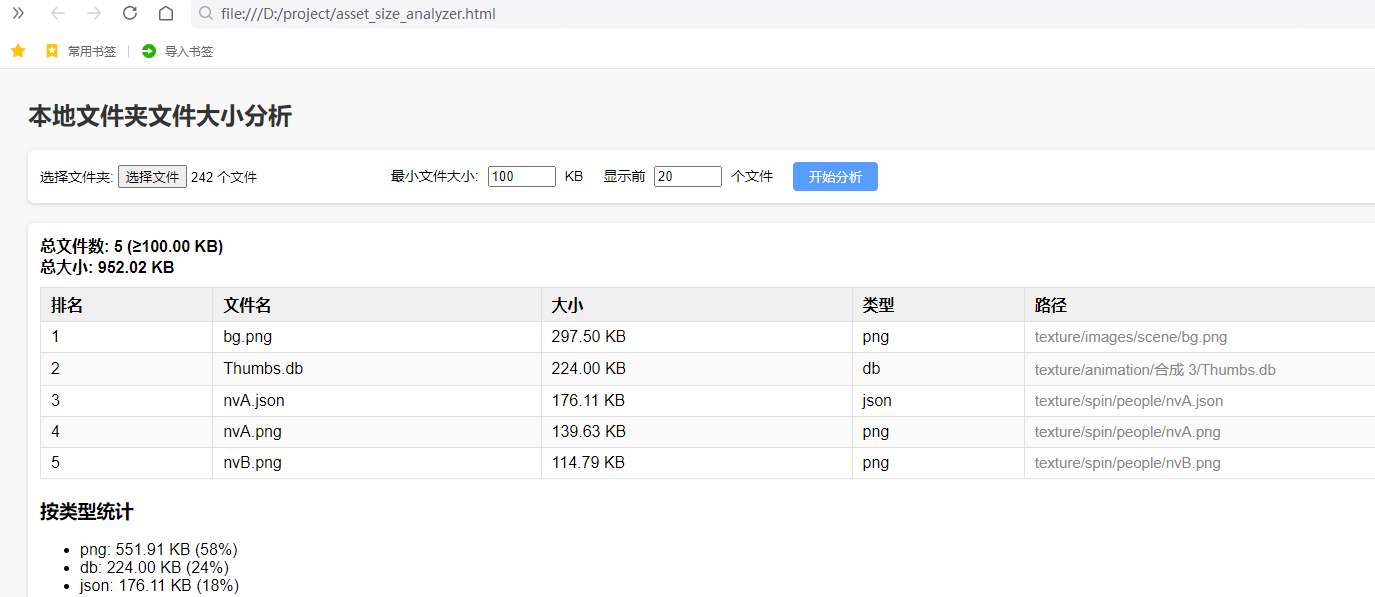 2.cocos creator插件形式,只支持cocos2.x,可以分析项目assets目录下的所有文件
在cocos creator项目根目标新建文件夹,packages,如果有可以不建,然后在packages中新建插件文件夹,文件夹名字一定要是"cocos-asset-analyzer"
插件结构如下
─ package.json
── main.js
── panel/ ── index.js
── panel/ ── index.html
1.package.json的内容
{
  "name": "cocos-asset-analyzer",
  "version": "1.0.0",
  "description": "Cocos Creator 资源文件大小分析工具",
  "author": "wxk",
  "main": "main.js",
  "panel": {
    "title": "资源分析",
    "main": "panel/index.js",
    "type": "dockable",
    "size": {
      "width": 800,
      "height": 600
    }
  },
  "main-menu": {
    "Tools/资源分析": {
      "message": "cocos-asset-analyzer:open-panel"
    }
  },
  "dependencies": {
  }
}
2.main.js内容
'use strict';

module.exports = {
  load() {
    // 插件加载时执行
    Editor.log('资源分析插件已加载');
  },

  unload() {
    // 插件卸载时执行
    Editor.log('资源分析插件已卸载');
  },
  // 添加消息响应,菜单会调用 open-panel
  messages: {
    'open-panel'() {
      Editor.log('打开资源分析面板');
      Editor.Panel.open('cocos-asset-analyzer');

    }
  }
};
3.index.js内容
'use strict';

const { log } = require('console');
const fs = require('fs');
const path = require('path');
Editor.Panel.extend({
    template: fs.readFileSync(Editor.url('packages://cocos-asset-analyzer/panel/index.html'), 'utf8'),
    ready() {
        const panel = this;
        const doc = panel.shadowRoot || panel; // 关键:获取面板文档对象
        const root = Editor.Project.path;
        const assetsPath = path.join(root, 'assets');

        let sizeThreshold = 1024 * 100;

        initUI();
        doc.getElementById('analyze-btn').addEventListener('click', analyzeAssets);
        doc.getElementById('threshold').addEventListener('input', updateThreshold); // 改为input事件
        // doc.getElementById('update-threshold').addEventListener('click', updateThreshold);
        // panel.addEventListener('click', (event) => {
        //     Editor.log(`点击事件: ${event.target.id}`);
        //     if (event.target.id === 'cocos-asset-analyzer') {
        //         analyzeAssets();
        //     } else if (event.target.id === 'update-threshold') {
        //         updateThreshold();
        //     }
        // });

        function formatSize(bytes) {
            if (bytes < 1024) return bytes + ' B';
            if (bytes < 1024 * 1024) return (bytes / 1024).toFixed(2) + ' KB';
            if (bytes < 1024 * 1024 * 1024) return (bytes / 1024 / 1024).toFixed(2) + ' MB';
            return (bytes / 1024 / 1024 / 1024).toFixed(2) + ' GB';
        }
        function initUI() {
            doc.getElementById('threshold').value = sizeThreshold / 1024;
            doc.getElementById('result').innerHTML = '<p>点击"开始分析"按钮分析资源</p>';
        }

        function updateThreshold() {
            Editor.log(`输入了: `);
            const newThreshold = parseInt(doc.getElementById('threshold').value);
            if (!isNaN(newThreshold)) {
                sizeThreshold = newThreshold * 1024;
                Editor.log(`更新文件大小阈值为: ${newThreshold}KB`);
            }
        }

        function analyzeAssets() {
            Editor.log(`开始分析: ${assetsPath}`);
            if (!fs.existsSync(assetsPath)) {
                showError('assets目录不存在');
                return;
            }
            doc.getElementById('result').innerHTML = '<p>分析中,请稍候...</p>';
            setTimeout(() => {
                try {
                    const files = getAssetFiles(assetsPath);
                    displayResults(files);
                } catch (e) {
                    showError(`分析失败: ${e.message}`);
                }
            }, 100);
        }

        function getAssetFiles(dir) {
            const files = [];
            function walk(currentDir) {
                const entries = fs.readdirSync(currentDir);
                entries.forEach(entry => {
                    if (entry.startsWith('.')) return;
                    const fullPath = path.join(currentDir, entry);
                    const stat = fs.statSync(fullPath);
                    if (stat.isDirectory()) {
                        walk(fullPath);
                    } else if (stat.isFile() && stat.size >= sizeThreshold) {
                        const relativePath = path.relative(assetsPath, fullPath);
                        files.push({
                            name: entry,
                            path: relativePath,
                            size: stat.size,
                            ext: path.extname(entry).toLowerCase()
                        });
                    }
                });
            }
            walk(dir);
            return files.sort((a, b) => b.size - a.size);
        }

        function displayResults(files) {
            const limit = parseInt(doc.getElementById('file-limit').value) || 20;
            const topFiles = files.slice(0, limit);
            const totalSize = files.reduce((sum, f) => sum + f.size, 0);

            let html = `
      <div class="summary">
        <div>总文件数: ${files.length} (≥${formatSize(sizeThreshold)})</div>
        <div>总大小: ${formatSize(totalSize)}</div>
      </div>
      <table class="result-table">
        <thead>
          <tr>
            <th>排名</th>
            <th>文件名</th>
            <th>大小</th>
            <th>类型</th>
            <th>路径</th>
          </tr>
        </thead>
        <tbody>
    `;

            topFiles.forEach((file, index) => {
                html += `
        <tr>
          <td>${index + 1}</td>
          <td>${file.name}</td>
          <td>${formatSize(file.size)}</td>
          <td>${file.ext}</td>
          <td class="path">${file.path}</td>
        </tr>
      `;
            });

            html += `</tbody></table>`;

            // 添加文件类型统计
            const typeStats = getFileTypeStats(files);
            html += '<div class="type-stats"><h3>按类型统计</h3><ul>';
            for (const [type, size] of Object.entries(typeStats)) {
                html += `<li class="textCls">${type}: ${formatSize(size)} (${Math.round(size / totalSize * 100)}%)</li>`;
            }
            html += '</ul></div>';

            doc.getElementById('result').innerHTML = html;
        }

        function getFileTypeStats(files) {
            const stats = {};
            files.forEach(file => {
                const type = file.ext || 'other';
                stats[type] = (stats[type] || 0) + file.size;
            });
            return stats;
        }

        function showError(message) {
            doc.getElementById('result').innerHTML =
                `<div class="error">${message}</div>`;
        }
    }
});
4.index.html内容
<!DOCTYPE html>
<html>

<head>
  <meta charset="UTF-8">
  <title>资源分析工具</title>
  <style>
    /* ...你原有的样式... */
    .result-table {
      max-height: 600px;
      width: 100%;
      overflow-y: auto;
      display: block;
      margin-right: 20px;
      padding-left: 20px;
      padding-right: 20px;
    }

    .result-table table {
      width: 100%;
      table-layout: fixed;
      border-collapse: collapse;
    }

    .result-table th,
    .result-table td {
      padding: 8px 16px;
      text-align: left;
      word-break: break-all;
    }

    .type-stats {
      max-height: 200px;
      overflow-y: auto;
      margin-top: 16px;
      display: block;
    }

    #result {
      max-height: 800px;
      overflow-y: auto;
    }

    body {
      font-family: -apple-system, BlinkMacSystemFont, "Segoe UI", Roboto, Helvetica, Arial, sans-serif;
      padding: 15px;
      color: #333;
    }

    .error {
      color: #f44336;
      padding: 10px;
      background: #ffebee;
      border-radius: 4px;
    }

    .summary {
      margin: 10px 0;
      width: 400px;
      padding: 10px;
      background: #f5f5f5;
      border-radius: 4px;
      font-size: 18px;
      color: #333;
    }

    .summary div {
      margin: 5px 0;
    }

    .controls {
      margin-bottom: 15px;
      padding: 10px;
      background: #f5f5f5;
      border-radius: 4px;
      display: flex;
      align-items: center;
      flex-wrap: wrap;
      gap: 10px;
    }

    .control-group {
      display: flex;
      align-items: center;
      gap: 5px;
      margin-right: 15px;
    }

    button {
      padding: 6px 12px;
      background: #1890ff;
      color: white;
      border: none;
      border-radius: 4px;
      cursor: pointer;
      font-size: 20px;
    }

    button:hover {
      background: #40a9ff;
    }

    input {
      padding: 5px;
      border: 1px solid #d9d9d9;
      border-radius: 4px;
      width: 80px;
      font-size: 20px;
    }

    .path {
      max-width: 300px;
      overflow: hidden;
      text-overflow: ellipsis;
      white-space: nowrap;
    }

    .type-stats {
      margin-top: 10px;
      font-size: 16px;
    }

    .type-stats ul {
      list-style: none;
      padding: 0;
      margin: 0;
      display: grid;
      grid-template-columns: repeat(auto-fill, minmax(200px, 1fr));
      gap: 10px;
    }

    .type-stats li {
      padding: 8px;
      background: #f5f5f5;
      border-radius: 4px;
    }

    .textCls {
      font-size: 20px;
      color: #333;
    }
  </style>
</head>

<body>
  <h2>资源文件大小分析</h2>

  <div class="controls">
    <div class="control-group">
      <label class="textCls">最小文件大小:</label>
      <input type="number" id="threshold" value="100">
      <span class="textCls">KB</span>
      <!-- <button id="update-threshold">更新</button> -->
    </div>

    <div class="control-group">
      <label class="textCls">显示前</label>
      <input type="number" id="file-limit" value="20">
      <span class="textCls">个文件</span>
    </div>

    <button id="analyze-btn">开始分析</button>
  </div>

  <div id="result"></div>
</body>

</html>
最后重启cocos ,在菜单栏选择 Tools/资源分析 即可





 扫一扫
扫一扫


 1万+
1万+

 被折叠的 条评论
为什么被折叠?
被折叠的 条评论
为什么被折叠?
 到【灌水乐园】发言





