


 本文详细介绍了视频转码的全过程,包括解封装、解码、编码、封装及音频重采样,提供关键代码片段,适合初学者理解FFmpeg核心结构和操作。
首发地址,会更错
本文汇总前面几篇文章,把所有流程合并到一块,简单实现转码的流程。其中有些异常不做处理。
转码原理
先看雷神的一张图:
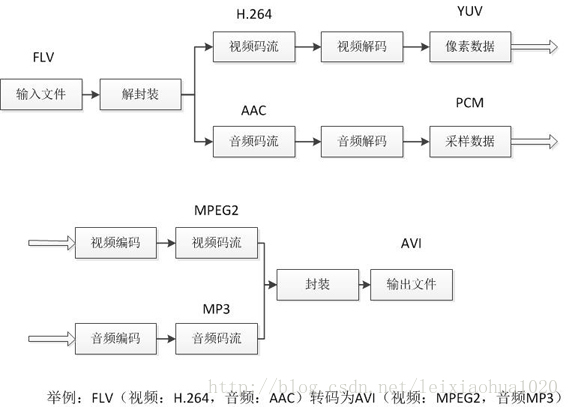
上图描述的很明白,上完图发现已经不需要语言描述了[Dog]。 但还是画个来说明一下这块之间的联系:
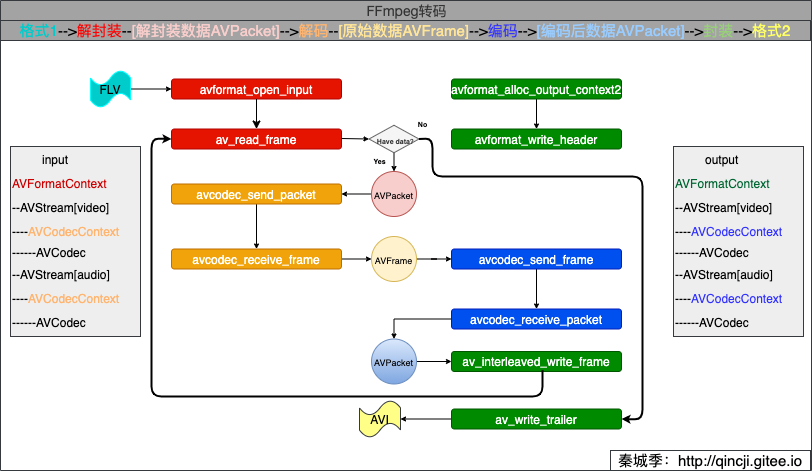
其中,AVFormatContext、AVPacket等重要的结构体请看:FFmpeg重要结构体(转自雷神) 。
代码实现
/**
* @author 秦城季
* @email xhunmon@126.com
* @Blog https://qincji.gitee.io
* @date 2021/01/08
* description: 转码
* 主要思路:
* 格式1-->解封装--[解封装数据AVPacket]-->解码--[原始数据AVFrame]-->编码-->[编码后数据AVPacket]-->封装-->格式2
*
* 2021/01/11 增加音频重采样变换
* <br>
*/
#include <stdint.h>
#include <stdio.h>
extern "C" {
#include <libavformat/avformat.h>
#include <libavcodec/avcodec.h>
#include <libavutil/channel_layout.h>
#include <libavutil/common.h>
#include <libavutil/frame.h>
#include <libavutil/samplefmt.h>
#include <libavutil/opt.h>
#include <libavutil/imgutils.h>
#include <libswresample/swresample.h>
}
int main(int argc, char **argv) {
// const char *in_filename = "source/lol.mp4";
// const char *out_filename = "output/lol.wma";
// const char *in_filename = "source/Kobe.flv";
// const char *out_filename = "output/Kobe.avi";
// const char *in_filename = "source/lol.mp4";
// const char *out_filename = "output/lol.avi";
const char *in_filename = "source/Kobe.flv";
const char *out_filename = "output/Kobe2.avi";
remove(out_filename);
SwrContext *swr_ctx;//当有需要时,需要重采样
AVFormatContext *ifmt_ctx = NULL, *ofmt_ctx = NULL;
AVPacket *ipkt = NULL, *opkt = NULL;
AVFrame *iframe = NULL, *oframe_a = NULL;
AVCodecContext *ic_v = NULL, *ic_a = NULL, *oc_v = NULL, *oc_a = NULL;
AVCodec *ocodec_v = NULL, *ocodec_a = NULL;
int iindex_v = -1, iindex_a = -1, oindex_v = -1, oindex_a = -1, ret, dst_nb_samples;
ipkt = av_packet_alloc();
opkt = av_packet_alloc();
/**(解封装 1.1):创建并初始化AVFormatContext*/
if (avformat_open_input(&ifmt_ctx, in_filename, NULL, NULL) < 0) {
fprintf(stderr, "Could not open source file %s\n", in_filename);
goto end;
}
/**(解封装 1.2):检索流信息,这个过程会检查输入流中信息是否存在异常*/
if (avformat_find_stream_info(ifmt_ctx, NULL) < 0) {
fprintf(stderr, "Could not find stream information\n");
goto end;
}
/**(解封装 1.3):查找视频和音频的下标*/
if ((iindex_v = av_find_best_stream(ifmt_ctx, AVMEDIA_TYPE_VIDEO, -1, -1, NULL, 0)) < 0) {
fprintf(stderr, "Could not find video stream\n");
goto end;
}
if ((iindex_a = av_find_best_stream(ifmt_ctx, AVMEDIA_TYPE_AUDIO, -1, -1, NULL, 0)) < 0) {
fprintf(stderr, "Could not find video stream\n");
goto end;
}
/**(解码 2.1):解码器直接从AVFormatContext对象的流中获取,然后指定该解码器的AVCodec*/
ic_v = ifmt_ctx->streams[iindex_v]->codec;
if (!(ic_v->codec = avcodec_find_decoder(ic_v->codec_id)) 最低0.47元/天 解锁文章






 扫一扫
扫一扫


 775
775

 被折叠的 条评论
为什么被折叠?
被折叠的 条评论
为什么被折叠?
 到【灌水乐园】发言





