


首发地址,会更错
本文主要参考雷神的最简单的基于FFmpeg的封装格式处理:视音频复用器(muxer) 与官方例子doc/examples/muxing.c 。
FFmpeg解封装流程
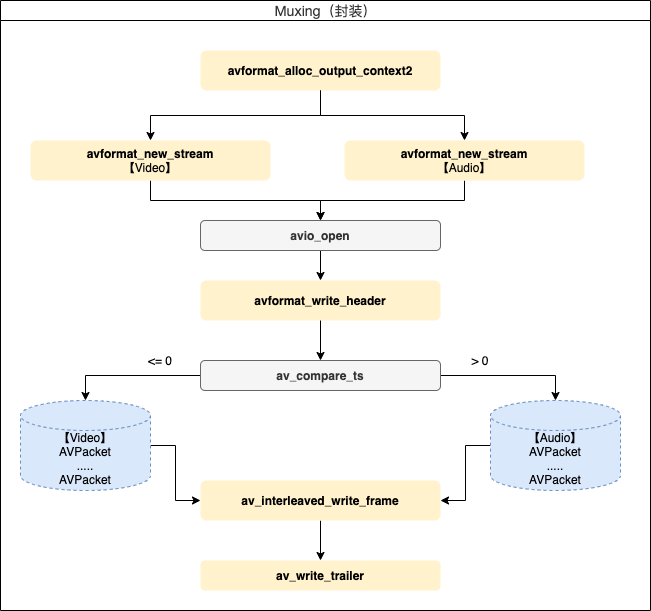
其中,AVFormatContext、AVPacket等重要的结构体请看:FFmpeg重要结构体(转自雷神) 。
以上步骤主要方法的简单说明。
(1)avformat_alloc_output_context2
构造输出的AVFormatContext。
(2)avformat_new_stream
将新的流添加到AVFormatContext中。
(3)avformat_write_header
写入文件头
(4)av_interleaved_write_frame
通过解封装文件(或者创建)得到的AVPacket数据写入到文件中。
(5)av_write_trailer
写入文件尾
代码实现
/**
 * @author 秦城季
 * @email xhunmon@126.com
 * @Blog https://qincji.gitee.io
 * @date 2021/01/04
 * description: FFmpeg 封装  <br>
 */

#include <stdio.h>

#define __STDC_CONSTANT_MACROS

#ifdef _WIN32
//Windows
extern "C"
{
#include "libavformat/avformat.h"
};
#else
//Linux...
#ifdef __cplusplus
extern "C"
{
#endif
#include <libavformat/avformat.h>
#ifdef __cplusplus
};
#endif
#endif

/*
FIX: H.264 in some container format (FLV, MP4, MKV etc.) need
"h264_mp4toannexb" bitstream filter (BSF)
  *Add SPS,PPS in front of IDR frame
  *Add start code ("0,0,0,1") in front of NALU
H.264 in some container (MPEG2TS) don't need this BSF.
*/
//'1': Use H.264 Bitstream Filter
#define USE_H264BSF 0

/*
FIX:AAC in some container format (FLV, MP4, MKV etc.) need
"aac_adtstoasc" bitstream filter (BSF)
*/
//'1': Use AAC Bitstream Filter
#define USE_AACBSF 0

int main(int argc, char *argv[]) {
    AVOutputFormat *ofmt = NULL;
    //Input AVFormatContext and Output AVFormatContext
    AVFormatContext *ifmt_ctx_v = NULL, *ifmt_ctx_a = NULL, *ofmt_ctx = NULL;
    AVPacket pkt;
    int ret, i;
    int videoindex_v = -1, videoindex_out = -1;
    int audioindex_a = -1, audioindex_out = -1;
    int frame_index = 0;
    int64_t cur_pts_v = 0, cur_pts_a = 0;
    int writing_v = 1, writing_a = 1;

    const char *in_filename_v = "source/kobe.h264";
    const char *in_filename_a = "source/kobe.aac";

    const char *out_filename = "output/kobe.flv";//Output file URL
    remove(out_filename);
    //Input
    if ((ret = avformat_open_input(&ifmt_ctx_v, in_filename_v, 0, 0)) < 0) {
        printf("Could not open input file.");
        goto end;
    }
    if ((ret = avformat_find_stream_info(ifmt_ctx_v, 0)) < 0) {
        printf("Failed to retrieve input stream information");
        goto end;
    }

    if ((ret = avformat_open_input(&ifmt_ctx_a, in_filename_a, 0, 0)) < 0) {
        printf("Could not open input file.");
        goto end;
    }
    if ((ret = avformat_find_stream_info(ifmt_ctx_a, 0)) < 0) {
        printf("Failed to retrieve input stream information");
        goto end;
    }
    //Output
    avformat_alloc_output_context2(&ofmt_ctx, NULL, NULL, out_filename);
    if (!ofmt_ctx) {
        printf("Could not create output context\n");
        ret = AVERROR_UNKNOWN;
        goto end;
    }
    ofmt = ofmt_ctx->oformat;

    for (i = 0; i < ifmt_ctx_v->nb_streams; i++) {
        //Create output AVStream according to input AVStream
        if (ifmt_ctx_v->streams[i]->codec->codec_type == AVMEDIA_TYPE_VIDEO) {
            AVStream *out_stream = avformat_new_stream(ofmt_ctx, ifmt_ctx_v->streams[i]->codec->codec);
            videoindex_v = i;
            if (!out_stream) {
                printf("Failed allocating output stream\n");
                ret = AVERROR_UNKNOWN;
                goto end;
            }
            videoindex_out = out_stream->index;

            //Copy the settings of AVCodecContext
            if (avcodec_copy_context(out_stream->codec, ifmt_ctx_v->streams[i]->codec) < 0) {
                printf("Failed to copy context from input to output stream codec context\n");
                goto end;
            }
            out_stream->codec->codec_tag = 0;
            if (ofmt_ctx->oformat->flags & AVFMT_GLOBALHEADER)
                out_stream->codec->flags |= AV_CODEC_FLAG_GLOBAL_HEADER;
            break;
        }
    }

    for (i = 0; i < ifmt_ctx_a->nb_streams; i++) {
        //Create output AVStream according to input AVStream
        if (ifmt_ctx_a->streams[i]->codec->codec_type == AVMEDIA_TYPE_AUDIO) {
            AVStream *out_stream = avformat_new_stream(ofmt_ctx, ifmt_ctx_a->streams[i]->codec->codec);
            audioindex_a = i;
            if (!out_stream) {
                printf("Failed allocating output stream\n");
                ret = AVERROR_UNKNOWN;
                goto end;
            }
            audioindex_out = out_stream->index;

            //Copy the settings of AVCodecContext
            if (avcodec_copy_context(out_stream->codec, ifmt_ctx_a->streams[i]->codec) < 0) {
                printf("Failed to copy context from input to output stream codec context\n");
                goto end;
            }
            out_stream->codec->codec_tag = 0;
            if (ofmt_ctx->oformat->flags & AVFMT_GLOBALHEADER)
                out_stream->codec->flags |= AV_CODEC_FLAG_GLOBAL_HEADER;
            break;
        }
    }
    /* open the output file, if needed */
    if (!(ofmt->flags & AVFMT_NOFILE)) {
        if (avio_open(&ofmt_ctx->pb, out_filename, AVIO_FLAG_WRITE)) {
            fprintf(stderr, "Could not open '%s': %s\n", out_filename,
                    av_err2str(ret));
            goto end;
        }
    }

    //Write file header
    if (avformat_write_header(ofmt_ctx, NULL) < 0) {
        fprintf(stderr, "Error occurred when opening output file: %s\n",
                av_err2str(ret));
        goto end;
    }

    while (writing_v || writing_a) {
        AVFormatContext *ifmt_ctx;
        int stream_index = 0;
        AVStream *in_stream, *out_stream;
        if (writing_v && (!writing_a || av_compare_ts(cur_pts_v, ifmt_ctx_v->streams[videoindex_v]->time_base,
                                                      cur_pts_a, ifmt_ctx_a->streams[audioindex_a]->time_base) <= 0)) {
            ifmt_ctx = ifmt_ctx_v;
            stream_index = videoindex_out;
            if (av_read_frame(ifmt_ctx, &pkt) >= 0) {
                do {
                    in_stream = ifmt_ctx->streams[pkt.stream_index];
                    out_stream = ofmt_ctx->streams[stream_index];

                    if (pkt.stream_index == videoindex_v) {
                        //FIX:No PTS (Example: Raw H.264)
                        //Simple Write PTS
                        if (pkt.pts == AV_NOPTS_VALUE) {
                            //Write PTS
                            AVRational time_base1 = in_stream->time_base;
                            //Duration between 2 frames (us)
                            int64_t calc_duration = (double) AV_TIME_BASE / av_q2d(in_stream->r_frame_rate);
                            //Parameters
                            pkt.pts = (double) (frame_index * calc_duration) /
                                      (double) (av_q2d(time_base1) * AV_TIME_BASE);
                            pkt.dts = pkt.pts;
                            pkt.duration = (double) calc_duration / (double) (av_q2d(time_base1) * AV_TIME_BASE);
                            frame_index++;
                        }

                        cur_pts_v = pkt.pts;
                        break;
                    }
                } while (av_read_frame(ifmt_ctx, &pkt) >= 0);
            } else {
                writing_v = 0;
                continue;
            }
        } else {
            ifmt_ctx = ifmt_ctx_a;
            stream_index = audioindex_out;
            if (av_read_frame(ifmt_ctx, &pkt) >= 0) {
                do {
                    in_stream = ifmt_ctx->streams[pkt.stream_index];
                    out_stream = ofmt_ctx->streams[stream_index];

                    if (pkt.stream_index == audioindex_a) {

                        //FIX:No PTS
                        //Simple Write PTS
                        if (pkt.pts == AV_NOPTS_VALUE) {
                            //Write PTS
                            AVRational time_base1 = in_stream->time_base;
                            //Duration between 2 frames (us)
                            int64_t calc_duration = (double) AV_TIME_BASE / av_q2d(in_stream->r_frame_rate);
                            //Parameters
                            pkt.pts = (double) (frame_index * calc_duration) /
                                      (double) (av_q2d(time_base1) * AV_TIME_BASE);
                            pkt.dts = pkt.pts;
                            pkt.duration = (double) calc_duration / (double) (av_q2d(time_base1) * AV_TIME_BASE);
                            frame_index++;
                        }
                        cur_pts_a = pkt.pts;
                        break;
                    }
                } while (av_read_frame(ifmt_ctx, &pkt) >= 0);
            } else {
                writing_a = 0;
                continue;
            }
        }

        //Convert PTS/DTS
        pkt.pts = av_rescale_q_rnd(pkt.pts, in_stream->time_base, out_stream->time_base,
                                   (AVRounding) (AV_ROUND_NEAR_INF | AV_ROUND_PASS_MINMAX));
        pkt.dts = av_rescale_q_rnd(pkt.dts, in_stream->time_base, out_stream->time_base,
                                   (AVRounding) (AV_ROUND_NEAR_INF | AV_ROUND_PASS_MINMAX));
        pkt.duration = av_rescale_q(pkt.duration, in_stream->time_base, out_stream->time_base);
        pkt.pos = -1;
        pkt.stream_index = stream_index;

        printf("Write 1 Packet. size:%5d\tpts:%lld\n", pkt.size, pkt.pts);
        //Write
        if (av_interleaved_write_frame(ofmt_ctx, &pkt) < 0) {
            printf("Error muxing packet\n");
            break;
        }
        av_free_packet(&pkt);
    }

    printf("Write file trailer.\n");
    //Write file trailer
    av_write_trailer(ofmt_ctx);

    end:
    avformat_close_input(&ifmt_ctx_v);
    avformat_close_input(&ifmt_ctx_a);
    /* close output */
    if (ofmt_ctx && !(ofmt->flags & AVFMT_NOFILE))
        avio_close(ofmt_ctx->pb);
    avformat_free_context(ofmt_ctx);
    if (ret < 0 && ret != AVERROR_EOF) {
        printf("Error occurred.\n");
        return -1;
    }
    return 0;
}
测试文件下载地址: Kobe.aac 、 Kobe.h264 。
参考
- https://blog.youkuaiyun.com/leixiaohua1020/article/details/39802913


 2711


 扫一扫


 被折叠的 条评论
为什么被折叠?
 到【灌水乐园】发言


