



 本文深入探讨了Git中两种核心分支合并策略:rebase与merge。通过实例讲解了rebase如何将实验分支的更改重新应用到主分支,以及它与merge在提交历史呈现上的差异。强调了rebase在本地开发中整理提交历史的重要性,以及不应对其已推送至远程仓库的内容进行rebase的原则。
两种合并分支的方式:merge,rebase
With the
rebasecommand, you can take all the changes that were committed on one branch and replay them on a different branch
rebase是如何合并分支的
如下图:采用rebase方式将experiment分支上的内容合并到master分支上
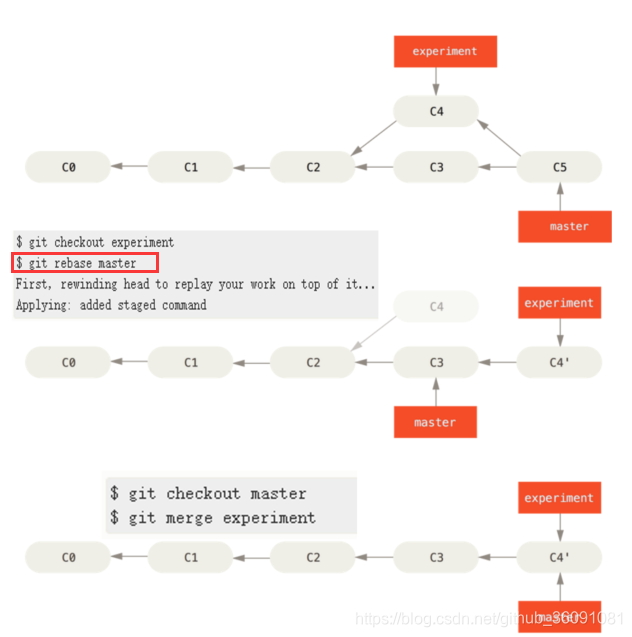
git rebase master这个命令幕后都做了什么操作:
- 先
experiment分支的修改暂存起来 - 将
experiment分支reset到master分支的状态 - 在重置后的
experiment分支上replay刚刚暂存起来的修改
最后:切换到master分支,进行简单的fast-forward合并即可
为什么要用rebase(和merge的区别)
如上例中所示,rebase的提交历史更干净线性
何时(不)使用rebase
In general the way to get the best of both worlds is to
rebaselocal changes you’ve made but haven’t shared yet before you push them in order to clean up your story, but neverrebaseanything you’ve pushed somewhere.
-
在本地开发时可以使用,让我们的提交历史更干净易读
-
不要使用
rebase合并已经push到远程仓库的内容
更多讨论可访问github:
https://github.com/pluscai/use-git/issues/18





 扫一扫
扫一扫


 1593
1593

 被折叠的 条评论
为什么被折叠?
被折叠的 条评论
为什么被折叠?
 到【灌水乐园】发言





