



 这篇博客主要介绍了Gson库在处理Json时的基础使用,包括应对Json字段缺失的解决方案,以及如何自定义TypeAdapter进行详细解析。通过分析JsonToken枚举类型和JsonElement,揭示了Gson将Json转换为Java对象的机制。同时,讨论了反射类型的Adapter以及注解在Gson中的应用,强调了TypeAdapterFactory在Gson构造过程中的关键作用。
JSON
定义
JSON(JavaScript Object Notation) 是一种轻量级的数据交换格式。
作用:
数据标记,存储,传输
特点:
1. 读写速度快
2. 解析简单
3. 轻量级
4. 独立于语言,平台
5. 具有自我描叙性
使用 Gson需要导包:
implementation 'com.google.code.gson:gson:2.8.4'
Gson基础使用案例一
 Gson gson = new Gson();
        //输出"1",单个字符也可以序列化
        System.out.println(gson.toJson("1"));
        //输出 "fw123"
        System.out.println(gson.toJson("fw123"));

        //打印结果:[1,2,3] ---这种形式是数组吗?
        int[] value = {1,2,3};
        System.out.println(gson.toJson(value));
        //上面的序列化结果都是转化成字符串类型的

        // 下面是反序列化的过程
        //这是一个泛型入参的函数,打印的结果: i 的值为: 1
        int i = gson.fromJson("1",int.class);
        System.out.println("i 的值为: " + i);


        //打印出来的值为: gsonBean的值为: {"mInt":1,"mStr":"22"}--- 这个是序列化格式
        String gsonBean = gson.toJson(new GsonBean(1,"22"));
        System.out.println("gsonBean的值为: " + gsonBean);
SerializedName注解的使用:
public class JsonAdepterTest {
    static class SerializedNameTestClass {
        @SerializedName("name") //给a设置Key值为:name
                String a;
        @SerializedName(value = "name1", alternate = {"name2", "name3"})
        String b;

        String c;

        public SerializedNameTestClass(String a, String b, String c) {
            this.a = a;
            this.b = b;
            this.c = c;
        }

        public static void test() {
            SerializedNameTestClass target =
                     new SerializedNameTestClass("v1", "v2", "v3");
            Gson gson = new Gson();
            String json = gson.toJson(target);
            System.out.println(json);
        }
    }

    public static void main(String[] args) {
        SerializedNameTestClass.test();
    }
}
执行结果为:{"name":"v1","name1":"v2","c":"v3"}
JsonAdapter注解的使用:
 @JsonAdapter(UserJsonAdapter.class)
    static
    class User {
        public final String firstName, lastName;
        public User(String firstName, String lastName) {
            this.firstName = firstName;
            this.lastName = lastName;
        }

        @Override
        public String toString() {
            return "User{" +
                    "firstName='" + firstName + '\'' +
                    ", lastName='" + lastName + '\'' +
                    '}';
        }
    }

    class UserJsonAdapter extends TypeAdapter<User> {
        @Override
        public void write(JsonWriter out, User user) throws IOException {
            out.beginObject();
            out.name("firstKey:");
            out.value(user.firstName);
            out.endObject();
            out.beginObject();
            out.name("secondKey");
            out.value(user.lastName);
            out.endObject();
        }
        @Override
        public User read(JsonReader in) throws IOException {
            in.beginObject();
            in.nextName();
            String nameParts1 = in.nextString();
            in.endObject();

            in.beginObject();
            in.nextName();
            String nameParts2 = in.nextString();
            in.endObject();
            return new User(nameParts1, nameParts2);
        }
    }

    public static void main(String[] args) {
        User user = new User("gg","Zero");
        Gson gson = new GsonBuilder()
                .setVersion(1.2).create();
        String gsonStr = gson.toJson(user);
        System.out.println("gsonStr=" + gsonStr);

        user = gson.fromJson(gsonStr,User.class);
        System.out.println("user: " + user);
    }

输出结果:
gsonStr={"firstKey:":"gg"}{"secondKey":"Zero"}
user: User{firstName='gg', lastName='Zero'}
public class GsonError1 {
        private String name;
        private List<AuthorsBean> authors;
        @Override
        public String toString() {
            return "GsonError1{" +
                    "name='" + name + '\'' +
                    ", authors=" + authors +
                    '}';
        }

        public String getName() {
            return name;
        }

        public void setName(String name) {
            this.name = name;
        }

        public List<AuthorsBean> getAuthors() {
            return authors;
        }

        public void setAuthors(List<AuthorsBean> authors) {
            this.authors = authors;
        }

        public static class AuthorsBean {
            private String id;
            private String name;
            public String getId() {
                return id;
            }
            public void setId(String id) {
                this.id = id;
            }
            public String getName() {
                return name;
            }
            public void setName(String name) {
                this.name = name;
            }
            @Override
            public String toString() {
                return "AuthorsBean{" +
                        "id='" + id + '\'' +
                        ", name='" + name + '\'' +
                        '}';
            }
        }

    public static void test1() {
        //TODO:
        String json = "{\n" +
                "    \"name\": \"java\",\n" +
                "    \"authors\": [\n" +
                "        {\n" +
                "            \"id\": \"1'\",\n" +
                "            \"name\": \"Joshua Bloch'\"\n" +
                "        },\n" +
                "        {\n" +
                "            \"id\": \"2'\",\n" +
                "            \"name\": \"Tom\"\n" +
                "        }\n" +
                "    ]\n" +
                "}";
        Gson gson = new Gson();
        GsonError1 gsonError1 = gson.fromJson(json, GsonError1.class);
        System.out.println(gsonError1);
    }

    public static void main(String[] args) {
        test1();
    }

输出结果:
GsonError1{name='java', authors=[AuthorsBean{id='1'', name='Joshua Bloch''}, AuthorsBean{id='2'', name='Tom'}]}
String json = "{\n" +
                "    \"name\": \"java\",\n" +
                "    \"authors\": \"\"\n" +
                "}";
Gson gson = new Gson();
GsonError1 gsonError1 = gson.fromJson(json, GsonError1.class);
System.out.println(gsonError1);

如果上面的Json序列化形式不对,
就会上报错误:
Caused by: java.lang.IllegalStateException: Expected BEGIN_ARRAY but was STRING at line 3 column 17 path $.authors
为了解决由于Json中某些字段缺省的情况,方案一:
package com.android.serializable;

import com.google.gson.Gson;
import com.google.gson.GsonBuilder;
import com.google.gson.JsonDeserializationContext;
import com.google.gson.JsonDeserializer;
import com.google.gson.JsonElement;
import com.google.gson.JsonObject;
import com.google.gson.JsonParseException;

import java.lang.reflect.Type;
import java.util.Arrays;
import java.util.List;

public class GsonError1 {
        private String name;
        private List<AuthorsBean> authors;
        @Override
        public String toString() {
            return "GsonError1{" +
                    "name='" + name + '\'' +
                    ", authors=" + authors +
                    '}';
        }

        public String getName() {
            return name;
        }

        public void setName(String name) {
            this.name = name;
        }

        public List<AuthorsBean> getAuthors() {
            return authors;
        }

        public void setAuthors(List<AuthorsBean> authors) {
            this.authors = authors;
        }

        public static class AuthorsBean {
            private String id;
            private String name;
            public String getId() {
                return id;
            }
            public void setId(String id) {
                this.id = id;
            }
            public String getName() {
                return name;
            }
            public void setName(String name) {
                this.name = name;
            }
            @Override
            public String toString() {
                return "AuthorsBean{" +
                        "id='" + id + '\'' +
                        ", name='" + name + '\'' +
                        '}';
            }
        }

    static class GsonError1Deserializer implements JsonDeserializer<GsonError1> {

        @Override
        public GsonError1 deserialize(JsonElement json, Type typeOfT, JsonDeserializationContext context) throws JsonParseException {
            final JsonObject jsonObject = json.getAsJsonObject();

            final JsonElement jsonTitle = jsonObject.get("name");
            final String name = jsonTitle.getAsString();

            JsonElement jsonAuthors = jsonObject.get("authors");

            GsonError1 gsonError1 = new GsonError1();

            if (jsonAuthors.isJsonArray()) {//如果数组类型,此种情况是我们需要的
                //关于context在文章最后有简单说明
                GsonError1.AuthorsBean[] authors = context.deserialize(jsonAuthors, GsonError1.AuthorsBean[].class);
                gsonError1.setAuthors(Arrays.asList(authors));
            } else {//此种情况为无效情况
                gsonError1.setAuthors(null);
            }
            gsonError1.setName(name);
            return gsonError1;
        }
    }

    static class AuthorDeserializer implements JsonDeserializer {

        @Override
        public Object deserialize(JsonElement json, Type typeOfT, JsonDeserializationContext context) throws JsonParseException {
            final JsonObject jsonObject = json.getAsJsonObject();

            final GsonError1.AuthorsBean author = new GsonError1.AuthorsBean();
            author.setId(jsonObject.get("id").getAsString());
            author.setName(jsonObject.get("name").getAsString());
            return author;
        }
    }

    public static void test3() {
        //TODO:
        String json = "{\n" +
                "    \"name\": \"java\",\n" +
                "    \"authors\": \"\"\n" +
                "}";

        GsonBuilder gsonBuilder = new GsonBuilder();

        //注册TypeAdapter
        gsonBuilder.registerTypeAdapter(GsonError1.class, new GsonError1Deserializer());
        gsonBuilder.registerTypeAdapter(GsonError1.AuthorsBean.class, new AuthorDeserializer());

        Gson gson = gsonBuilder.create();
        GsonError1 gsonError1 = gson.fromJson(json, GsonError1.class);

        System.out.println(gsonError1);
    }

    public static void main(String[] args) {
        test3();
    }


}
解决方法二: 参照上面自定义TypeAdapter
Gson的源码解析
JsonToken是枚举类型.---定义Json数据的类型
/**
 * A structure, name or value type in a JSON-encoded string.
 */
public enum JsonToken {

    /**
     * The opening of a JSON array. Written using {@link JsonWriter#beginObject}
     * and read using {@link JsonReader#beginObject}.
     */
    BEGIN_ARRAY,

    /**
     * The closing of a JSON array. Written using {@link JsonWriter#endArray}
     * and read using {@link JsonReader#endArray}.
     */
    END_ARRAY,

    /**
     * The opening of a JSON object. Written using {@link JsonWriter#beginObject}
     * and read using {@link JsonReader#beginObject}.
     */
    BEGIN_OBJECT,

    /**
     * The closing of a JSON object. Written using {@link JsonWriter#endObject}
     * and read using {@link JsonReader#endObject}.
     */
    END_OBJECT,

    /**
     * A JSON property name. Within objects, tokens alternate between names and
     * their values. Written using {@link JsonWriter#name} and read using {@link
     * JsonReader#nextName}
     */
    NAME,

    /**
     * A JSON string.
     */
    STRING,

    /**
     * A JSON number represented in this API by a Java {@code double}, {@code
     * long}, or {@code int}.
     */
    NUMBER,

    /**
     * A JSON {@code true} or {@code false}.
     */
    BOOLEAN,

    /**
     * A JSON {@code null}.
     */
    NULL,

    /**
     * The end of the JSON stream. This sentinel value is returned by {@link
     * JsonReader#peek()} to signal that the JSON-encoded value has no more
     * tokens.
     */
    END_DOCUMENT
}
JsonElement
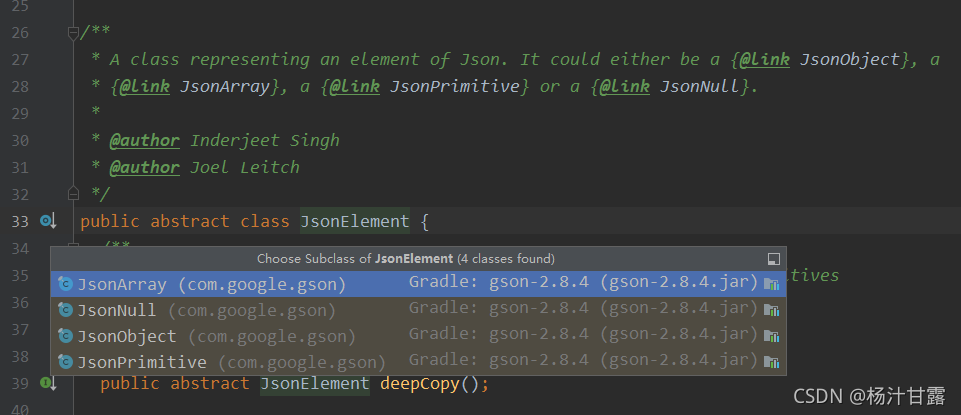
该类是一个抽象类,代表着json串的某一个元素。这个元素可以是一个Json(JsonObject)、可以是一个 数组(JsonArray)、可以是一个Java的基本类型(JsonPrimitive)、当然也可以为
null(JsonNull);JsonObject,JsonArray,JsonPrimitive,JsonNull都是JsonElement这个抽象类的子类。 JsonElement提供了一系列的方法来判断当前的JsonElement。
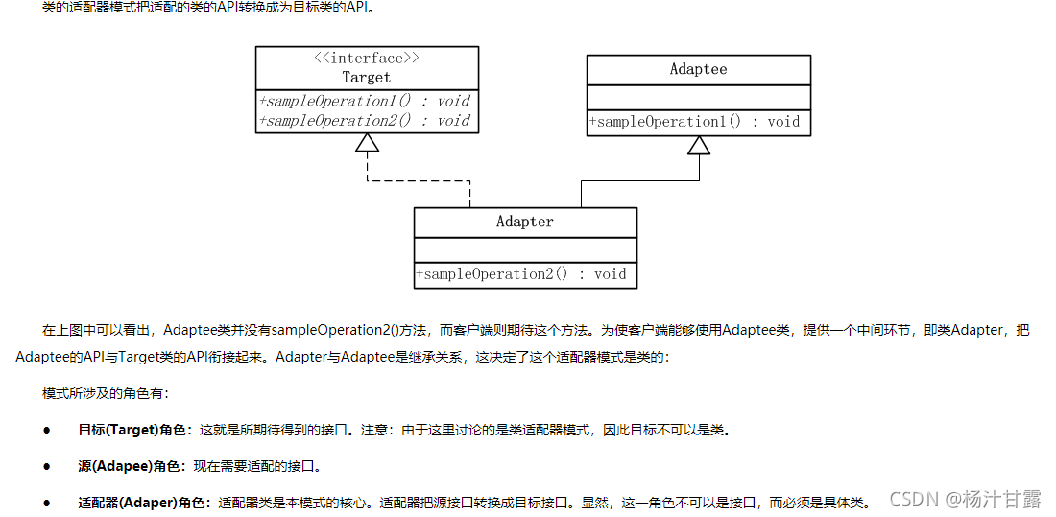
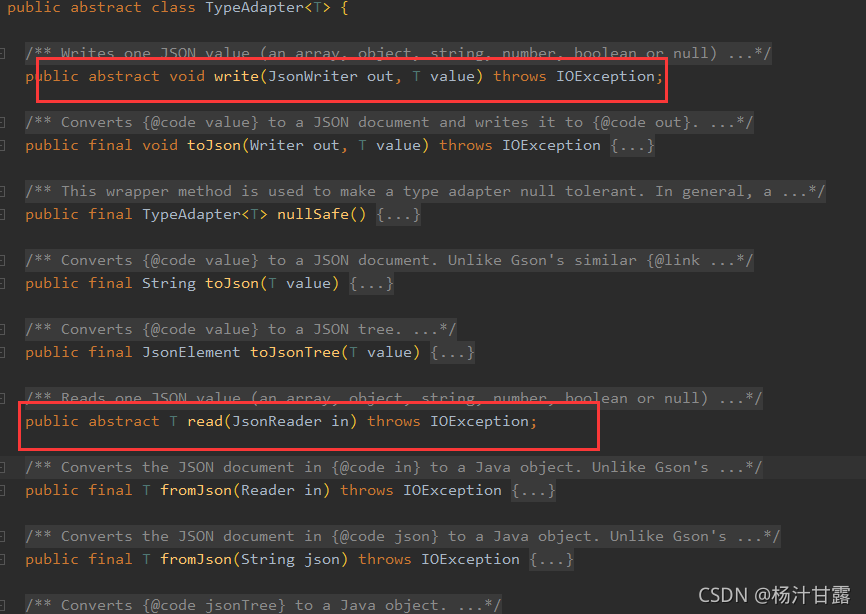
Json 解析全靠TypeAdapter, 将Json文件 转换到bean使用的是TypeAdapter中的read,反过来用的是write 方法。
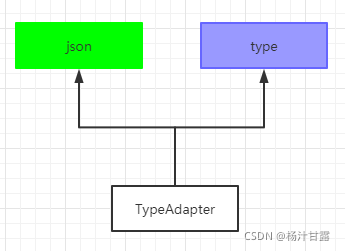
 任意的一种类型都对应一个TypeAdapter 基本数据类型
其他的要么是自定义,要么是使用ReflectiveTypeAdapterFactory类中的Adapter进行解析:
下面就是使用ReflectiveTypeAdapterFactory中的TypeAdapter来进行读写的
  public static final class Adapter<T> extends TypeAdapter<T> {

    @Override public T read(JsonReader in) throws IOException {

      T instance = constructor.construct();

       in.beginObject();
        while (in.hasNext()) {
          String name = in.nextName();
          BoundField field = boundFields.get(name);
          if (field == null || !field.deserialized) {
            in.skipValue();
          } else {
            field.read(in, instance);
          }
        }

      in.endObject();
      return instance;
    }

    @Override public void write(JsonWriter out, T value) throws IOException {
      out.beginObject();
        for (BoundField boundField : boundFields.values()) {
          if (boundField.writeField(value)) {
            out.name(boundField.name);
            boundField.write(out, value);
          }
        }

      out.endObject();
    }
  }
public interface TypeAdapterFactory {

  /**
   * Returns a type adapter for {@code type}, or null if this factory doesn't
   * support {@code type}.
   */
  <T> TypeAdapter<T> create(Gson gson, TypeToken<T> type);
}
自定义的TypeAdapter实现Gson的原理:
 public static void main(String[] args) {
        User user = new User("gg","Zero");
        GsonBuilder gsonBuilder = new GsonBuilder();
        gsonBuilder.registerTypeAdapter(User.class, new UserJsonAdapter()); //1
        Gson gson = gsonBuilder.create(); // 2
        String gsonStr = gson.toJson(user); //
        System.out.println("gsonStr=" + gsonStr);

        user = gson.fromJson(gsonStr,User.class);
        System.out.println("user: " + user);
    }

//上面1处就是将自定义的TypeAdapter添加到
//private final List<TypeAdapterFactory> factories = new ArrayList<TypeAdapterFactory>();
// 这个集合里面。

 public GsonBuilder registerTypeAdapter(Type type, Object typeAdapter) {
    $Gson$Preconditions.checkArgument(typeAdapter instanceof JsonSerializer<?>
        || typeAdapter instanceof JsonDeserializer<?>
        || typeAdapter instanceof InstanceCreator<?>
        || typeAdapter instanceof TypeAdapter<?>);
    if (typeAdapter instanceof InstanceCreator<?>) {
      instanceCreators.put(type, (InstanceCreator) typeAdapter);
    }

    //这是自定义JsonSerializer类型的序列化
    //这是自定义过程的反序列化JsonDeserializer
    if (typeAdapter instanceof JsonSerializer<?> || typeAdapter instanceof JsonDeserializer<?>) {
      TypeToken<?> typeToken = TypeToken.get(type);
      factories.add(TreeTypeAdapter.newFactoryWithMatchRawType(typeToken, typeAdapter));
    }

    //如果是自定义TypeAdapter类型将走这里
    if (typeAdapter instanceof TypeAdapter<?>) {
      factories.add(TypeAdapters.newFactory(TypeToken.get(type), (TypeAdapter)typeAdapter));
    }
    return this;
  }


//上面2处的
Gson gson = gsonBuilder.create();
将上面创建的TypeAdapterFactory添加到Gson类的成员变量final List<TypeAdapterFactory> factories;当中
代码:
factories.addAll(this.factories);
// users' type adapters
factories.addAll(factoriesToBeAdded);//使用自定义的factory

//上面3处:
 public String toJson(Object src) {
    if (src == null) {
      return toJson(JsonNull.INSTANCE);
    }
    return toJson(src, src.getClass());// 这里
  }

public String toJson(Object src, Type typeOfSrc) {
    StringWriter writer = new StringWriter();
    toJson(src, typeOfSrc, writer); // 这里
    return writer.toString();
  }


  @SuppressWarnings("unchecked")
  public void toJson(Object src, Type typeOfSrc, JsonWriter writer) throws JsonIOException {
    // 最重要的是这里
    TypeAdapter<?> adapter = getAdapter(TypeToken.get(typeOfSrc));
    boolean oldLenient = writer.isLenient();
    boolean oldHtmlSafe = writer.isHtmlSafe();
    writer.setHtmlSafe(htmlSafe);
    boolean oldSerializeNulls = writer.getSerializeNulls();
    writer.setSerializeNulls(serializeNulls);
    try {

// 从getAdapter获取TypeAdapter就需要执行自定义的write方法。
      ((TypeAdapter<Object>) adapter).write(writer, src);

    } catch (IOException e) {
      throw new JsonIOException(e);
    } finally {
      writer.setLenient(oldLenient);
      writer.setHtmlSafe(oldHtmlSafe);
      writer.setSerializeNulls(oldSerializeNulls);
    }
  }


public <T> TypeAdapter<T> getAdapter(TypeToken<T> type) {
    //看factories为new ArrayList<TypeAdapterFactory>();动态数组类型,
    //他是按照添加元素的顺序先后来查找的
    for (TypeAdapterFactory factory : factories) {
        TypeAdapter<T> candidate = factory.create(this, type);//1
        if (candidate != null) {
          。。。。
          return candidate;
        }
      }
}
//上面的1处就是要找到上面的factory,调用里面的create方法,获得自定义的TypeAdapter。
总结: 就要通过实现TypeAdapterFactory 接口的工厂的Create方法来创建TypeAdapter,再调用里面的writer 和read方法。
在流程中关键点是创建Gson构造函数的时候。
  Gson(final Excluder excluder, final FieldNamingStrategy fieldNamingStrategy,
      final Map<Type, InstanceCreator<?>> instanceCreators, boolean serializeNulls,
      boolean complexMapKeySerialization, boolean generateNonExecutableGson, boolean htmlSafe,
      boolean prettyPrinting, boolean lenient, boolean serializeSpecialFloatingPointValues,
      LongSerializationPolicy longSerializationPolicy, String datePattern, int dateStyle,
      int timeStyle, List<TypeAdapterFactory> builderFactories,
      List<TypeAdapterFactory> builderHierarchyFactories,
      List<TypeAdapterFactory> factoriesToBeAdded) {

    this.excluder = excluder; // 使用@Expose标注的就拒绝序列化或者反序列化

    this.fieldNamingStrategy = fieldNamingStrategy;
    this.instanceCreators = instanceCreators;
    this.constructorConstructor = new ConstructorConstructor(instanceCreators);
    this.serializeNulls = serializeNulls;
    this.complexMapKeySerialization = complexMapKeySerialization;
    this.generateNonExecutableJson = generateNonExecutableGson;
    this.htmlSafe = htmlSafe;
    this.prettyPrinting = prettyPrinting;
    this.lenient = lenient;
    this.serializeSpecialFloatingPointValues = serializeSpecialFloatingPointValues;
    this.longSerializationPolicy = longSerializationPolicy;
    this.datePattern = datePattern;
    this.dateStyle = dateStyle;
    this.timeStyle = timeStyle;
    this.builderFactories = builderFactories;
    this.builderHierarchyFactories = builderHierarchyFactories;

    List<TypeAdapterFactory> factories = new ArrayList<TypeAdapterFactory>();

    // built-in type adapters that cannot be overridden
    factories.add(TypeAdapters.JSON_ELEMENT_FACTORY);
    factories.add(ObjectTypeAdapter.FACTORY);

    // the excluder must precede all adapters that handle user-defined types
    factories.add(excluder);

    // users' type adapters
    factories.addAll(factoriesToBeAdded);//添加自定义的factory

    // type adapters for basic platform types
    factories.add(TypeAdapters.STRING_FACTORY);
    factories.add(TypeAdapters.INTEGER_FACTORY);
    factories.add(TypeAdapters.BOOLEAN_FACTORY);
    factories.add(TypeAdapters.BYTE_FACTORY);
    factories.add(TypeAdapters.SHORT_FACTORY);
    TypeAdapter<Number> longAdapter = longAdapter(longSerializationPolicy);
    factories.add(TypeAdapters.newFactory(long.class, Long.class, longAdapter));
    factories.add(TypeAdapters.newFactory(double.class, Double.class,
            doubleAdapter(serializeSpecialFloatingPointValues)));
    factories.add(TypeAdapters.newFactory(float.class, Float.class,
            floatAdapter(serializeSpecialFloatingPointValues)));
    factories.add(TypeAdapters.NUMBER_FACTORY);
    factories.add(TypeAdapters.ATOMIC_INTEGER_FACTORY);
    factories.add(TypeAdapters.ATOMIC_BOOLEAN_FACTORY);
    factories.add(TypeAdapters.newFactory(AtomicLong.class, atomicLongAdapter(longAdapter)));
    factories.add(TypeAdapters.newFactory(AtomicLongArray.class, atomicLongArrayAdapter(longAdapter)));
    factories.add(TypeAdapters.ATOMIC_INTEGER_ARRAY_FACTORY);
    factories.add(TypeAdapters.CHARACTER_FACTORY);
    factories.add(TypeAdapters.STRING_BUILDER_FACTORY);
    factories.add(TypeAdapters.STRING_BUFFER_FACTORY);
    factories.add(TypeAdapters.newFactory(BigDecimal.class, TypeAdapters.BIG_DECIMAL));
    factories.add(TypeAdapters.newFactory(BigInteger.class, TypeAdapters.BIG_INTEGER));
    factories.add(TypeAdapters.URL_FACTORY);
    factories.add(TypeAdapters.URI_FACTORY);
    factories.add(TypeAdapters.UUID_FACTORY);
    factories.add(TypeAdapters.CURRENCY_FACTORY);
    factories.add(TypeAdapters.LOCALE_FACTORY);
    factories.add(TypeAdapters.INET_ADDRESS_FACTORY);
    factories.add(TypeAdapters.BIT_SET_FACTORY);
    factories.add(DateTypeAdapter.FACTORY);
    factories.add(TypeAdapters.CALENDAR_FACTORY);
    factories.add(TimeTypeAdapter.FACTORY);
    factories.add(SqlDateTypeAdapter.FACTORY);
    factories.add(TypeAdapters.TIMESTAMP_FACTORY);
    factories.add(ArrayTypeAdapter.FACTORY);
    factories.add(TypeAdapters.CLASS_FACTORY);

    // type adapters for composite and user-defined types
    factories.add(new CollectionTypeAdapterFactory(constructorConstructor));
    factories.add(new MapTypeAdapterFactory(constructorConstructor, complexMapKeySerialization));

    this.jsonAdapterFactory = new JsonAdapterAnnotationTypeAdapterFactory(constructorConstructor);//使用注解添加factory

    factories.add(jsonAdapterFactory);
    factories.add(TypeAdapters.ENUM_FACTORY);

    //最后使用反射来兜底的创建工厂
    factories.add(new ReflectiveTypeAdapterFactory(
        constructorConstructor, fieldNamingStrategy, excluder, jsonAdapterFactory));

    this.factories = Collections.unmodifiableList(factories);
  }
来看看注解的实现:
this.jsonAdapterFactory = new JsonAdapterAnnotationTypeAdapterFactory(constructorConstructor);//使用注解添加factory
@Retention(RetentionPolicy.RUNTIME)
@Target({ElementType.TYPE, ElementType.FIELD})
public @interface JsonAdapter {

  /** Either a {@link TypeAdapter} or {@link TypeAdapterFactory}, or one or both of {@link JsonDeserializer} or {@link JsonSerializer}. */
  Class<?> value();

  /** false, to be able to handle {@code null} values within the adapter, default value is true. */
  boolean nullSafe() default true;

}
  @Override
  public <T> TypeAdapter<T> create(Gson gson, TypeToken<T> targetType) {
    Class<? super T> rawType = targetType.getRawType();
    JsonAdapter annotation = rawType.getAnnotation(JsonAdapter.class);
    if (annotation == null) {
      return null;
    }
    return (TypeAdapter<T>) getTypeAdapter(constructorConstructor, gson, targetType, annotation);
  }
  @SuppressWarnings({ "unchecked", "rawtypes" }) // Casts guarded by conditionals.
  TypeAdapter<?> getTypeAdapter(ConstructorConstructor constructorConstructor, Gson gson,
      TypeToken<?> type, JsonAdapter annotation) {
    Object instance = constructorConstructor.get(TypeToken.get(annotation.value())).construct();

    TypeAdapter<?> typeAdapter;
    if (instance instanceof TypeAdapter) {
      typeAdapter = (TypeAdapter<?>) instance;
    }

    return typeAdapter;
  }





 扫一扫
扫一扫


 3416
3416

 被折叠的 条评论
为什么被折叠?
被折叠的 条评论
为什么被折叠?
 到【灌水乐园】发言





