


app.json:
{
"pages": [
"pages/index/index",
"pages/detail/detail"
],
"window": {
"navigationBarTitleText": "小程序Demo"
}
}
pages/index/index.wxml
<view class="container">
<!-- 数据绑定 -->
<text class="title">{{message}}</text>
<!-- 条件渲染 -->
<view wx:if="{{showMessage}}" class="conditional-box">
<text>当前状态:显示</text>
</view>
<view wx:else class="conditional-box">
<text>当前状态:隐藏</text>
</view>
<!-- 列表渲染 -->
<view class="list-container">
<view wx:for="{{list}}" wx:key="index" class="list-item">
<text>{{index + 1}}. {{item.name}}</text>
</view>
</view>
<!-- 事件绑定 -->
<button bindtap="toggleMessage" class="btn">切换状态</button>
<button bindtap="navigateToDetail" class="btn">跳转详情页</button>
</view>
. pages/index/index.wxss
.container {
padding: 20rpx;
display: flex;
flex-direction: column;
align-items: center;
}
.title {
font-size: 40rpx;
color: #2b9939;
margin: 20rpx 0;
}
.conditional-box {
padding: 20rpx;
background-color: #f0f0f0;
margin: 20rpx;
}
.list-container {
width: 100%;
margin: 30rpx 0;
}
.list-item {
padding: 15rpx;
border-bottom: 1rpx solid #eee;
}
.btn {
width: 60%;
margin-top: 30rpx;
background-color: #2b9939;
color: white;
}
pages/index/index.js
Page({
// 初始数据
data: {
message: "欢迎来到小程序Demo!",
showMessage: true,
list: [
{ name: "项目1" },
{ name: "项目2" },
{ name: "项目3" }
]
},
// 生命周期函数
onLoad() {
console.log("页面加载");
},
onShow() {
console.log("页面显示");
},
onReady() {
console.log("页面初次渲染完成");
},
// 事件处理
toggleMessage() {
this.setData({
showMessage: !this.data.showMessage
});
},
navigateToDetail() {
wx.navigateTo({
url: '/pages/detail/detail'
});
}
});
pages/detail/detail.wxml
<view class="container">
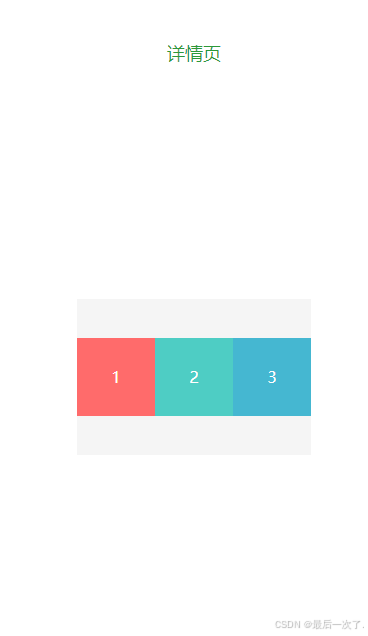
<text class="detail-title">详情页</text>
<!-- Flex布局示例 -->
<view class="flex-container">
<view class="flex-item item1">1</view>
<view class="flex-item item2">2</view>
<view class="flex-item item3">3</view>
</view>
<button bindtap="redirectBack" class="btn">返回首页</button>
</view>
pages/detail/detail.wxss
.container {
padding: 40rpx;
}
.detail-title {
font-size: 36rpx;
color: #2b9939;
text-align: center;
display: block;
margin: 40rpx 0;
}
.flex-container {
display: flex;
justify-content: space-around;
align-items: center;
height: 300rpx;
background-color: #f5f5f5;
margin: 40rpx 0;
}
.flex-item {
width: 150rpx;
height: 150rpx;
display: flex;
justify-content: center;
align-items: center;
color: white;
}
.item1 { background-color: #ff6b6b; }
.item2 { background-color: #4ecdc4; }
.item3 { background-color: #45b7d1; }
.btn {
width: 60%;
margin-top: 50rpx;
background-color: #2b9939;
color: white;
}
pages/detail/detail.js
Page({
// 返回首页
redirectBack() {
wx.redirectTo({
url: '/pages/index/index'
});
}
});
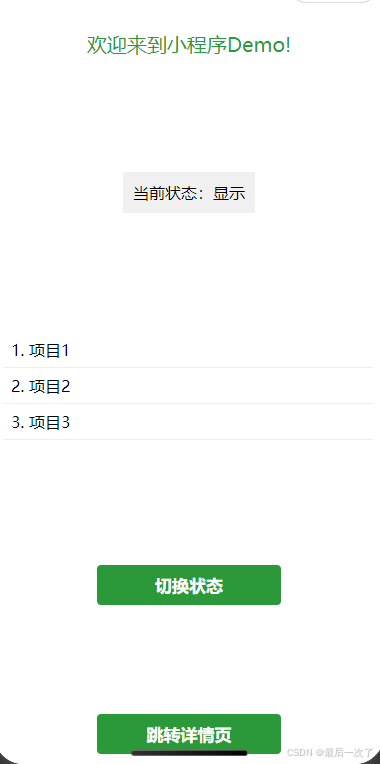
点击切换状态选择是否隐藏,点击详情页可以实现跳转





 扫一扫
扫一扫


 4454
4454

 被折叠的 条评论
为什么被折叠?
被折叠的 条评论
为什么被折叠?
 到【灌水乐园】发言





