


 Thymeleaf是一个XML/XHTML/HTML模板引擎,常用于SpringMVC项目,替代JSP。本文介绍了如何在SpringBoot中集成Thymeleaf,包括依赖引入、配置文件设置以及使用示例,强调了Thymeleaf提高开发效率和代码重用的特点。此外,还展示了Thymeleaf的语法,如变量表达式、选择变量表达式和消息表达式等,并提到其在处理非HTML模板文件的应用场景。
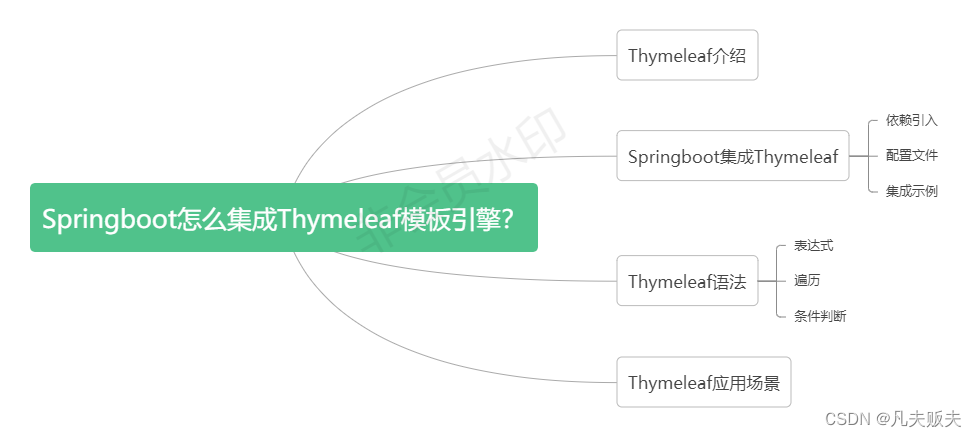
Thymeleaf介绍
Thymeleaf,是一个XML/XHTML/HTML模板引擎,开源的java库,可以用于SpingMVC项目中,用于代替JSP、FreeMarker或者其他的模板引擎;页面与数据分离,提高了开发效率,让代码重用更容易。
Springboot集成Thymeleaf
文章示例环境配置信息
jdk版本:1.8
开发工具:Intellij iDEA 2020.1
springboot:2.3.9.RELEASE
依赖引入
<dependency>
    <groupId>org.springframework.boot</groupId>
    <artifactId>spring-boot-starter-thymeleaf</artifactId>
</dependency>
<dependency>
    <groupId>ognl</groupId>
    <artifactId>ognl</artifactId>
    <version>3.1.26</version>
</dependency>
配置文件
spring.thymeleaf.cache=false
spring.thymeleaf.suffix=.html
spring.thymeleaf.prefix=classpath:/templates/
spring.thymeleaf.servlet.content-type=text/html
spring.thymeleaf.encoding=utf-8
spring.messages.basename=i18n/messages
集成示例
thymeleaf的用法,其实和jsp、freemarker差不多,下面用一个示例实际看一下thymeleaf是怎么使用的;
1、定义一个ExampleController类,注意,这里使用@Controller注解标记ExampleController,不要使用@RestController;
2、controller层具体处理请求的方法内,增加一个形参org.springframework.ui.Model,用于携带后台的处理数据;
3、返回值的“index”,表示classpath下templates中,模板名称是index,后缀是.html的模板;
4、contoller层处理完后,携带后台处理数据,到达视图层进行数据的渲染。
@Controller
@RequestMapping("/example")
public class ExampleController {
   @GetMapping("/index")
        public String index(Model model) {
        model.addAttribute("userName", "fanfu");
        model.addAttribute("msg", "thymeleaf模板内容");
        return "index";
    }
}
这里注意一下,通过xmlns:th="http://www.thymeleaf.org"引入了thymeleaf命名空间,th:text用于处理html标签体的文本内容,但是html5不允许使用th:*这些非标准属性的,因此可以切换到thymeleaf的data-th-*方法,来替换th:*方法;因此可以这么理解th:*和data-th-*的用法是等效的,为了遵循标准的用法,这篇文章的所有示例都采用data-th-*的写法。
<!DOCTYPE html>
<html lang="en" xmlns:th="http://www.thymeleaf.org">
<head>
    <meta charset="UTF-8">
    <title>测试</title>
</head>
<body>
    <div>你好!<span data-th-text="${userName}"></span>!</div>
    <div>这是一个<span data-th-text="${msg}"></span> 。</div>
</body>
</html>
Thymeleaf语法
表达式
thymeleaf内置了5种标准表达式,如下:
1、${...}:变量表达式,取出上下文环境中变量的值;
<p data-th-text="${username}"></p>2、*{...}:选择变量表达式,取选择的对象的属性值;
<div data-th-object="${formObj}">
    <p data-th-text="*{title}"></p>
    <p data-th-text="*{creator}"></p>
</div>
3、#{...}:消息表达式,使用文字消息的国际化;
<p data-th-text="#{welcome.message}"></p>
<p data-th-text="#{welcome.user.message(${formObj.creator})}"></p>
4、@{...}:链接表达式,用于表示各种超链接地址;
 <p data-th-text="@{http://localhost:8080/example/index(creator=${formObj.creator},status='1')}"></p>
<a data-th-href="@{url}" target="_blank">超链接</a>
5、~{...}:片段表达式,引用一段公共的代码片段;如下:“example”表示另外一个模板名字,里面是一些通用代码片段,可以使用这种方式引入到当前模板中;
<p data-th-text="~{example}"></p>遍历
<p data-th-each="student:${students}" data-th-text="${student.name}"></p>条件判断
条件判断语句有三种,分别是:th:if、th:unless、th:switch
th:if,如果表达式内容为真,则显示内容;
<p data-th-if="${userName!=null}">如果username不是null,我就会显示</p>th:unless,如果表达式内容为假,则显示内容;
<p data-th-unless="${userName==null}">如果username不是null,我就会显示</p>th:switch,为多路选择语句,需要搭配th:case来使用;
<div data-th-switch="${userName}">
    <p data-th-case="fanfu">凡夫贬夫,你好</p>
    <p data-th-case="test">这是一个test</p>
</div>
Thymeleaf应用场景
Thymeleaf可以替代JSP来进行动态网页的开发,但是在前后端分离、前端组件更加丰富多元化的今天,依然采用JSP的模式,用Thymeleaf来替代JSP进行动态网页的开发,未免有些落后了,因此Thymeleaf就没有用武之地吗?当然不。Thymeleaf是模板引擎,不仅可以处理html模板,还可以处理xml、CSS等其他一些格式的模板文件。例如:输出一些有样式的制式文本,如通知公告、申请书、建议书等。
下面是一个具体的示例,student.html是一个学生成绩展示的模板,但是学生会有很多,成绩也不一样,但是如果需要用一个制式的格式来展示这些数据,可以这么做:
1、先拿到学生的成绩数据;
2、然后用编程式的方法,使用thymeleaf模板引擎,根据模板生成静态的带有样式且加载好数据的html网页代码;
3、通常成绩、通知这类信息,一旦形成,基本上是不会改了,因此拿到已经加载数据的html网页内容就可以直接渲染显示了;
@Test
public void test() throws IOException {
    //测试数据
    List<Student> students = this.students();
    String staticDir = ResourceUtils.getFile("classpath:static\\").getPath() + File.separator;
    String targetFilePath=staticDir+"/student-data.html";
    //thymeleaf引擎上下文环境
    Context context=new Context();
    //在thymeleaf引擎上下文环境中装载模板上要渲染的数据
    context.setVariable("students",students);
    File file = new File(targetFilePath);
    if (!file.exists()) {
        file.delete();
    }
    //定义thymeleaf模板打印输出流
    PrintWriter printWriter=new PrintWriter(file);
    //定义thymeleaf模板解析器
    FileTemplateResolver fileTemplateResolver = new FileTemplateResolver();
    //thymeleaf模板解析器解析内容的后缀
    fileTemplateResolver.setSuffix(".html");
    //thymeleaf模板解析器解析内容的前缀
    String tempDir = ResourceUtils.getFile("classpath:templates\\").getPath()+File.separator;
    fileTemplateResolver.setPrefix(tempDir);
    //定义//thymeleaf模板引擎
    TemplateEngine templateEngine = new TemplateEngine();
    //装载thymeleaf模板解析器
    templateEngine.setTemplateResolver(fileTemplateResolver);
    //执行thymeleaf模板引擎的模板解析能力,有三个参数,分别是模板名字(不包括后缀和前缀)、上下文环境、打印输出流
    templateEngine.process("student",context,printWriter);
}
public List<Student> students() {
    List<Student> students = new ArrayList<>();
    for (int i = 0; i < 10; i++) {
        Student student = new Student();
        student.setName("张三" + i);
        student.setScore(98);
        students.add(student);
    }
    return students;
}
<!DOCTYPE html>
<html lang="en" xmlns:th="http://www.thymeleaf.org">
<head>
<meta charset="UTF-8"/>
<title>学生信息</title>
</head>
<body>
<div>
<p>
<span data-th-text="姓名"></span>-----
<span data-th-text="成绩"></span>
</p>
<p data-th-each="student:${students}">
<span data-th-text="${student.name}"></span>-----
<span data-th-text="${student.score}"></span>
</p>
</div>
</body>
</html>





 扫一扫
扫一扫


 21万+
21万+

 被折叠的 条评论
为什么被折叠?
被折叠的 条评论
为什么被折叠?
 到【灌水乐园】发言





