

矩阵乘法pytorch._c

本文深入探讨PyTorch库中的_C模块,重点解析如何使用该模块进行高效矩阵乘法操作,结合抽象代数概念,阐述底层计算原理。
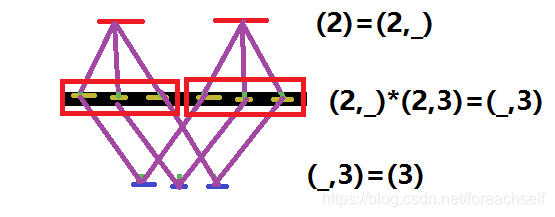
在这里插入图片描述

In [1]: import torch

In [2]: x=torch.randn(2)

In [3]: w=torch.randn(2,3)

In [4]: x@w
Out[4]: tensor([0.9364, 1.3934, 0.3611])

In [5]: _.shape
Out[5]: torch.Size([3])

In [8]: x.repeat(2,1)
Out[8]:
tensor([[ 0.2738, -1.1417],
        [ 0.2738, -1.1417]])

In [9]: x.repeat(2
(pytorch_env) PS E:\PyTorch_Build\pytorch\builder> # 激活 Conda 环境 (pytorch_env) PS E:\PyTorch_Build\pytorch\builder> conda activate pytorch_env EnvironmentNameNotFound: Could not find conda environment: pytorch_env You can list all discoverable environments with `conda info --envs`. Failed to run 'conda activate pytorch_env'. (pytorch_env) PS E:\PyTorch_Build\pytorch\builder> (pytorch_env) PS E:\PyTorch_Build\pytorch\builder> # 安装 mkl-service 和 intel-openmp 包 (pytorch_env) PS E:\PyTorch_Build\pytorch\builder> conda install -c intel -y mkl-service intel-openmp 3 channel Terms of Service accepted Channels: - intel - defaults - conda-forge - https://mirrors.tuna.tsinghua.edu.cn/anaconda/cloud/pytorch - https://mirrors.tuna.tsinghua.edu.cn/anaconda/pkgs/free - https://mirrors.tuna.tsinghua.edu.cn/anaconda/pkgs/main Platform: win-64 Collecting package metadata (repodata.json): failed UnavailableInvalidChannel: HTTP 403 FORBIDDEN for channel intel <https://conda.anaconda.org/intel> The channel is not accessible or is invalid. You will need to adjust your conda configuration to proceed. Use `conda config --show channels` to view your configuration's current state, and use `conda config --show-sources` to view config file locations. (pytorch_env) PS E:\PyTorch_Build\pytorch\builder> (pytorch_env) PS E:\PyTorch_Build\pytorch\builder> # 验证 MKL 安装 (pytorch_env) PS E:\PyTorch_Build\pytorch\builder> python -c "import mkl; print(f'MKL version: {mkl.__version__}')" Traceback (most recent call last): File "<string>", line 1, in <module> ModuleNotFoundError: No module named 'mkl' (pytorch_env) PS E:\PyTorch_Build\pytorch\builder> (pytorch_env) PS E:\PyTorch_Build\pytorch\builder> # 验证 NumPy 是否使用 MKL (pytorch_env) PS E:\PyTorch_Build\pytorch\builder> python -c "import numpy as np; np.show_config()" Traceback (most recent call last): File "<string>", line 1, in <module> ModuleNotFoundError: No module named 'numpy' (pytorch_env) PS E:\PyTorch_Build\pytorch\builder> # 激活 Conda 环境 (pytorch_env) PS E:\PyTorch_Build\pytorch\builder> conda activate pytorch_env EnvironmentNameNotFound: Could not find conda environment: pytorch_env You can list all discoverable environments with `conda info --envs`. Failed to run 'conda activate pytorch_env'. (pytorch_env) PS E:\PyTorch_Build\pytorch\builder> (pytorch_env) PS E:\PyTorch_Build\pytorch\builder> # 安装 mkl-service 和 intel-openmp 包 (pytorch_env) PS E:\PyTorch_Build\pytorch\builder> conda install -c intel -y mkl-service intel-openmp 3 channel Terms of Service accepted Channels: - intel - defaults - conda-forge - https://mirrors.tuna.tsinghua.edu.cn/anaconda/cloud/pytorch - https://mirrors.tuna.tsinghua.edu.cn/anaconda/pkgs/free - https://mirrors.tuna.tsinghua.edu.cn/anaconda/pkgs/main Platform: win-64 Collecting package metadata (repodata.json): failed UnavailableInvalidChannel: HTTP 403 FORBIDDEN for channel intel <https://conda.anaconda.org/intel> The channel is not accessible or is invalid. You will need to adjust your conda configuration to proceed. Use `conda config --show channels` to view your configuration's current state, and use `conda config --show-sources` to view config file locations. (pytorch_env) PS E:\PyTorch_Build\pytorch\builder> (pytorch_env) PS E:\PyTorch_Build\pytorch\builder> # 验证 MKL 安装 (pytorch_env) PS E:\PyTorch_Build\pytorch\builder> python -c "import mkl; print(f'MKL version: {mkl.__version__}')" Traceback (most recent call last): File "<string>", line 1, in <module> ModuleNotFoundError: No module named 'mkl' (pytorch_env) PS E:\PyTorch_Build\pytorch\builder> (pytorch_env) PS E:\PyTorch_Build\pytorch\builder> # 验证 NumPy 是否使用 MKL (pytorch_env) PS E:\PyTorch_Build\pytorch\builder> python -c "import numpy as np; np.show_config()" Traceback (most recent call last): File "<string>", line 1, in <module> ModuleNotFoundError: No module named 'numpy' (pytorch_env) PS E:\PyTorch_Build\pytorch\builder> # 进入 builder 目录 (pytorch_env) PS E:\PyTorch_Build\pytorch\builder> cd E:\PyTorch_Build\pytorch\builder (pytorch_env) PS E:\PyTorch_Build\pytorch\builder> (pytorch_env) PS E:\PyTorch_Build\pytorch\builder> # 执行 Windows 构建脚本 (pytorch_env) PS E:\PyTorch_Build\pytorch\builder> .\windows\build_pytorch.bat -cudaver 13.0 -cudnnver 9.12 -pythonver 3.10 .\windows\build_pytorch.bat: The term '.\windows\build_pytorch.bat' is not recognized as a name of a cmdlet, function, script file, or executable program. Check the spelling of the name, or if a path was included, verify that the path is correct and try again. (pytorch_env) PS E:\PyTorch_Build\pytorch\builder> (pytorch_env) PS E:\PyTorch_Build\pytorch\builder> # 如果脚本不存在,手动创建 (pytorch_env) PS E:\PyTorch_Build\pytorch\builder> if (-not (Test-Path .\windows\build_pytorch.bat)) { >> @" >> @echo off >> setlocal enabledelayedexpansion >> >> REM 设置构建参数 >> set CUDA_VERSION=13.0 >> set CUDNN_VERSION=9.12 >> set PYTHON_VERSION=3.10 >> >> REM 调用 PyTorch 构建 >> cd ..\..\pytorch >> call python setup.py install >> "@ | Out-File -FilePath .\windows\build_pytorch.bat -Encoding ASCII >> } Out-File: Line | 14 | "@ | Out-File -FilePath .\windows\build_pytorch.bat -Encoding ASCII | ~~~~~~~~~~~~~~~~~~~~~~~~~~~~~~~~~~~~~~~~~~~~~~~~~~~~~~~~~~~~~~ | Could not find a part of the path 'E:\PyTorch_Build\pytorch\builder\windows\build_pytorch.bat'. (pytorch_env) PS E:\PyTorch_Build\pytorch\builder> python -c " >> import torch >> print('='*50) >> print(f'PyTorch 版本: {torch.__version__}') >> print(f'CUDA 可用: {torch.cuda.is_available()}') >> if torch.cuda.is_available(): >> print(f'CUDA 版本: {torch.version.cuda}') >> print(f'cuDNN 版本: {torch.backends.cudnn.version()}') >> print(f'GPU 名称: {torch.cuda.get_device_name(0)}') >> >> print('='*20 + ' 性能测试 ' + '='*20) >> x = torch.randn(10000, 10000).cuda() >> y = torch.randn(10000, 10000).cuda() >> z = x @ y >> print(f'矩阵乘法完成: {z.size()}') >> >> print('='*20 + ' 配置信息 ' + '='*20) >> print(torch.__config__.show()) >> print('='*50) >> " Traceback (most recent call last): File "<string>", line 2, in <module> ModuleNotFoundError: No module named 'torch' (pytorch_env) PS E:\PyTorch_Build\pytorch\builder> # 保存为 E:\PyTorch_Build\Dockerfile (pytorch_env) PS E:\PyTorch_Build\pytorch\builder> FROM nvidia/cuda:13.0-devel-ubuntu22.04 ParserError: Line | 1 | FROM nvidia/cuda:13.0-devel-ubuntu22.04 | ~~~~ | The 'from' keyword is not supported in this version of the language. (pytorch_env) PS E:\PyTorch_Build\pytorch\builder> (pytorch_env) PS E:\PyTorch_Build\pytorch\builder> RUN apt-get update && \ RUN: The term 'RUN' is not recognized as a name of a cmdlet, function, script file, or executable program. Check the spelling of the name, or if a path was included, verify that the path is correct and try again. (pytorch_env) PS E:\PyTorch_Build\pytorch\builder> apt-get install -y git ninja-build python3-pip && \ apt-get: The term 'apt-get' is not recognized as a name of a cmdlet, function, script file, or executable program. Check the spelling of the name, or if a path was included, verify that the path is correct and try again. (pytorch_env) PS E:\PyTorch_Build\pytorch\builder> pip3 install cmake Looking in indexes: https://pypi.tuna.tsinghua.edu.cn/simple Collecting cmake Using cached https://pypi.tuna.tsinghua.edu.cn/packages/7c/d0/73cae88d8c25973f2465d5a4457264f95617c16ad321824ed4c243734511/cmake-4.1.0-py3-none-win_amd64.whl (37.6 MB) Installing collected packages: cmake Successfully installed cmake-4.1.0 (pytorch_env) PS E:\PyTorch_Build\pytorch\builder> (pytorch_env) PS E:\PyTorch_Build\pytorch\builder> RUN git clone https://github.com/pytorch/pytorch RUN: The term 'RUN' is not recognized as a name of a cmdlet, function, script file, or executable program. Check the spelling of the name, or if a path was included, verify that the path is correct and try again. (pytorch_env) PS E:\PyTorch_Build\pytorch\builder> WORKDIR pytorch WORKDIR: The term 'WORKDIR' is not recognized as a name of a cmdlet, function, script file, or executable program. Check the spelling of the name, or if a path was included, verify that the path is correct and try again. (pytorch_env) PS E:\PyTorch_Build\pytorch\builder> (pytorch_env) PS E:\PyTorch_Build\pytorch\builder> RUN git submodule update --init --recursive && \ RUN: The term 'RUN' is not recognized as a name of a cmdlet, function, script file, or executable program. Check the spelling of the name, or if a path was included, verify that the path is correct and try again. (pytorch_env) PS E:\PyTorch_Build\pytorch\builder> python3 setup.py install (pytorch_env) PS E:\PyTorch_Build\pytorch\builder> cd E:\PyTorch_Build (pytorch_env) PS E:\PyTorch_Build> docker build -t pytorch-custom . docker: The term 'docker' is not recognized as a name of a cmdlet, function, script file, or executable program. Check the spelling of the name, or if a path was included, verify that the path is correct and try again. (pytorch_env) PS E:\PyTorch_Build> # 创建新环境 (pytorch_env) PS E:\PyTorch_Build> conda create -n pytorch-env python=3.10 3 channel Terms of Service accepted Channels: - defaults - conda-forge - https://mirrors.tuna.tsinghua.edu.cn/anaconda/cloud/pytorch - https://mirrors.tuna.tsinghua.edu.cn/anaconda/pkgs/free - https://mirrors.tuna.tsinghua.edu.cn/anaconda/pkgs/main Platform: win-64 Collecting package metadata (repodata.json): done Solving environment: done ## Package Plan ## environment location: C:\Miniconda3\envs\pytorch-env added / updated specs: - python=3.10 The following packages will be downloaded: package | build ---------------------------|----------------- pip-25.2 | pyhc872135_0 1.2 MB defaults python-3.10.18 | h981015d_0 16.2 MB defaults done # # To activate this environment, use # # $ conda activate pytorch-env # # To deactivate an active environment, use # # $ conda deactivate (pytorch_env) PS E:\PyTorch_Build> conda activate pytorch-env (pytorch_env) PS E:\PyTorch_Build> (pytorch_env) PS E:\PyTorch_Build> # 安装官方 PyTorch 包 (pytorch_env) PS E:\PyTorch_Build> conda install -c pytorch -c nvidia -y pytorch torchvision torchaudio pytorch-cuda=12.1 3 channel Terms of Service accepted Channels: - pytorch - nvidia - defaults - conda-forge - https://mirrors.tuna.tsinghua.edu.cn/anaconda/cloud/pytorch - https://mirrors.tuna.tsinghua.edu.cn/anaconda/pkgs/free - https://mirrors.tuna.tsinghua.edu.cn/anaconda/pkgs/main Platform: win-64 Collecting package metadata (repodata.json): done Solving environment:
最新发布
09-02
评论
添加红包

请填写红包祝福语或标题

红包个数最小为10个

红包金额最低5元

当前余额3.43前往充值 >
需支付:10.00
成就一亿技术人!
领取后你会自动成为博主和红包主的粉丝 规则
hope_wisdom
发出的红包
实付
使用余额支付
点击重新获取
扫码支付
钱包余额 0

抵扣说明:

1.余额是钱包充值的虚拟货币,按照1:1的比例进行支付金额的抵扣。
2.余额无法直接购买下载,可以购买VIP、付费专栏及课程。

余额充值



