



 本文介绍了一种简化POI开发的库javaexceltemplate,通过现有模板生成Excel,支持行循环、列合并和动态数据填充。通过实例展示了如何编辑模板、组织数据并导出,以及标签的各种用法。
如果这篇文章对您有些用处,请点赞告诉我O(∩_∩)O
一、简介
1、java excel template,利用已有excel作为格式模板,结合业务数据实现导出,简化poi开发中各种格式以及样式的设定,支持行循环,动态列,列合并等。
2、gitee地址:https://gitee.com/flyzing/jxl
二、依赖
<dependency>
            <groupId>org.springframework.boot</groupId>
            <artifactId>spring-boot-starter</artifactId>
        </dependency>
        <dependency>
            <groupId>org.apache.poi</groupId>
            <artifactId>poi-ooxml</artifactId>
            <version>4.1.2</version>
        </dependency>
三、helloworld
1、编辑excel模板

2、组织业务数据生成excel
        List stores = new ArrayList();
        Store store = null;
        for (int i = 0; i < 10; i++) {
            store = new Store();
            store.setStoreNo("100" + i);
            store.setStoreName("门店" + i);
            stores.add(store);
        }
        Map datas = new HashMap();
        datas.put("storeList", stores);

        JXTemplate jxTemplate = new JXTemplate("/jxt/test1.xlsx");
        try {
            FileOutputStream fos = new FileOutputStream("out.xlsx");
            jxTemplate.parseSheet(0, datas);
            jxTemplate.export(fos); //这里是写入本地excel文件,也可以写入response做网页导出
            fos.flush();
            fos.close();
        } catch (IOException e) {
            e.printStackTrace();
        }
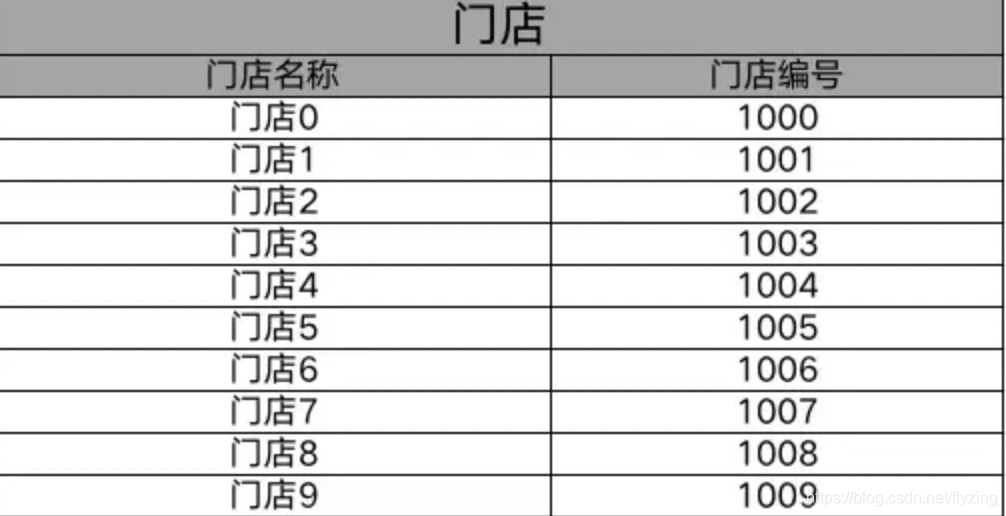
3、导出结果
四、支持标签
1、值标签
(1)不存在合并单元格,简单使用:{{si.storeName}}
(2)当前单元格需要合并列,且值为常量:{{jxt.value 商品 merge 3}}
(3)当前单元格需要合并列,且值为变量:{{jxt.value s.storeName merge 2}}
(4)当前单元格需要设置时间格式:{{jxt.value item.createTime format (yyyy-MM-dd hh:mm:ss)}}
(5)当前单元格需要合并列,且需要格式化:{{jxt.value item.createTime merge 2 format (yyyy-MM-dd hh:mm:ss)}}
注意:只支持列合并,不支持行合并,且merge属性需要在format之前。
2、行循环标签
{{jxt.each item in productList}}
其中,item为循环变量名,可自定义。
注意:行循环标签只支持each标签的下一行单行循环,因此不需要配置结束标签。
3、列循环标签
{{jxt.coleach s in stores2}}
其中,s为循环变量名,可自定义。
注意:列循环标签支持多列循环,结束标签为{{\jxt.coleach}}
4、空标签
{{jxt.empty}}
空出单元格或行,如两个循环列表之间需要空三行。
五、多sheet全标签导出展示
1、测试类
public static void main(String[] args) {
        List stores = new ArrayList();
        Store store = null;
        for (int i = 0; i < 10; i++) {
            store = new Store();
            store.setStoreNo("100" + i);
            store.setStoreName("门店" + i);
            stores.add(store);
        }

        Random rand = new Random(47);
        List products = new ArrayList();
        Product product = null;
        for (int i = 0; i < 20; i++) {
            product = new Product();
            product.setProductNo("p00" + i);
            product.setProductName("商品" + i);
            product.setProductNum(rand.nextInt(100));
            product.setCreateId("操作人" + i);
            product.setCreateTime(new Date());
            product.setStore((Store) stores.get(rand.nextInt(5)));
            products.add(product);
        }

        List stores2 = new ArrayList();
        for (int j = 0; j < 5; j++) {
            Store store2 = new Store();
            store2.setStoreName("门店" + j);
            store2.setStoreNo("100" + j);
            stores2.add(store2);
        }
        List products2 = new ArrayList();
        Product2 product2 = null;
        for (int i = 0; i < 20; i++) {
            List nums = new ArrayList();
            product2 = new Product2();
            product2.setProductNo("p00" + i);
            product2.setProductName("商品" + i);
            for (int j = 0; j < 5; j++) {
                nums.add(j * 100);
            }
            product2.setNums(nums);
            products2.add(product2);
        }

        Map datas = new HashMap();
        datas.put("products", products);
        datas.put("stores", stores);
        datas.put("stores2", stores2);
        datas.put("products2", products2);
        JXTemplate jxTemplate = new JXTemplate("/jxt/test1.xlsx");
        try {
            FileOutputStream fos = new FileOutputStream("out.xlsx");
            jxTemplate.parseSheet(0, datas);
            jxTemplate.parseSheet(1, datas);
            jxTemplate.export(fos);
            fos.flush();
            fos.close();
        } catch (IOException e) {
            e.printStackTrace();
        }
    }
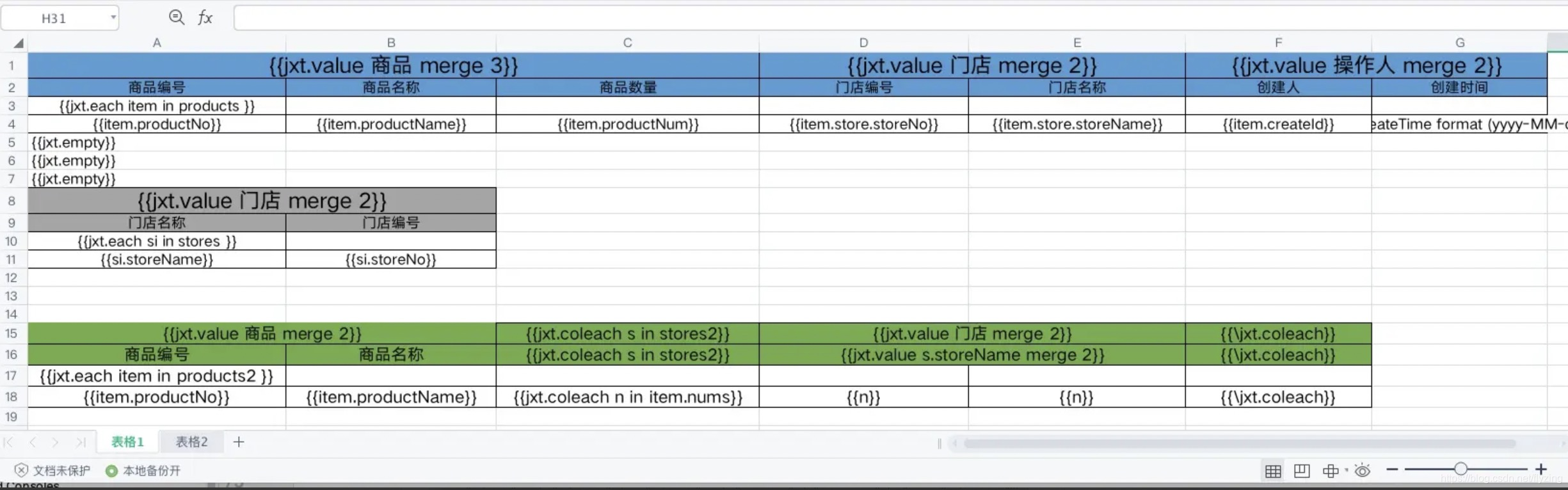
2、模板
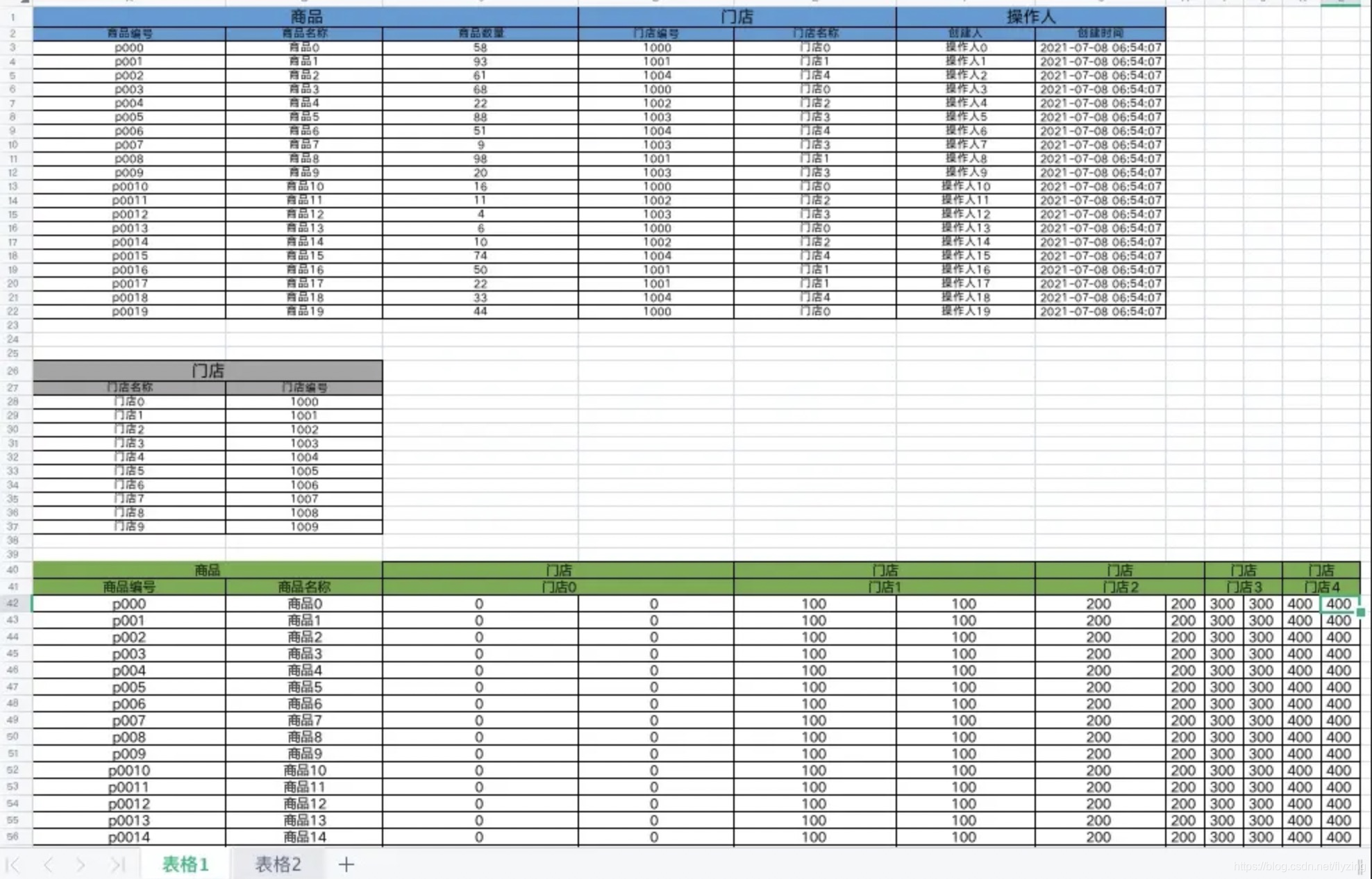
3、导出结果





 扫一扫
扫一扫


 878
878

 被折叠的 条评论
为什么被折叠?
被折叠的 条评论
为什么被折叠?
 到【灌水乐园】发言





