


 这篇博客详细介绍了如何在Android应用中创建一个自定义的圆形按钮。通过在XML布局文件中定义Button,并在drawable资源文件中使用Shape元素设置背景,包括颜色、内边距和圆角半径,实现了按钮的圆形效果。这种方法允许开发者轻松地复用和定制按钮样式。
在需要的activity中建立一个button
下面建立一个button
<Button
    android:id="@+id/btn_edittext"//button的名字随便起
    android:layout_width="match_parent"
    android:layout_height="wrap_content"
    android:background="@drawable/roundbutton"//直接建立roundbutton的模板以后直接用


在drawable里建立roundbutton
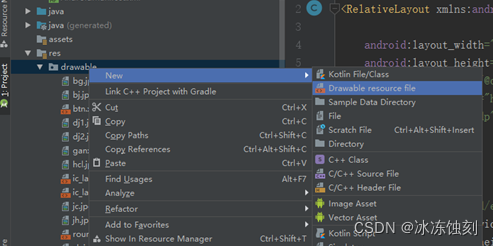
用shape工具完成
<?xml version="1.0" encoding="utf-8"?>
<shape xmlns:android="http://schemas.android.com/apk/res/android"
    android:shape="rectangle">
<solid

    android:color="#5095edff"/> //按钮的颜色,随意设
    <padding
        android:left="10dp"
        android:right="10dp"/>
    <corners
        android:radius="30dp"/> //圆角的半径

</shape>





 扫一扫
扫一扫


 4613
4613

 被折叠的 条评论
为什么被折叠?
被折叠的 条评论
为什么被折叠?
 到【灌水乐园】发言





