



1. 前言
编写 frida JavaScript 脚本是一件 very 普遍的事情在 Android Reverse 中。为了方便编写,配置相关的环境使其能够自动补全是很关键的,即通过类名就能够获取该类的所有对外接口信息,这是面向对象编程的核心优势,可惜我没有对象。
首先我们还是要有一个信仰,相信这是能够配置好的,这个原因很简单,因为 frida 的控制台中就给出了相应的补全操作,只是因为操作不方便我才要去 VSCode 中配置。

2. 配置
In C/C++ 中我们只需要 #include 相应的头文件就能够达到在编写源码时的自动补全了,后续的补全操作都是由 Microsoft の IntelliSense 组件完成的。
同样的在 JavaScript 中包含相应的 .ts (TypeScript)文件就能够达到这样的效果。当然 .ts 绝对不是用来干这个的,只是我找到的 frida-gum 的相关文件是 .ts 的。相应的下载地址在这 @types/frida-gum。我下载的是 19.0.0 版本的,对应的 frida-17.2.* 这个版本的 API 与 frida-16.1.0 是不同的,配置的时候需要找到对应版本的 index.d.ts 文件。
安装 node.js 后可以直接使用其附带的 npm 进行下载。After 下载,@types/frida-gum 目录下的 index.d.ts 复制到 Frida JavaScript 目录下即可。在文件开头添加下面的代码进行包含即可。
/// <reference path="./frida.d.ts" />
当然如果不 want 下载 node.js 可以直接从网页端产看代码,然后全选,复制到文件中保存,这里我要吐槽一下 npm 管理了,代码都展示出来了却不提供下载的接口。
完成包含后就可以在 VSCode 使用 Frida 的自动补全了。

[Append]:
我发现一个新的配置方式,能够将 Java 也配置好 in the meanwhile. Frida JavaScript API 中给出一个配置的方案,只需要去下载相应的 example 就可以了。不过在这里面也需要使用 npm,如果不 want 下载可以直接去看 package_lock.json 文件中的下载地址,只需要下载 frida-gum 和 frida-java-bride 就可以了。


当然需要注意的一点是 TM frida-17 做了大改,把 Java 的相关 API 定义弄到了单独的文件中去,而在 17 之前则一个 frida-gum 就够了。

3. API 变化
frida-17.2.5 与 frida-16.1.0 的 API 是不一样的,这里我只能说我亲身体会到的一个例子,这个 Bug 我找了好久,修完之后 I just wanna say sun your mum frida。
下面的代码是 frida-16.1.0 以及很多网上教程中常用的用来 Hook Android 加载库时的操作。但在 frida-17.2.5 中这样的操作是不行的。
Module.findExportByName(null, "dlopen");
当输入上述 JavaScript 之后会在得到这样的报错信息,出现这样错误的原因是 frida-17.2.5 中没有相应的 API 实现。

When 我去查看相应的 API 描述 in @type/frida-gum-19.0.0 时,发现在 Module 中只有一个 findExportByName 的实现,而其参数列表只接受一个参数,并且函数没有 static 关键字修饰,必须要实例化之后才能使用。

While in @type/frida-gum-15.2.0 中则是另一种情况,在其 Module 中有两个 findExportByName 的实现,并且其中一个使用 static 关键字修饰,即不需要实例化也能使用。这就是代码 Module.findExportByName(null, "dlopen") 为什么在 frida-16.1.0 中能够正常使用的原因。

4. Hook loadLibrary
这里我要记录一下 Hook Java 层的 System.loadLibrary 时遇到的一个 BUG: java.lang.UnsatisfiedLinkError: dlopen failed: library "***.so" not found 及其解决方案。这里是参考 Blog。
When 我们 Hook 一个函数 in Java layer using frida,我们大部分时候希望这个函数在执行完我们的代码之后能够回去执行原本的控制流,因此大部分时候我们会使用 this.func 去执行原本的功能 at the end of Hook。
So it is normal to call this.loadLibrary(libName) after we 获取了加载库的名称。However,when I do like this,an error occurs。这个出现的原因是很简单的,没有找到加载的文件。这里虽然将传入的名称添加上了 lib 的前缀和 .so 的后缀,但是没有将寻址路径也添加进去,从而无法找到相应的文件。
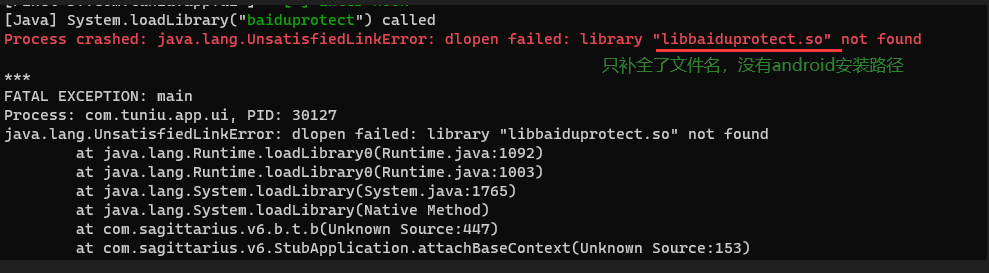
而真实的传入路径应该入下图所示:
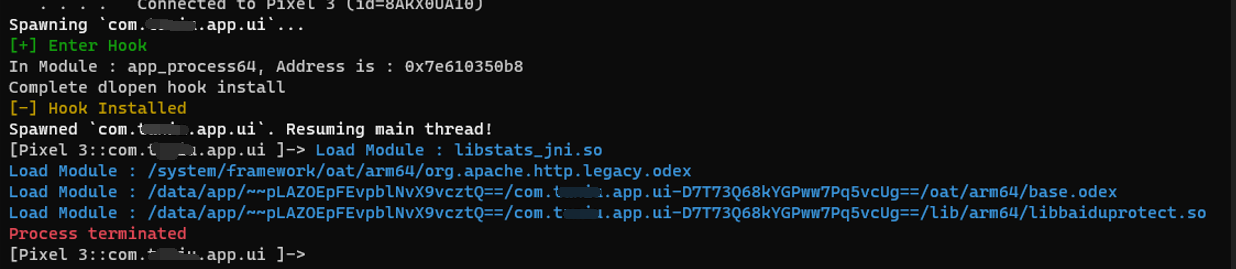
那么导致这个问题的原因是 what 呢?System.loadLibrary 是 Java 的库函数,而 Android 安装包的 路径 没有添加到名称的前面,这是我们遇到的问题。查看调用栈发现 loadLibrary 会调用 RunTime.loadLibrary0 进行加载,而这个函数是可以携带参数的,而其中一个就是 ClassLoader。而调用栈中的则是只有一个参数的 overload 这就是问题的原因所在。
RunTime.loadLibrary0 如果不传入任何 ClassLoader 类只会在系统的默认路径下寻找 lib 库,而不会去 app 的按照路径中寻找。解决这个问题的方案就是传入一个 ClassLoader 类。
    /**
     * Hook System.loadLibrary()
     * @todo : if you want to hook loadlibrary, just uncomment it.
    */
    var System = Java.use('java.lang.System');
    System.loadLibrary.overload('java.lang.String').implementation = function(libName) {
        console.log(`[Java] System.loadLibrary("${CMD_GREEN}${libName}${CMD_WHITE}") called`);
        //JavaCallingStack();
        try {
            this.loadLibrary(libName);
        }
        catch(e) {
            // Fallback with dependency resolution
            const Runtime = Java.use('java.lang.Runtime');
            const runtime = Runtime.getRuntime();
            const loader = Java.classFactory.loader;
            // Use Android's internal loader with dependency resolution
            runtime.loadLibrary0(loader, libName);
        }
    };
按照上面的方案去 Hook System.loadLibrary 就可以正常的运行。
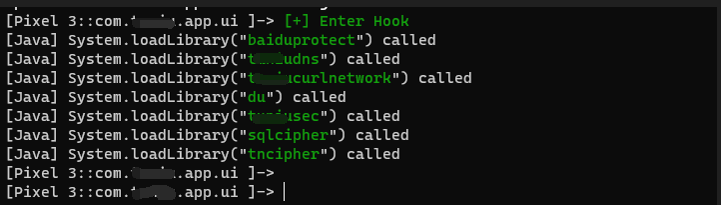
5. Some Code
这部分是我用来记录自己写的 JavaScript 代码的位置,主要是给自己以后查阅。使用的是 frida-17.2.5。包括:查找 API 函数,输出调用栈,颜色字。
/**this is a frida JavaScript function library, where I have save some functions */
/// <reference path="./include/frida16.d.ts" />

const CMD_RED = "\x1b[31m";
const CMD_GREEN = "\x1b[32m";
const CMD_YELLOW = "\x1b[33m";
const CMD_BLUE = "\x1b[34m";
const CMD_MAGENTA = "\x1b[35m";
const CMD_CYAN = "\x1b[36m";
const CMD_WHITE = "\x1b[37m";
// Store original console.log
const originalLog = console.log;
// Override console.log
console.log = function(...args) {
  originalLog(args, CMD_WHITE);
};

Java.perform(function() {
    /**
     * enumerate all the methods of a Java object
     * @param 0: a Java object
     * @returns : none, but will output all the methods in consloe
     */
    function EnumerateMethod(targetClass) {
        // Get declared methods (including private/protected, excluding inherited)
        var methods = targetClass.class.getDeclaredMethods();

        console.log(CMD_CYAN + targetClass.class.getName() + " : ");
        methods.forEach(function(method) {
            var methodName = method.getName();
            var returnType = method.getReturnType().getName();

            // Extract parameter types
            var params = [];
            var paramTypes = method.getParameterTypes();
            for (var i = 0; i < paramTypes.length; i++) {
                params.push(paramTypes[i].getName());
            }
            console.log("\t" + CMD_CYAN + returnType + " " + CMD_YELLOW + methodName + CMD_WHITE + "(" + params.join(", ") + ")");
        });
    }

    /**
     * print the Calling Stack
     * @returns : none
     */
    function JavaCallingStack() {
        // Get stack trace
        const Exception = Java.use('java.lang.Exception');
        const stackTrace = Exception.$new().getStackTrace();

        // Convert to readable format
        console.log(CMD_YELLOW + "Calling Stack:");
        for (let i = 0; i < stackTrace.length; i++) {
            console.log(`  ${stackTrace[i].toString()}`);
        }
    }

    /**
     * dump memroy to file /data/local/tmp/FW%d, you need to create it first and chmod 666
     * @param 0 : the address you want to dump
     * @param 1 : the size to dump
     * @returns : none
     */
    var nIndex = 1;
    function Dumpfile(address, nSize) {
        var strFile = "/data/local/tmp/" + `FW${nIndex}`;
        console.log(strFile);
        var fFile = new File(strFile, "wb");
        var point = new NativePointer(address);
        var buf = point.readByteArray(parseInt(nSize, 16));
        fFile.write(buf);
        fFile.close();
        nIndex = nIndex + 1;
        console.log("Dump file : " + CMD_GREEN + strFile);
    }

    /**
     * dereference a pointer just like *p
     * @param 0 : the address you want to deference, just like int* pInt = 0x123456, it will get
     0x123456 to you
     * @returns : dereference result
     */
    function Dereference(address) {
        var point = new NativePointer(address);
        var deref = point.readPointer();
        return deref;
    }

    /**
     * this is just a template on how to use frida to hook a memory address.
     you need to fill it will what you want to do.
     * @param 0 : targetaddress is the memory address you want to hook
     * @todo : don't use it directly without any changes.
     */
    function AttackPoint(targetAddress) {
        Interceptor.attach(targetAddress, {
            onEnter: function (args) {
                const ctx = this.context;
                const arch = Process.arch;
                console.log(CMD_GREEN + `[+] Hit address: ${targetAddress}`);
                //console.log(CMD_CYAN + "Call : " + CMD_GREEN + `${ctx.x0}`);
                console.log(`x0 : ${ctx.x0}`);
                console.log(`x1 : ${ctx.x1}`);
                console.log(`x2 : ${ctx.x2}`);
                console.log(`x3 : ${ctx.x3}`);
                console.log(`x4 : ${ctx.x4}`);
                console.log(`x5 : ${ctx.x5}`);
                console.log(`x6 : ${ctx.x6}`);
                console.log(`x7 : ${ctx.x7}`);
                console.log(`x8 : ${ctx.x8}`);
                var sp = parseInt(ctx.sp, 16);
                var deref = Dereference(sp + 0x8);
                //console.log(`sp + 0x8 : 0x${(sp + 0x8).toString(16)}`);
                //console.log(hexdump(ctx.x2));
                //console.log(hexdump(ctx.x1));
                //console.log(hexdump(ctx.x2));
                //console.log(hexdump(ctx.x3));
                //Dumpfile(ctx.x1, ctx.x2);
                Dumpfile(ctx.x2, ctx.x3);
            }
        });
    }

    /**
     * Hook System.loadLibrary()
     * @todo : if you want to hook loadlibrary, just uncomment it.
    */
    // var System = Java.use('java.lang.System');
    // System.loadLibrary.overload('java.lang.String').implementation = function(libName) {
    //     console.log(`[Java] System.loadLibrary("${CMD_GREEN}${libName}${CMD_WHITE}") called`);
    //     //JavaCallingStack();
    //     try {
    //         this.loadLibrary(libName);
    //     }
    //     catch(e) {
    //         // Fallback with dependency resolution
    //         const Runtime = Java.use('java.lang.Runtime');
    //         const runtime = Runtime.getRuntime();
    //         const loader = Java.classFactory.loader;
    //         // Use Android's internal loader with dependency resolution
    //         runtime.loadLibrary0(loader, libName);
    //     }
    // };

});

{
/**
 * get a export function by its name
 * @param {string} strName : the function you want to hook
 * @returns {fnPoint} : the address of the function
 */
function FindExportByName(strName) {
    var fn = null;
    const Modules = Process.enumerateModules();
    for(let i = 0; i < Modules.length; i++) {
        fn = Modules[i].getExportByName(strName);
        if(fn) {
            console.log(`In Module : ${Modules[i].name}, Address is : ${fn}`);
            break;
        }
    };
    return fn;
}

/**
 * print out a thread calling stack
 * @param {context} Context : the context of current Thread, can be obtained in Interceptor.attach() callback
 */
function TraceStack(Context) {
    try {
        const backtrace = Thread.backtrace(Context, Backtracer.ACCURATE)
            .map(DebugSymbol.fromAddress)
            .map(sym => sym.name + CMD_YELLOW +'[' + sym.moduleName + ']');
        console.log(CMD_YELLOW + 'Backtrace:');
        backtrace.forEach((frame, i) => console.log(CMD_GREEN + "\t" + `${i}: ${frame}`));
    }
    catch(e) {
        console.log(CMD_RED + "\tStack trace unavailable");
        console.log(CMD_RED + `\t${e}`);
    }
    console.log(CMD_GREEN + "End Trace");
}

// record which lib are loaded
var setLoged = new Set();
setLoged.add("libstats_jni.so")
/**
 * if the module isn't record in setLoged, then print it.
 * @param {string} libPath : the module name that is loaded
 * @returns : if the first that load it return 1 else return 0.
 */
function LogLib(libPath) {
    if(libPath && !setLoged.has(libPath)) {
        setLoged.add(libPath);
        console.log(CMD_CYAN + `Load Module : ${libPath}`);
        return 1;
    }
    return 0;
    //console.log(CMD_RED + `00: ${this}`);
}

/**
 * hook android_dlopen_ext function to see which module is loaded
 * @returns : none
 */
function TraceModuleLoad() {
    var fnOpen = FindExportByName("android_dlopen_ext");
    if(fnOpen) {
        var bThere = 0;
        var libPath;
        Interceptor.attach(fnOpen, {
            onEnter(args) {
                libPath = args[0].readCString();
                bThere = LogLib(libPath);
                if(bThere) {
                    TraceStack(this.context);
                }
            },
            onLeave(retval) {
                console.log(`leave ${retval}`);
            }
        })
        console.log("Complete dlopen hook install");
    }
}
}





 扫一扫
扫一扫


 3183
3183


 到【灌水乐园】发言




