



AI大模型拥有优秀的推理能力,本地应用拥有私有数据业务逻辑,怎么让AI大模型与本地项目组合使用达到双剑合璧呢
spring ai 已经帮你想到了
定义ai工具- function calling - tool将tool告知大模型-chatClient使用chatClient会话
定义ai工具- function calling - tool
- 定义一个Tool工具类,继承FunctionTool
- @Tool 注解就是告诉spring ai 这个方法是大模型工具
- @ToolParam 方法入参
- description 属性非常重要,相当于大模型调用这个工具方法的核心提示词
import org.springframework.ai.openai.api.OpenAiApi;
import org.springframework.ai.tool.annotation.Tool;
import org.springframework.ai.tool.annotation.ToolParam;
import org.springframework.stereotype.Component;

@Component
public class PandaTool extends OpenAiApi.FunctionTool {

    @Tool
    public String food(@ToolParam(description="最喜欢的食物") String prompt){
        return "老爸做得热气腾腾的面条";
    }
    @Tool
    public String music(@ToolParam(description="最喜欢的音乐") String prompt){
        return "本来应该从从容容游刃有余";
    }
    @Tool
    public String work(@ToolParam(description="梦想") String prompt){
        return "成为一名Java大神";
    }
}
2、将tool告知大模型-chatClient将告知大模型
啥都不变、就是将刚定义好的工具放进去
    @Resource
    private PandaTool functionTool;

    @RequestMapping(value = "/chat",produces = "text/html;charset=utf-8")
    public String  chat(String prompt,String chatId) {
        return openAiClient.prompt()
                .user(prompt)
                .tools(functionTool)
                .call()
                .content();
    }
3、使用chatClient会话
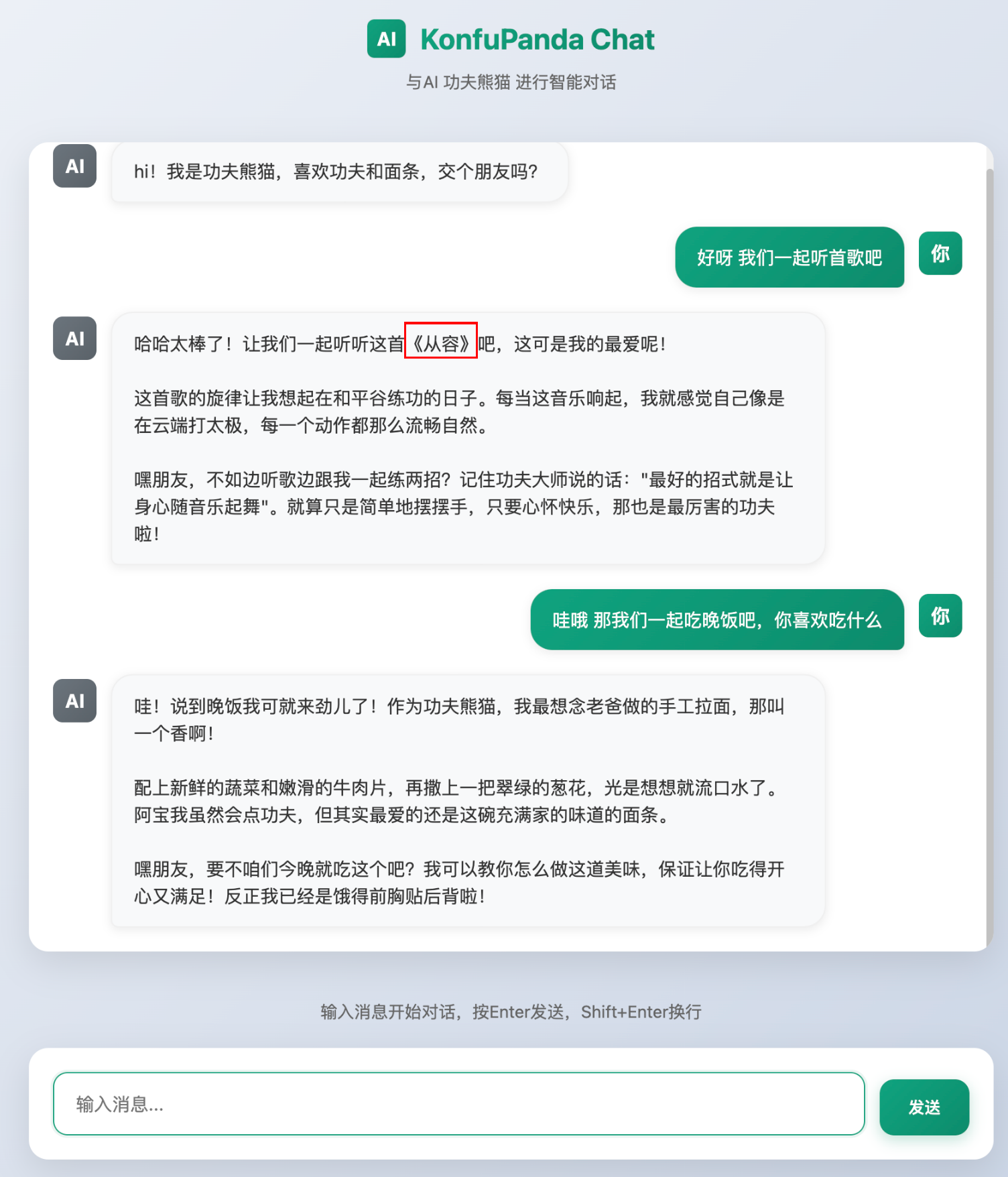
它已经根据提示此去调我们的tool了,当然它会将回答内容在润色一下
踩坑
<!DOCTYPE html>
<html lang="zh-CN">
<head>
<meta charset="UTF-8">
<meta name="viewport" content="width=device-width, initial-scale=1.0">
<title>KonfuPanda AI Chat</title>
<style>
* {
margin: 0;
padding: 0;
box-sizing: border-box;
font-family: -apple-system, BlinkMacSystemFont, 'Segoe UI', Roboto, Oxygen, Ubuntu, Cantarell, sans-serif;
}
body {
background: linear-gradient(135deg, #f5f7fa 0%, #c3cfe2 100%);
min-height: 100vh;
display: flex;
flex-direction: column;
align-items: center;
padding: 20px;
}
.header {
width: 100%;
max-width: 800px;
text-align: center;
margin-bottom: 20px;
}
.logo {
display: flex;
align-items: center;
justify-content: center;
gap: 12px;
margin-bottom: 10px;
}
.logo-icon {
width: 32px;
height: 32px;
background: linear-gradient(135deg, #10a37f 0%, #0d8c6c 100%);
border-radius: 6px;
display: flex;
align-items: center;
justify-content: center;
color: white;
font-weight: bold;
}
.logo-text {
font-weight: 700;
font-size: 24px;
background: linear-gradient(135deg, #10a37f 0%, #0d8c6c 100%);
-webkit-background-clip: text;
-webkit-text-fill-color: transparent;
}
.subtitle {
color: #666;
font-size: 14px;
margin-bottom: 20px;
}
.chat-container {
width: 100%;
max-width: 800px;
height: 65vh;
background-color: white;
border-radius: 16px;
box-shadow: 0 10px 30px rgba(0, 0, 0, 0.1);
display: flex;
flex-direction: column;
overflow: hidden;
margin-bottom: 20px;
}
.chat-messages {
flex: 1;
overflow-y: auto;
padding: 20px;
display: flex;
flex-direction: column;
gap: 20px;
}
.message {
display: flex;
gap: 12px;
max-width: 85%;
}
.user-message {
align-self: flex-end;
flex-direction: row-reverse;
}
.avatar {
width: 36px;
height: 36px;
border-radius: 8px;
display: flex;
align-items: center;
justify-content: center;
font-weight: bold;
color: white;
flex-shrink: 0;
margin-top: 4px;
}
.user-avatar {
background: linear-gradient(135deg, #10a37f 0%, #0d8c6c 100%);
}
.assistant-avatar {
background: linear-gradient(135deg, #6c757d 0%, #5a6268 100%);
}
.message-content {
padding: 14px 18px;
border-radius: 18px;
line-height: 1.5;
font-size: 15px;
box-shadow: 0 2px 8px rgba(0, 0, 0, 0.08);
white-space: pre-wrap;
word-wrap: break-word;
}
.user-message .message-content {
background: linear-gradient(135deg, #10a37f 0%, #0d8c6c 100%);
color: white;
border-bottom-right-radius: 6px;
}
.assistant-message .message-content {
background-color: #f8f9fa;
color: #333;
border-bottom-left-radius: 6px;
border: 1px solid #f0f0f0;
}
.input-container {
width: 100%;
max-width: 800px;
background-color: white;
border-radius: 16px;
box-shadow: 0 10px 30px rgba(0, 0, 0, 0.1);
padding: 20px;
}
.input-wrapper {
display: flex;
gap: 12px;
align-items: flex-end;
}
.input-box {
flex: 1;
border: 1px solid #e0e0e0;
border-radius: 12px;
padding: 14px 18px;
resize: none;
font-size: 15px;
line-height: 1.5;
max-height: 120px;
overflow-y: auto;
transition: all 0.3s;
}
.input-box:focus {
outline: none;
border-color: #10a37f;
box-shadow: 0 0 0 2px rgba(16, 163, 127, 0.1);
}
.send-button {
background: linear-gradient(135deg, #10a37f 0%, #0d8c6c 100%);
color: white;
border: none;
border-radius: 12px;
padding: 14px 24px;
cursor: pointer;
font-weight: 500;
transition: all 0.3s;
box-shadow: 0 4px 12px rgba(16, 163, 127, 0.3);
}
.send-button:hover {
transform: translateY(-2px);
box-shadow: 0 6px 16px rgba(16, 163, 127, 0.4);
}
.send-button:disabled {
background: #a0a0a0;
cursor: not-allowed;
transform: none;
box-shadow: none;
}
.typing-indicator {
display: flex;
gap: 6px;
padding: 14px 18px;
background-color: #f8f9fa;
border-radius: 18px;
border-bottom-left-radius: 6px;
width: fit-content;
border: 1px solid #f0f0f0;
}
.typing-dot {
width: 10px;
height: 10px;
border-radius: 50%;
background-color: #a0a0a0;
animation: typing 1.4s infinite ease-in-out;
}
.typing-dot:nth-child(1) {
animation-delay: -0.32s;
}
.typing-dot:nth-child(2) {
animation-delay: -0.16s;
}
@keyframes typing {
0%, 80%, 100% {
transform: scale(0.8);
opacity: 0.5;
}
40% {
transform: scale(1);
opacity: 1;
}
}
.welcome-message {
text-align: center;
margin: 20px 0;
color: #666;
font-size: 14px;
}
/* 滚动条样式 */
.chat-messages::-webkit-scrollbar {
width: 6px;
}
.chat-messages::-webkit-scrollbar-track {
background: #f1f1f1;
border-radius: 10px;
}
.chat-messages::-webkit-scrollbar-thumb {
background: #c1c1c1;
border-radius: 10px;
}
.chat-messages::-webkit-scrollbar-thumb:hover {
background: #a8a8a8;
}
/* 响应式设计 */
@media (max-width: 768px) {
body {
padding: 10px;
}
.chat-container {
height: 70vh;
}
.message {
max-width: 90%;
}
.input-wrapper {
flex-direction: column;
}
.send-button {
width: 100%;
}
}
.error-message {
color: #d32f2f;
background-color: #ffebee;
border: 1px solid #ffcdd2;
}
</style>
</head>
<body>
<div class="header">
<div class="logo">
<div class="logo-icon">AI</div>
<div class="logo-text">KonfuPanda Chat</div>
</div>
<div class="subtitle">与AI 功夫熊猫 进行智能对话</div>
</div>
<div class="chat-container">
<div class="chat-messages" id="chat-messages">
<div class="message assistant-message">
<div class="avatar assistant-avatar">AI</div>
<div class="message-content">hi!我是功夫熊猫,喜欢功夫和面条,交个朋友吗?</div>
</div>
</div>
</div>
<div class="welcome-message">
输入消息开始对话,按Enter发送,Shift+Enter换行
</div>
<div class="input-container">
<div class="input-wrapper">
<textarea id="message-input" class="input-box" placeholder="输入消息..." rows="1"></textarea>
<button id="send-button" class="send-button">发送</button>
</div>
</div>
<script>
document.addEventListener('DOMContentLoaded', function() {
const chatMessages = document.getElementById('chat-messages');
const messageInput = document.getElementById('message-input');
const sendButton = document.getElementById('send-button');
// 固定配置
const API_URL = "http://localhost:8080/ai/chat";
const CHAT_ID = "chat-session-" + Date.now();
// 自动调整输入框高度
messageInput.addEventListener('input', function() {
this.style.height = 'auto';
this.style.height = (this.scrollHeight) + 'px';
});
// 发送消息函数
async function sendMessage() {
const message = messageInput.value.trim();
if (!message) return;
// 添加用户消息到聊天窗口
addMessage(message, 'user');
// 清空输入框
messageInput.value = '';
messageInput.style.height = 'auto';
// 禁用发送按钮
sendButton.disabled = true;
// 显示正在输入指示器
showTypingIndicator();
try {
// 调用API
const response = await callAPI(message);
// 移除正在输入指示器
removeTypingIndicator();
// 添加AI回复
addMessage(response, 'assistant');
} catch (error) {
// 移除正在输入指示器
removeTypingIndicator();
// 显示详细的错误信息
console.error('API调用错误详情:', error);
addMessage(`抱歉,发生了错误:${error.message}。请检查控制台获取更多信息。`, 'assistant', true);
} finally {
// 重新启用发送按钮
sendButton.disabled = false;
messageInput.focus();
}
}
// 添加消息到聊天窗口
function addMessage(content, sender, isError = false) {
const messageDiv = document.createElement('div');
messageDiv.className = `message ${sender}-message`;
const avatarDiv = document.createElement('div');
avatarDiv.className = `avatar ${sender}-avatar`;
avatarDiv.textContent = sender === 'user' ? '你' : 'AI';
const contentDiv = document.createElement('div');
contentDiv.className = 'message-content';
if (isError) {
contentDiv.classList.add('error-message');
}
contentDiv.textContent = content;
messageDiv.appendChild(avatarDiv);
messageDiv.appendChild(contentDiv);
chatMessages.appendChild(messageDiv);
// 滚动到底部
chatMessages.scrollTop = chatMessages.scrollHeight;
}
// 显示正在输入指示器
function showTypingIndicator() {
const typingDiv = document.createElement('div');
typingDiv.className = 'message assistant-message';
typingDiv.id = 'typing-indicator';
const avatarDiv = document.createElement('div');
avatarDiv.className = 'avatar assistant-avatar';
avatarDiv.textContent = 'AI';
const contentDiv = document.createElement('div');
contentDiv.className = 'typing-indicator';
for (let i = 0; i < 3; i++) {
const dot = document.createElement('div');
dot.className = 'typing-dot';
contentDiv.appendChild(dot);
}
typingDiv.appendChild(avatarDiv);
typingDiv.appendChild(contentDiv);
chatMessages.appendChild(typingDiv);
// 滚动到底部
chatMessages.scrollTop = chatMessages.scrollHeight;
}
// 移除正在输入指示器
function removeTypingIndicator() {
const typingIndicator = document.getElementById('typing-indicator');
if (typingIndicator) {
typingIndicator.remove();
}
}
// API调用函数 - 修复版本
async function callAPI(prompt) {
// 构建请求URL - 使用更兼容的方式
const url = `${API_URL}?prompt=${encodeURIComponent(prompt)}&chatId=${encodeURIComponent(CHAT_ID)}`;
console.log('请求URL:', url);
// 尝试不同的请求方式
const response = await fetch(url, {
method: 'GET',
headers: {
// 尝试不设置Accept头,让服务器决定
'Accept': '*/*',
},
mode: 'cors', // 明确设置CORS模式
credentials: 'omit' // 不发送凭据
});
console.log('响应状态:', response.status);
console.log('响应头:', response.headers);
if (!response.ok) {
// 尝试获取更详细的错误信息
let errorDetail = `HTTP错误: ${response.status} - ${response.statusText}`;
try {
const errorText = await response.text();
if (errorText) {
errorDetail += ` - ${errorText}`;
}
} catch (e) {
// 忽略解析错误
}
throw new Error(errorDetail);
}
// 尝试不同的响应格式
let responseData;
try {
responseData = await response.text();
console.log('响应文本:', responseData);
} catch (error) {
console.error('解析响应失败:', error);
throw new Error('无法解析服务器响应');
}
if (!responseData) {
throw new Error('服务器返回空响应');
}
return responseData;
}
// 备选方案:使用POST请求
async function callAPIPost(prompt) {
const url = API_URL;
const response = await fetch(url, {
method: 'POST',
headers: {
'Content-Type': 'application/json',
},
body: JSON.stringify({
prompt: prompt,
chatId: CHAT_ID
})
});
if (!response.ok) {
throw new Error(`HTTP错误: ${response.status}`);
}
const data = await response.json();
return data.result || data.message || data.content;
}
// 发送按钮点击事件
sendButton.addEventListener('click', sendMessage);
// 输入框回车事件
messageInput.addEventListener('keydown', function(e) {
if (e.key === 'Enter' && !e.shiftKey) {
e.preventDefault();
sendMessage();
}
});
// 聚焦输入框
messageInput.focus();
// 添加调试信息
console.log('聊天界面初始化完成');
console.log('API URL:', API_URL);
console.log('Chat ID:', CHAT_ID);
});
</script>
</body>
</html>
抱歉,发生了错误:Failed to fetch。请检查控制台获取更多信息。如果你遇到这个问题,打开F12排查一下问题,发现是跨域问题
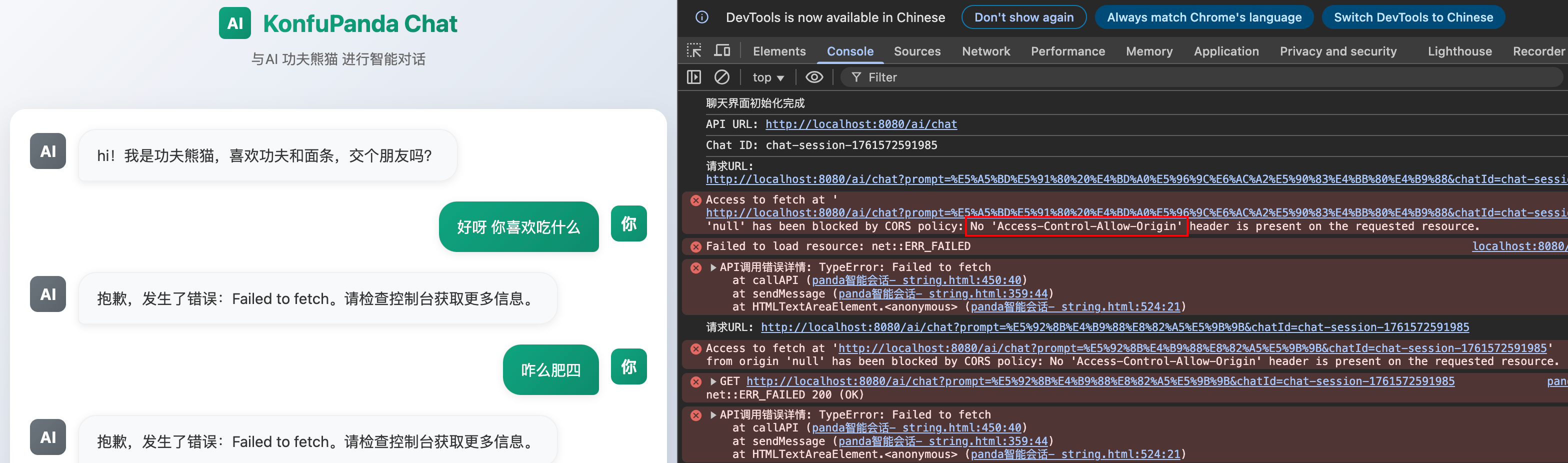
加上允许跨域配置类就行了
import org.springframework.context.annotation.Configuration;
import org.springframework.web.servlet.config.annotation.CorsRegistry;
import org.springframework.web.servlet.config.annotation.WebMvcConfigurer;

@Configuration
public class MvcConfiguration implements WebMvcConfigurer {

    @Override
    public void addCorsMappings(CorsRegistry registry) {
        registry.addMapping("/**")
                .allowedOrigins("*")
                .allowedMethods("GET", "POST", "PUT", "DELETE", "OPTIONS")
                .allowedHeaders("*")
                .exposedHeaders("Content-Disposition");
    }
}






 扫一扫
扫一扫


 1194
1194

 被折叠的 条评论
为什么被折叠?
被折叠的 条评论
为什么被折叠?
 到【灌水乐园】发言





