
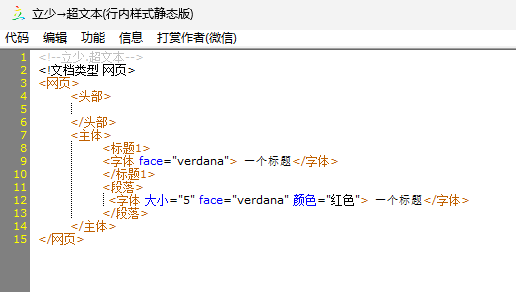
立少→超文本”写中文html标签:<字体>标签的简单实例和含义,以及注意事项


实例:

<!--立少.超文本-->
<!文档类型 网页>
<网页>
    <头部>
        
    </头部>
    <主体>
        <标题1> 
        <字体 face="verdana"> 一个标题</字体> 
        </标题1> 
        <段落>
         <字体 大小="5" face="verdana" 颜色="红色"> 一个标题</字体> 
        </段落>
    </主体>
</网页>


定义和用法:

<字体> 规定文本的字体、字体尺寸、字体颜色。
提示:请使用样式(代替 <字体> )来定义文本的字体、字体颜色、字体尺寸。


刘佳奇 gold33031 HTML标题与段落:网络文章网页 实验总用时:00:00:38 nav 第1关:HTML标题与段落:网络文章网页 100 学习内容 参考答案 记录 评论 任务描述 相关知识 分级标题 段落与换行 列表 有序列表实例 无序列表实例 描述列表实例 文本格式化 引用 编程要求 测试说明 任务描述 本关任务是完成一个格式丰富的文章网页,你将通过本关学习标题、段落、文本格式化引用等,与文本相关的标签。 本关网页显示效果如下图所示: 为了顺利完成以上网页的制作,请大家认真阅读以下内容。 相关知识 分级标题 HTML提供了六级标题用于创建网页信息的层级关系。<h1> 定义重要等级最高的标题,之后<h2>到<h6>层级依次递减。 举例如下: <body> <h1>书籍标题</h1> <h2>第一章</h2> <h3>第一节</h3> <h4>重点 1</h4> <h5>1.1 标题</h5> <h6>1.1.1 标题</h6> </body> 显示效果如图: 提示: 注意请不要根据标题字体大小来选择级别,而应该根据内容。例如一本书的第一章是第二层级,但是有一部分人认为<h2>字体太大,从而选择<h3>作为层级标题,这样做是不正确的。 段落与换行 如大家在之前的例子中看到的,我们使用p元素定义段落。p元素是HTML中最常用的元素之一。 举例如下: 例 1. 超文本标记语言(HTML)是一种标准化的用来创建Web页面Web应用的标准化的标记语言。在级联样式表单(CSS)JavaScript的帮助下,HTML已经成功构建了一整套面向Web的开发与应用平台。 例 2. <p>超文本标记语言(HTML)是一种标准化的用来创建Web页面Web应用的标准化的标记语言。 在级联样式表单(CSS)JavaScript的帮助下,HTML已经成功构建了一整套面向Web的开发与应用平台</p> 例1例2唯一的不同在于,例2中我们在段落内容中换行了。那么,在实际显示时,会显示换行吗? 显示效果如下图: 大家可以看到,虽然我们在段落内容中换行了,但是显示时是不会换行的。那么如果我们想要在一个段落中换行要怎么做呢? 我们可以使用<br>标签。 举例如下: 超文本标记语言(HTML)是一种标准化的用来创建Web页面Web应用的标准化的标记语言。 在级联样式表单(CSS)JavaScript的帮助下,HTML已经成功构建了一整套面向Web的开发与应用平台 显示效果如图: 列表 生活中我们经常使用列表,例如购物清单、待办事项。在HTML中,我们可以创建无序列表、有序列表描述列表,而且一个列表中可以嵌套另一个列表。 通常,列表都是由父元素子元素构成的,父元素用于指定要创建的列表的类型,子元素用于指定要创建的列表项目类型。 三种列表类型组成元素如下: | 类型 | 父元素 | 子元素| | ------------ | ------------ | | 有序列表 | ol | li| | 无序列表 | ul | li| | 描述列表 | dl| dt, dd| 提示: ol: order list; ul: unorder list。 有序列表实例 如果列表顺序是不能随意交换时,我们使用有序列表。例如: <body> <p>健身房基本锻炼步骤</p> <ol> <li>热身</li> <li>无氧运动(包括俯卧撑、仰卧起坐、器械锻炼等)</li> <li>有氧运动(包括慢跑、单车、游泳、登山机等)</li> <li>拉伸、放松</li> </ol> </body> 显示效果如图: 无序列表实例 如果列表顺序不重要时,我们使用无序列表。例如: <body> <p>购物清单</p> <ul> <li>酸奶</li> <li>苹果</li> <li>鸡胸肉</li> <li>白炽灯泡</li> </ul> </body> 显示效果如图: 描述列表实例 当我们需要描述成组出现的名称(术语)及其值之间的关联时,我们使用描述列表。例如: <body> <p>HTML里程碑</p> <dl> <dt>1995年11月24日</dt> <dd>HTML2.0发布,对应的IETF文档
09-16
import { useEffect, useRef, useState } from 'react' import './App.css' import { Button, ColorPicker, Divider, Drawer, Form, Input, InputNumber, Radio, Select, Slider, Space, Spin, Switch, message, } from 'antd' import { useForm } from 'antd/es/form/Form.js' // import { PlayerEvents, SDKEvents } from './lib/enums/events' // import AvatarPlatform from './lib/core' import cloneDeep from 'lodash/cloneDeep' import AvatarPlatform, { PlayerEvents, SDKEvents, } from './testSdk/3.1.2.1002/avatar-sdk-web_3.1.2.1002/index.js' const avatarPlatform=new AvatarPlatform() const InitAppInfo = { serverUrl: 'wss://avatar.cn-huadong-1.xf-yun.com/v1/interact', // serverUrl: 'wss://test.xfyousheng.com/apigateway/avatar_ray/v1/avatar', // serverUrl: 'wss://test.xfyousheng.com/apigateway/avatar/v1/avatar', // 以下信息为交互平台 创建接口服务 后 服务项目页面获取 // appId: '', // apiKey: '', // apiSecret: '', // sceneId: '', appId: 'cbecf66f', apiKey: '0d702e376302191067b50d3553141d10', apiSecret: 'NzhkOTJlMGFiNzExYzk5MTA0MGYzNzVk', sceneId: '236101719493316608', } function App() { const [drawerOpen, setDrawerOpen] = useState(false) const [loglevel, setLoglevel] = useState(0) const [loading, setLoading] = useState(false) const [initForm] = useForm() const [apiInfoForm] = useForm() const [avatarConfigForm] = useForm() const [startAvatarForm] = useForm() const [textDriverForm] = useForm() const [audioDriverForm] = useForm() const [actionDriverForm] = useForm() const [subtitle, setSubtitle] = useState('') const interativeRef = useRef<any>() useEffect(() => { return () => { interativeRef.current?.stop() } }, []) const InitSDK = () => { try { let interative = interativeRef.current if (!interative) { interativeRef.current = interative = new (AvatarPlatform as any)({ ...initForm.getFieldsValue(), }) message.success('初始化成功 可以开启后续实例方法调用') } else { message.warning('请勿多次初始化 或先销毁当前实例') } } catch (e: any) { console.error(e) message.error('初始化失败' + e?.message) } } //绑定sdk交互事件 const bindInteractEvent = () => { if (!interativeRef.current) { return message.warning('请初始化sdk') } interativeRef.current.removeAllListeners() interativeRef.current .on(SDKEvents.connected, (initResp: any) => { console.log('sdk event: connected', initResp) }) .on(SDKEvents.stream_start, () => { console.log('sdk event: stream_start') }) .on(SDKEvents.disconnected, (e: any) => { setLoading(false) console.log('sdk event: disconnected') if (e) { message.error('ws link disconnected') console.error(e.code, e.message, e.name, e.stack) } }) .on(SDKEvents.asr, (asrData: any) => { console.log('sdk event: asr', asrData) }) .on(SDKEvents.nlp, (nlpData: any) => { console.log('sdk event: nlp', nlpData) }) .on(SDKEvents.frame_start, (frameData: any) => { console.log('sdk event: frameBegin', frameData) }) .on(SDKEvents.frame_stop, (frameData: any) => { console.log('sdk event: frameEnd', frameData) }) .on(SDKEvents.action_start, (actionData: any) => { console.log('sdk event: actionBegin', actionData) }) .on(SDKEvents.action_stop, (actionData: any) => { console.log('sdk event: actionEnd', actionData) }) .on(SDKEvents.tts_duration, (sessionData: any) => { console.log('sdk event: duration', sessionData) }) .on(SDKEvents.subtitle_info, (subtitleData: any) => { console.log('sdk event: subtitle', subtitleData) setSubtitle(subtitleData?.text || '') }) .on(SDKEvents.error, (error: any) => { console.log('sdk event: error', error) }) message.success( 'SDK 交互事件监听绑定成功 可以打开控制台 查看事件日志 [sdk event:]' ) } const UnInitSDK = () => { interativeRef.current?.destroy() interativeRef.current = undefined message.success('UnInitSDK成功') } const getPlayer = () => { const player = interativeRef.current.player console.log('player', player) } const createPlayer = () => { if (!interativeRef.current) { return message.warning('请初始化sdk') } const player = interativeRef.current.player || interativeRef.current.createPlayer() console.log('player', player) return player } const bindPlayerEvent = () => { if (!interativeRef.current) { return message.warning('请初始化sdk') } const player = interativeRef.current.player if (!player) { return message.warning('当前不存在player 实例 请调用create 创建') } player.removeAllListeners() player .on(PlayerEvents.error /* "error" */, (err: any) => { console.log('sdk player event: player error', err) if (err?.code === '700005') { // 不支持h264 console.log('sdk player event: player h264 not supported') } }) ?.on(PlayerEvents.play, () => { console.log('sdk player event: player play') }) .on(PlayerEvents.waiting, () => { console.log('sdk player event: player waiting') }) .on(PlayerEvents.playing, () => { console.log('sdk player event: player playing') }) .on(PlayerEvents.playNotAllowed, () => { console.log( 'sdk player event: play not allowed, muted play, player call resume after user gusture' ) }) message.success( 'SDK Player 事件监听绑定成功 可以打开控制台 查看事件日志 [sdk player event:]' ) } const setApiInfo = () => { if (!interativeRef.current) { return message.warning('请初始化sdk') } interativeRef.current.setApiInfo({ ...apiInfoForm.getFieldsValue(), }) message.success('Api 服务信息设置成功 ') } avatarPlatform.setApiInfo({ appId: 'cbecf66f', apiKey: '0d702e376302191067b50d3553141d10', apiSecret: 'NzhkOTJlMGFiNzExYzk5MTA0MGYzNzVk', sceneId: '236101719493316608', serverUrl: 'wss://avatar.cn-huadong-1.xf-yun.com/v1/interact', }) const setGlobalParams = () => { if (!interativeRef.current) { return message.warning('请初始化sdk') } const fcolor = avatarConfigForm.getFieldsValue().subtitle.font_color const subtitle_font_color = Object.prototype.toString.call(fcolor) === '[object String]' ? fcolor : fcolor?.toHexString?.() const values = cloneDeep(avatarConfigForm.getFieldsValue()) if (values.avatar.mask_region) { values.avatar.mask_region = JSON.parse(values.avatar.mask_region) } else { delete values.avatar.mask_region } if (!values.subtitle?.subtitle) { delete values.subtitle } if (!values.background?.enabled) { delete values.background } else { delete values.background.enabled } if (values.subtitle) { values.subtitle.width = values.avatar.width values.subtitle.font_color = subtitle_font_color } interativeRef.current.setGlobalParams({ ...values, }) message.success('全局 start 信息 设置成功 服务信息设置成功 ') } avatarPlatform.setGlobalParams({ stream: {//(必传)视频流信息 protocol: 'xrtc',//(必传)实时视频协议,支持webrtc/xrtc/rtmp,其中只有xrtc支持透明背景,需参数alpha传1 alpha:1,//(非必传)是否开启透明背景,0关闭1开始,需配合protocol=xrtc使用 bitrate:1000000,//(非必传)视频码率,值越大,越清晰,对网络要求越高,默认1000000即可 fps:25//(非必传)视频刷新率,值越大,越流畅,取值范围0-25,默认25即可 }, avatar: {//(必传)形象信息 avatar_id: '110022006', //(必传)授权的形象资源id,请到交互平台-接口服务-形象列表中获取 width:1080,//(非必传)视频分辨率宽(不是画布的宽,调整画布大小需调整名为wrapper的div宽) height:1920,//(非必传)视频分辨率高(不是画布的高,调整画布大小需调整名为wrapper的div高) mask_region:'[0,0,1080,1920]',//(非必传)形象裁剪参数,[从左到右,从上到下,从右到左,从下到上] scale:1,//(非必传)形象缩放比例,取值范围0.1-1 move_h:0,//(非必传)形象左右移动 move_v:0,//(非必传)形象上下移动 audio_format:1,//(非必传)音频采样率,传1即可 }, tts: {//(必传)发音人信息 vcn: 'x4_yezi', //(必传)授权的声音资源id,请到交互平台-接口服务-声音列表中获取 speed:50,//(非必传)语速 pitch:50,//(非必传)语调 volume:100//(非必传)音量 }, avatar_dispatch:{//交互模式 interactive_mode:1,//(非必传)0追加模式,1打断模式 content_analysis: 0,// (非必传)默认0, 是否开启情感分析,当前仅超拟人支持 }, air:{//动作模式 air:1,//(非必传)是否开启自动动作,0关闭,1开启,当开启时,虚拟人会根据语境自动匹配动作 add_nonsemantic:1//(非必传)是否开启无指向性动作,0关闭,1开启,虚拟人会做没有意图指向性的动作 } }) const startAvatar = async () => { if (!interativeRef.current) { return message.warning('请初始化sdk') } const values = startAvatarForm.getFieldsValue() setLoading(true) await interativeRef.current ?.start({ wrapper: document.querySelector( '.' + values.container ) as HTMLDivElement, // preRes: { // image: [ // { // url: 'https://pygfile.peiyinge.com/business/user/bgimg/1699422531256_ec250b66142fbf375b4899cc416968b3.png', // }, // { // url: 'https://pygfile.peiyinge.com/light/user/20240530/31f7e9c5-5e76-4b24-b071-075a8f703327.jpg', // }, // ], // }, }) .then(() => { console.warn('player fetch stream ed') message.success('连接成功 & 拉流订阅成功 & 流播放成功') setLoading(false) }) .catch((e: any) => { message.error('连接失败,可以打开控制台查看信息') console.error(e.code, e.message, e.name, e.stack) setLoading(false) }) } const driveAction = async () => { const { actionId } = actionDriverForm.getFieldsValue() if (!interativeRef.current) { return message.warning('请初始化sdk & 连接') } if (!actionId?.trim()) { return message.warning('请输入actionId') } interativeRef.current.writeCmd('action', actionId?.trim()) } const writeText = async () => { const { text, tts, ...extend } = textDriverForm.getFieldsValue() if (!interativeRef.current) { return message.warning('请初始化sdk & 连接') } if (!text?.trim()) { return message.warning('请输入文本') } if (tts && !tts?.vcn) { delete tts.vcn } interativeRef.current .writeText(text, { tts, ...extend, }) .then((reqId: string) => { message.success(`发送成功request_id: ${reqId}`) }) .catch((err: any) => { console.error(err) message.error('发送失败,可以打开控制台查看信息') }) } const interrupt = async () => { if (!interativeRef.current) { return message.warning('请初始化sdk & 连接') } interativeRef.current.interrupt() } const startRecord = () => { if (!interativeRef.current) { return message.warning('请初始化sdk & 连接') } const { nlp, full_duplex, single_seconds } = audioDriverForm.getFieldsValue() const audio_format = avatarConfigForm.getFieldValue([ 'avatar', 'audio_format', ]) const destSampleRate: any = { 1: 16000, 2: 24000, } if (interativeRef.current?.recorder) { if (nlp && interativeRef.current?.recorder?.sampleRate !== 16000) { // 交互拾音只支持16k 16bit interativeRef.current.destroyRecorder() } else if ( !nlp && interativeRef.current?.recorder && interativeRef.current?.recorder?.sampleRate !== destSampleRate[audio_format] ) { // 驱动必须与 形象设置的输出声音采样率一致, interativeRef.current.destroyRecorder() } } if (!interativeRef.current?.recorder) { // 交互播放器必须是16000, 音频驱动 一定要与setGloableParams 全局参数avatar.audio_format interativeRef.current?.createRecorder({ sampleRate: nlp ? 16000 : destSampleRate[audio_format] || 16000, }) } const recorder = interativeRef.current?.recorder recorder?.startRecord( full_duplex ? 0 : single_seconds * 1000, () => { console.log('recorder auto stopped') }, { nlp: nlp, } ) } const stopRecorder = () => { if (!interativeRef.current) { return message.warning('请初始化sdk & 连接') } const recorder = interativeRef.current?.recorder recorder?.stopRecord() } const stopAvatar = async () => { if (!interativeRef.current) { return message.warning('请初始化sdk') } interativeRef.current?.stop() } useEffect(() => { return () => { interativeRef.current?.destroy() } }, []) return ( <Spin spinning={loading} tip="Loading..."> <div className={'wrapper'}> <div className="wp wrapper1"></div> <div className="wp wrapper2"></div> <p className="subtitle">{subtitle}</p> </div> <Button className="hdl" onClick={() => setDrawerOpen(true)}> 打开调试面板 </Button> <Drawer title="API" onClose={() => setDrawerOpen(false)} open={drawerOpen} width={450} maskClosable={false} > <Space direction="vertical"> <Button onClick={() => message.success(AvatarPlatform.getVersion())}> static getVersion </Button> <Space> <Select style={{ width: '100px' }} options={[ { value: 0, label: 'verbose' }, { value: 1, label: 'debug' }, { value: 2, label: 'info' }, { value: 3, label: 'warn' }, { value: 4, label: 'error' }, { value: 5, label: 'none' }, ]} value={loglevel} onChange={(va) => setLoglevel(va)} ></Select> <Button onClick={() => { AvatarPlatform.setLogLevel(loglevel) message.success('日志级别设置成功 可以开启控制台查看') }} > static setLogLevel </Button> </Space> <Divider>SDK 初始化参数(初始化前设置)</Divider> <Form form={initForm} initialValues={{ useInlinePlayer: true, binaryData: false, }} > <Form.Item label="使用内敛播放器" name="useInlinePlayer"> <Switch></Switch> </Form.Item> {/* <Form.Item label="binary发送" name="binaryData"> <Switch></Switch> </Form.Item> */} {/* <Form.Item label="静音续连" name="keepAliveTime"> <InputNumber min={0} step={1} addonAfter="毫秒"></InputNumber> </Form.Item> */} </Form> <Button onClick={InitSDK} block type="primary"> 初始化SDK </Button> <Button onClick={bindInteractEvent} block type="primary"> 监听SDK交互事件 </Button> <Divider>播放器</Divider> <Space> <Button onClick={getPlayer}>获取player实例</Button> <Button onClick={createPlayer}>create player实例</Button> </Space> <Button onClick={bindPlayerEvent} block type="primary"> 监听player事件 </Button> <Divider>SDK 环境参数(start前设置)</Divider> <Form form={apiInfoForm} initialValues={{ ...InitAppInfo, }} > <Form.Item label="serverUrl" name="serverUrl"> <Input></Input> </Form.Item> <Form.Item label="appId" name="appId"> <Input></Input> </Form.Item> <Form.Item label="apiKey" name="apiKey"> <Input></Input> </Form.Item> <Form.Item label="apiSecret" name="apiSecret"> <Input></Input> </Form.Item> <Form.Item label="sceneId" name="sceneId"> <Input></Input> </Form.Item> </Form> <Button onClick={setApiInfo} block type="primary"> SDK setApiInfo </Button> <Divider>SDK startAvatar 参数(startAvatar前设置)</Divider> <Form form={avatarConfigForm} initialValues={{ avatar_dispatch: { interactive_mode: 0, content_analysis: 0 }, stream: { protocol: 'xrtc', alpha: 1, bitrate: 1000000, fps: 25, }, avatar: { avatar_id: '110022006', width: 720, height: 1280, mask_region: '[0, 0, 1080, 1920]', scale: 1, move_h: 0, move_v: 0, audio_format: 1, }, tts: { vcn: 'x4_yezi', speed: 50, pitch: 50, volume: 100, }, subtitle: { subtitle: 0, font_color: '#ffffff', }, background: { enabled: false, type: 'url', data: '', }, }} > <Divider>打断模式全局设置</Divider> <Form.Item label="文本打断模式" name={['avatar_dispatch', 'interactive_mode']} > <Radio.Group> <Radio value={1}>打断模式</Radio> <Radio value={0}>追加模式</Radio> </Radio.Group> </Form.Item> <Divider>推流信息</Divider> <Form.Item label="推流格式" name={['stream', 'protocol']}> <Select style={{ width: '100px' }} options={[ { value: 'webrtc', label: 'webrtc' }, { value: 'xrtc', label: 'xrtc' }, { value: 'rtmp', label: 'rtmp 不支持播放' }, ]} ></Select> </Form.Item> <Form.Item label="透明通道(xrtc)" name={['stream', 'alpha']}> <Radio.Group> <Radio value={1}>开启</Radio> <Radio value={0}>关闭</Radio> </Radio.Group> </Form.Item> <Form.Item label="码率" name={['stream', 'bitrate']}> <InputNumber min={500000} max={5000000} step={1}></InputNumber> </Form.Item> <Form.Item label="fps" name={['stream', 'fps']}> <Slider min={15} max={25} step={1} marks={{ 15: '15', 20: '20', 25: '25' }} ></Slider> </Form.Item> <Divider>形象信息</Divider> <Form.Item label="形象ID" name={['avatar', 'avatar_id']}> <Input></Input> </Form.Item> <Form.Item label="情感分析" name={['avatar_dispatch', 'content_analysis']} extra="该参数仅超拟人非语音驱动时支持,常规请关闭" > <Radio.Group> <Radio value={1}>开启</Radio> <Radio value={0}>关闭</Radio> </Radio.Group> </Form.Item> <Form.Item label="流宽" name={['avatar', 'width']}> <InputNumber></InputNumber> </Form.Item> <Form.Item label="流高" name={['avatar', 'height']}> <InputNumber></InputNumber> </Form.Item> <Form.Item label="mask_region" name={['avatar', 'mask_region']}> <Input></Input> </Form.Item> <Form.Item label="scale" name={['avatar', 'scale']}> <InputNumber min={0.1} max={1}></InputNumber> </Form.Item> <Form.Item label="move_h" name={['avatar', 'move_h']}> <InputNumber></InputNumber> </Form.Item> <Form.Item label="move_v" name={['avatar', 'move_v']}> <InputNumber></InputNumber> </Form.Item> <Form.Item label="音频驱动/音频输出采样率" name={['avatar', 'audio_format']} > <Radio.Group> <Radio value={1}>16k</Radio> <Radio value={2}>24k</Radio> </Radio.Group> </Form.Item> <Divider>形象信息</Divider> <Form.Item label="声音" name={['tts', 'vcn']}> <Input></Input> </Form.Item> <Form.Item label="语速" name={['tts', 'speed']}> <Slider min={1} max={100}></Slider> </Form.Item> <Form.Item label="语调" name={['tts', 'pitch']}> <Slider min={1} max={100}></Slider> </Form.Item> <Form.Item label="音量" name={['tts', 'volume']}> <Slider min={1} max={100}></Slider> </Form.Item> <Divider>字幕信息</Divider> <Form.Item label="字幕" name={['subtitle', 'subtitle']} extra="不启用 sdk 内部默认未启用" > <Select options={[ { value: 0, label: '关闭' }, { value: 1, label: '服务端字幕' }, // { value: 2, label: '响应字幕' }, ]} ></Select> </Form.Item> <Form.Item label="字体颜色" name={['subtitle', 'font_color']}> <ColorPicker disabledAlpha format="hex"></ColorPicker> </Form.Item> <Divider>背景</Divider> <Form.Item label="背景" name={['background', 'enabled']} extra="不启用(默认原始训练)" > <Switch></Switch> </Form.Item> <Form.Item label="数据类型" name={['background', 'type']}> <Radio.Group> <Radio value={'url'}>url</Radio> <Radio value={'res_id'}>resId</Radio> <Radio value={'data'}>base64</Radio> </Radio.Group> </Form.Item> <Form.Item label="图片数据" name={['background', 'data']}> <Input></Input> </Form.Item> {/* <Divider>全局上行音频配置</Divider> */} {/* <Form.Item label="采样率" name={['audio', 'sample_rate']} extra="sdk 内部默认 16000" > <Radio.Group> <Radio value={16000}>16000</Radio> <Radio value={24000}>24000</Radio> </Radio.Group> </Form.Item> */} </Form> <Button onClick={setGlobalParams} block type="primary"> SDK setGlobalParams </Button> <Form form={startAvatarForm} initialValues={{ container: 'wrapper1', }} > <Form.Item label="选择渲染区域dom" name="container"> <Radio.Group> <Radio value={'wrapper1'}>左侧容器</Radio> <Radio value={'wrapper2'}>右侧容器</Radio> </Radio.Group> </Form.Item> </Form> <Button onClick={startAvatar} block type="primary"> SDK start </Button> <Divider>交互 / 虚拟人驱动</Divider> <Form form={textDriverForm} initialValues={{ avatar_dispatch: { interactive_mode: 0, content_analysis: 0, }, text: '你好[[action=A_W_walk_left_O]]', tts: { vcn: '', speed: 50, pitch: 50, volume: 50, }, nlp: false, }} > <Form.Item label="文本是否理解" name="nlp"> <Switch></Switch> </Form.Item> <Form.Item label="文本打断模式" name={['avatar_dispatch', 'interactive_mode']} > <Radio.Group> <Radio value={1}>打断模式</Radio> <Radio value={0}>追加模式</Radio> </Radio.Group> </Form.Item> <Form.Item label="情感分析" name={['avatar_dispatch', 'content_analysis']} extra="该参数仅超拟人非语音驱动时支持,常规请关闭" > <Radio.Group> <Radio value={1}>开启</Radio> <Radio value={0}>关闭</Radio> </Radio.Group> </Form.Item> <Form.Item label="文本" name="text"> <Input.TextArea></Input.TextArea> </Form.Item> <Form.Item label="声音" name={['tts', 'vcn']}> <Input></Input> </Form.Item> <Form.Item label="语速" name={['tts', 'speed']}> <Slider min={1} max={100}></Slider> </Form.Item> <Form.Item label="语调" name={['tts', 'pitch']}> <Slider min={1} max={100}></Slider> </Form.Item> <Form.Item label="音量" name={['tts', 'volume']}> <Slider min={1} max={100}></Slider> </Form.Item> </Form> <Button onClick={writeText} type="primary"> 文本驱动/交互 writeText </Button> <Divider>即驱动指定动作</Divider> <Form form={actionDriverForm} initialValues={{ actionId: '', }} > <Form.Item label="动作ID" name="actionId"> <Input></Input> </Form.Item> </Form> <Button block onClick={driveAction} type="primary"> 即执行动作 API driveAction </Button> <Divider>全局打断当前播报</Divider> <Button block onClick={interrupt} type="primary"> 发送打断 SDK API interrupt </Button> <Divider>语音交互 / 语音驱动</Divider> <Form form={audioDriverForm} initialValues={{ full_duplex: 0, nlp: false, single_seconds: 20, }} > <Form.Item label="是否理解" name="nlp"> <Switch></Switch> </Form.Item> <Form.Item label="语音模式" name="full_duplex"> <Radio.Group> <Radio value={1}>全双工</Radio> <Radio value={0}>单轮</Radio> </Radio.Group> </Form.Item> <Form.Item label="单轮模式端语音自动停止时间" name="single_seconds" extra="单轮模式 该时间内 用户未主动停止录音,则自动停止;sdk startRecord 支持设置时间" > <Slider min={5} max={30}></Slider> </Form.Item> </Form> <Button onClick={startRecord} type="primary"> 开始录音 SDK API startRecord </Button> <Button onClick={stopRecorder} type="primary"> 结束录音 SDK API stopRecord </Button> <Divider>播放器方法--前端</Divider> <Button onClick={() => { interativeRef.current?.player?.resume() }} type="primary" > 恢复播放 SDK player API resume </Button> <p> 由于浏览器限制,无法自动播放时,需要引导用户手动点击 并 调用 resume 恢复播放 </p> <Button onClick={() => { interativeRef.current?.player?.resize() }} > 手动刷新渲染 SDK player API resize </Button> <Button onClick={() => { if (interativeRef.current?.player) interativeRef.current.player.muted = true }} type="primary" > 静音 SDK player player.muted = true </Button> <Button onClick={() => { if (interativeRef.current?.player) interativeRef.current.player.muted = false }} type="primary" > 解除静音 SDK player.muted = false </Button> <div> 设置播放外放音量: <Slider min={0} max={100} defaultValue={100} onChange={(v: number) => { if (interativeRef.current?.player) interativeRef.current.player.volume = v / 100 }} ></Slider> </div> <Divider>断开链接</Divider> <Button onClick={stopAvatar} block type="primary"> SDK API stop </Button> <Divider>逆初始化 销毁SDK实例</Divider> <Button onClick={UnInitSDK} block type="primary"> SDK API destroy </Button> </Space> </Drawer> <div className={'panel'}> {/* <div onClick={() => { console.log(UserMedia.getEnumerateDevices('audiooutput')) }} > get output Devices </div> <div onClick={() => { console.log(UserMedia.getEnumerateDevices('audioinput')) }} > get input Devices </div> <div onClick={async () => { const outputs = await UserMedia.getEnumerateDevices('audiooutput') const output = outputs[Math.floor(Math.random() * outputs.length)] console.log(output) if (interativeRef.current?.player) interativeRef.current.player.setSinkId(output.deviceId) }} > switch Devices </div> */} {/* <div onClick={async () => { const inputs = await UserMedia.getEnumerateDevices('audioinput') const input = inputs[Math.floor(Math.random() * inputs.length)] console.log(input) if (interativeRef.current?.player) interativeRef.current.recorder?.switchDevice(input.deviceId) }} > switch recorder Devices </div> */} </div> </Spin> ) } export default App 怎么能自动点击按钮,不用手动操作
10-17
评论
添加红包

请填写红包祝福语或标题

红包个数最小为10个

红包金额最低5元

当前余额3.43前往充值 >
需支付:10.00
成就一亿技术人!
领取后你会自动成为博主和红包主的粉丝 规则
hope_wisdom
发出的红包

打赏作者

立 少

你的鼓励将是我创作的最大动力

¥1 ¥2 ¥4 ¥6 ¥10 ¥20
扫码支付:¥1
获取中
扫码支付

您的余额不足,请更换扫码支付或充值

打赏作者

实付
使用余额支付
点击重新获取
扫码支付
钱包余额 0

抵扣说明:

1.余额是钱包充值的虚拟货币,按照1:1的比例进行支付金额的抵扣。
2.余额无法直接购买下载,可以购买VIP、付费专栏及课程。

余额充值


