



VS配置GO依赖
-
安装vs code,这一步很简单不做描述,下载地址:https://code.visualstudio.com/
-
安装完vs code后,搜索扩展(ctrl+shift+X)go 第一个就是,然后点击安装,安装之后,会弹出弹框安装依赖插件,但是因为有墙,所以基本所有依赖都会下载失败
-
安装依赖不成功,采用手动方式,首先在你的GOPATH下创建src\github.com和src\golang.org\x两个目录
-
接下来在x目录下,运行命令
git clone http://github.com/golang/tools
git clone https://github.com/golang/lint
5. 执行结束后就切换到github.com目录执行命令
git clone https://github.com/mdempsky/gocode
git clone https://github.com/uudashr/gopkgs/cmd/gopkgs(已变更,具体看下文)
git clone https://github.com/ramya-rao-a/go-outline
git clone https://github.com/acroca/go-symbols
git clone https://golang.org/x/tools/cmd/guru
git clone https://golang.org/x/tools/cmd/gorename
git clone https://github.com/go-delve/delve/cmd/dlv(已变更,具体看下文)
git clone https://github.com/stamblerre/gocode
git clone https://github.com/rogpeppe/godef
git clone https://github.com/sqs/goreturns
git clone https://golang.org/x/lint/golint
两个包路径已经更改
git clone https://github.com/uudashr/gopkgs/cmd/gopkgs -> git clone https://github.com/uudashr/gopkgs
git clone https://github.com/go-delve/delve/cmd/dlv -> git clone https://github.com/go-delve/delve
6. 执行完上诉命令后,切换到GOPATH下,执行install命令,注意github.com目录下的所有包都没有创建相应的路径所以需要下载下来后,手动创建路径,比如上面有两个gocode,下载完第一个后第二个就会报错已存在,且不为空
go install github.com/mdempsky/gocode
go install github.com/uudashr/gopkgs/cmd/gopkgs
go install github.com/ramya-rao-a/go-outline
go install github.com/acroca/go-symbols
go install golang.org/x/tools/cmd/guru
go install golang.org/x/tools/cmd/gorename
go install github.com/go-delve/delve/cmd/dlv
go install github.com/stamblerre/gocode
go install github.com/rogpeppe/godef
go install github.com/sqs/goreturns
go install golang.org/x/lint/golint
执行到底二条install命令时,可能报错,如下图:

有两个项目找不到,这个时候复制找不到的包,从git上再次获取,同样的获取需要从GOPATH\src\github.com 下进行,运行命令
git clone https://github.com/karrick/godirwalk
git clone https://github.com/pkg/errors
一直配置到运行到第五条又报错包不存在
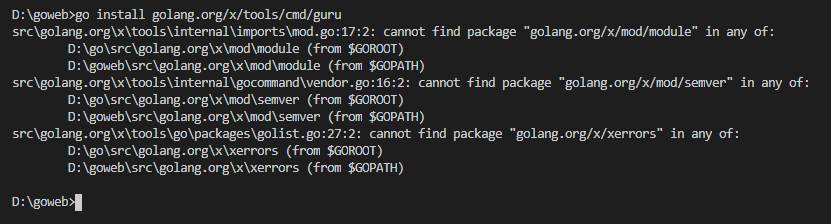
同上,继续下载包,但是这次报错是在golang.org下,所以,要切换到golang.org\x下运行
git clone https://github.com/golang/mod.git
git clone https://github.com/golang/xerrors
接下来其他的应该就不会报错了,如果有报错,多半也是不存在包,根据报错的信息,去下载对应的包就行了。





 扫一扫
扫一扫


 958
958

 被折叠的 条评论
为什么被折叠?
被折叠的 条评论
为什么被折叠?
 到【灌水乐园】发言





