






 本文详细介绍了在CentOS7系统上搭建Apache、Mysql和Php环境的步骤,包括Apache的安装与配置、Mysql的安装与权限设定、Php的安装与扩展,以及最后的测试验证。
一、起步操作
查询系统版本、系统内核
cat /etc/redhat-release
cat /proc/version 
二、搭建Apache
1.安装Apache
yum install -y httpd 
2.启动Apache服务
systemctl start httpd.service
systemctl status httpd.service 
3.设置开机启动服务
systemclt enable httpd.service 
4.开放防火墙的80端口
firewall-cmd --zone=public --add-port=80/tcp --permanent
firewall-cmd --reload
firewall-cmd --list-ports 
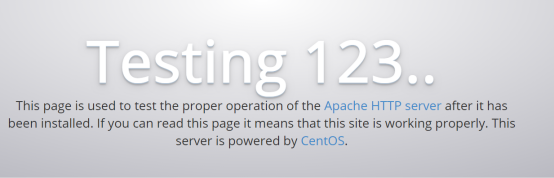
5.Apache测试(在浏览器输入ip访问即可)
三、搭建Mysql
1. Yum仓库下载mysql
yum localinstall https://repo.mysql.com//mysql80-community-release-el7-1.noarch.rpm 
2.Yum安装mysql
yum install mysql-community-server 
3.启动mysql服务
service mysqld start
service mysqld status 
4.查看初始密码、设置mysql密码
grep 'temporary password' /var/log/mysqld.log 
使用初始化密码登录后必须设置一个自己的密码,否则不能进行其他操作。设置密码的策略组是默认的必须包含大小写字符、数字、特殊字符且大于8位(可以通过修改密码策略等级来允许配置简单密码,这个自己bing吧)。
5.开放防火墙3306端口

6.登录mysql,进入mysql数据库设置允许远程访问
alter user 'root'@'localhost' identified with mysql_native_password by '123456'; 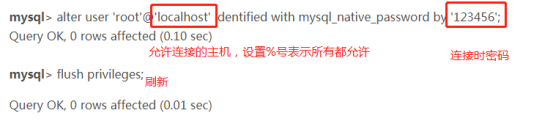
四、搭建Php
1.yum安装php

2.重启Apache服务器。
systemctl restart httpd
3.安装php的扩展,安装完成之后也需要重启Apache服务器
yum -y install php-gd php-ldap php-odbc php-pear php-xml php-xmlrpc php-mbstring php-snmp php-soap curl curl-devel
五、测试
1.在/var/www/html目录下创建index.php文件,并在其中添加一下代码保存。
<?php
phpinfo();
?>
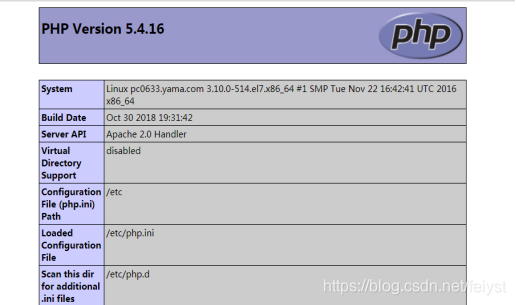
2.使用浏览器访问ip,出现以下界面表示成功。
文章内容参考:
【解决】client does not support authentication
阿里云服务器CentOS系统搭建php开发环境(apache+php+mysql)





 扫一扫
扫一扫


 615
615

 被折叠的 条评论
为什么被折叠?
被折叠的 条评论
为什么被折叠?
 到【灌水乐园】发言





