



树莓派 -- 按键 (key)使用BCM2835 gpio library

本文介绍了一个用于Raspberry Pi的C语言库BCM2835 GPIO,该库提供了对Broadcom BCM2835芯片上的GPIO和其他IO功能的访问权限。通过此库可以轻松地控制和与各种外部设备进行交互。文中还提供了一个简单的按键应用程序实例及编译指南。

BCM2835 GPIO library介绍

This is a C library for Raspberry Pi (RPi). It provides access to GPIO
and other IO functions on the Broadcom BCM 2835 chip, as used in the
RaspberryPi, allowing access to the GPIO pins on the 26 pin IDE plug
on the RPi board so you can control and interface with various
external devices.

其链接如下
http://www.airspayce.com/mikem/bcm2835/

在之前的文章中也有介绍
https://blog.youkuaiyun.com/feiwatson/article/details/80781683
https://blog.youkuaiyun.com/feiwatson/article/details/80779159

利用其来实现简单按键应用。代码如下

/* key.c
 * you can build this like: 
 * gcc -Wall key.c -o key -lbcm2835
 * sudo ./key
*/
#include <bcm2835.h>
#include <stdio.h>

char KEY = 20;
unsigned char i;
int main(int argc, char **argv)
{
    if (!bcm2835_init())return 1;
    bcm2835_gpio_fsel(KEY, BCM2835_GPIO_FSEL_INPT);
    bcm2835_gpio_set_pud(KEY, BCM2835_GPIO_PUD_UP);
    printf("Key Test Program!!!!\n");   
    while (1)
    {
        if(bcm2835_gpio_lev(KEY) == 0)
        {  
            printf ("KEY PRESS\n") ;
            while(bcm2835_gpio_lev(KEY) == 0)
                bcm2835_delay(100);
        }
        bcm2835_delay(100);
    }
    bcm2835_close();
    return 0;
}

交叉编译makefile如下,(也可以选择直接在树莓派板上编译)

CC = /home/xxx/Raspberry/tools-master/arm-bcm2708/arm-rpi-4.9.3-linux-gnueabihf/bin/arm-linux-gnueabihf-gcc-4.9.3
CFLAGS = -I./ -L./lib
CFLAGS += -Wall
key:key.c
    $(CC) $(CFLAGS)  key.c -o key -lbcm2835
clean:
    rm key event

如果直接在板上编译,

 gcc -Wall key.c -o key -lbcm2835

运行, 按下按键后,输出“KEYPRESS”

pi@raspberrypi:~/learning/bcm2835/key_test $ ./key 
Key Test Program!!!!
KEY PRESS
KEY PRESS
KEY PRESS
KEY PRESS
KEY PRESS

硬件接线:
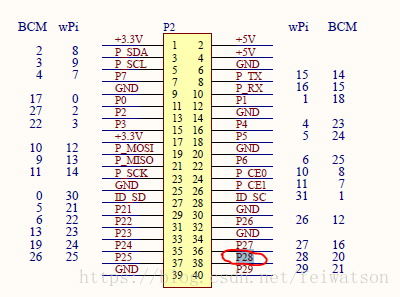
这里写图片描述

### Hobot.GPIO Library Usage and Documentation The `Hobot.GPIO` library is designed for controlling General Purpose Input/Output (GPIO) pins on specific hardware platforms, typically associated with embedded systems or single-board computers produced by Hobot. Below is a detailed explanation of its usage and key functionalities[^1]. #### Overview of Hobot.GPIO The `Hobot.GPIO` library provides an interface to interact with GPIO pins, enabling users to set pin modes, read input values, and write output values. It supports both simple digital I/O operations and more advanced features such as event detection[^2]. #### Installation To use the `Hobot.GPIO` library, ensure that it is installed on your system. Typically, this can be done using a package manager or directly from the source code repository. For example: ```bash pip install hobot-gpio ``` If the library is not available via `pip`, consult the official documentation or repository for manual installation instructions[^3]. #### Basic Usage Below is an example demonstrating how to configure and use GPIO pins with the `Hobot.GPIO` library: ```python import Hobot.GPIO as GPIO # Set up the pin numbering mode (BOARD or BCM) GPIO.setmode(GPIO.BCM) # Define the pin number pin_number = 18 # Set the pin as an output GPIO.setup(pin_number, GPIO.OUT) # Write a high signal to the pin GPIO.output(pin_number, GPIO.HIGH) # Alternatively, set the pin as an input GPIO.setup(pin_number, GPIO.IN) # Read the value from the pin value = GPIO.input(pin_number) print(f"Pin {pin_number} value: {value}") # Clean up GPIO settings when done GPIO.cleanup() ``` This script demonstrates setting up a GPIO pin, configuring it as either an input or output, reading/writing values, and cleaning up resources after use[^4]. #### Advanced Features In addition to basic I/O operations, the `Hobot.GPIO` library supports advanced functionalities such as event detection. This allows you to trigger actions based on changes in pin states. ```python def my_callback(channel): print(f"Event detected on channel {channel}") # Set up the pin for event detection pin_event = 23 GPIO.setup(pin_event, GPIO.IN, pull_up_down=GPIO.PUD_UP) # Add an event detection callback GPIO.add_event_detect(pin_event, GPIO.RISING, callback=my_callback, bouncetime=200) # Keep the program running to detect events try: while True: pass except KeyboardInterrupt: GPIO.cleanup() ``` In this example, the `add_event_detect` function sets up a callback that triggers whenever the pin transitions to a high state (`RISING`). The `bouncetime` parameter helps debounce the input signal to prevent multiple detections due to noise[^5]. #### Documentation and Resources For comprehensive details about the `Hobot.GPIO` library, refer to the official documentation or user guides provided by Hobot. These resources typically include API references, examples, and troubleshooting tips[^6]. ---
评论
添加红包

请填写红包祝福语或标题

红包个数最小为10个

红包金额最低5元

当前余额3.43前往充值 >
需支付:10.00
成就一亿技术人!
领取后你会自动成为博主和红包主的粉丝 规则
hope_wisdom
发出的红包
实付
使用余额支付
点击重新获取
扫码支付
钱包余额 0

抵扣说明:

1.余额是钱包充值的虚拟货币,按照1:1的比例进行支付金额的抵扣。
2.余额无法直接购买下载,可以购买VIP、付费专栏及课程。

余额充值


