springboot踩坑篇-01--@EnableWebMvc注解和@EnableAutoConfiguration 注解

基于Jetson Nano与YOLOv5s的无人机道路抛洒物实时检测系统【附数据集+代码】 本文详细介绍基于Jetson Nano与YOLOv5s的无人机道路抛洒物实时检测系统,通过硬件选型、数据采集、模型优化等关键步骤,实现高效的道路安全监控。系统结合无人机高空视角和YOLOv5s算法,能精准识别各类抛洒物,实测准确率达98.2%,为交通管理提供智能化解决方案。 阅读详情

springboot踩坑篇-01

springboot踩坑篇-01–@EnableWebMvc注解和@EnableAutoConfiguration 注解
问题出现

最近项目在用springboot开发,项目当中要用到spring的拦截器;
import java.util.Date;

import javax.servlet.http.HttpServletRequest;
import javax.servlet.http.HttpServletResponse;

import org.apache.commons.lang3.StringUtils;
import org.springframework.beans.factory.annotation.Autowired;
import org.springframework.stereotype.Component;
import org.springframework.web.servlet.HandlerInterceptor;
import org.springframework.web.servlet.ModelAndView;
import org.springframework.web.servlet.handler.HandlerInterceptorAdapter;

import com.jcl.gycms.entity.LoginLogs;
import com.jcl.gycms.service.LoginLogsService;

/**

  • @author zpf

  • @version 1.0
    */
    @Component
    public class LoginInterceptor implements HandlerInterceptor {

    @Autowired
    private LoginLogsService loginLogsService;
    @Override
    public boolean preHandle(HttpServletRequest request, HttpServletResponse response, Object handler)
    throws Exception {
    return true;
    }

    @Override
    public void postHandle(HttpServletRequest request, HttpServletResponse response, Object handler,
    ModelAndView modelAndView) throws Exception {
    }

    @Override
    public void afterCompletion(HttpServletRequest request, HttpServletResponse response, Object handler, Exception ex)
    throws Exception {
    String username = (String) request.getSession().getAttribute(“isLogin”);
    if(StringUtils.isNotBlank(username)) {
    LoginLogs loginLogs = new LoginLogs();
    loginLogs.setLoginname(username);
    loginLogs.setLogintime(new Date());
    String localAddr = request.getLocalAddr();
    String ip = request.getRemoteAddr();
    System.out.println("–localAddr"+localAddr+"----ip"+ip);
    loginLogs.setLoginip(request.getLocalAddr());
    int i = loginLogsService.saveSelective(loginLogs);
    if(i>0) {
    System.out.println(“记录登录日志-----成功”);
    }
    }
    }
    }

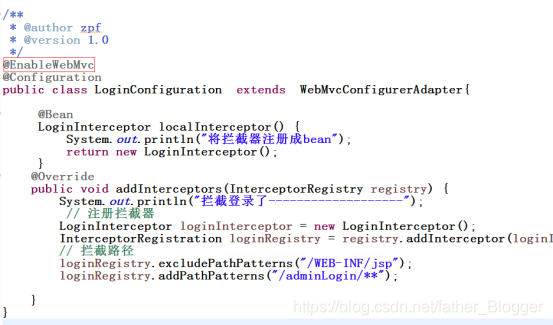
在配置拦截器时用到了@EnableWebMvc
import org.springframework.context.annotation.Bean;
import org.springframework.context.annotation.Configuration;
import org.springframework.web.servlet.config.annotation.EnableWebMvc;
import org.springframework.web.servlet.config.annotation.InterceptorRegistration;
import org.springframework.web.servlet.config.annotation.InterceptorRegistry;
import org.springframework.web.servlet.config.annotation.WebMvcConfigurerAdapter;

/**

  • @author zpf

  • @version 1.0
    */
    @EnableWebMvc
    @Configuration
    public class LoginConfiguration extends WebMvcConfigurerAdapter{

    @Bean
    LoginInterceptor localInterceptor() {
    System.out.println(“将拦截器注册成bean”);
    return new LoginInterceptor();
    }
    @Override
    public void addInterceptors(InterceptorRegistry registry) {
    System.out.println(“拦截登录了-------------------”);
    // 注册拦截器
    LoginInterceptor loginInterceptor = new LoginInterceptor();
    InterceptorRegistration loginRegistry = registry.addInterceptor(loginInterceptor);
    // 拦截路径
    loginRegistry.excludePathPatterns("/WEB-INF/jsp");
    loginRegistry.addPathPatterns("/adminLogin/**");

    }
    }

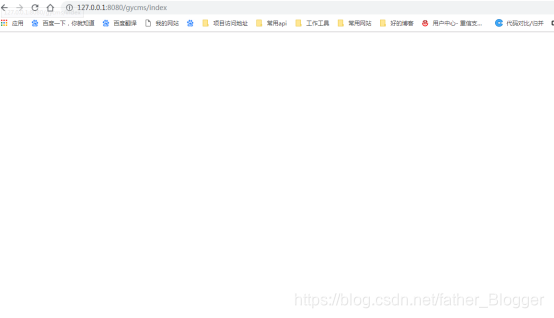
然后项目可以正常启动,但是当我访问项目是
在这里插入图片描述

查看后台发现报错Could not resolve view with name ‘index’ in servlet with name ‘dispatcherServlet’–路径映射不到,但是也没想到问题所在,于是只能问万能的度娘了
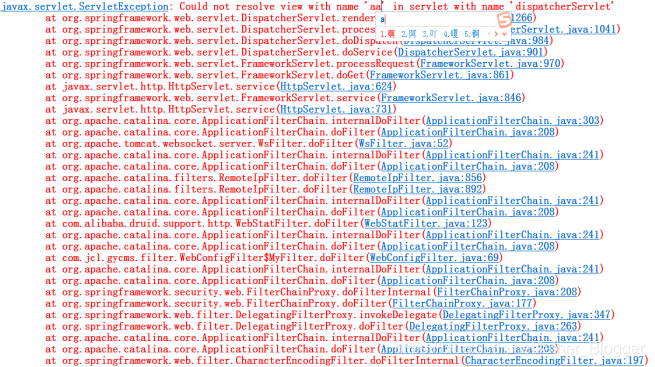
在这里插入图片描述
问题解决
参考了https://blog.youkuaiyun.com/testcs_dn/article/details/80249894微wx笑的博客发现是@EnableWebMvc这个注解的问题
在这里插入图片描述
使用 @EnableWebMvc 注解,需要以编程的方式指定视图文件相关配置;
使用 @EnableAutoConfiguration 注解,会读取 application.properties 或 application.yml 文件中的配置。

解决1
换成@EnableAutoConfiguration
import org.springframework.boot.autoconfigure.EnableAutoConfiguration;
import org.springframework.context.annotation.Bean;
import org.springframework.context.annotation.Configuration;
import org.springframework.web.servlet.config.annotation.InterceptorRegistration;
import org.springframework.web.servlet.config.annotation.InterceptorRegistry;
import org.springframework.web.servlet.config.annotation.WebMvcConfigurerAdapter;

/**

  • @author zpf

  • @version 1.0
    */
    @EnableAutoConfiguration
    @Configuration
    public class LoginConfiguration extends WebMvcConfigurerAdapter{

    @Bean
    LoginInterceptor localInterceptor() {
    System.out.println(“将拦截器注册成bean”);
    return new LoginInterceptor();
    }
    @Override
    public void addInterceptors(InterceptorRegistry registry) {
    System.out.println(“拦截登录了-------------------”);
    // 注册拦截器
    LoginInterceptor loginInterceptor = new LoginInterceptor();
    InterceptorRegistration loginRegistry = registry.addInterceptor(loginInterceptor);
    // 拦截路径
    loginRegistry.excludePathPatterns("/WEB-INF/jsp");
    loginRegistry.addPathPatterns("/adminLogin/**");

    }
    }

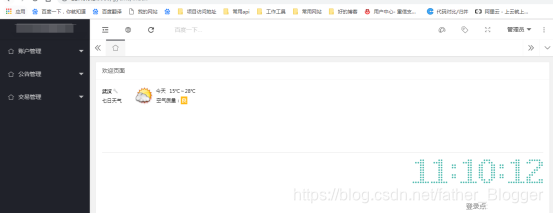
然后得到解决,可以访问了
在这里插入图片描述

解决二
在入口类注入视图解析器

import javax.servlet.MultipartConfigElement;
import org.springframework.boot.SpringApplication;
import org.springframework.boot.autoconfigure.SpringBootApplication;
import org.springframework.boot.web.servlet.MultipartConfigFactory;
import org.springframework.context.annotation.Bean;
import org.springframework.web.servlet.view.InternalResourceViewResolver;
import tk.mybatis.spring.annotation.MapperScan;

@SpringBootApplication
@MapperScan({“com.jcl.gycms.mapper”})
public class GycmsApplication {
public static void main(String[] args) {
SpringApplication.run(GycmsApplication.class, args);
}
@Bean
public MultipartConfigElement multipartConfigElement() {
MultipartConfigFactory factory = new MultipartConfigFactory();
//单个文件最大
factory.setMaxFileSize(“10240KB”); //KB,MB
//设置总上传数据总大小
factory.setMaxRequestSize(“102400KB”);
return factory.createMultipartConfig();
}

@Bean
public InternalResourceViewResolver setupViewResolver() {
	InternalResourceViewResolver resolver = new InternalResourceViewResolver();
	/** 设置视图路径的前缀 */
	resolver.setPrefix("/WEB-INF/jsp/");
	/** 设置视图路径的后缀 */
	resolver.setSuffix(".jsp");
	return resolver;
}

}

新华DCS系统仿真测试方法详细介绍 新华DCS ICAN3.1系统是应用广泛并且功能非常强大的国产DCS系统。具有管理虚拟CPU并仿真运行的功能。并且上位机画面可以与虚拟DPU数据实时同步仿真。具体仿真方法如下所示: 1、 需要设备及软件: 2、步骤如下: 2.1硬件步骤: 1)电脑开机。 2)交换机连接电脑网卡。 3)交换机上电运行。 2.2软件步骤: 1)设置电脑IP 一般配置IP为A网工程站IP。 222.222.221.201/255.255.255.0 2)建立虚拟DPU 登录 D:\iCAN\Program\Vxcu 文件夹。 阅读详情

相关推荐

Unidbg逆向阿里系App签名:从环境补全到算法还原实战

在移动安全与协议分析领域,理解应用层签名机制是核心挑战之一。签名算法作为保障通信安全与身份验证的关键技术,其原理通常涉及哈希、加密及密钥协商等基础密码学概念。在Android平台,核心签名逻辑常被加固并隐藏于Native层SO库中,以对抗动态调试与静态分析,这为安全研究和协议兼容带来了技术障碍。Unidbg作为一种基于模拟执行的逆向工程工具,通过模拟ARM指令集和系统调用,允许研究者在脱离真机环境的情况下,可控地执行和调试SO文件,为解决此类问题提供了创新思路。其技术价值在于实现了对加固代码的确定性分析与算

weixin_42525738的博客 939

8.SpringMVC自动配置-Auto-configuration

官方文档:https://docs.spring.io/spring-boot/docs/2.3.9.RELEASE/reference/htmlsingle/#using-boot-auto-configuration 本片文章大部分是翻译SpringBoot的使用手册中的文章,希望大家能有耐心的看文本片文章。 1、Spring MVC Auto-configuration 自动配置 备注:进入到文档直接搜索 Spring MVC Auto-configuration找到自动配置的文档介绍,打开项目双机s

Mao_yafeng的博客 1086

LTSPICE仿真电路:(二十八)三极管厄利电压与输出特性曲线深度解析

本文深入解析了LTSPICE仿真电路中三极管的厄利电压与输出特性曲线,详细介绍了厄利电压的物理意义、仿真设置及实际应用。通过伏安特性曲线和厄利电压的分析,帮助读者理解三极管放大性能的关键参数,并提供了电路设计中的优化方案和故障排查技巧。

weixin_26899659的博客 149

SpringBoot 项目 @EnableWebMvc 注解应用总结

SpringBoot 项目中不管是在哪个类上使用 @EnableWebMvc 注解,都将导致所有URL访问时返回 404 错误;看到一篇文章:“Spring4 @EnableWebMvc 纯注解启动”,但还没有在 Spring MVC 项目上尝试过。另外参考文章:“解析@EnableWebMvc 、WebMvcConfigurationSupport和WebMvcConfigurationAdap...

无知人生,记录点滴 5万+

【WorkBuddy专栏39】零基础也能做小程序——WorkBuddy微信小程序开发完全指南

【WorkBuddy专栏39】零基础也能做小程序——WorkBuddy微信小程序开发完全指南

AI人人懂 3161

AutoSAR系列讲解(入门篇)2.4-Runnables可运行实体

讲解一下Runnable和其工程的实际映射

雪云飞星的博客 3万+

Spring Boot中的@EnableWebMvc

学习Spring Security时,需要在Spring Boot的配置类里面注册自己编写的登录页面,但是发现在/resources/static/目录下面的静态文件找不到了,访问的话显示404。找了很久才知道了问题所在。 Spring中对静态文件的加载 在Spring中如果我们想通过URL访问静态资源,比如/resources/下的文件,通过/resources/**来访问,就需要在配置类中重写...

面向学姐编程 672

UFS软件分区介绍

本文主要介绍了ufs软件分区管理的概况,能够使大家对软件分区有个大体的认识

肥匪斐's blogs 1万+

SpringBoot全面接管SpringMVC的@EnableWebMvc底层原理

SpringBoot全面接管SpringMVC的@EnableWebMvc底层原理。 当SpringBoot对SpringMVC的自动配置不需要时,选择自己所配置时,我们只需要在相关的配置类当中添加 **@EnableWebMvc**即可。

white_mvlog的博客 462

《python算法与数据结构2000讲》算法与数据结构总结

《python算法与数据结构2000讲》算法与数据结构总结

IT 甄选推荐 1104

windows在使用ping 127.0.0.1时出现一般故障的解决方案

本文主要介绍了windows在使用ping 127.0.0.1时出现一般故障的解决方案,希望能对使用windows的同学们有所帮助。 文章目录 1. 问题描述 2. 解决方案

weixin_43178406的博客 7万+

@EnableWebMvc 与 @EnableAutoConfiguration 的关系

先讲自动配置:@EnableAutoConfiguration,引入两个 JAVA 类@AutoConfigurationPackage @Import(EnableAutoConfigurationImportSelector.class) public @interface EnableAutoConfiguration {}@Import(AutoConfigurationPackages.R

pomer_huang的博客 1391

OV9734 DATASHEET,完整规格书

OV9734完整规格书,包括电气参数,尺寸规格,寄存器配置表等

每天一个注解之@EnableWebMvc

视图解析器(ViewResolvers)、静态资源处理(StaticResourcesHandling)、消息转换器(MessageConverters)、拦截器(Interceptors)、异常处理(ExceptionHandling)定义全局的异常处理器、跨域资源共享(CORS)、国际化和本地化(InternationalizationandLocalization)、文件上传配置(File Upload Configuration)、安全配置(SecurityConfiguration)。

qq_43406318的博客 6907

TMS_WebGMaps_1.9.8.0_Full_Source

TMS_WebGMaps_1.9.8.0_Full_Source 全源码 delphi cbuilder

汉书HE8,好用的汇编代码编写工具

汉书HE8,好用的汇编代码编写工具早期编写汇编代码所用功能强大

spring boot中慎用@EnableWebMvc

什么情况?我为了自定义了一个HandlerInterceptor,非常普通的做法,先是继承了WebMvcConfigurerAdapter,再添加了@EnableWebMvc。注:本篇基于spring-webmvc 4.3.9版本。 @EnableWebMvc @Configuration public class XXXAutoConfiguration extends WebMvcConf...

布道 8837

Devexpress16.2.6破解工具

Devexpress16.2.6破解工具Devexpress16.2.6破解工具Devexpress16.2.6破解工具Devexpress16.2.6破解工具

springboot之@EnableWebMvc注解

#@EnableWebMvc注解 在使用中误用了@EnableWebMvc注解,导致所有静态资源访问都被拦截 springmvc自动注入入口:WebMvcAutoConfiguration类,条件注解@ConditionalOnMissingBean(WebMvcConfigurationSupport.class),当没有WebMvcConfigurationSupport相关bean时,会自动装配mvc的相关配置类 而@EnableWebMvc注解会自动引入DelegatingWebMvc

菜鸟园管理者 1066

Spring Boot 手动配置@Enable的秘密

在Spring Boot中,我们会经常遇到@Enable***用来激活我们某一个功能性的模块,通过类注解激活后我们就能使用所激活的配置给我们带来的功能。接下来我们就来探究一下这个@Enable***给我们做了哪些工作,或者我们应该怎么通过自定义的方式开发我们自己的功能模块。 演示环境 Int...

chuanjian6907的博客 377

Spring Boot,@ EnableWebMvc和常见用例

事实证明,Spring Boot与标准Spring MVC @EnableWebMvc不能很好地融合@EnableWebMvc 。 添加注释时发生的事情是禁用了Spring Boot自动配置。 不好的部分(浪费了我几个小时)是,在任何指南中,您都找不到明确指出的内容。 在本指南中,它说Spring Boot是自动添加它的,但是没有说如果您按照以前的经验并仅添加注释会发生什么。 实际上...

最佳 Java 编程 388

Spring注解@EnableWebMvc使用坑点解析

通过注解的方式来进行Spring4 MVC开发时,我们都会在配置文件中加入<mvc:annotation-driven/>标签,这个配置会自动注册了一个 RequestMappingHandlerMapping、一个RequestMappingHandlerAdapter、以及一个ExceptionHandlerExceptionResolver 以支持使用注解Controller的注解方法(如@RequestMapping、@ExceptionHandler)来处理request,并开启一系列

z69183787的专栏 1263

Springboot整合jsp出现Could not resolve view with name Index in servlet with name dispatcherServlet

新手在学Springboot整合jsp的时候出现的一个问题 问题描述: 无法在名称为“ dispatcherServlet”的servlet中解析名称为“ Index”的视图 问题分析: 在控制层: @RequestMapping("/TestIndex") public ModelAndView Test() { System.out.println("hello"); ModelAndView mv = new ModelAndView();

Shen19981110的博客 1万+

@EnableWebMvc以及有关WebSocket的一些心得

有关@EnableWebMvc 打开@EnableWebMvc查看官方注释,: * Adding this annotation to an {@code @Configuration} class imports the Spring MVC * configuration from {@link WebMvcConfigurationSupport}, e.g.: 意思就是这个标签注释与@Configuration一起使用,注释在springMvc的配置类上以配置自己需要的springMvc配置

zuyunfanwoerzi的博客 874

@EnableWebMvc如何禁止@EnableAutoConfiguration

今天一直纠结于一个问题,问题的来源是解析@EnableWebMvc 、WebMvcConfigurationSupport和WebMvcConfigurationAdapter 博客中总结出来的三点使用@EnableWebMvc的规则: @EnableWebMvc+extends WebMvcConfigurationAdapter,在扩展的类中重写父类的方法即可,这种方式会屏...

lqadam的博客 3750

SpringBoot 项目 @EnableWebMvc 和@EnableAutoConfiguration注解一些坑总结

关于springBoot项目中报错: javax.servlet.ServletException: Could not resolve view with name 'xxx' in servlet with name 'dispatcherServlet', 有可能是因为如下使用方式造成的无法使用视图解析器,请自行排查。 使用方式 结果 @EnableWebMvc + e...

Code_Flyer的博客 744

解析@EnableWebMvc 、WebMvcConfigurationSupport和WebMvcConfigurationAdapter

解析@EnableWebMvc 、WebMvcConfigurationSupport和WebMvcConfigurationAdapter访问我的个人网站获取更多文章在spring-boot+spring mvc 的项目中,有些时候我们需要自己配置一些项目的设置,就会涉及到这三个,那么,他们之间有什么关系呢?首先,@EnableWebMvc=WebMvcConfigurationSupport,使

灯下尘 1万+

springboot 加入@EnableWebMvc不执行converter

@Configuration // @EnableWebMvc 不能加入这个注解否则不执行自定义的converter public class MyWebAppConfigurer extends WebMvcConfigurerAdapter{ @Bean WXLoginInterceptor WXLoginInterceptor() { return new

猿份哥 2431

SpringBoot 项目 @EnableWebMvc 注解应用的总结

在spring-boot+spring mvc 的项目中,有我们需要自己配置一些项目的设置,就会涉及到三个类(@EnableWebMvc 、WebMvcConfigurationSupport和WebMvcConfigurationAdapter),那么,他们之间有什么关系呢?  首先,@EnableWebMvc=WebMvcConfigurationSupport,使用了@EnableWebMv...

曾舜尧的专栏 2055

Spring Boot 2 @EnableWebMvc 注解和@EnableSpringDataWebSupport 注解使用说明

1. @EnableWebMvc使用说明 @EnableWebMvc 只能添加到一个@Configuration配置类上,用于导入Spring Web MVC configuration 可以有多个@Configuration类来实现WebMvcConfigurer,以定制提供的配置。 WebMvcConfigurer 没有暴露高级设置,如果需要高级设置 需要 删除@...

我就是我不一样的美男子! 5132
上一篇: Maven手动打本地依赖
下一篇: Springboot整合UEditor
张长弓
博客等级 码龄9年 0粉丝 10原创
评论
成就一亿技术人!
拼手气红包6.0元
还能输入1000个字符
 
 条评论被折叠 查看
添加红包

请填写红包祝福语或标题

个

红包个数最小为10个

元

红包金额最低5元

当前余额3.43元 前往充值 >
需支付:10.00元
成就一亿技术人!
领取后你会自动成为博主和红包主的粉丝 规则
hope_wisdom
发出的红包
实付元
使用余额支付
点击重新获取
扫码支付
钱包余额 0

抵扣说明:

1.余额是钱包充值的虚拟货币,按照1:1的比例进行支付金额的抵扣。
2.余额无法直接购买下载,可以购买VIP、付费专栏及课程。

余额充值