


静态路由综合实验
拓扑

要求
1.全网用192.168.1.0/24进行地址分配
2.R5作为DHCP服务器为PC分配IP地址
3.路由上均具备两个环回地址
4.R4更R5之间正常走1000M,备份走100M
5.全网尽量负载均衡
6.减少路由表数量,并避免环路产生
7.全网通路
过程:
先配置路由器接口
192.168.1.000 000 00/30 -----192.168.1.0/30
192.168.1.000 001 00/30 -----192.168.1.4/30
192.168.1.000 010 00/30 -----192.168.1.8/30
192.168.1.000 011 00/30 -----192.168.1.12/30
192.168.1.000 100 00/30 -----192.168.1.16/30
192.168.1.000 101 00/30 -----192.168.1.20/30
r1:
192.168.1.001 00000/27 -----R1环回接口的网段 ------ 192.168.1.32/27
 192.168.1.001 0 0000/28         -------192.168.1.32/28

 192.168.1.001 1 0000/28         -------192.168.1.48/28
r2:
192.168.1.010 00000/27 -----R2环回接口的网段 ------ 192.168.1.64/27
 192.168.1.010 0 0000/28        -------192.168.1.64/28

 192.168.1.010 1 0000/28        -------192.168.1.80/28
r3:
192.168.1.011 00000/27 -----R3环回接口的网段 ------ 192.168.1.96/27
192.168.1.011 0 0000/28         -------192.168.1.96/28

192.168.1.011 1 0000/28         -------192.168.1.112/28
r4:
192.168.1.100 00000/27 -----R4环回接口的网段 ------ 192.168.1.128/27
192.168.1.100 0 0000/28        -------192.168.1.128/28

192.168.1.100 1 0000/28        -----192.168.1.144/28
配置静态路由表
防止出现环路
[r1]ip rou 192.168.1.32 27 null 0
~~
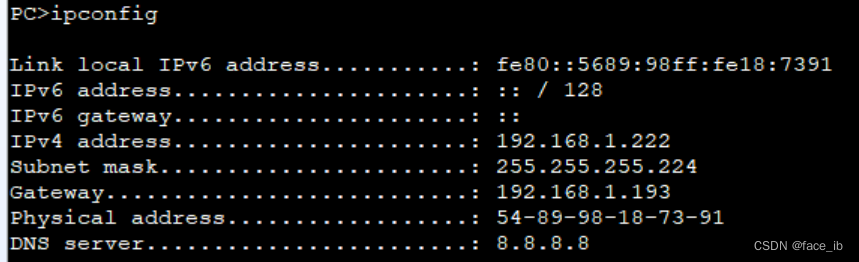
配pc地址:
[r5-GigabitEthernet0/0/1]ip add 192.169.1.254 24
开启DHCP服务
部分代码
[r1-GigabitEthernet0/0/0]ip add 192.168.1.1 30
Mar 15 2023 00:20:00-08:00 r1 %%01IFNET/4/LINK_STATE(l)[0]:The line protocol IP
on the interface GigabitEthernet0/0/0 has entered the UP state.
[r1-GigabitEthernet0/0/0]int g 0/0/1
[r1-GigabitEthernet0/0/1]ip add 192.168.1.5 30
Mar 15 2023 00:25:11-08:00 r1 %%01IFNET/4/LINK_STATE(l)[1]:The line protocol IP
on the interface GigabitEthernet0/0/1 has entered the UP state.
[r1-GigabitEthernet0/0/1]q
[r1]int l0
[r1-LoopBack0]ip add 192.168.1.33 28
[r1-LoopBack0]int l1
[r1-LoopBack1]ip add 192.168.1.49 28
[r5-LoopBack2]display ip interface brief
*down: administratively down
^down: standby
(l): loopback
(s): spoofing
The number of interface that is UP in Physical is 5
The number of interface that is DOWN in Physical is 0
The number of interface that is UP in Protocol is 4
The number of interface that is DOWN in Protocol is 1

Interface                         IP Address/Mask      Physical   Protocol
GigabitEthernet0/0/0              192.168.1.18/30      up         up
GigabitEthernet0/0/1              unassigned           up         down
GigabitEthernet0/0/2              192.168.1.22/30      up         up
LoopBack2                         5.5.5.5/24           up         up(s)
NULL0                             unassigned           up         up(s)
[r1]ip rou
[r1]ip route-s
[r1]ip route-static 192.168.1.64 27 192.168.1.2
[r1]ip route-static 192.168.1.96 27 192.168.1.6
[r1]ip route-static 192.168.1.10 30 192.168.1.2
[r1]ip route-static 192.168.1.14 30 192.168.1.6
[r1]q
```bash
[r5]dhcp enable
[r5]ip pool 111
[r5-ip-pool-111]network 192.168.1.0 mask 24
[r5-ip-pool-111]gateway-list 192.168.1.254
[r5-ip-pool-111]dns-list 8.8.8.8 114.114.114.114
[r5-ip-pool-111]quit
[r5]interface GigabitEthernet 0/0/0
[r5-GigabitEthernet0/0/0]dhcp select global
press CTRL_C to break
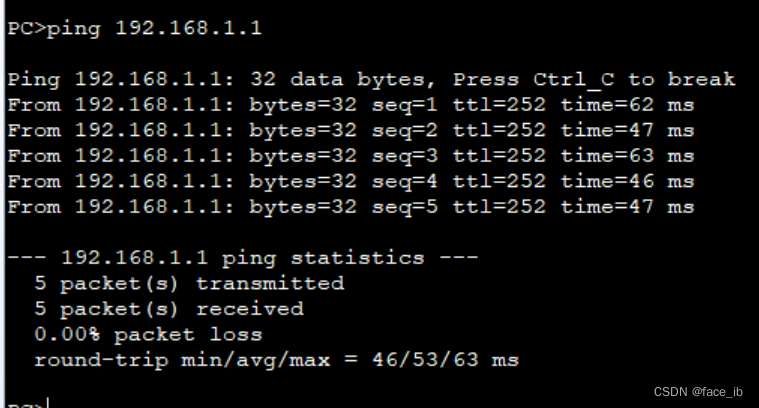
    Reply from 192.168.1.13: bytes=56 Sequence=1 ttl=255 time=100 ms
    Reply from 192.168.1.13: bytes=56 Sequence=2 ttl=255 time=20 ms
    Reply from 192.168.1.13: bytes=56 Sequence=3 ttl=255 time=20 ms
    Reply from 192.168.1.13: bytes=56 Sequence=4 ttl=255 time=20 ms
    Reply from 192.168.1.13: bytes=56 Sequence=5 ttl=255 time=20 ms

  --- 192.168.1.13 ping statistics ---
    5 packet(s) transmitted
    5 packet(s) received
    0.00% packet loss
    round-trip min/avg/max = 20/36/100 ms





 扫一扫
扫一扫


 419
419

 被折叠的 条评论
为什么被折叠?
被折叠的 条评论
为什么被折叠?
 到【灌水乐园】发言





