



 本文详细介绍如何使用Flash创建一个可以从外部网站加载并播放音乐的播放器。文章提供了具体步骤和代码示例,包括如何利用Flash API进行音乐加载、进度显示及播放控制等。
目标:建立一个音乐播放器,从别的网站下载音乐来播!
解决方案:
第一步:
舞台上拖放一个progress,一个按钮,一个inputbox,做相关设置如下:
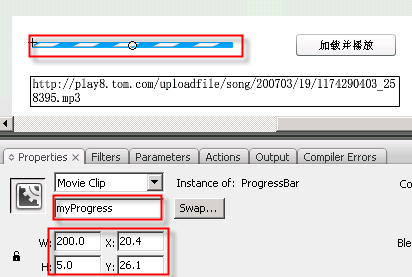
图一
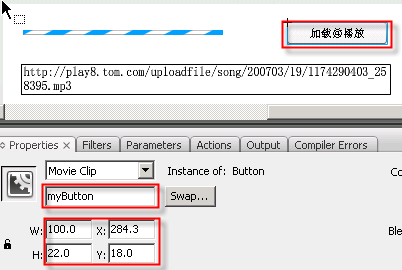
图二

图三
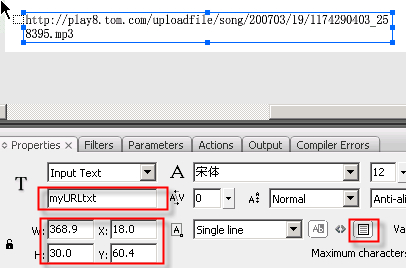
图四
第二步:
把下面的代码添加到第一帧中:
import fl.controls.Button;
import fl.controls.ProgressBar;
import fl.controls.ProgressBarMode;
import fl.controls.ProgressBar;
import fl.controls.ProgressBarMode;
import flash.net.URLRequest;
import flash.events.*;
import flash.media.Sound;
import flash.media.SoundChannel;
import flash.media.SoundLoaderContext;
import flash.events.*;
import flash.media.Sound;
import flash.media.SoundChannel;
import flash.media.SoundLoaderContext;
System.useCodePage =true;
var myURL:String =new String();
var Isplaying:Boolean =new Boolean(false);
var sound=new Sound();
var channel:SoundChannel=new SoundChannel();
var loadvar:SoundLoaderContext=new SoundLoaderContext(1000,true);
var myrequest:URLRequest;
var volcomplete:Boolean =new Boolean();
myURL = myURLtxt.text;
myButton.addEventListener(MouseEvent.CLICK,onload);
function onload(evt:Event) {
if ( myURLtxt.text=="") {
myURLtxt.text="请在此输入mp3文件的地址";
} else {
myURL=myURLtxt.text;
loadmusic(myURL);
}
}
if ( myURLtxt.text=="") {
myURLtxt.text="请在此输入mp3文件的地址";
} else {
myURL=myURLtxt.text;
loadmusic(myURL);
}
}
function loadmusic(str:String) {
myrequest=new URLRequest(str);
if (channel.position >0){
if (!volcomplete){
sound.close();
}
sound=new Sound();
}
sound.addEventListener(ProgressEvent.PROGRESS, progressHandler);
sound.addEventListener(Event.COMPLETE, completeHandler);
sound.load(myrequest,loadvar);
volcomplete=false;
myrequest=new URLRequest(str);
if (channel.position >0){
if (!volcomplete){
sound.close();
}
sound=new Sound();
}
sound.addEventListener(ProgressEvent.PROGRESS, progressHandler);
sound.addEventListener(Event.COMPLETE, completeHandler);
sound.load(myrequest,loadvar);
volcomplete=false;
channel=sound.play();
Isplaying=true;
Isplaying=true;
}
function progressHandler(event:ProgressEvent) {
myProgress.indeterminate = false;
myProgress.mode = ProgressBarMode.MANUAL;
myProgress.maximum = 200;
myProgress.setProgress(event.bytesLoaded*200/event.bytesTotal, myProgress.maximum);
}
function completeHandler(event:Event){
volcomplete=true;
}
function progressHandler(event:ProgressEvent) {
myProgress.indeterminate = false;
myProgress.mode = ProgressBarMode.MANUAL;
myProgress.maximum = 200;
myProgress.setProgress(event.bytesLoaded*200/event.bytesTotal, myProgress.maximum);
}
function completeHandler(event:Event){
volcomplete=true;
}
测试,放在网页中测试也不会出现警告。
(注意:要放在服务器上)
需要源文件留下email
关键字:flash player 域 其它网站 mp3 下载 安全沙漏





 扫一扫
扫一扫


 6756
6756


 到【灌水乐园】发言



