


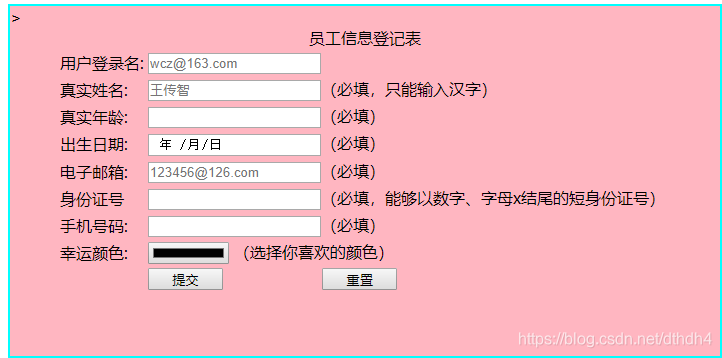
 这篇博客介绍了HTML5中的表单元素和如何使用CSS进行美化。内容包括表单的开头部分、CSS样式设计以及最终的展示效果。
h5表单
开头和css部分
<!DOCTYPE html >
<html xmlns="http://www.w3.org/1999/xhtml">
<head>
<meta http-equiv="Content-Type" content="text/html; charset=utf-8" />
<title></title>
</head>
<style type="text/css">
	input[type=date]{
						width:168px;
						height:18px;
					}
	input[type=color]{
						width: 75px;
						height:18px;
					}
	input[type=submit]{
						width:75px ;
						height:22px;
					}
	input[type=reset]{
						width:75px ;
						height:22px;
					}
	div{
		width:710px;
		height:350px;
		background-color:lightpink;
		border:2px aqua solid;
		}
</style>
主体部分
<body>
<form cation="admin.php" method="post" name="message">
<div>
<table  border="0" align="center">
<caption align="center" >员工信息登记表</caption>
  <tr>
    <td>用户登录名:</td>
    <td><input type="text" placeholder="wcz@163.com"/></td>
  </tr>
  <tr>
    <td>真实姓名:</td>
    <td><input type="text" placeholder="王传智"/>(必填,只能输入汉字)</td>

  </tr>
  <tr>
    <td>真实年龄:</td>
    <td><input type="text"/>(必填)</td>

  </tr>
  <tr>
    <td>出生日期:</td>
    <td><input type="date"/>(必填)</td>

  </tr>
<tr>
<td>电子邮箱:</td>
<td><input type="email" placeholder="123456@126.com"/>(必填)</td>
</tr>
<tr>
<td>身份证号</td>
<td><input type="text"/>(必填,能够以数字、字母x结尾的短身份证号)</td>
</tr>
<tr>
<td>手机号码:</td>
<td><input type="text"/>(必填)</td>
</tr>
<tr>
<td>幸运颜色:</td>
<td><input name="mycolor" type="color"/ width="200px" height="20px"> (选择你喜欢的颜色)</td>
</tr>
<tr>
<td></td>>
<td><input type="submit" value="提交"/ >
<input type="reset" value="重置"/ ></td>
<td></td>
</tr>
</table>
</div>
</form>
</body>
</html>
效果图





 扫一扫
扫一扫


 368
368

 被折叠的 条评论
为什么被折叠?
被折叠的 条评论
为什么被折叠?
 到【灌水乐园】发言





