


 本文探讨了Vue项目在与后端集成时常见的问题,包括路径配置不匹配导致资源加载失败、使用CDN引入外部库以减小打包体积、以及跨域请求的解决方案。
1、build production之后放到后端webapp/static下,访问不到,如下:
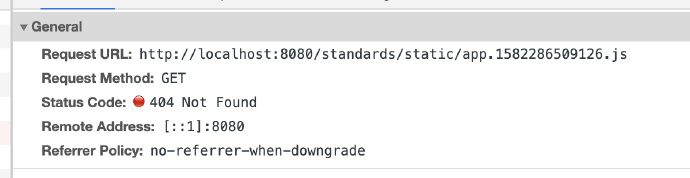
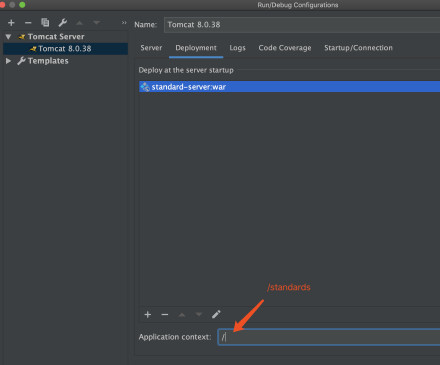
原因:后端在本地部署,然后后端的tomcat没有设置二级域名,即http://localhost:8080/
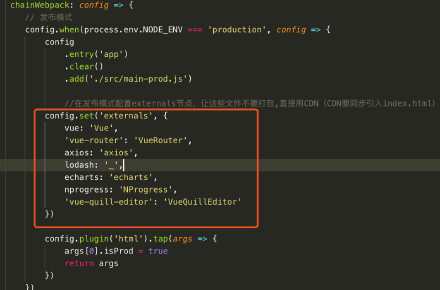
config.set('externals',{}), 在发布模式配置externals节点,让这些文件不要打包,直接用CDN(CDN要同步引入index.html),为了节省打包体积,Vue等组件都是通过CDN获取,
而publicPath: process.env.NODE_ENV === "production" ? "/standards/static/" : "/",
导致访问http://localhost:8080/#/login时,出现上面的错误。build打包之后,生成的文件在index.html 中的路径都带了/standards/static/app.1582286509126.js,
修改tomcat二级域名,因为线上的域名也都有二级域名,所以不动publicPath的配置。
vuejs代码嵌入到server端都属于production环境,单独的启动才是development环境,production环境应该再细分为qa环境、预发环境、正式环境。
如果将vuejs代码嵌入到server端,就需要publicPath的路径与tomcat的域名保持一致
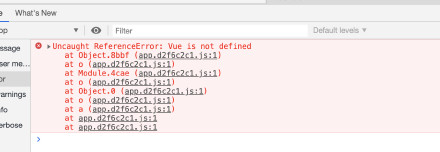
2、报错如下:
无法识别Vue,网上搜了之后发现production中有一个配置如下:
config.set('externals',{}), 在发布模式配置externals节点,让这些文件不要打包,直接用CDN(CDN要同步引入index.html),为了节省打包体积,Vue等组件都是通过CDN获取,
所以需要在index.html中增加这些依赖的地址:
可以直接放到vue项目public文件夹的index.html,这样每次build之后就会有了,
<<span style="color: #f92672;">link
rel=
stylesheet
href=
https://cdn.staticfile.org/nprogress/0.2.0/nprogress.min.css>
<<span style="color: #f92672;">link
rel=
stylesheet
href=
https://cdn.staticfile.org/quill/1.3.4/quill.core.min.css>
<<span style="color: #f92672;">link
rel=
stylesheet
href=
https://cdn.staticfile.org/quill/1.3.4/quill.snow.min.css>
<<span style="color: #f92672;">link
rel=
stylesheet
href=
https://cdn.staticfile.org/quill/1.3.4/quill.bubble.min.css>
<<span style="color: #f92672;">link
rel=
stylesheet
href=
https://cdn.staticfile.org/element-ui/2.8.2/theme-chalk/index.css>
<<span style="color: #f92672;">script
src=
https://cdn.staticfile.org/vue/2.5.22/vue.min.js> </<span style="color: #f92672;">script>
<<span style="color: #f92672;">script
src=
https://cdn.staticfile.org/vue-router/3.0.1/vue-router.min.js> </<span style="color: #f92672;">script>
<<span style="color: #f92672;">script
src=
https://cdn.staticfile.org/axios/0.18.0/axios.min.js> </<span style="color: #f92672;">script>
<<span style="color: #f92672;">script
src=
https://cdn.staticfile.org/lodash.js/4.17.11/lodash.min.js> </<span style="color: #f92672;">script>
<<span style="color: #f92672;">script
src=
https://cdn.staticfile.org/echarts/4.1.0/echarts.min.js> </<span style="color: #f92672;">script>
<<span style="color: #f92672;">script
src=
https://cdn.staticfile.org/nprogress/0.2.0/nprogress.min.js> </<span style="color: #f92672;">script>
<<span style="color: #f92672;">script
src=
https://cdn.staticfile.org/quill/1.3.4/quill.min.js> </<span style="color: #f92672;">script>
<<span style="color: #f92672;">script
src=
https://cdn.jsdelivr.net/npm/vue-quill-editor@3.0.4/dist/vue-quill-editor.js> </<span style="color: #f92672;">script>
<<span style="color: #f92672;">script
src=
https://cdn.staticfile.org/element-ui/2.8.2/index.js> </<span style="color: #f92672;">script>
3、跨域的问题,vue项目与server端代码同时运行,分别运行在8080和8081端口上,这样前端访问后端代码时就会出现跨域的问题,如下:
http://localhost:8081from origin 'http://localhost:8080' has been blocked by CORS policy: Request header field authorization is not allowed by Access-Control-Allow-Headers in preflight response.
解决:





 扫一扫
扫一扫


 2673
2673

 被折叠的 条评论
为什么被折叠?
被折叠的 条评论
为什么被折叠?
 到【灌水乐园】发言





